1. ആമുഖം
This manual provides comprehensive instructions for the setup, operation, maintenance, and troubleshooting of your Logitech Ergo M575S Wireless Trackball Mouse. Designed for comfort and precision, the ERGO M575S minimizes movement and maximizes comfort with its sculpted ergonomic shape and thumb control. It offers smooth, precise tracking and is compatible with both PC and Mac systems.
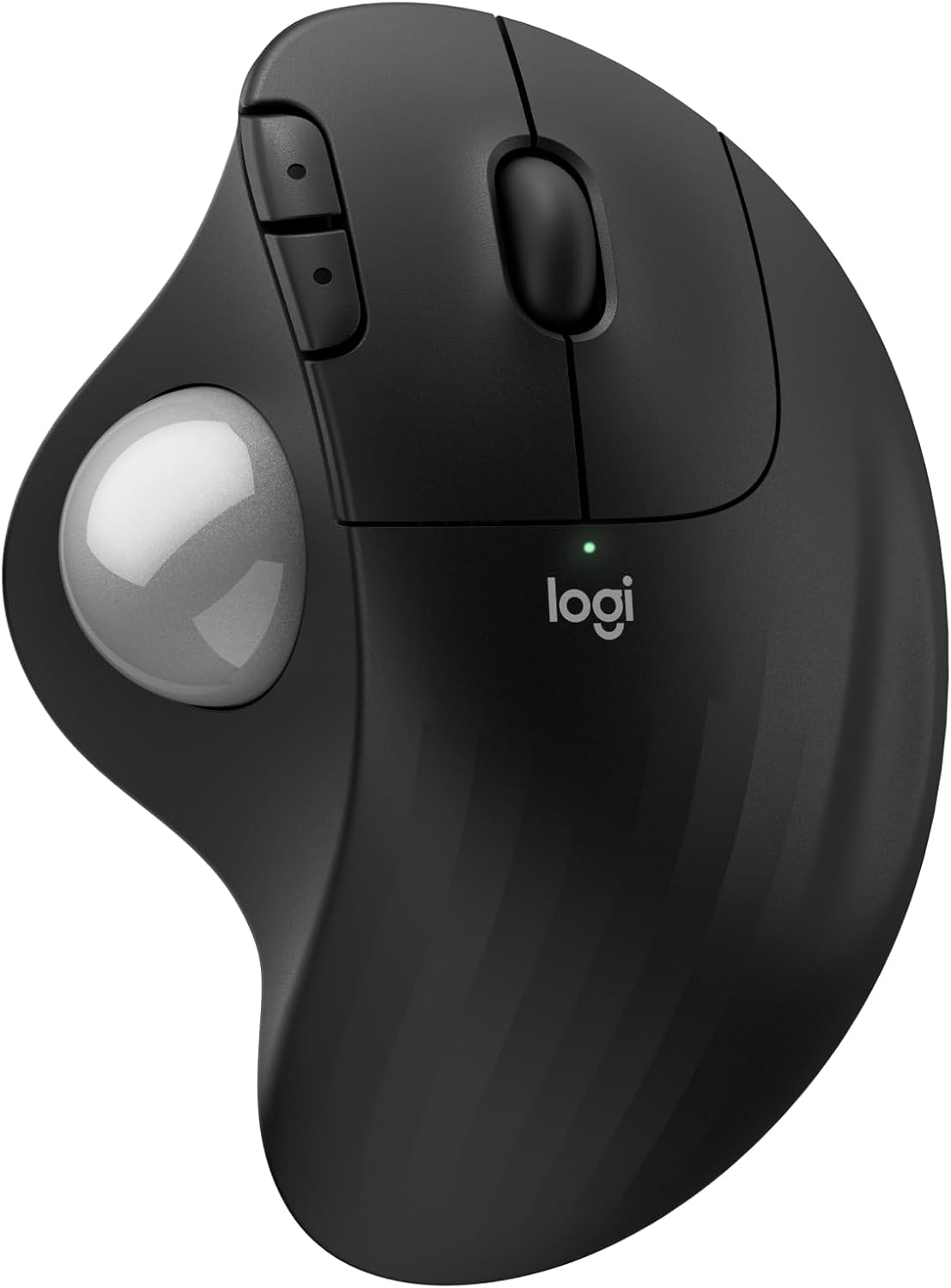
ചിത്രം: മുകളിൽ view of the Logitech Ergo M575S Wireless Trackball Mouse, highlighting its ergonomic design and trackball.
Key features include 25% less muscle strain in the forearm compared to traditional mice, an improved forearm posture, customizable buttons via the Logi Options+ App, and long battery life. The mouse is also made with certified post-consumer recycled plastic, contributing to a lighter environmental footprint.
2. സജ്ജീകരണം
2.1. ബാറ്ററി ഇൻസ്റ്റാളേഷൻ
The Logitech Ergo M575S uses one AA battery. To install or replace the battery:
- മൗസിന്റെ അടിഭാഗത്ത് ബാറ്ററി കമ്പാർട്ട്മെന്റ് കണ്ടെത്തുക.
- ബാറ്ററി കവർ തുറക്കുക.
- ശരിയായ പോളാരിറ്റി (+/-) ഉറപ്പാക്കിക്കൊണ്ട് AA ബാറ്ററി ഇടുക.
- ബാറ്ററി കവർ സുരക്ഷിതമായി അടയ്ക്കുക.

ചിത്രം: അടിവശം view of the mouse, illustrating the battery compartment and the slot for the Logi Bolt USB receiver.
2.2. കണക്റ്റിവിറ്റി ഓപ്ഷനുകൾ
The ERGO M575S offers two ways to connect to your computer:
- ലോജി ബോൾട്ട് യുഎസ്ബി റിസീവർ: Plug the included Logi Bolt USB receiver into an available USB port on your computer. The mouse should connect automatically.
- ബ്ലൂടൂത്ത്:
- അടിവശത്തുള്ള പവർ സ്വിച്ച് ഉപയോഗിച്ച് മൗസ് ഓണാക്കുക.
- Press and hold the Easy-Switch button (usually on the underside or side) until the LED indicator starts blinking rapidly, indicating pairing mode.
- On your computer, go to Bluetooth settings and select "Logitech ERGO M575S" from the list of available devices to pair.
For optimal performance and customization, download and install the Logi Options+ App from the official Logitech website. This software allows you to personalize button functions, adjust cursor speed, and create application-specific settings.
3. മൗസ് പ്രവർത്തിപ്പിക്കൽ
3.1. അടിസ്ഥാന പ്രവർത്തനങ്ങൾ
- ഇടത് ക്ലിക്ക്: ഇനങ്ങൾ തിരഞ്ഞെടുക്കുന്നതിനും സോഫ്റ്റ്വെയറുമായി സംവദിക്കുന്നതിനുമുള്ള പ്രാഥമിക ബട്ടൺ.
- വലത് ക്ലിക്കിൽ: സന്ദർഭ മെനുകൾക്കും അധിക ഓപ്ഷനുകൾക്കുമുള്ള സെക്കൻഡറി ബട്ടൺ.
- സ്ക്രോൾ വീൽ: Scroll up and down through documents and web പേജുകൾ. സ്ക്രോൾ വീൽ ഒരു മിഡിൽ ക്ലിക്ക് ബട്ടണായും പ്രവർത്തിക്കുന്നു.
- ട്രാക്ക്ബോൾ: Use your thumb to control the cursor movement on the screen. This eliminates the need to move the entire mouse, reducing arm and wrist strain.

Image: A hand demonstrating the smooth, effortless thumb control of the trackball for precise tracking.
3.2. ഇഷ്ടാനുസൃതമാക്കാവുന്ന ബട്ടണുകൾ
The ERGO M575S features additional buttons that can be customized using the Logi Options+ App. These typically include forward and back buttons located near the thumb trackball.
- ഫോർവേഡ്/ബാക്ക് ബട്ടണുകൾ: By default, these navigate forward and backward in web ബ്രൗസറുകൾ അല്ലെങ്കിൽ file പര്യവേക്ഷകർ.
- ഇഷ്ടാനുസൃതമാക്കൽ: Through the Logi Options+ App, you can reassign these buttons to perform various functions, such as media controls, application switching, or custom keystrokes, enhancing your workflow efficiency.

Image: A laptop displaying the Logi Options+ App interface, demonstrating how to customize the mouse buttons for personalized use.
4. പരിപാലനം
4.1. ട്രാക്ക്ബോൾ വൃത്തിയാക്കൽ
Over time, dust and debris can accumulate around the trackball, affecting its smooth operation. Regular cleaning is recommended.
- Gently push the trackball from the underside of the mouse to pop it out.
- ട്രാക്ക്ബോൾ തുടച്ചു വൃത്തിയാക്കാൻ മൃദുവായ, ലിന്റ് രഹിത തുണി ഉപയോഗിക്കുക.
- Use a cotton swab or compressed air to clean the three small support bearings inside the trackball cavity. Ensure no debris remains.
- Place the trackball back into its socket, ensuring it clicks into place.
കുറിപ്പ്: Avoid using harsh chemicals or abrasive materials, as these can damage the trackball or the mouse surface.
4.2 ജനറൽ ക്ലീനിംഗ്
Wipe the exterior of the mouse with a soft, damp വൃത്തിയായി സൂക്ഷിക്കാൻ ആവശ്യാനുസരണം തുണി.
5. പ്രശ്നപരിഹാരം
5.1. കണക്റ്റിവിറ്റി പ്രശ്നങ്ങൾ
- മൗസ് പ്രതികരിക്കുന്നില്ല:
- മൗസ് ഓൺ ആണോ എന്ന് പരിശോധിക്കുക.
- ബാറ്ററി ശരിയായി ഇൻസ്റ്റാൾ ചെയ്തിട്ടുണ്ടെന്നും ആവശ്യത്തിന് ചാർജ് ഉണ്ടെന്നും ഉറപ്പാക്കുക. ആവശ്യമെങ്കിൽ മാറ്റിസ്ഥാപിക്കുക.
- യുഎസ്ബി റിസീവർ ഉപയോഗിക്കുകയാണെങ്കിൽ, അത് മറ്റൊരു യുഎസ്ബി പോർട്ടിലേക്ക് പ്ലഗ് ചെയ്യാൻ ശ്രമിക്കുക.
- If using Bluetooth, ensure Bluetooth is enabled on your computer and the mouse is paired. Try re-pairing the device.
- ഇടവിട്ടുള്ള കണക്ഷൻ:
- Move the mouse closer to the USB receiver or your computer (for Bluetooth) to reduce interference.
- Avoid placing the receiver near other electrical devices that might cause interference.
5.2. ട്രാക്കിംഗ് പ്രശ്നങ്ങൾ
- Erratic or no cursor movement:
- Clean the trackball and its internal support bearings as described in the Maintenance section.
- Ensure the trackball is properly seated in its socket.
- Check the surface the mouse is on; while trackballs are less sensitive to surfaces, extreme conditions might affect performance.
5.3. Button/Scroll Wheel Issues
- ബട്ടണുകൾ പ്രതികരിക്കുന്നില്ല:
- Verify that the Logi Options+ App is not causing conflicts with custom settings. Try resetting button assignments to default.
- Reinstall the Logi Options+ App if issues persist.
- സ്ക്രോൾ വീൽ പ്രവർത്തിക്കുന്നില്ല:
- Ensure no debris is lodged around the scroll wheel.
6 സ്പെസിഫിക്കേഷനുകൾ
| ഫീച്ചർ | വിശദാംശങ്ങൾ |
|---|---|
| ബ്രാൻഡ് | ലോജിടെക് |
| മോഡൽ നമ്പർ | 910-007392 |
| കണക്റ്റിവിറ്റി ടെക്നോളജി | ബ്ലൂടൂത്ത്, യുഎസ്ബി (ലോജി ബോൾട്ട് റിസീവർ) |
| മൂവ്മെന്റ് ഡിറ്റക്ഷൻ ടെക്നോളജി | ഒപ്റ്റിക്കൽ |
| ഡിപിഐ ശ്രേണി | 400-2000 DPI (Adjustable via Logi Options+ App) |
| ബാറ്ററി ലൈഫ് | Up to 18 months (with AA battery) |
| ഓപ്പറേറ്റിംഗ് സിസ്റ്റം അനുയോജ്യത | വിൻഡോസ്, മാകോസ് |
| ഇനത്തിൻ്റെ ഭാരം | 7.4 ഔൺസ് |
| അളവുകൾ | 5.51 x 4.17 x 1.93 ഇഞ്ച് (പാക്കേജ് അളവുകൾ) |
| മെറ്റീരിയൽ | Plastic parts made with certified post-consumer recycled plastic (Graphite: 52%, Off-White: 21%) |
7. വാറൻ്റിയും പിന്തുണയും
For detailed warranty information regarding your Logitech Ergo M575S Wireless Trackball Mouse, please refer to the warranty card included with your product or visit the official Logitech support webസൈറ്റ്.
Logitech provides customer support for product inquiries, technical assistance, and warranty claims.
- ഓൺലൈൻ പിന്തുണ: സന്ദർശിക്കുക support.logi.com പതിവുചോദ്യങ്ങൾ, ട്രബിൾഷൂട്ടിംഗ് ഗൈഡുകൾ, ഡ്രൈവർ ഡൗൺലോഡുകൾ എന്നിവയ്ക്കായി.
- പിന്തുണയുമായി ബന്ധപ്പെടുക: Information on contacting Logitech customer service via phone or chat can be found on their support webസൈറ്റ്.