ആമുഖം
Welcome to the user manual for your new boAt Stone 352 Pro Bluetooth Speaker. This guide provides detailed instructions on how to set up, operate, and maintain your speaker, ensuring you get the best audio experience. Please read this manual thoroughly before using the product.
ബോക്സിൽ എന്താണുള്ളത്
Upon unboxing your boAt Stone 352 Pro, you should find the following items:
- 1 x boAt Stone 352 Pro Bluetooth Speaker
- 1 x ചാർജിംഗ് കേബിൾ (ടൈപ്പ്-സി)
- 1 x ഉപയോക്തൃ മാനുവൽ (ഈ പ്രമാണം)
- 1 x വാറൻ്റി കാർഡ്
- 1 x കാറ്റലോഗ്

Image: The boAt Stone 352 Pro speaker, a USB Type-C charging cable, and the warranty card/user manual are shown, representing the contents of the product box.
Video: An unboxing demonstration of the boAt Stone 352 Pro Bluetooth Speaker, showing the speaker, charging cable, and documentation included in the package.
ഉൽപ്പന്നം കഴിഞ്ഞുview
The boAt Stone 352 Pro is a portable Bluetooth speaker designed to deliver powerful audio with enhanced features. Key highlights include:
- 14W boAt Signature Sound: Experience clear and powerful audio output.
- Dynamic RGB LEDs: Enhance your listening experience with vibrant lighting effects.
- 12 മണിക്കൂർ വരെ പ്ലേബാക്ക്: ഒറ്റ ചാർജിൽ ദീർഘനേരം സംഗീത പ്ലേബാക്ക് ആസ്വദിക്കൂ.
- TWS ഫീച്ചർ: Connect two Stone 352 Pro speakers for a stereo sound experience.
- ബിൽറ്റ്-ഇൻ മൈക്രോഫോൺ: Facilitates hands-free calling.
- ബ്ലൂടൂത്ത് v5.3: സ്ഥിരവും കാര്യക്ഷമവുമായ വയർലെസ് കണക്റ്റിവിറ്റി ഉറപ്പാക്കുന്നു.
- IPX5 ജല പ്രതിരോധം: തെറിച്ചു വീഴുന്നതിൽ നിന്നും വിയർപ്പിൽ നിന്നും സംരക്ഷണം നൽകുന്നു.
- ഒന്നിലധികം കണക്റ്റിവിറ്റി മോഡുകൾ: Supports Bluetooth, AUX, and TF Card playback.
- ടൈപ്പ്-സി ചാർജിംഗ്: ആധുനികവും സൗകര്യപ്രദവുമായ ചാർജിംഗ് ഇന്റർഫേസ്.

Image: A black boAt Stone 352 Pro speaker, showcasing its cylindrical design and the illuminated RGB LED strip on the front.
നിയന്ത്രണങ്ങളും സൂചകങ്ങളും
Familiarize yourself with the speaker's controls and indicators for optimal use.

Image: The side panel of the boAt Stone 352 Pro speaker, highlighting the power button, volume up/down buttons, and mode selection button.
- പവർ ബട്ടൺ: പവർ ഓൺ/ഓഫ് ചെയ്യാൻ അമർത്തിപ്പിടിക്കുക. സംഗീതം പ്ലേ ചെയ്യാൻ/താൽക്കാലികമായി നിർത്താൻ ഹ്രസ്വമായി അമർത്തുക.
- വോളിയം കൂട്ടുക (+): ശബ്ദം കൂട്ടാൻ ഷോർട്ട് പ്രസ് ചെയ്യുക. അടുത്ത ട്രാക്കിനായി ദീർഘനേരം അമർത്തുക.
- വോളിയം ഡൗൺ (-): ശബ്ദം കുറയ്ക്കാൻ ഷോർട്ട് പ്രസ് ചെയ്യുക. മുമ്പത്തെ ട്രാക്കിനായി ദീർഘനേരം അമർത്തുക.
- മോഡ് (എം) ബട്ടൺ: Short press to switch between Bluetooth, AUX, and TF Card modes.
- RGB LED Strip: Indicates power status, charging, and provides dynamic lighting effects.
ആമുഖം
സ്പീക്കറെ കുറ്റപ്പെടുത്തുന്നു
Before first use, fully charge your speaker. The boAt Stone 352 Pro features a Type-C charging port.
- Connect the Type-C end of the charging cable to the speaker's charging port.
- Connect the USB-A end of the cable to a compatible USB power adapter (5V/1A recommended).
- The RGB LED strip will indicate charging status. It typically takes approximately 2 hours for a full charge.
- പൂർണ്ണമായി ചാർജ് ചെയ്തുകഴിഞ്ഞാൽ, ചാർജിംഗ് കേബിൾ വിച്ഛേദിക്കുക.

ചിത്രം: വിശദമായ ഒരു ചിത്രം view of the boAt Stone 352 Pro's side panel, illustrating the Type-C charging interface and the various connectivity ports (Bluetooth, AUX, TF Card).
പവർ ചെയ്യുന്നത് ഓൺ/ഓഫ്
- To power on, press and hold the Power button until you hear an audible prompt and the RGB LEDs illuminate.
- To power off, press and hold the Power button again until you hear an audible prompt and the RGB LEDs turn off.
പ്രവർത്തന നിർദ്ദേശങ്ങൾ
ബ്ലൂടൂത്ത് കണക്റ്റിവിറ്റി
- Ensure the speaker is powered on and in Bluetooth mode (indicated by a specific LED pattern or audible prompt).
- നിങ്ങളുടെ സ്മാർട്ട്ഫോണിലോ ഓഡിയോ ഉപകരണത്തിലോ, ബ്ലൂടൂത്ത് പ്രവർത്തനക്ഷമമാക്കി ലഭ്യമായ ഉപകരണങ്ങൾക്കായി തിരയുക.
- Select "boAt Stone 352 Pro" from the list of devices.
- Once paired, you will hear a confirmation tone, and the speaker's LED will indicate a successful connection.
- ഉപകരണം പരിധിക്കുള്ളിലാണെങ്കിൽ, പവർ ഓൺ ചെയ്യുമ്പോൾ, സ്പീക്കർ അവസാനം ജോടിയാക്കിയ ഉപകരണത്തിലേക്ക് യാന്ത്രികമായി വീണ്ടും കണക്റ്റുചെയ്യും.
AUX മോഡ്
For wired connections, use the AUX port.
- Connect one end of a 3.5mm AUX cable (not included) to the speaker's AUX port.
- Connect the other end to your audio device's 3.5mm audio output.
- Press the 'M' (Mode) button on the speaker to switch to AUX mode.
- നിങ്ങളുടെ കണക്റ്റ് ചെയ്ത ഉപകരണത്തിൽ നിന്ന് സ്പീക്കറിലൂടെ ഓഡിയോ ഇപ്പോൾ പ്ലേ ചെയ്യും.
TF കാർഡ് പ്ലേബാക്ക്
Play music directly from a TF (microSD) card.
- MP3 ഓഡിയോ ഉള്ള ഒരു TF കാർഡ് ചേർക്കുക files into the speaker's TF card slot.
- Press the 'M' (Mode) button to switch to TF Card mode.
- The speaker will automatically begin playing music from the card.
ടിഡബ്ല്യുഎസ് (ട്രൂ വയർലെസ് സ്റ്റീരിയോ) പ്രവർത്തനം
Connect two boAt Stone 352 Pro speakers wirelessly for a true stereo sound experience.
- രണ്ട് സ്പീക്കറുകളും ഓണാക്കിയിട്ടുണ്ടെന്നും മറ്റ് ബ്ലൂടൂത്ത് ഉപകരണങ്ങളുമായി ബന്ധിപ്പിച്ചിട്ടില്ലെന്നും ഉറപ്പാക്കുക.
- On one speaker (this will be the primary speaker), long press the 'M' (Mode) button until you hear a TWS pairing prompt.
- The two speakers will automatically search and pair with each other. A confirmation tone will indicate successful TWS pairing.
- Now, connect your audio device to the primary speaker via Bluetooth as described above.
- Both speakers will play audio in stereo.

Image: Two boAt Stone 352 Pro speakers, one black and one blue, operating in TWS mode, demonstrating synchronized audio playback from a connected smartphone.
ഹാൻഡ്സ് ഫ്രീ കോളിംഗ്
The built-in microphone allows for convenient hands-free calls when connected via Bluetooth.
- When an incoming call is received, press the Power button once to answer.
- To end a call, press the Power button once again.
- To reject an incoming call, long press the Power button.
RGB LED Functionality
The boAt Stone 352 Pro features dynamic RGB LEDs that add a visual element to your audio experience.

ചിത്രം: ഒരു ക്ലോസ്-അപ്പ് view of the boAt Stone 352 Pro's RGB LED strip, displaying a gradient of colors from blue to green to orange, highlighting its dynamic lighting feature.
- The RGB LEDs automatically cycle through various colors, synchronizing with the music or providing ambient lighting.
- Specific button presses may allow for changing LED modes or turning them off (refer to product-specific quick start guide for advanced controls if available).
പരിപാലനവും പരിചരണവും
- വൃത്തിയാക്കൽ: സ്പീക്കർ വൃത്തിയാക്കാൻ മൃദുവായതും ഉണങ്ങിയതുമായ തുണി ഉപയോഗിക്കുക. അബ്രാസീവ് ക്ലീനറുകളോ ലായകങ്ങളോ ഉപയോഗിക്കരുത്.
- ജല പ്രതിരോധം (IPX5): The speaker is IPX5 rated, meaning it is protected against low-pressure water jets from any direction. It is not designed for submersion in water. Ensure the charging port cover is securely closed to maintain water resistance.
- സംഭരണം: നേരിട്ടുള്ള സൂര്യപ്രകാശത്തിൽ നിന്നും കടുത്ത താപനിലയിൽ നിന്നും മാറി തണുത്തതും വരണ്ടതുമായ സ്ഥലത്ത് സ്പീക്കർ സൂക്ഷിക്കുക.
- ബാറ്ററി കെയർ: ബാറ്ററി ലൈഫ് വർദ്ധിപ്പിക്കാൻ, സ്പീക്കർ ഇടയ്ക്കിടെ പൂർണ്ണമായും ഡിസ്ചാർജ് ചെയ്യുന്നത് ഒഴിവാക്കുക. ദീർഘനേരം ഉപയോഗിച്ചിട്ടില്ലെങ്കിൽ പോലും പതിവായി ചാർജ് ചെയ്യുക.

Image: The boAt Stone 352 Pro speaker with water droplets on its surface, emphasizing its IPX5 splash and sweat resistance feature.
ട്രബിൾഷൂട്ടിംഗ്
| പ്രശ്നം | സാധ്യമായ പരിഹാരം |
|---|---|
| സ്പീക്കർ പവർ ഓൺ ചെയ്യുന്നില്ല. | സ്പീക്കർ ചാർജ് ചെയ്തിട്ടുണ്ടെന്ന് ഉറപ്പാക്കുക. ഒരു പവർ സ്രോതസ്സുമായി ബന്ധിപ്പിച്ച് വീണ്ടും ശ്രമിക്കുക. |
| ബ്ലൂടൂത്ത് വഴി ജോടിയാക്കാൻ കഴിയില്ല. |
|
| ശബ്ദമില്ല അല്ലെങ്കിൽ കുറഞ്ഞ ശബ്ദമില്ല. |
|
| TWS ജോടിയാക്കൽ പരാജയപ്പെട്ടു. |
|
| കോൾ നിലവാരം മോശമാണ്. |
|
സ്പെസിഫിക്കേഷനുകൾ
| ഫീച്ചർ | വിശദാംശങ്ങൾ |
|---|---|
| മോഡലിൻ്റെ പേര് | സ്റ്റോൺ 352 പ്രോ |
| സ്പീക്കർ തരം | പോർട്ടബിൾ സ്പീക്കർ |
| സ്പീക്കർ ഔട്ട്പുട്ട് പവർ | 14 വാട്ട്സ് |
| ബ്ലൂടൂത്ത് പതിപ്പ് | v5.3 |
| ബ്ലൂടൂത്ത് ശ്രേണി | 10 മീറ്റർ |
| ബാറ്ററി ശരാശരി ആയുസ്സ് | 12 മണിക്കൂർ |
| ചാർജിംഗ് സമയം | 2 മണിക്കൂർ |
| ബാറ്ററി ശേഷി | 3600 മില്ലിamp മണിക്കൂറുകൾ |
| ജല പ്രതിരോധം | IPX5 |
| കണക്റ്റിവിറ്റി ടെക്നോളജി | Bluetooth, USB, Wi-Fi (Note: While Wi-Fi is listed, primary connectivity is Bluetooth, AUX, and TF Card as per product features.) |
| നിയന്ത്രണ രീതി | പുഷ് ബട്ടൺ |
| ഉൽപ്പന്ന അളവുകൾ | 15.8D x 9.4W x 9.4H സെന്റീമീറ്ററുകൾ |
| ഇനത്തിൻ്റെ ഭാരം | 20 ഗ്രാം |
| ഉൾപ്പെടുത്തിയ ഘടകങ്ങൾ | Speaker, Cable, User Manual, Warranty Card, Catalogue |
വാറൻ്റിയും പിന്തുണയും
Your boAt Stone 352 Pro Bluetooth Speaker comes with a standard brand warranty. Please refer to the included Warranty Card for specific terms and conditions.
- വാറൻ്റി കാലയളവ്: Typically 1 year from the date of purchase.
- ക്ലെയിം പ്രക്രിയ: For warranty claims or technical support, please contact boAt customer service or visit their official website. Keep your purchase receipt and warranty card handy.
- വിപുലീകരിച്ച വാറൻ്റി: An optional 1 Year Extended Warranty by OneAssist is available for purchase.
കൂടുതൽ സഹായത്തിന്, നിങ്ങൾക്ക് ഇത് കൂടി റഫർ ചെയ്യാം boAt Hearables App for additional user help guides and support resources.
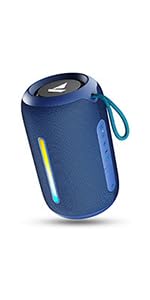
Image: A QR code for the boAt Hearables App, which provides additional support and features for the speaker.


