1. ആമുഖം
The FEELWORLD TP16 is a 16-inch folding teleprompter designed for professional video production. It supports tablets up to 16 inches, allowing for both horizontal and vertical prompting. This device is compatible with DSLR cameras, camcorders, and other camera shooting setups. Its folding design enhances portability, while the included Bluetooth remote control and dedicated application simplify operation. The TP16 features a standard beam-splitting glass for clear text display and supports wide-angle lenses.
2. പാക്കേജ് ഉള്ളടക്കം
Please verify that all items listed below are present in your package. If any items are missing or damaged, please contact FEELWORLD customer support.
- FEELWORLD TP16 ടെലിപ്രോംപ്റ്റർ യൂണിറ്റ്
- Beam-splitting Glass
- Folding Sun-hood
- ബ്ലൂടൂത്ത് റിമോട്ട് കൺട്രോൾ
- ക്യാമറ മൗണ്ടിംഗ് പ്ലേറ്റ്
- ടാബ്ലെറ്റ് Clamp/Holder
- Mounting Screws and Tools
- ഉപയോക്തൃ മാനുവൽ
- ചുമക്കുന്ന കേസ്
3. സജ്ജീകരണ നിർദ്ദേശങ്ങൾ
3.1 Unfolding the Teleprompter
Carefully unfold the main teleprompter unit. Ensure all locking mechanisms (if present) are securely engaged to provide a stable base for your equipment.

Figure 3.1: The FEELWORLD TP16 teleprompter in its unfolded state, ready for use with a camera.
3.2 Installing the Beam-Splitting Glass
The TP16 features a 16-inch standard beam-splitting glass with 70/30 visible light transmission. Handle the glass with care to avoid fingerprints or damage. Insert the glass into the designated slot on the teleprompter frame. Ensure it is seated correctly and securely.

Figure 3.2: Installation or removal of the beam-splitting glass, highlighting its size and careful handling.
3.3 Attaching the Sun-Hood
The removable sun-hood helps to prevent light interference and improve the clarity of the prompted text. Attach the sun-hood to the top of the teleprompter frame, ensuring it covers the beam-splitting glass effectively.
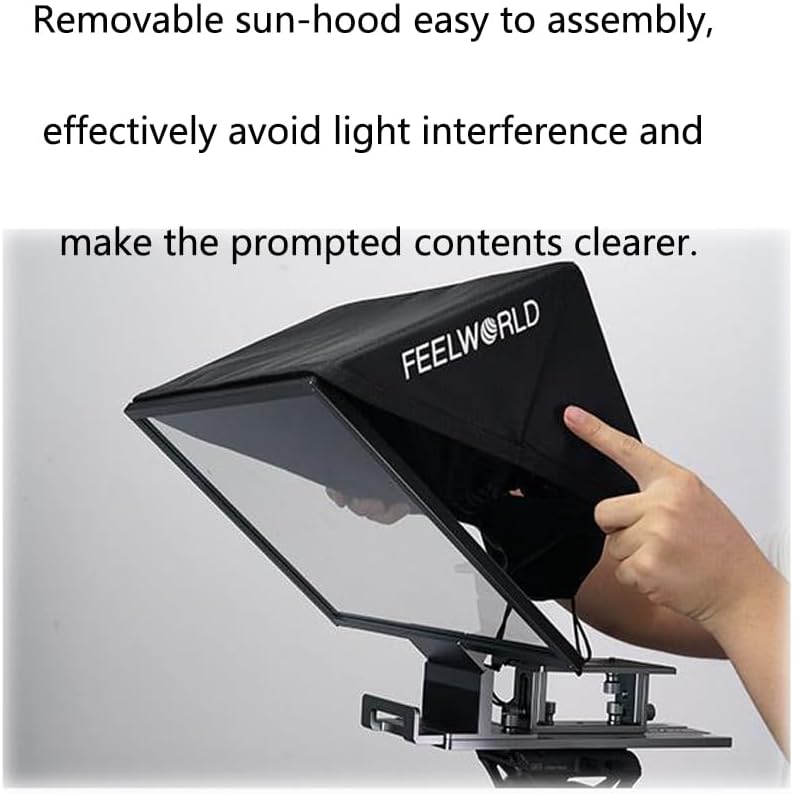
Figure 3.3: Attaching the removable sun-hood to minimize external light interference.
3.4 നിങ്ങളുടെ ക്യാമറ മൌണ്ട് ചെയ്യുന്നു
Attach your DSLR, camcorder, or camera to the provided camera mounting plate. Secure the camera firmly using the appropriate screws. Then, slide the camera mounting plate onto the teleprompter's base. Adjust the position of the camera to ensure the lens is centered and aligned with the beam-splitting glass.

Figure 3.4: Securing the camera to the teleprompter's mounting plate.

ചിത്രം 3.5: വിശദമായി view of the adjustable mounting hardware for camera and tablet.

Figure 3.6: Adjusting the extendable base plate for optimal camera positioning.
3.5 Mounting Your Tablet
Place your tablet (up to 16 inches) into the tablet clamp/holder. Ensure it is held securely. The TP16 supports both horizontal and vertical tablet orientations. Adjust the tablet's position for optimal viewing through the beam-splitting glass.
3.6 ഒരു ട്രൈപോഡിൽ ഘടിപ്പിക്കൽ
Mount the entire teleprompter assembly onto a sturdy tripod using the standard tripod mounting threads located on the base. Ensure the teleprompter is balanced and stable before proceeding.
4. പ്രവർത്തന നിർദ്ദേശങ്ങൾ
4.1 Adjusting the Teleprompter Angle
The teleprompter allows for angle adjustments to suit various shooting requirements. Adjust the tilt of the beam-splitting glass and tablet holder to achieve the desired viewing angle for the presenter.
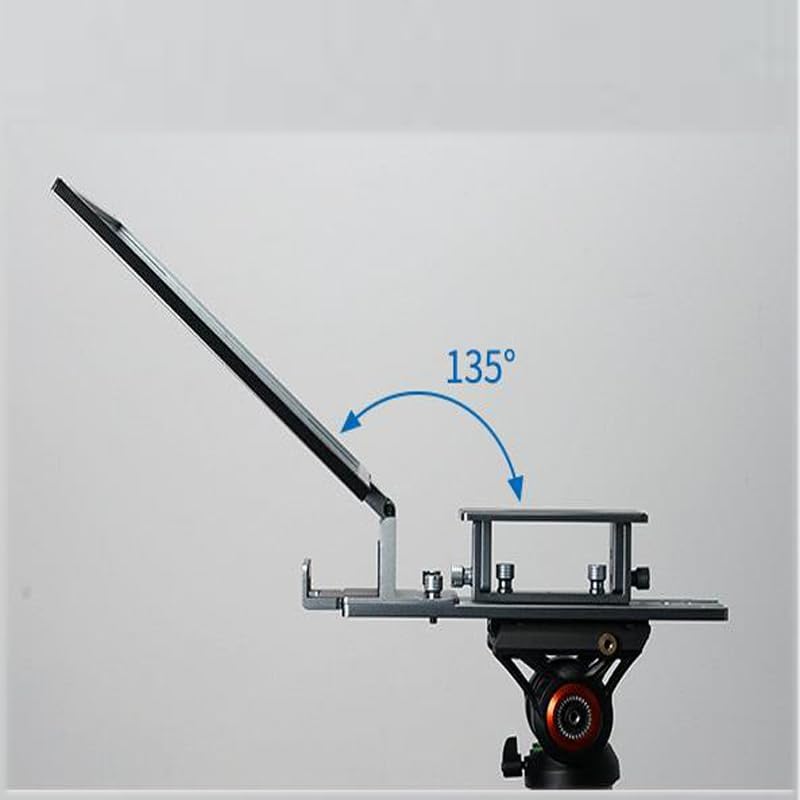
Figure 4.1: Demonstrating the 135-degree angle adjustment capability of the teleprompter.
4.2 Connecting the Bluetooth Remote Control
- Ensure your tablet's Bluetooth is enabled.
- ബ്ലൂടൂത്ത് റിമോട്ട് കൺട്രോൾ ഓണാക്കുക.
- On your tablet, search for available Bluetooth devices and select the FEELWORLD remote control.
- Pair the devices. Once paired, the remote can be used to control the teleprompter application.
4.3 Using the Teleprompter Application
Download and install the official FEELWORLD teleprompter application on your tablet. This application allows you to load scripts, adjust text size, speed, and color, and control the prompting flow using the Bluetooth remote. Refer to the application's in-app guide for detailed usage instructions.
4.4 Horizontal and Vertical Prompting
The TP16 supports both horizontal and vertical orientations for your tablet. Simply rotate your tablet within its clamp to switch between modes. Ensure the teleprompter application is configured to match the tablet's orientation for correct text display.
5. പരിപാലനം
- ഗ്ലാസ് വൃത്തിയാക്കൽ: Use a soft, lint-free cloth and a specialized glass cleaning solution (e.g., lens cleaner) to gently wipe the beam-splitting glass. Avoid abrasive materials or harsh chemicals.
- യൂണിറ്റ് വൃത്തിയാക്കൽ: Wipe the main unit with a dry or slightly damp soft cloth. Do not immerse the unit in water.
- സംഭരണം: When not in use, fold the teleprompter and store it in its protective carrying case in a dry, dust-free environment.
- ബാറ്ററി കെയർ: For the Bluetooth remote, replace batteries as needed. Remove batteries if storing the remote for extended periods.
6. പ്രശ്നപരിഹാരം
| പ്രശ്നം | സാധ്യമായ കാരണം | പരിഹാരം |
|---|---|---|
| Text appears blurry or unclear. | Fingerprints or dust on glass; improper camera/tablet alignment; ambient light interference. | Clean the beam-splitting glass. Ensure camera lens is centered. Adjust tablet position. Use the sun-hood. |
| Bluetooth remote not connecting. | Remote batteries low; Bluetooth not enabled on tablet; remote not in pairing mode. | Replace remote batteries. Enable Bluetooth on tablet. Put remote in pairing mode and re-attempt connection. |
| Text is not scrolling or responding to remote. | Remote not paired; teleprompter app not active or frozen. | Verify Bluetooth connection. Restart the teleprompter application. |
| Camera image is visible on the teleprompter glass. | Incorrect camera placement or lens angle. | Adjust camera position to ensure only the reflected tablet screen is visible through the glass. |
7 സ്പെസിഫിക്കേഷനുകൾ
- മോഡൽ: TP16
- ബ്രാൻഡ്: ഫീൽവേൾഡ്
- Beam-splitting Glass: 16-inch standard, 70/30 visible light transmission
- ടാബ്ലെറ്റ് അനുയോജ്യത: Supports tablets up to 16 inches
- Prompting Modes: തിരശ്ചീനവും ലംബവും
- നിയന്ത്രണം: Bluetooth Remote Control, Dedicated Teleprompter APP
- ക്യാമറ അനുയോജ്യത: DSLR, Camcorder, Camera Shooting
- ഫീച്ചറുകൾ: Folding design, Standard expansion arm for accessories (fill light, microphone), Removable sun-hood
- ഇനത്തിൻ്റെ ഭാരം: 9.9 പൗണ്ട് (4.5 കിലോഗ്രാം)
- നിറം: കറുപ്പ്
8. വാറൻ്റിയും പിന്തുണയും
The FEELWORLD TP16 Teleprompter comes with a standard manufacturer's warranty. For specific warranty terms, duration, and conditions, please refer to the warranty card included in your product packaging or visit the official FEELWORLD website. For technical support, troubleshooting assistance, or to inquire about replacement parts, please contact FEELWORLD customer service through their official channels.
ഉദ്യോഗസ്ഥൻ Webസൈറ്റ്: www.feelworld.cn (ഉദാampലെ, യഥാർത്ഥമായത് URL വ്യത്യാസപ്പെടാം)
വാറൻ്റി ക്ലെയിമുകൾക്കായി നിങ്ങളുടെ വാങ്ങിയതിൻ്റെ തെളിവ് സൂക്ഷിക്കുക.


