1. ആമുഖം
വാങ്ങിയതിന് നന്ദി.asing the Aiwa AWS200BT Portable Bluetooth Speaker. This manual provides essential information for the safe and efficient operation of your device. Please read it thoroughly before use and retain it for future reference.
2 സുരക്ഷാ വിവരങ്ങൾ
- ഉയർന്ന താപനിലയിലോ നേരിട്ടുള്ള സൂര്യപ്രകാശത്തിലോ ദീർഘനേരം സ്പീക്കറിനെ തുറന്നുകാട്ടരുത്.
- സ്പീക്കറെ ശക്തമായ ആഘാതങ്ങൾക്ക് വിധേയമാക്കുകയോ താഴെയിടുകയോ ചെയ്യുന്നത് ഒഴിവാക്കുക.
- മെഡിക്കൽ ഉപകരണങ്ങളിൽ നിന്ന് സ്പീക്കറെ അകറ്റി നിർത്തുക.
- സ്പീക്കർ ഡിസ്അസംബ്ലിംഗ് ചെയ്യാനോ പരിഷ്കരിക്കാനോ ശ്രമിക്കരുത്. ഇത് വാറന്റി അസാധുവാക്കും.
- Ensure all ports are securely closed when using the speaker near water to maintain its IPX5 water resistance.
- Use only the specified charging cable and adapter.
3. പാക്കേജ് ഉള്ളടക്കം
- ഐവ AWS200BT പോർട്ടബിൾ ബ്ലൂടൂത്ത് സ്പീക്കർ
- യുഎസ്ബി ചാർജിംഗ് കേബിൾ
- ഉപയോക്തൃ മാനുവൽ
4. ഉൽപ്പന്നം കഴിഞ്ഞുview
Familiarize yourself with the various parts and controls of your Aiwa AWS200BT speaker.

ചിത്രം 4.1: ഫ്രണ്ട് view ഐവ AWS200BT സ്പീക്കറിന്റെ, ഷോക്asing the dual speaker grilles and illuminated RGB rings.
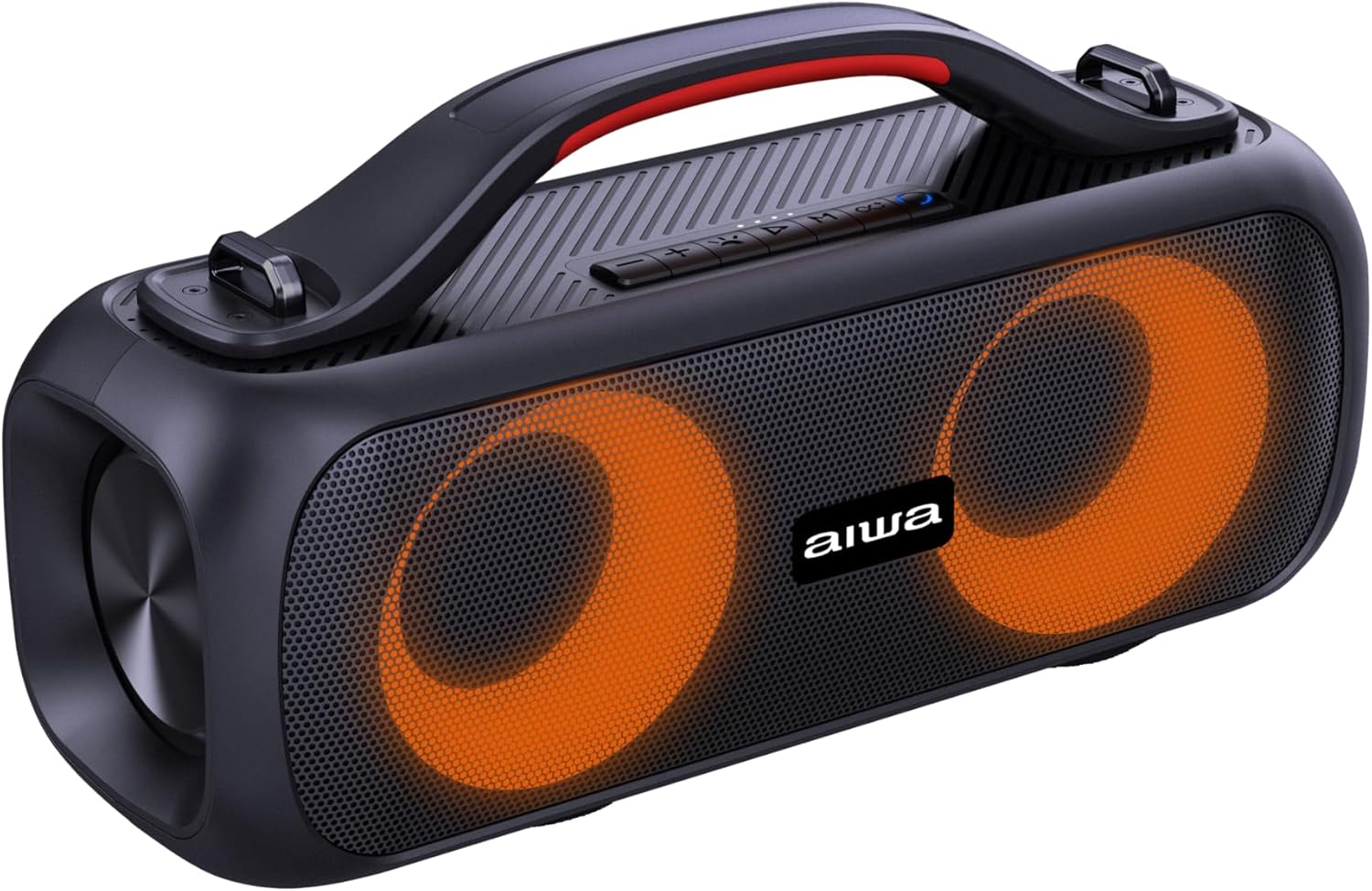
ചിത്രം 4.2: കോണാകൃതിയിലുള്ളത് view of the speaker, highlighting the integrated carrying handle and top-mounted control panel.

ചിത്രം 4.3: മുകളിൽ view of the speaker, detailing the control buttons for power, volume, playback, and mode selection.
നിയന്ത്രണ ബട്ടണുകൾ:
- പവർ ബട്ടൺ: ഓൺ/ഓഫ് ചെയ്യാൻ അമർത്തിപ്പിടിക്കുക.
- വോളിയം കൂട്ടുക (+): വോളിയം കൂട്ടുക.
- വോളിയം ഡൗൺ (-): വോളിയം കുറയ്ക്കുക.
- പ്ലേ/താൽക്കാലികമായി നിർത്തുക ബട്ടൺ: ഓഡിയോ പ്ലേ ചെയ്യുക അല്ലെങ്കിൽ താൽക്കാലികമായി നിർത്തുക.
- മോഡ് ബട്ടൺ (M): Switch between Bluetooth, FM Radio, USB, and AUX modes.
- RGB ലൈറ്റ് ബട്ടൺ: Cycle through RGB lighting modes.
- Previous Track/FM Scan Down: Short press for previous track, long press for FM scan down.
- Next Track/FM Scan Up: Short press for next track, long press for FM scan up.
തുറമുഖങ്ങൾ:

ചിത്രം 4.4: പിൻഭാഗം view of the speaker, indicating the USB, DC 5V charging, and AUX input ports, protected by a cover.
- USB പോർട്ട്: യുഎസ്ബി ഡ്രൈവ് പ്ലേബാക്കിനായി.
- DC 5V പോർട്ട്: സ്പീക്കർ ചാർജ് ചെയ്തതിന്.
- AUX ഇൻപുട്ട്: 3.5mm ഓഡിയോ കേബിൾ വഴി ബാഹ്യ ഓഡിയോ ഉപകരണങ്ങൾ ബന്ധിപ്പിക്കുന്നതിന്.
5. സജ്ജീകരണം
5.1 പ്രാരംഭ ചാർജിംഗ്
- ആദ്യ ഉപയോഗത്തിന് മുമ്പ്, സ്പീക്കർ പൂർണ്ണമായും ചാർജ് ചെയ്യുക.
- Connect the provided USB charging cable to the DC 5V port on the speaker.
- USB കേബിളിന്റെ മറ്റേ അറ്റം അനുയോജ്യമായ ഒരു USB പവർ അഡാപ്റ്ററുമായി (ഉൾപ്പെടുത്തിയിട്ടില്ല) അല്ലെങ്കിൽ കമ്പ്യൂട്ടറിന്റെ USB പോർട്ടുമായി ബന്ധിപ്പിക്കുക.
- The charging indicator light will illuminate. Once fully charged (approximately 4 hours), the light may change color or turn off.
5.2 പവർ ഓൺ/ഓഫ്
- To power on, press and hold the Power Button until you hear an audible prompt and the RGB lights illuminate.
- To power off, press and hold the Power Button again until you hear an audible prompt and the lights turn off.
6. പ്രവർത്തന നിർദ്ദേശങ്ങൾ
6.1 ബ്ലൂടൂത്ത് ജോടിയാക്കൽ
- സ്പീക്കർ ഓണാക്കുക. മിന്നുന്ന LED ലൈറ്റ് സൂചിപ്പിക്കുന്ന തരത്തിൽ അത് യാന്ത്രികമായി ബ്ലൂടൂത്ത് ജോടിയാക്കൽ മോഡിലേക്ക് പ്രവേശിക്കും.
- നിങ്ങളുടെ സ്മാർട്ട്ഫോണിലോ മറ്റ് ഉപകരണത്തിലോ ബ്ലൂടൂത്ത് പ്രവർത്തനക്ഷമമാക്കുക.
- ഇതിനായി തിരയുക "AWS200BT" in the list of available Bluetooth devices.
- Select "AWS200BT" to connect. Once connected, you will hear a confirmation sound, and the LED light will stop flashing.
- ഇപ്പോൾ നിങ്ങളുടെ ഉപകരണത്തിൽ നിന്ന് സ്പീക്കറിലൂടെ ഓഡിയോ പ്ലേ ചെയ്യാൻ കഴിയും.

ചിത്രം 6.1: The Aiwa AWS200BT speaker highlighting its Bluetooth and TWS capabilities.
6.2 TWS (True Wireless Stereo) Function
The TWS function allows you to connect two AWS200BT speakers for a stereo sound experience.
- Ensure both AWS200BT speakers are powered on and not connected to any Bluetooth device.
- On one of the speakers (this will be the primary speaker), press and hold the TWS button (often integrated with the Play/Pause button or a dedicated button, refer to Figure 4.3 for specific button layout if available).
- The primary speaker will search for the secondary speaker. Once connected, you will hear a confirmation sound.
- ഇപ്പോൾ, വിഭാഗം 6.1-ൽ വിവരിച്ചിരിക്കുന്നതുപോലെ ബ്ലൂടൂത്ത് വഴി നിങ്ങളുടെ ഉപകരണം പ്രാഥമിക സ്പീക്കറുമായി ബന്ധിപ്പിക്കുക. സ്റ്റീരിയോയിൽ രണ്ട് സ്പീക്കറുകളിലൂടെയും ഓഡിയോ പ്ലേ ചെയ്യും.
6.3 എഫ്എം റേഡിയോ
- Press the Mode Button (M) to switch to FM Radio mode.
- To automatically scan and save available stations, press and hold the Play/Pause button. The speaker will scan and store stations.
- Use the Previous Track and Next Track buttons to navigate between saved stations.
6.4 USB/AUX Input
- യുഎസ്ബി പ്ലേബാക്ക്: USB പോർട്ടിലേക്ക് ഒരു USB ഫ്ലാഷ് ഡ്രൈവ് ഇടുക. സ്പീക്കർ യാന്ത്രികമായി USB മോഡിലേക്ക് മാറുകയും ഓഡിയോ പ്ലേ ചെയ്യാൻ തുടങ്ങുകയും ചെയ്യും. files.
- AUX ഇൻപുട്ട്: Connect a 3.5mm audio cable from your external device to the AUX port on the speaker. Press the Mode Button (M) to switch to AUX mode.
6.5 Voice Assistant & Hands-free Calling
- When connected via Bluetooth, the speaker supports voice assistants like Google Assistant and Siri. Press the dedicated Voice Assistant button (if available, or a long press on Play/Pause) to activate.
- For hands-free calling, when a call comes in, press the Play/Pause button to answer. Press again to end the call.
6.6 RGB ലൈറ്റിംഗ് മോഡുകൾ
The speaker features multiple RGB lighting modes that synchronize with your music.
- Press the RGB Light Button to cycle through the available lighting effects.
- Continue pressing to find your preferred mode or to turn the lights off.

ചിത്രം 6.2: The Aiwa AWS200BT speaker showcasing its dynamic RGB lighting feature.
7. പരിപാലനം
- വൃത്തിയാക്കൽ: സ്പീക്കറിന്റെ പുറംഭാഗം വൃത്തിയാക്കാൻ മൃദുവായതും ഉണങ്ങിയതുമായ തുണി ഉപയോഗിക്കുക. അബ്രസീവ് ക്ലീനറുകളോ ലായകങ്ങളോ ഉപയോഗിക്കരുത്.
- ജല പ്രതിരോധം: Ensure the port cover is always securely closed to maintain IPX5 water resistance. Do not submerge the speaker.
- സംഭരണം: ദീർഘനേരം ഉപയോഗിക്കാത്തപ്പോൾ നേരിട്ടുള്ള സൂര്യപ്രകാശത്തിൽ നിന്നും കടുത്ത താപനിലയിൽ നിന്നും മാറി തണുത്തതും വരണ്ടതുമായ സ്ഥലത്ത് സ്പീക്കർ സൂക്ഷിക്കുക.
- ബാറ്ററി: To prolong battery life, charge the speaker regularly, even if not in frequent use. Avoid fully discharging the battery for long periods.
8. പ്രശ്നപരിഹാരം
| പ്രശ്നം | സാധ്യമായ കാരണം | പരിഹാരം |
|---|---|---|
| സ്പീക്കർ ഓണാക്കുന്നില്ല. | കുറഞ്ഞ ബാറ്ററി. | സ്പീക്കർ പൂർണ്ണമായും ചാർജ് ചെയ്യുക. |
| ബ്ലൂടൂത്ത് വഴി ജോടിയാക്കാൻ കഴിയില്ല. | സ്പീക്കർ ജോടിയാക്കൽ മോഡിൽ ഇല്ല; ഉപകരണം ബ്ലൂടൂത്ത് ഓഫാണ്; സ്പീക്കറിൽ നിന്ന് വളരെ അകലെയാണ്. | Ensure speaker is in pairing mode (flashing LED). Turn on Bluetooth on your device. Move device closer to speaker (within 10 meters). |
| ശബ്ദമില്ല. | ശബ്ദം വളരെ കുറവാണ്; തെറ്റായ മോഡ് തിരഞ്ഞെടുത്തു; ഉപകരണം പ്ലേ ചെയ്യുന്നില്ല. | Increase speaker and device volume. Press 'M' button to select correct input mode (Bluetooth, USB, AUX, FM). Ensure audio is playing on your connected device. |
| എഫ്എം റേഡിയോ റിസപ്ഷൻ മോശമാണ്. | ദുർബലമായ സിഗ്നൽ. | മികച്ച സ്വീകരണം ലഭിക്കുന്ന ഒരു സ്ഥലത്തേക്ക് സ്പീക്കർ മാറ്റുക. |
| TWS ജോടിയാക്കൽ പരാജയപ്പെടുന്നു. | Speakers already paired to another device; speakers too far apart. | Disconnect both speakers from any Bluetooth devices. Ensure they are close to each other. Try pairing again. |
9 സ്പെസിഫിക്കേഷനുകൾ
| ഫീച്ചർ | വിശദാംശങ്ങൾ |
|---|---|
| മോഡലിൻ്റെ പേര് | AWS200BT |
| ബ്രാൻഡ് | ഐവ |
| കണക്റ്റിവിറ്റി ടെക്നോളജി | ബ്ലൂടൂത്ത് |
| സ്പീക്കർ തരം | ട്വീറ്റർ |
| പരമാവധി സ്പീക്കർ ഔട്ട്പുട്ട് പവർ | 30 വാട്ട്സ് |
| ഫ്രീക്വൻസി പ്രതികരണം | 20 KHz |
| സൗണ്ട് ചാനൽ കോൺഫിഗറേഷൻ | 2.0 |
| പ്രത്യേക സവിശേഷതകൾ | Bluetooth, Portable, RGB Lighting, FM Radio, TWS, USB, AUX, Voice Assistant, Hands-free |
| വാട്ടർപ്രൂഫ് റേറ്റിംഗ് | IPX5 |
| പവർ ഉറവിടം | ബാറ്ററി |
| ബാറ്ററി ശേഷി | 3000mAh (3E+3 Milliamp മണിക്കൂറുകൾ) |
| ശരാശരി ബാറ്ററി ലൈഫ് | 4 മണിക്കൂർ (50% വോളിയത്തിൽ) |
| ബാറ്ററി കോമ്പോസിഷൻ | ലിഥിയം അയോൺ |
| നിയന്ത്രണ രീതി | ശബ്ദം |
| ഉൽപ്പന്ന അളവുകൾ | 20.7cm (depth) x 8.4cm (width) x 8.4cm (height) |
| ഉൽപ്പന്ന ഭാരം | 2 കിലോഗ്രാം |
10. വാറൻ്റിയും പിന്തുണയും
The Aiwa AWS200BT speaker comes with a limited warranty. For specific warranty terms and conditions, please refer to the warranty card included in your package or contact Aiwa customer support.
For technical support, troubleshooting assistance, or general inquiries, please visit the official Aiwa webസൈറ്റ് അല്ലെങ്കിൽ അവരുടെ ഉപഭോക്തൃ സേവന വിഭാഗവുമായി ബന്ധപ്പെടുക.
- വാറന്റി തരം: ലിമിറ്റഡ്


