ആമുഖം
The STRONG Mini WI-FI Powerline Kit AV1000 (POWERWF1000DUOMINIUK) provides a simple and effective solution to extend your internet network throughout your home using existing electrical wiring. This kit includes a Powerline 1000 adapter and a Powerline Wi-Fi 1000 adapter, enabling high-speed wired and wireless connectivity in areas with weak or no Wi-Fi signal.
ബോക്സിൽ എന്താണുള്ളത്
- 1 x Powerline 1000 Adapter
- 1 x Powerline Wi-Fi 1000 Adapter
- ഇഥർനെറ്റ് കേബിൾ
- ദ്രുത ഇൻസ്റ്റലേഷൻ ഗൈഡ്
ഉൽപ്പന്നം കഴിഞ്ഞുview
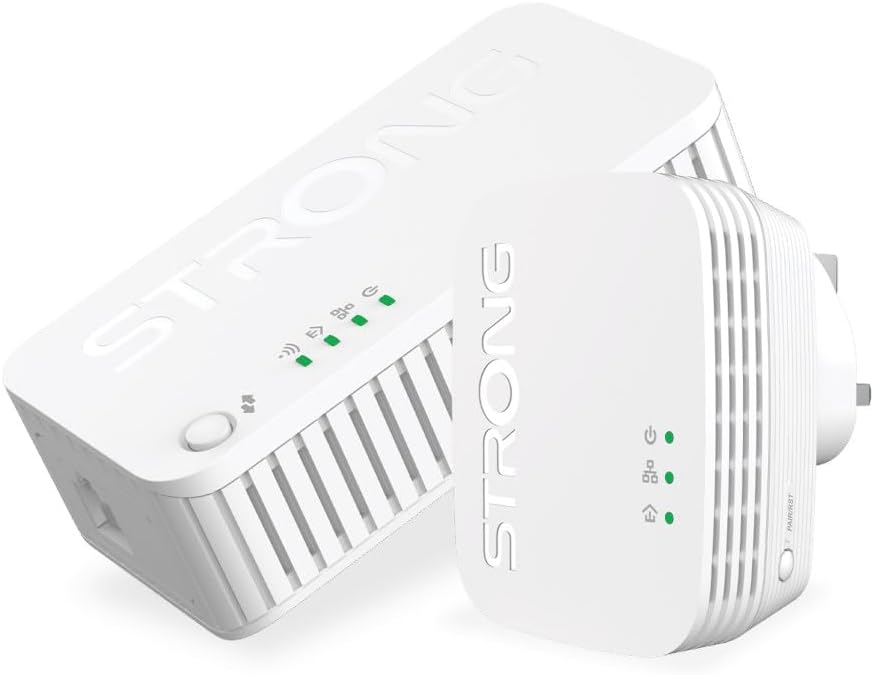
Image: The STRONG Mini WI-FI Powerline Kit AV1000, featuring both the Powerline 1000 adapter and the Powerline Wi-Fi 1000 adapter. The Powerline 1000 adapter is larger and designed for connection to the router, while the Powerline Wi-Fi 1000 adapter is more compact and extends the Wi-Fi signal.
Powerline 1000 Adapter

This adapter connects to your internet router via an Ethernet cable and plugs into a power outlet. It uses your home's electrical wiring to transmit network data. It features indicator lights for power, Powerline connection, and Ethernet activity. A 'Connect & Secure' button is present for secure pairing.
- പവർ എൽഇഡി: പവർ സ്റ്റാറ്റസ് സൂചിപ്പിക്കുന്നു.
- Powerline LED: Indicates Powerline network connection status.
- ഇഥർനെറ്റ് LED: ഇതർനെറ്റ് പോർട്ട് പ്രവർത്തനത്തെ സൂചിപ്പിക്കുന്നു.
- കണക്റ്റ് & സെക്യൂർ ബട്ടൺ: Used for secure pairing with other Powerline devices.
Powerline Wi-Fi 1000 Adapter
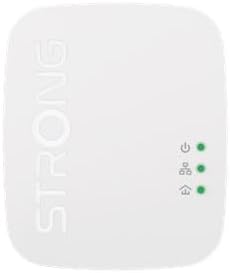
This adapter plugs into any power outlet in your home and extends both the wired and wireless network. It receives the network signal through the electrical wiring and broadcasts a Wi-Fi signal. It also includes an Ethernet port for wired connections.
- പവർ എൽഇഡി: പവർ സ്റ്റാറ്റസ് സൂചിപ്പിക്കുന്നു.
- Powerline LED: Indicates Powerline network connection status.
- Wi-Fi LED: വൈഫൈ നില സൂചിപ്പിക്കുന്നു.
- ഇഥർനെറ്റ് പോർട്ട്: For connecting wired devices.
- കണക്റ്റ് & സെക്യൂർ ബട്ടൺ: Used for secure pairing and Wi-Fi Clone function.
സജ്ജമാക്കുക
- Connect the Powerline 1000 Adapter:
- Plug the Powerline 1000 adapter into a wall power outlet near your internet router. Avoid power strips or extension cords as they can interfere with performance.
- Connect one end of an Ethernet cable to an available LAN port on your router and the other end to the Ethernet port on the Powerline 1000 adapter.
- Wait for the Power LED and Ethernet LED on the adapter to turn solid green.
- Connect the Powerline Wi-Fi 1000 Adapter:
- Plug the Powerline Wi-Fi 1000 adapter into a wall power outlet in the room where you need extended Wi-Fi or wired internet access.
- Wait for the Power LED and Powerline LED on the adapter to turn solid green. If the Powerline LED is not green, try a different outlet or ensure the first adapter is correctly set up.
- Pairing the Adapters (Optional, for security):
- Within two minutes of plugging in the second adapter, press the 'Connect & Secure' button on the Powerline 1000 adapter for one second.
- Then, within the next two minutes, press the 'Connect & Secure' button on the Powerline Wi-Fi 1000 adapter for one second.
- The Powerline LEDs on both adapters should blink and then turn solid green, indicating a secure, paired connection.
- വൈഫൈയിലേക്ക് കണക്റ്റുചെയ്യുക:
- നിങ്ങളുടെ വൈഫൈ പ്രാപ്തമാക്കിയ ഉപകരണത്തിൽ (സ്മാർട്ട്ഫോൺ, ലാപ്ടോപ്പ്, ടാബ്ലെറ്റ്), ലഭ്യമായ വൈഫൈ നെറ്റ്വർക്കുകൾക്കായി തിരയുക.
- The Powerline Wi-Fi 1000 adapter will broadcast a new Wi-Fi network (SSID) with a default name and password usually found on a label on the adapter itself.
- Connect to this network using the provided password.
- വയർഡ് ഉപകരണങ്ങൾ ബന്ധിപ്പിക്കുക (ഓപ്ഷണൽ):
- For wired devices like desktop computers, gaming consoles, or smart TVs, connect an Ethernet cable from the device to the Ethernet port on the Powerline Wi-Fi 1000 adapter.
പ്രവർത്തിക്കുന്നു
Extending Wi-Fi Coverage
Once set up, the Powerline Wi-Fi 1000 adapter automatically extends your network. You can connect to its Wi-Fi signal or use its Ethernet port for wired connections. For optimal performance, ensure the adapter is plugged directly into a wall outlet.
Wi-Fi Clone Function
The Powerline Wi-Fi 1000 adapter supports a Wi-Fi Clone function, allowing it to copy the SSID and password of your main router's Wi-Fi network. This creates a seamless roaming experience where your devices automatically switch to the strongest signal without manual intervention.
- Place the Powerline Wi-Fi 1000 adapter near your main router.
- നിങ്ങളുടെ പ്രധാന റൂട്ടറിലെ WPS ബട്ടൺ അമർത്തുക.
- Within two minutes, press the 'Connect & Secure' (or Wi-Fi Clone) button on the Powerline Wi-Fi 1000 adapter for approximately 3 seconds.
- The Wi-Fi LED on the Powerline Wi-Fi 1000 adapter will blink and then turn solid, indicating successful cloning.
- You can now move the Powerline Wi-Fi 1000 adapter to your desired location.
മെയിൻ്റനൻസ്
- വൃത്തിയാക്കൽ: Use a soft, dry cloth to clean the adapters. Do not use liquid cleaners or aerosols.
- പ്ലേസ്മെൻ്റ്: Ensure adapters are plugged directly into wall outlets. Avoid power strips, surge protectors, or extension cords as they can degrade performance.
- വെൻ്റിലേഷൻ: Do not block the ventilation holes on the adapters. Ensure adequate airflow to prevent overheating.
- ഫേംവെയർ അപ്ഡേറ്റുകൾ: നിർമ്മാതാവിന്റെ webഒപ്റ്റിമൽ പ്രകടനവും സുരക്ഷയും ഉറപ്പാക്കാൻ ഫേംവെയർ അപ്ഡേറ്റുകൾക്കായുള്ള സൈറ്റ്.
ട്രബിൾഷൂട്ടിംഗ്
| പ്രശ്നം | സാധ്യമായ കാരണം | പരിഹാരം |
|---|---|---|
| പവർ എൽഇഡി ഇല്ല | Adapter not plugged in or no power from outlet. | അഡാപ്റ്റർ വർക്ക് വാൾ ഔട്ട്ലെറ്റിൽ സുരക്ഷിതമായി പ്ലഗ് ചെയ്തിട്ടുണ്ടെന്ന് ഉറപ്പാക്കുക. മറ്റൊരു ഉപകരണം ഉപയോഗിച്ച് ഔട്ട്ലെറ്റ് പരിശോധിക്കുക. |
| Powerline LED is off or red | No Powerline connection or poor connection quality. |
|
| ഇന്റർനെറ്റ് വേഗത കുറവാണ് | Electrical interference, long distance, or poor wiring. |
|
| Wi-Fi-യിലേക്ക് കണക്റ്റുചെയ്യാൻ കഴിയില്ല | Incorrect Wi-Fi password or Wi-Fi not enabled. |
|
സ്പെസിഫിക്കേഷനുകൾ
- മോഡൽ: POWERWF1000DUOMINIUK
- പവർലൈൻ സ്റ്റാൻഡേർഡ്: ഹോംപ്ലഗ് എ.വി
- ഡാറ്റ കൈമാറ്റ നിരക്ക്: Up to 1000 Mbps (Powerline), Up to 1200 Mbps (Wi-Fi)
- പരിധി: 300 meters over electrical circuit (Powerline)
- ഇൻ്റർഫേസുകൾ: ഇഥർനെറ്റ് പോർട്ട് (RJ45)
- സുരക്ഷ: 128-bit AES Encryption (Powerline), WPA/WPA2 (Wi-Fi)
- അളവുകൾ: (Refer to product packaging for exact dimensions, approx. 7.64 x 7.05 x 3.23 inches for package)
- ഭാരം: Approx. 1.19 pounds (package weight)
പിന്തുണ
For further assistance, technical support, or warranty information, please refer to the official Strong website or contact their customer service directly. Keep your purchase receipt and product model number (POWERWF1000DUOMINIUK) handy when seeking support.
നിർമ്മാതാവ്: ശക്തമായ


