1. ആമുഖം
Thank you for choosing the KOFIRE Wireless Gaming Headset. This manual provides essential information for setting up, operating, and maintaining your headset to ensure an optimal gaming and audio experience. The XG ONE headset is designed for multi-platform compatibility, offering seamless connectivity and high-fidelity sound.
2. ബോക്സിൽ എന്താണുള്ളത്?
- 1 x KOFIRE Wireless Gaming Headset
- 1 x USB & Type-C 2-in-1 Transmitter
- 1 x വേർപെടുത്താവുന്ന നോയ്സ്-റദ്ദാക്കൽ മൈക്രോഫോൺ
- 1 x ടൈപ്പ്-സി ചാർജിംഗ് കേബിൾ
- 1 x 3.5mm ഓഡിയോ കേബിൾ
- 1 x ഉപയോക്തൃ മാനുവൽ

Image: KOFIRE Wireless Gaming Headset with its USB/Type-C transmitter and detachable microphone.
3. സജ്ജീകരണം
3.1 പ്രാരംഭ ചാർജിംഗ്
Before first use, fully charge the headset using the provided Type-C charging cable. A full charge takes approximately 2 hours.
3.2 മൈക്രോഫോൺ അറ്റാച്ച്മെന്റ്
The headset comes with a detachable microphone. Align the microphone's 3.5mm jack with the port on the left earcup and firmly insert it until it clicks into place.
3.3 കണക്റ്റിവിറ്റി മോഡുകൾ
The KOFIRE XG ONE supports three connection modes:
- 2.4GHz Wireless Mode (for Xbox Series X|S|One):
Insert the USB & Type-C 2-in-1 transmitter into the 3.5mm port of your Xbox controller. Ensure it is firmly inserted until you hear a click and see no gap to avoid noise or echoes from poor contact. This mode provides ultra-low latency wireless audio. - 2.4GHz Wireless Mode (for PC/PS5/Switch Docked):
Take the USB-A port out of the back of the transmitter and insert it into your PC, PS5, or Nintendo Switch dock. Long-press the microphone button on the headset for 3 seconds to switch to 2.4GHz dongle mode. The headset will then pair with the transmitter. - Bluetooth 5.4 Mode (for Mobile Devices/Switch Handheld):
Long-press the microphone button on the headset for 3 seconds to switch to Bluetooth mode. ഇതിനായി തിരയുക "KOFIRE XG ONE" on your device's Bluetooth settings and pair. - 3.5mm വയർഡ് മോഡ്:
Connect the provided 3.5mm audio cable to the headset and your gaming device for a wired connection. This mode is available even if the headset battery is depleted.

Image: Proper insertion of the 2.4GHz transmitter into an Xbox controller.

Image: Connecting the 2.4GHz transmitter to a PC or PS5.
കുറിപ്പ്: Microphone is not supported on Nintendo Switch in any mode.
4. പ്രവർത്തന നിർദ്ദേശങ്ങൾ
4.1 നിയന്ത്രണങ്ങൾ
ഇയർകപ്പുകളിൽ സ്ഥിതിചെയ്യുന്ന അവബോധജന്യമായ നിയന്ത്രണങ്ങൾ ഹെഡ്സെറ്റിന്റെ സവിശേഷതയാണ്:
- വോളിയം നിയന്ത്രണം: Use the volume dial to adjust audio levels.
- മൈക്രോഫോൺ നിശബ്ദമാക്കുക: Press the dedicated mic button for one-touch mute/unmute.
- മോഡ് സ്വിച്ചിംഗ്: Long-press the mic button for 3 seconds to toggle between 2.4GHz wireless and Bluetooth modes.
- പവർ ഓൺ/ഓഫ്: Use the power button to turn the headset on or off.
5 പ്രധാന സവിശേഷതകൾ
5.1 ഇമ്മേഴ്സീവ് ഓഡിയോ അനുഭവം
Equipped with super-large 53mm dynamic drivers, the KOFIRE XG ONE delivers cinematic 3D stereo sound. These speakers are designed to reproduce game audio effectively, capturing environmental sounds and enemy footsteps from all directions for an immersive gaming experience.

ചിത്രം: വിശദമായത് view of the 53mm dynamic speaker for enhanced audio.
5.2 ബാറ്ററി ലൈഫ് വർദ്ധിപ്പിച്ചു
Enjoy prolonged gaming sessions with up to 60 hours of playtime in Bluetooth mode (microphone off) or 35-45 hours in 2.4GHz dongle mode. The headset supports simultaneous charging and use, ensuring uninterrupted gameplay. A low battery alert will notify you when recharging is needed.
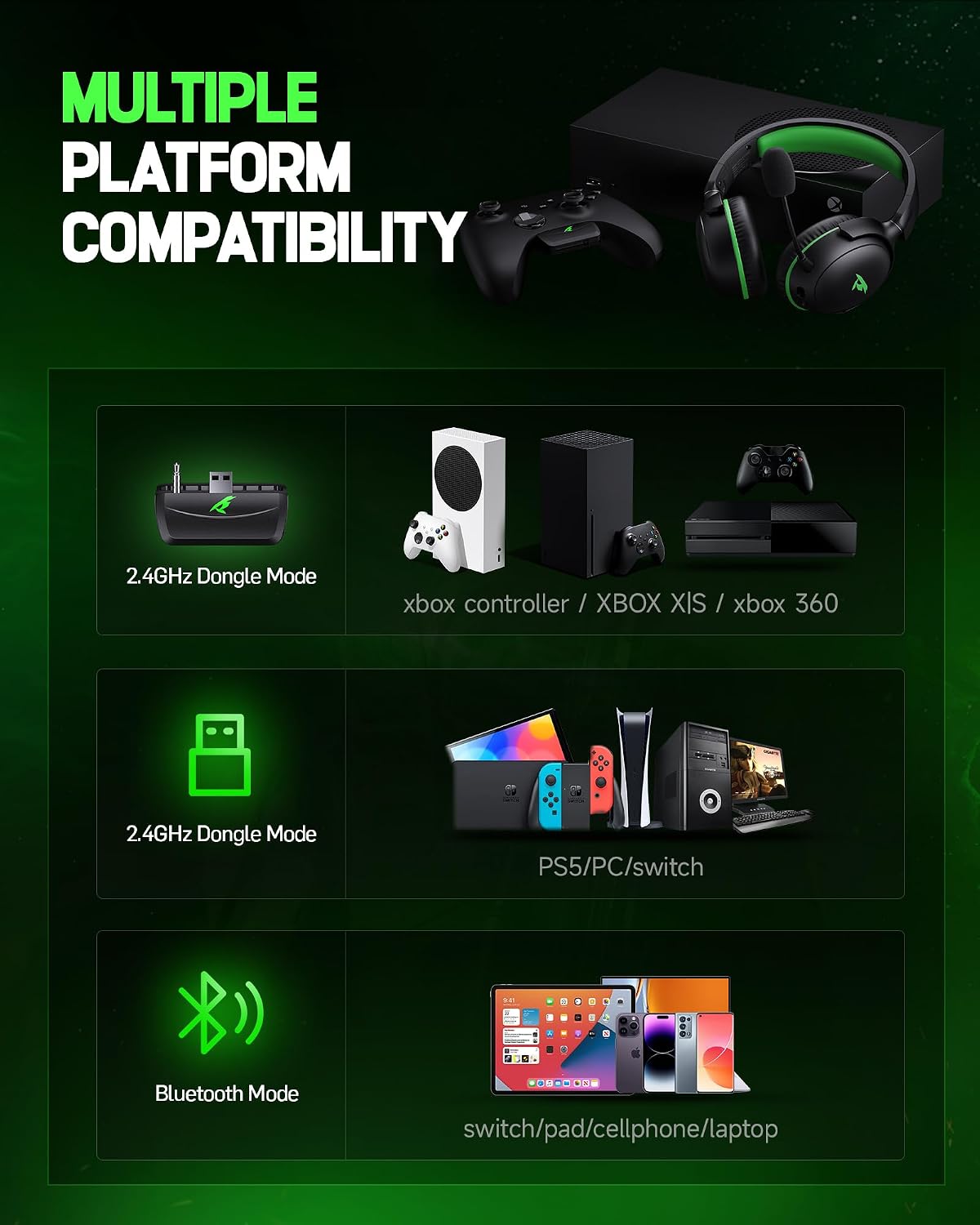
Image: Visual representation of the headset's long-lasting battery.
5.3 Detachable ENC Noise-Canceling Microphone
The 360° omnidirectional microphone features Environmental Noise Cancellation (ENC) to accurately capture your voice while minimizing background noise. This ensures clear communication with teammates. The microphone can be easily detached when not in use, making the headset versatile for various activities.

Image: Illustration of the detachable and omni-directional noise-canceling microphone.
5.4 Lightweight & Ergonomic Design
Weighing only 9.5 ounces, the headset is designed for long-term wear without causing head pressure or neck strain. It features rotatable and foldable ear cups, an adjustable headband, and soft memory sponge cushions with breathable leather for a customized and comfortable fit. Passive noise cancellation is achieved through the ear cup design, effectively isolating environmental noise.
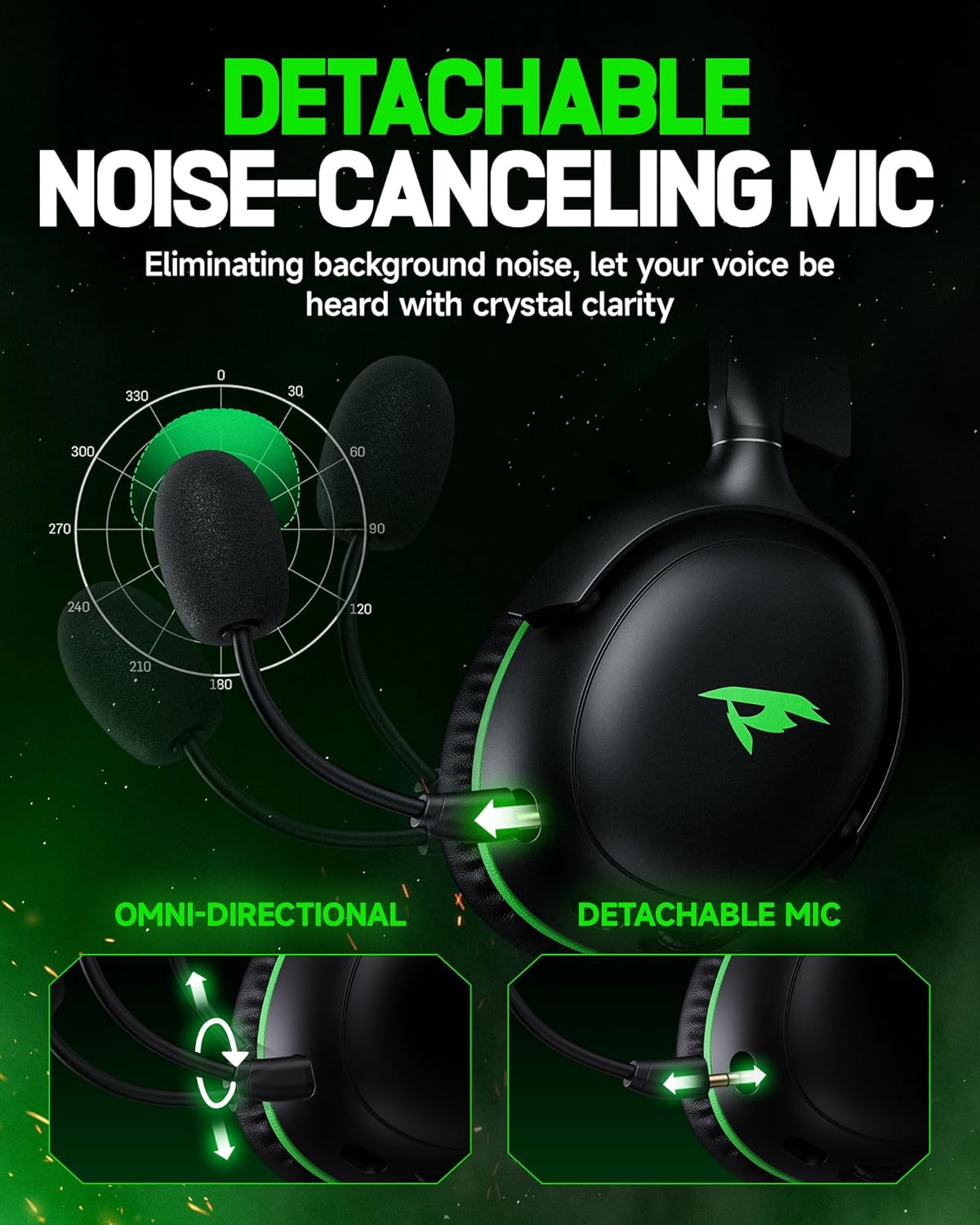
Image: User demonstrating the comfortable and adjustable fit of the headset.
6. പരിപാലനം
- മൃദുവായതും ഉണങ്ങിയതുമായ തുണി ഉപയോഗിച്ച് ഇയർകപ്പുകളും ഹെഡ്ബാൻഡും പതിവായി വൃത്തിയാക്കുക.
- ഹെഡ്സെറ്റ് തീവ്രമായ താപനിലയിലോ നേരിട്ടുള്ള സൂര്യപ്രകാശത്തിലോ ഏൽക്കുന്നത് ഒഴിവാക്കുക.
- Store the headset in a cool, dry place. The foldable design allows for compact storage.
- Do not attempt to disassemble or repair the headset yourself.
7. പ്രശ്നപരിഹാരം
- ശബ്ദമില്ല/ഇടവിട്ടുള്ള ഓഡിയോ:
- Ensure the headset is powered on and fully charged.
- Check the connection mode (2.4GHz, Bluetooth, or wired) and ensure it matches your device.
- For 2.4GHz Xbox connection, firmly insert the transmitter into the controller's 3.5mm port until it clicks. Poor contact can cause noise or echoes.
- Re-pair the headset with your device if using wireless modes. - മൈക്രോഫോൺ പ്രവർത്തിക്കുന്നില്ല:
- Ensure the detachable microphone is securely attached.
- Check if the microphone is muted using the one-touch mute button.
- Remember that the microphone is not supported on Nintendo Switch. - കണക്റ്റിവിറ്റി പ്രശ്നങ്ങൾ:
- Ensure your device's Bluetooth is enabled and discoverable.
- Move closer to your device to ensure you are within the Bluetooth range (10 meters) or 2.4GHz range (40 feet).
- Restart both the headset and your device.
8 സ്പെസിഫിക്കേഷനുകൾ
| ഫീച്ചർ | സ്പെസിഫിക്കേഷൻ |
|---|---|
| മോഡലിൻ്റെ പേര് | XG ONE |
| കണക്റ്റിവിറ്റി ടെക്നോളജി | 2.4GHz Wireless, Bluetooth 5.4, 3.5mm Wired |
| അനുയോജ്യമായ ഉപകരണങ്ങൾ | Xbox Series X|S|One, PS5/4, PC, Mac, Phone, Pad, Nintendo Switch (audio only) |
| ഓഡിയോ ഡ്രൈവർ വലിപ്പം | 53 എംഎം ഡൈനാമിക് ഡ്രൈവറുകൾ |
| ഫ്രീക്വൻസി പ്രതികരണം | 20 ഹെർട്സ് - 20,000 ഹെർട്സ് |
| ശബ്ദ നിയന്ത്രണം | Passive Noise Cancellation, Sound Isolation |
| മൈക്രോഫോൺ | Detachable ENC Noise-Canceling Omnidirectional Mic |
| ബാറ്ററി ലൈഫ് | Up to 60 hours (Bluetooth), 35-45 hours (2.4GHz) |
| ചാർജിംഗ് സമയം | 2 മണിക്കൂർ |
| ഭാരം | 9.5 ഔൺസ് (ഏകദേശം 269 ഗ്രാം) |
| മെറ്റീരിയൽ | Soft Memory Sponge Cushions, Faux Leather, PC, ABS |
9. വാറൻ്റിയും പിന്തുണയും
KOFIRE is committed to providing excellent customer service. If you encounter any issues with your headset, our experienced engineers and professional support team are available to assist you. Please feel free to contact us; we aim to respond within 0-24 hours and provide comprehensive assistance to ensure your satisfaction.
For support, please refer to the contact information provided on the product packaging or the official KOFIRE webസൈറ്റ്.


