1. ഉൽപ്പന്നം കഴിഞ്ഞുview
The ZOSI 5MP PoE Add-on Camera (Model: IPC-1825Y-W) is designed to enhance your security system with high-definition video surveillance. This camera features advanced detection capabilities, two-way audio, and robust weatherproofing for reliable indoor and outdoor use. It is specifically designed to be compatible only with ZOSI PoE NVRs.

Image: The ZOSI 5MP PoE Add-on Camera, a white bullet-style camera with visible lenses and LED lights, designed for security surveillance.
വീഡിയോ: ഒരു സംക്ഷിപ്ത വിവരണംview of the ZOSI PoE Security Camera, highlighting features like AI-powered vehicle detection, instant notifications, live viewing, human detection, sound & light deterrence, and IP66 weatherproofing.
2. പാക്കേജ് ഉള്ളടക്കം
താഴെ ലിസ്റ്റ് ചെയ്തിരിക്കുന്ന എല്ലാ ഇനങ്ങളും നിങ്ങളുടെ പാക്കേജിൽ ഉൾപ്പെടുത്തിയിട്ടുണ്ടെന്ന് ഉറപ്പാക്കുക:
- 1 x ZOSI 5MP PoE Add-on Camera
- 1 x ഉപയോക്തൃ മാനുവൽ
- 1 x Mounting Template Sticker
- 1 x ഇഥർനെറ്റ് കേബിൾ
- 1 x Bag of Mounting Screws and Wall Plugs
- 1 x Waterproof Kit for Ethernet Cable
- 1 x Security System Warning Sticker

Image: All components included in the ZOSI 5MP PoE Add-on Camera package, laid out on a surface, including the camera, cables, manual, and mounting hardware.
3. ഇൻസ്റ്റലേഷൻ ആവശ്യകതകൾ
Before proceeding with installation, ensure the following conditions are met for optimal performance and safety:
- അനുയോജ്യത: This camera is an add-on unit and is only compatible with ZOSI 4K PoE NVRs (Models: ZR16HB, ZR08HN, ZR08SN, ZR16SK, ZR16HK). It cannot be used as a standalone device or with third-party NVRs.
- സ്ഥാനം: Suitable for both indoor and outdoor environments due to its IP66 weatherproof rating.
- മൗണ്ടിംഗ് ഉപരിതലം: മൗണ്ടിംഗ് പ്രതലം ക്യാമറയെ പിന്തുണയ്ക്കാൻ തക്ക ശക്തിയുള്ളതാണെന്ന് ഉറപ്പാക്കുക.
- പവർ ഓവർ ഇഥർനെറ്റ് (PoE): The camera receives power and data through a single Ethernet cable when connected to a compatible ZOSI PoE NVR.
- ഉപകരണങ്ങൾ: You may need a drill, screwdriver, and possibly a hammer for wall plugs.
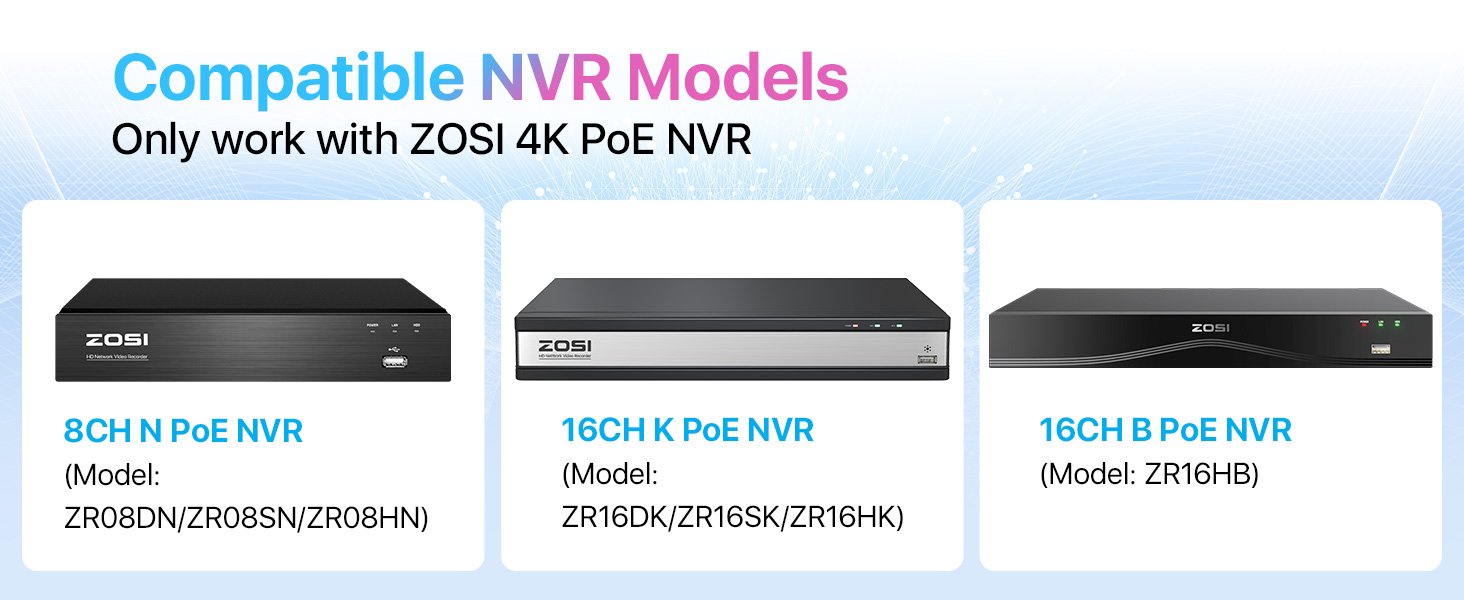
Image: Illustration showing the ZOSI 5MP PoE camera and various compatible ZOSI 4K PoE NVR models (ZR08DN/ZR08SN/ZR08HN, ZR16DK/ZR16SK/ZR16HK, ZR16HB), emphasizing compatibility.
4. സജ്ജീകരണവും കണക്ഷനും
4.1 ഫിസിക്കൽ ഇൻസ്റ്റലേഷൻ
- മൗണ്ടിംഗ് ലൊക്കേഷൻ: Choose a suitable location, ensuring a clear field of view and easy access for adjustments.
- അടയാളപ്പെടുത്തൽ ദ്വാരങ്ങൾ: Use the included mounting template sticker to mark the drill holes on your chosen surface.
- ഡ്രില്ലിംഗ്: Drill holes according to the marked positions and insert the plastic wall plugs.
- ക്യാമറ ഘടിപ്പിക്കുന്നു: Loosen the bracket screws, align the camera bracket with the drilled holes, and then tighten the screws with a screwdriver to fix the camera securely.
- ക്രമീകരിക്കുന്ന ആംഗിൾ: Adjust the camera's angle (vertical and horizontal) to achieve the desired coverage. Tilt down along the horizontal position about 30° - 60° for optimal viewing. Tighten the bracket screws once adjusted.

Image: A mounting template sticker used to mark drill holes for camera installation.
Video: A demonstration of how to install the ZOSI camera, including marking drill points and securing the camera to a wall.
4.2 Connecting to ZOSI PoE NVR
The ZOSI 5MP PoE Add-on Camera connects directly to your ZOSI PoE NVR using an Ethernet cable for both power and data transmission.
- ക്യാമറയുടെ PoE പോർട്ടിലേക്ക് ഇതർനെറ്റ് കേബിളിന്റെ ഒരറ്റം ബന്ധിപ്പിക്കുക.
- Connect the other end of the Ethernet cable to an available PoE port on your ZOSI NVR.
- Ensure your NVR is powered on and connected to a monitor (via HDMI or VGA) and your network router (via Ethernet cable).
- Once connected, the NVR should automatically detect and display the camera feed.
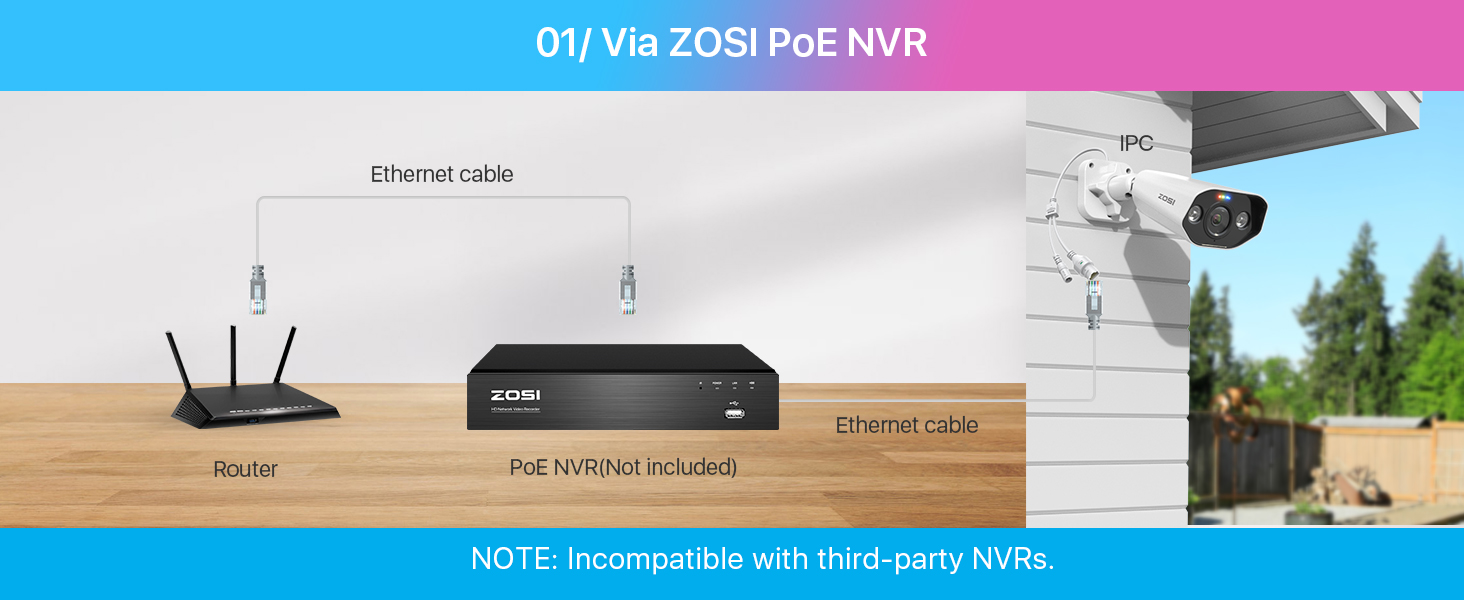
Image: Diagram illustrating how to connect the ZOSI PoE camera to a ZOSI PoE NVR and router using Ethernet cables.
Video: A step-by-step guide on connecting the ZOSI camera to an NVR using an Ethernet cable and powering on the system.
Video: Instructions on how to set up the ZOSI NVR system, including initial configuration and connecting cameras.
5. ഓപ്പറേഷൻ
5.1 High-Definition Video & Night Vision
The camera provides 5MP (3K) super high-definition video, offering 2.5 times better clarity than 1080P Full HD. It features advanced starlight sensors for brighter full-color nighttime videos and up to 100ft night vision.

Image: Comparison of daytime 3K Super HD video and starlight night vision footage from the camera, showing clear visibility in low light.

ചിത്രം: ഒരു വിഭജനം view demonstrating normal night vision versus 5MP color night vision, highlighting enhanced color detail in darkness.
5.2 Smart Detection & Alerts
The camera features AI detection for accurately identifying persons and vehicles. You can customize alert-specific areas to minimize unnecessary notifications. The camera also includes a siren and spotlight as deterrents.

Image: Screenshot showing the camera's smart detection feature identifying a person and a vehicle, with options for app push and email alerts.

Image: An illustration of customized verbal warnings and tripwire intrusion detection zones for tailored security against intruders.
Video: A short clip demonstrating the ZOSI camera's human motion detection capabilities.
5.3 Two-Way Audio & Remote Access
With a built-in microphone and speaker, you can communicate with individuals near the camera. Remote access is available via the ZOSI Smart App on your smartphone, allowing you to monitor your premises anytime, anywhere.

Image: A person using the ZOSI Smart App on a smartphone to engage in two-way audio communication through the camera.
6. പരിപാലനം
To ensure the longevity and optimal performance of your ZOSI 5MP PoE Add-on Camera, consider the following maintenance tips:
- പതിവ് വൃത്തിയാക്കൽ: ക്യാമറ ലെൻസ് ഇടയ്ക്കിടെ മൃദുവായ, ഡി-ടച്ച് ഉപയോഗിച്ച് വൃത്തിയാക്കുക.amp cloth to remove dust and debris that may affect image clarity. Avoid abrasive cleaners.
- ഫേംവെയർ അപ്ഡേറ്റുകൾ: Check the ZOSI Smart App or website for available firmware updates to ensure your camera has the latest features and security enhancements.
- കേബിൾ പരിശോധന: Regularly inspect the Ethernet cable and connections for any signs of wear, damage, or corrosion, especially for outdoor installations. Ensure the waterproof kit is properly sealed.
- മൗണ്ടിംഗ് സെക്യൂരിറ്റി: Periodically check that the camera's mounting screws are tight and the camera is securely fixed to prevent accidental dislodgement.

Image: The ZOSI camera shown operating reliably in various weather conditions (sun, rain) and different environments (home, office, store, warehouse), highlighting its IP66 weatherproof design.
7. പ്രശ്നപരിഹാരം
If you encounter issues with your ZOSI 5MP PoE Add-on Camera, try the following steps:
- വീഡിയോ ഫീഡ് ഇല്ല:
- Ensure the Ethernet cable is securely connected to both the camera and the NVR.
- Verify that the NVR is powered on and functioning correctly.
- Check the NVR's settings to confirm the camera is detected and enabled.
- മോശം ചിത്രത്തിന്റെ ഗുണനിലവാരം:
- ക്യാമറ ലെൻസിലെ അഴുക്കോ അഴുക്കോ നീക്കം ചെയ്യാൻ വൃത്തിയാക്കുക.
- Ensure the camera is properly focused (if adjustable).
- ക്യാമറയുടെ ഫീൽഡിൽ തടസ്സങ്ങൾ ഉണ്ടോയെന്ന് പരിശോധിക്കുക view.
- നെറ്റ്വർക്ക് കണക്ഷൻ സ്ഥിരത പരിശോധിക്കുക.
- മോഷൻ ഡിറ്റക്ഷൻ പ്രവർത്തിക്കുന്നില്ല:
- Confirm motion detection is enabled in the NVR or app settings.
- Adjust the detection sensitivity and detection zones.
- Ensure there are no constant movements (e.g., tree branches) in the detection zone causing false alarms.
- ടു-വേ ഓഡിയോ പ്രശ്നങ്ങൾ:
- Check the volume settings on both the NVR/app and the camera.
- ക്യാമറയിലെ മൈക്രോഫോണും സ്പീക്കറും തടസ്സപ്പെട്ടിട്ടില്ലെന്ന് ഉറപ്പാക്കുക.
- Verify network connection for real-time audio transmission.
For further assistance, please refer to the ZOSI support resources mentioned in the Support section.
8. ഉൽപ്പന്ന സവിശേഷതകൾ

Image: Detailed diagram of the ZOSI 5MP PoE camera highlighting its components, including metal casing, 4.0mm lens, spotlights, microphone, IR-LEDs, speaker, power port, and network port.
| ഫീച്ചർ | വിശദാംശങ്ങൾ |
|---|---|
| ബ്രാൻഡ് | സോസി |
| മോഡൽ നമ്പർ | IPC-1825Y-W |
| കണക്റ്റിവിറ്റി ടെക്നോളജി | വയേർഡ് (PoE) |
| വീഡിയോ ക്യാപ്ചർ റെസല്യൂഷൻ | 5MP (3K) |
| പ്രത്യേക ഫീച്ചർ | Two-Way Audio, Person/Vehicle Detection, Starlight Night Vision, Sound & Light Siren |
| മെമ്മറി സ്റ്റോറേജ് കപ്പാസിറ്റി | 256 GB (NVR dependent) |
| പവർ ഉറവിടം | കോർഡഡ് ഇലക്ട്രിക് (PoE വഴി) |
| ഇനത്തിന്റെ അളവുകൾ (L x W x H) | 8 x 4 x 3 ഇഞ്ച് |
| ഇനത്തിൻ്റെ ഭാരം | 1.34 പൗണ്ട് |
| ഓപ്പറേറ്റിംഗ് സിസ്റ്റം | Linux-Based System Or Proprietary OS (NVR dependent) |
| ശുപാർശ ചെയ്യുന്ന ഉപയോഗങ്ങൾ | ഇൻഡോർ, ഔട്ട്ഡോർ |
| അനുയോജ്യമായ ഉപകരണങ്ങൾ | ZOSI PoE NVRs, Smartphones (via app) |
| ലോ ലൈറ്റ് ടെക്നോളജി | നക്ഷത്രവിളക്ക് |
| നൈറ്റ് വിഷൻ റേഞ്ച് | 100 അടി |
| ഫ്രെയിം റേറ്റ് | 15fps, 20fps, 30fps |
| റെക്കോർഡിംഗ് മോഡ് | Event, Manual (NVR dependent) |
| ലെൻസ് തരം | Fixed (4.0mm, 90° Viewഇൻ ആംഗിൾ) |
9. വാറൻ്റിയും പിന്തുണയും
For detailed warranty information, technical support, or to access additional resources, please visit the official ZOSI webസൈറ്റ് അല്ലെങ്കിൽ അവരുടെ ഉപഭോക്തൃ സേവനവുമായി ബന്ധപ്പെടുക.
നിങ്ങൾക്ക് കൂടുതൽ വിവരങ്ങളും പിന്തുണയും ഇവിടെ കണ്ടെത്താനാകും ZOSI Brand Store on Amazon.

Image: A QR code for ZOSI support, with the text "Get Support" below it.


