1. ആമുഖം
This manual provides detailed instructions for the installation, operation, and maintenance of your PUSOKEI WiFi Bird Camera. This surveillance camera is designed for monitoring, featuring wide-angle infrared night vision, motion detection, and remote viewing capabilities. Please read this manual thoroughly before using the product to ensure proper functionality and safety.
2. പാക്കേജ് ഉള്ളടക്കം
പാക്കേജ് തുറക്കുമ്പോൾ, എല്ലാ ഇനങ്ങളും നിലവിലുണ്ടെന്നും നല്ല നിലയിലാണെന്നും ഉറപ്പാക്കുക:
- 1 x PUSOKEI WiFi Bird Camera
- 1 x ഉപയോക്തൃ മാനുവൽ
3. ഉൽപ്പന്ന ഘടകങ്ങൾ
Familiarize yourself with the various parts of your PUSOKEI WiFi Bird Camera:

ചിത്രം: Labeled diagram showing the camera's components. Key parts include the lens, 940nm LEDs for infrared illumination, microphone (MIC), memory card slot, mounting stents, WiFi antenna, RJ45 Ethernet port, DC12V power input, and a reset button.
- ലെൻസ്: 3.6mm lens for clear image capture.
- 940nm LEDs: 10 high-power infrared LEDs for wide-angle night vision.
- MIC: Integrated microphone for audio capture.
- കാർഡ് സ്ലോട്ട്: Supports Micro SD cards up to 128GB for local storage (card not included).
- Stents: Mounting brackets for installation.
- വൈഫൈ ആന്റിന: For 2.4 GHz wireless network connection.
- RJ45 പോർട്ട്: വയർഡ് നെറ്റ്വർക്ക് കണക്ഷനുള്ള ഇഥർനെറ്റ് പോർട്ട്.
- DC12V Input: പവർ ഇൻപുട്ട് പോർട്ട്.
- റീസെറ്റ് ബട്ടൺ: ക്യാമറ ഫാക്ടറി ക്രമീകരണങ്ങളിലേക്ക് പുനഃസജ്ജമാക്കാൻ ഉപയോഗിക്കുന്നു.
4 സ്പെസിഫിക്കേഷനുകൾ
| ഫീച്ചർ | വിശദാംശങ്ങൾ |
|---|---|
| ഇനം തരം | സുരക്ഷാ ക്യാമറ |
| ലെൻസ് | 3.6 മി.മീ |
| വീഡിയോ ഫോർമാറ്റ് | H.264 |
| വയർലെസ് കണക്ഷൻ | 2.4 ജിഗാഹെർട്സ് വൈഫൈ |
| മൊബൈൽ അപ്ലിക്കേഷൻ സവിശേഷതകൾ | Motion detection push alarm |
| മെമ്മറി കാർഡ് പിന്തുണ | Maximum 128GB (not included) |
| നെറ്റ്വർക്ക് പ്രോട്ടോക്കോളുകൾ | TP/IP, UDP/IP, HTTP, ICMP, FTP, EMAIL, TELNET, etc. |
| മോഷൻ ഡിറ്റക്ഷൻ സെൻസിറ്റിവിറ്റി | Adjustable from 0 to 100, detects 4 ranges |
| ബാധകമായ സിസ്റ്റങ്ങൾ | iOS, Android, LAN, Internet |
| ഇമേജ് സെൻസർ വലുപ്പം | IMX307 CMOS-Sensor 2MP |
| ഇൻസ്റ്റലേഷൻ തരം | മതിൽ മൗണ്ട് |
| മെറ്റീരിയൽ | പ്ലാസ്റ്റിക് |
| അളവുകൾ | 12 x 8 x 7 സെ.മീ |
| ഭാരം | 188 ഗ്രാം |
5. സജ്ജീകരണവും ഇൻസ്റ്റാളേഷനും
5.1 ഫിസിക്കൽ ഇൻസ്റ്റലേഷൻ
The PUSOKEI Bird Camera is designed for easy installation, suitable for mounting on most bird feeders or walls. Use the integrated stents for secure placement. Ensure the camera is positioned to capture the desired viewing area effectively.
5.2 പവർ കണക്ഷൻ
Connect the provided DC12V power adapter to the camera's DC12V input port. Plug the adapter into a standard power outlet. Ensure the power source is stable.

ചിത്രം: The camera unit connected to its power, Ethernet (RJ45), and WiFi antenna cables, illustrating the various connection points.
5.3 നെറ്റ്വർക്ക് കണക്ഷൻ
The camera supports both wireless (2.4 GHz WiFi) and wired (RJ45 Ethernet) connections.
5.3.1 Wireless Connection (WiFi)
To connect wirelessly, ensure your WiFi router is operating on a 2.4 GHz frequency. Follow the instructions in the mobile application to pair the camera with your home network. This allows for remote viewing from your mobile device.

ചിത്രം: Illustration of the wireless network connection process, showing the camera communicating with a WiFi router, which then allows a smartphone to remotely view ക്യാമറ ഫീഡ്.
5.3.2 Wired Connection (RJ45)
For a stable wired connection, connect an Ethernet cable from your router to the camera's RJ45 port.
5.4 മെമ്മറി കാർഡ് ഇൻസ്റ്റലേഷൻ
Insert a Micro SD card (up to 128GB, not included) into the camera's card slot for local video recording. Ensure the card is inserted correctly according to the diagram or markings on the camera.
6. ഓപ്പറേഷൻ
6.1 മൊബൈൽ ആപ്ലിക്കേഷൻ ഉപയോഗം
Download the dedicated mobile application (compatible with iOS and Android systems) to manage and view your camera feed. The app allows for real-time monitoring, playback of recorded footage, and configuration of camera settings.
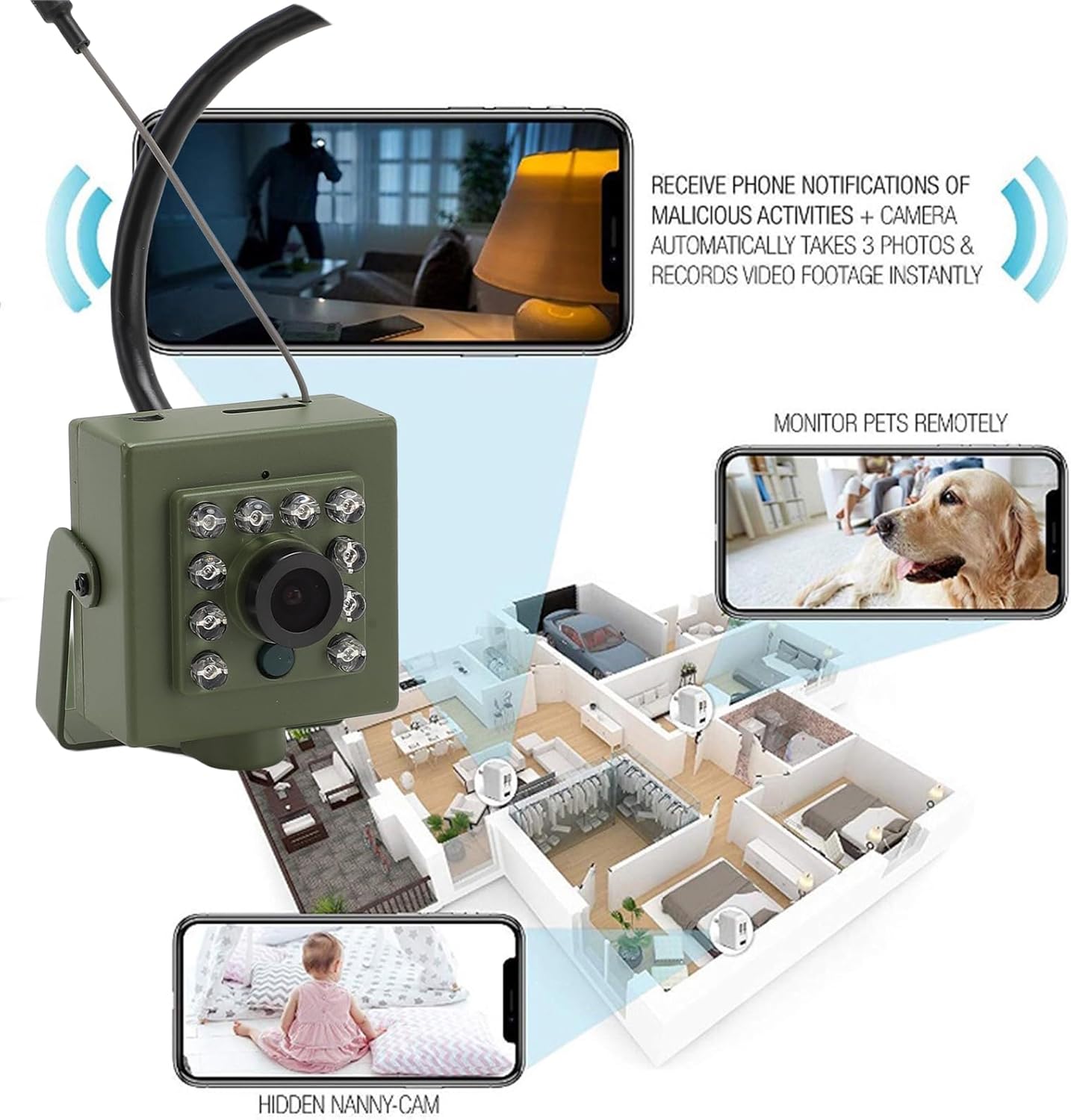
ചിത്രം: ഒരു ഓവർview of the camera's remote monitoring capabilities, showing how it can be used to monitor pets or as a nanny cam, with notifications sent to a phone for detected activities.
6.2 മോഷൻ ഡിറ്റക്ഷൻ
The camera features motion detection with adjustable sensitivity (0-100) and the ability to detect motion in up to four distinct ranges. When motion is detected, the mobile app will send push notifications to your device. This feature helps in monitoring activity in the camera's field of view.
6.3 നൈറ്റ് വിഷൻ
Equipped with 10 high-power 940nm infrared LEDs and a built-in light sensor, the camera provides clear night vision in dark conditions. The infrared illumination is wide-angle and operates silently, ensuring discreet monitoring without hotspots.

ചിത്രം: The camera's night vision capability is demonstrated by a clear image of a sleeping baby in a dark room, highlighting its silent operation.

ചിത്രം: The camera's night vision function is shown with a bird in the foreground, emphasizing its suitability for monitoring wildlife or outdoor areas in low light.

ചിത്രം: എ വിശദമായി view of the camera's front, showcasing the 10 high-power LEDs that provide wide-angle infrared illumination for enhanced night vision.
6.4 റിമോട്ട് മോണിറ്ററിംഗ്
Once connected to your network, the camera can be monitored remotely via the mobile application from anywhere with an internet connection. This allows you to view live feeds and receive alerts even when you are away.
7. പരിപാലനം
- വൃത്തിയാക്കൽ: മൃദുവായതും ഉണങ്ങിയതുമായ തുണി ഉപയോഗിച്ച് ക്യാമറ ലെൻസും ബോഡിയും സൌമ്യമായി തുടയ്ക്കുക. കഠിനമായ രാസവസ്തുക്കളോ ഉരച്ചിലുകളോ ഉള്ള വസ്തുക്കൾ ഉപയോഗിക്കുന്നത് ഒഴിവാക്കുക.
- ഫേംവെയർ അപ്ഡേറ്റുകൾ: Periodically check the mobile application for available firmware updates to ensure optimal performance and security.
- പരിസ്ഥിതി സംരക്ഷണം: While designed for outdoor use, protect the camera from extreme weather conditions if possible to prolong its lifespan.
8. പ്രശ്നപരിഹാരം
- ക്യാമറ വൈഫൈയിലേക്ക് കണക്റ്റ് ചെയ്യുന്നില്ല:
- Ensure your router is broadcasting a 2.4 GHz WiFi signal.
- Check that the WiFi password is entered correctly in the app.
- Move the camera closer to the router to improve signal strength.
- Try resetting the camera using the reset button.
- ചിത്രം ഇല്ല/മോശം ചിത്രം നിലവാരം:
- വൈദ്യുതി കണക്ഷൻ പരിശോധിക്കുക.
- ക്യാമറ ലെൻസ് വൃത്തിയാക്കുക.
- Check network stability for clear streaming.
- മോഷൻ ഡിറ്റക്ഷൻ പ്രവർത്തിക്കുന്നില്ല:
- Ensure motion detection is enabled in the mobile app settings.
- സംവേദനക്ഷമത നില ക്രമീകരിക്കുക.
- Check the detection ranges configured in the app.
- Memory Card Not Recording:
- മെമ്മറി കാർഡ് ശരിയായി ചേർത്തിട്ടുണ്ടെന്ന് ഉറപ്പാക്കുക.
- Check if the card is formatted correctly (usually FAT32).
- Verify that recording settings are enabled in the app.
- The card may be full; consider replacing it or enabling loop recording.
9. വാറൻ്റിയും പിന്തുണയും
For warranty information and technical support, please refer to the documentation provided at the point of purchase or visit the official PUSOKEI webസൈറ്റ്. ഏതെങ്കിലും വാറന്റി ക്ലെയിമുകൾക്ക് വാങ്ങിയതിന്റെ തെളിവായി നിങ്ങളുടെ വാങ്ങൽ രസീത് സൂക്ഷിക്കുക.


