ആമുഖം
The ASMAX S1 Motorcycle Bluetooth Headset is designed to provide seamless communication and entertainment for motorcycle riders. This manual provides detailed instructions for setup, operation, maintenance, and troubleshooting, ensuring you get the most out of your device.
ഉൽപ്പന്നം കഴിഞ്ഞുview
The ASMAX S1 features advanced Bluetooth 5.4 technology, supporting up to 8 riders in mesh intercom mode with a range of up to 1.6 km. It includes AI voice control, HiFi 3D sound with ENC noise cancellation, fast charging, and long battery life.
പ്രധാന സവിശേഷതകൾ:
- Latest Bluetooth 5.4 Technology: Supports up to 8 riders in intercom mode with a 1.6 km range, ensuring stable and clear connections.
- Voice Commands & Easy Button Control: Activate functions hands-free by saying "Hi Max" for calls, navigation, music, or FM radio.
- Free Mode & Group Mode: Effortlessly connect with groups using Free Mode for quick talks or Group Mode for private, secure conversations via MESH technology.
- Superior HiFi 3D Sound & ENC Noise Cancellation: Experience crystal-clear calls and immersive music, even at speeds up to 120 km/h, thanks to effective environmental noise cancellation.
- ഫാസ്റ്റ് ചാർജിംഗും നീണ്ട ബാറ്ററി ലൈഫും: Equipped with a 980mAh battery, offering up to 13 hours of talk time and 16 hours of music. Fully charges in just 60 minutes.
- ASMAX APP & Firmware Upgrade: Personalize headset settings and update firmware easily via the dedicated ASMAX app on your smartphone.
ബോക്സിൽ എന്താണുള്ളത്
The ASMAX S1 package includes the following components:
- S1 Motorcycle Bluetooth Headset (Main Unit)
- മെറ്റൽ Clamp
- Speaker Unit & Hybrid & Wired Microphone
- അസംബ്ലി ആക്സസറികൾ
- ഉപയോക്തൃ മാനുവൽ

This image illustrates all the components you will find inside the ASMAX S1 package, laid out for easy identification. It includes the main S1 unit, speaker units, wired and boom microphones, charging cable, metal clamp, 3M glue plate, speaker pads, and the user manual.
സജ്ജീകരണവും ഇൻസ്റ്റാളേഷനും
Follow these steps to properly install your ASMAX S1 headset into your helmet.
Choosing an Installation Method:
The ASMAX S1 offers two primary installation methods for attaching the main unit to your helmet:
- 3M Glue Plate: Recommended for helmets with a relatively thick edge (more than 5mm).
- മെറ്റൽ Clamp: Recommended for helmets with a relatively thin edge (less than 5mm).
Installation Steps (using Metal Clamp മുൻ പോലെampലെ):
- Attach Main Unit to Clamp അടിസ്ഥാനം: Securely slide the S1 main unit onto the chosen clamp or glue plate until it clicks into place.

The ASMAX S1 main unit, a sleek grey device with a blue indicator light, ready for attachment to the helmet.
- Attach Base to Helmet: cl സ്ഥാനംamp or glue plate on the left side of your helmet, ensuring it is firmly attached and does not obstruct your vision or helmet functionality.

The ASMAX S1 unit securely mounted on the side of a motorcycle helmet, showing its compact profile.
- സ്പീക്കറുകൾ ഇൻസ്റ്റാൾ ചെയ്യുക: Carefully remove the helmet padding to access the speaker pockets. Attach the speaker with the shorter cable to the left side (near the main unit) and the longer cable speaker to the right side. Ensure speakers are positioned close to your ears for optimal sound. Use speaker pads if needed for a better fit.
- മൈക്രോഫോൺ ഇൻസ്റ്റാൾ ചെയ്യുക: Choose between the wired microphone (for full-face helmets) or the boom microphone (for open-face helmets). Attach the microphone to the front of the helmet, near your mouth, using its Velcro attachment.
- റൂട്ട് കേബിളുകൾ: Carefully route all cables behind the helmet padding to prevent discomfort and ensure a clean, secure installation.
This diagram provides a visual guide for installing the ASMAX S1, detailing how to attach the main unit, speakers, and microphone within the helmet for a secure and comfortable fit.
This video provides a comprehensive guide on how to install the ASMAX S1 Bluetooth headset into a motorcycle helmet, covering the placement of the main unit, speakers, and microphone for optimal performance.
പ്രവർത്തന നിർദ്ദേശങ്ങൾ
പവർ ഓൺ/ഓഫ്:
To power on or off the ASMAX S1, press and hold the Function Key (located on the back of the unit) for approximately 3 seconds until you hear an audible prompt.
Voice Control ("Hi Max"):
The ASMAX S1 features intuitive AI voice control. Simply say "Hi Max" to activate the voice assistant. Once activated, you can issue commands for various functions, including:
- Music playback (e.g., "Music On", "Next Song")
- Navigation (e.g., "Go to Max Home", "Start Navigation")
- FM Radio (e.g., "Radio On", "Next Station")
- Phone calls (e.g., "Answer the Phone", "Hang Up")
- Intercom modes (e.g., "Free Mode", "Group Mesh")
- Battery status (e.g., "Battery Status")

This image demonstrates the AI voice control feature, showing a rider issuing commands such as 'Hi Max' to control various functions of the ASMAX S1 headset hands-free.
This video highlights the intuitive voice control capabilities of the ASMAX S1, demonstrating how users can manage music, calls, and intercom functions simply by speaking commands.
Intercom Modes:
The S1 supports two primary intercom modes for group communication:
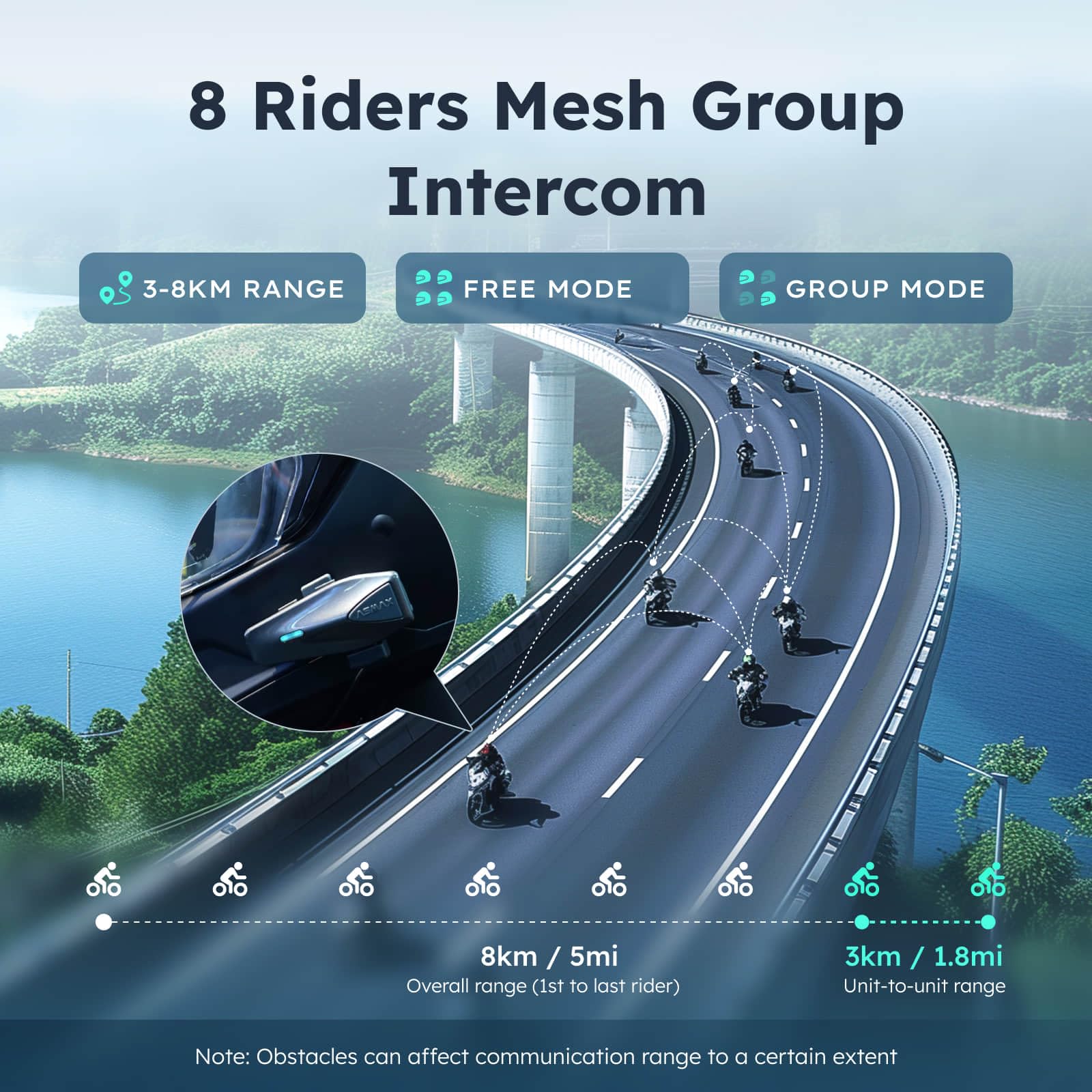
- സൗജന്യ മോഡ്: Allows for quick, spontaneous conversations with up to 8 riders.
- ഗ്രൂപ്പ് മോഡ്: Utilizes advanced MESH communication technology for private and secure group conversations, ensuring connectivity without interruptions.

This visual explains the mesh intercom capabilities, showing how up to 8 riders can stay connected over distances of up to 8km in Free Mode and 3km unit-to-unit in Group Mode.
Music and FM Radio:
Enjoy your favorite music or tune into FM radio stations directly through your headset. Use voice commands or the dedicated buttons to control playback and station selection.

This image illustrates the audio multitasking feature, allowing users to simultaneously manage music, FM radio, navigation, and group intercom via the ASMAX app.
ഫോൺ കോളുകൾ:
Answer or decline incoming phone calls hands-free using voice commands or by pressing the appropriate function button on the headset.
ASMAX App:
Download the ASMAX app from your smartphone's app store to customize settings, manage connections, and perform firmware updates for continuous improvement and new features.

The ASMAXWORLD App provides a user-friendly interface for customizing headset settings, including personalized LED lighting, FM radio tuning, and managing group chat rooms.
മെയിൻ്റനൻസ്
വൃത്തിയാക്കൽ:
ഒരു സോഫ്റ്റ് ഉപയോഗിക്കുക, ഡിamp cloth to clean the exterior of the headset. Avoid abrasive cleaners or solvents that could damage the finish. For the speaker and microphone, use the provided cleaning pack or a dry, soft brush to gently remove dust and debris.
സംഭരണം:
Store the headset in a cool, dry place when not in use. Avoid exposing it to extreme temperatures, direct sunlight, or high humidity, which can affect battery life and electronic components.
വാട്ടർപ്രൂഫിംഗ്:
The ASMAX S1 is IPX7 waterproof, meaning it can withstand immersion in water up to 1 meter for 30 minutes. To maintain its water resistance, always ensure the charging port cover is securely closed before exposure to moisture.
This image highlights the IPX7 waterproof rating of the ASMAX S1, ensuring reliable performance in various weather conditions, including rain, snow, and mud.
ട്രബിൾഷൂട്ടിംഗ്
പൊതുവായ പ്രശ്നങ്ങളും പരിഹാരങ്ങളും:
| ഇഷ്യൂ | സാധ്യമായ കാരണം | പരിഹാരം |
|---|---|---|
| No Power / Won't Turn On | Low battery; Unit not charged. | Charge the unit fully (approx. 60 minutes). Ensure charging cable is properly connected. |
| ചാർജിംഗ് പോർട്ട് പ്രവർത്തിക്കുന്നില്ല | Debris in port; Cable not fully inserted; Damaged port. | Clean the charging port. Ensure the cable is fully inserted. If damaged, contact support. |
| Cannot Pair with Phone/Intercom | Bluetooth not enabled; Device too far; Interference; Incorrect pairing mode. | Ensure Bluetooth is on. Keep devices within range. Follow pairing instructions in the manual. Restart both devices. |
| മോശം ഓഡിയോ നിലവാരം / ശബ്ദം | Improper speaker/microphone placement; Environmental noise; Loose connections. | Adjust speaker and microphone position. Ensure cables are securely connected. Utilize ENC noise cancellation feature. |
| Voice Commands Not Responding | Microphone obstructed; Background noise; Incorrect command. | Ensure microphone is clear and close to mouth. Reduce background noise. Refer to manual for correct voice commands. |
| ആപ്പ് കണക്റ്റിവിറ്റി പ്രശ്നങ്ങൾ | Bluetooth not connected; Outdated app/firmware. | Ensure headset is connected via Bluetooth. Update ASMAX app and headset firmware. |
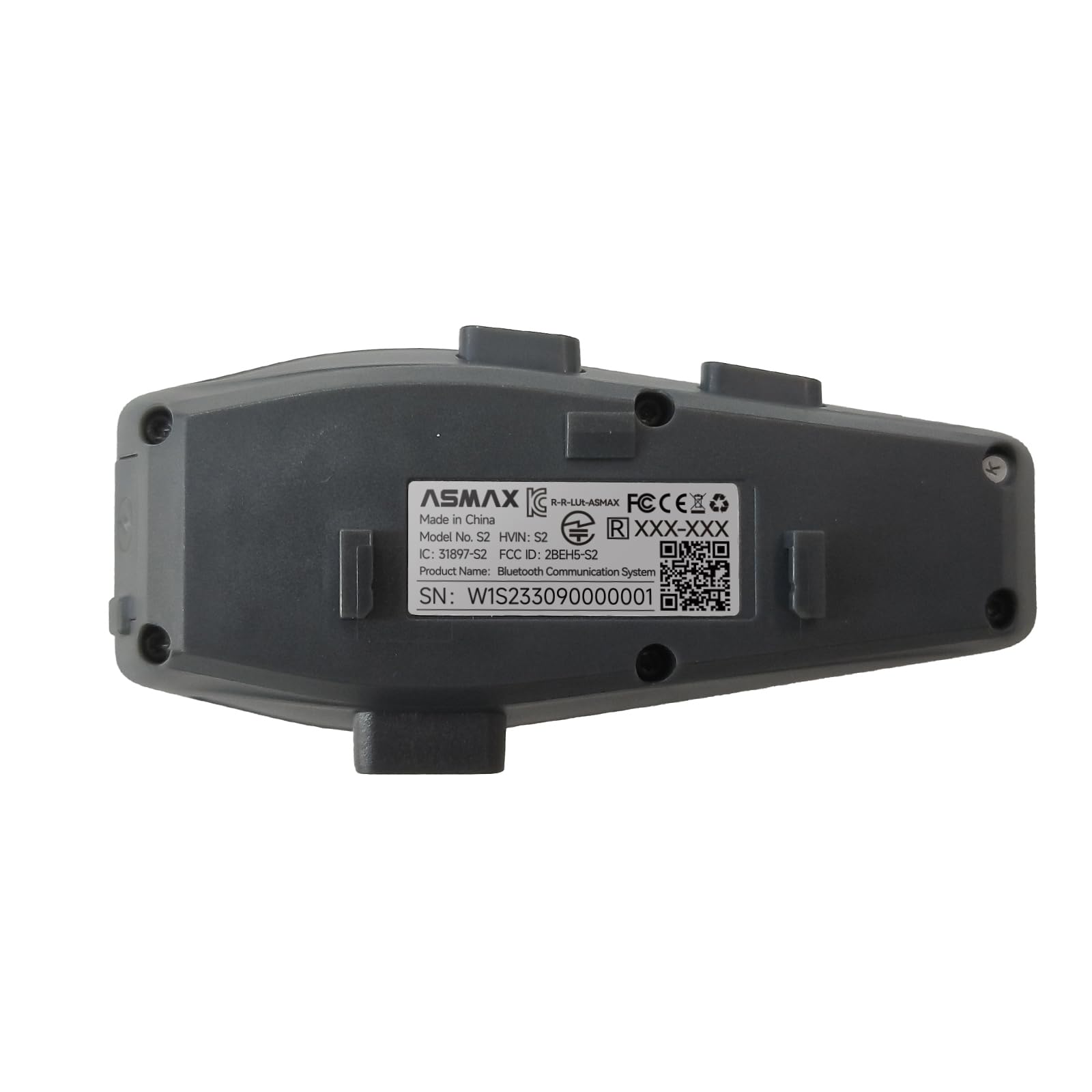
പിൻഭാഗം view of the ASMAX S1 unit, displaying important regulatory information and the serial number (W1S233090000001), which may be needed for support or warranty claims.
സ്പെസിഫിക്കേഷനുകൾ
| ഫീച്ചർ | വിശദാംശങ്ങൾ |
|---|---|
| മോഡലിൻ്റെ പേര് | S1 (S1SP) |
| ബ്രാൻഡ് | ASMAX |
| കണക്റ്റിവിറ്റി ടെക്നോളജി | വയർലെസ്സ് (ബ്ലൂടൂത്ത് 5.4) |
| ബ്ലൂടൂത്ത് ശ്രേണി | 1.6 കിലോമീറ്റർ |
| ബാറ്ററി ശേഷി | 980mAh |
| സംസാര സമയം | 13 മണിക്കൂർ വരെ |
| സംഗീത പ്ലേബാക്ക് സമയം | 16 മണിക്കൂർ വരെ |
| Navigation Time | 36 മണിക്കൂർ വരെ |
| സ്റ്റാൻഡ്ബൈ സമയം | 96 മണിക്കൂർ വരെ |
| ചാർജിംഗ് സമയം | 60 minutes (Fast Charging) |
| വാട്ടർപ്രൂഫ് റേറ്റിംഗ് | IPX7 |
| നോയ്സ് റദ്ദാക്കൽ | ENC (പരിസ്ഥിതി ശബ്ദ റദ്ദാക്കൽ) |
| നിയന്ത്രണ തരം | വോയ്സ് കൺട്രോൾ, ബട്ടൺ കൺട്രോൾ |
| ഫ്രീക്വൻസി റേഞ്ച് | 20 ഹെർട്സ് - 20,000 ഹെർട്സ് |
| ഇനത്തിൻ്റെ ഭാരം | 41 ഗ്രാം (1.45 ഔൺസ്) |
| മെറ്റീരിയൽ | അക്രിലോണിട്രൈൽ ബ്യൂട്ടാഡീൻ സ്റ്റൈറൈൻ (എബിഎസ്) |
| ഉൾപ്പെടുത്തിയ ഘടകങ്ങൾ | S1 Motorcycle Bluetooth Headset, Metal Clamp, Assembly Accessories, Speaker Unit & Hybrid & Wired Microphone, User Manual |
വാറൻ്റിയും പിന്തുണയും
The ASMAX S1 Motorcycle Bluetooth Headset is backed by ASMAX's commitment to quality. For specific warranty details, please refer to the warranty card included in your product packaging or visit the official ASMAX webസൈറ്റ്.
ഉപഭോക്തൃ പിന്തുണ:
If you encounter any issues or have questions regarding your ASMAX S1 headset, please contact ASMAX customer support for assistance.
കൂടുതൽ വിവരങ്ങൾക്കും പിന്തുണയ്ക്കും, സന്ദർശിക്കുക ASMAX Store on Amazon.


