1. ആമുഖം
Thank you for choosing the PRIXTON Multisport DV800 Action Camera. This manual provides essential information for setting up, operating, and maintaining your device. Please read it thoroughly before use to ensure optimal performance and longevity of your camera.
2. പാക്കേജ് ഉള്ളടക്കം
താഴെ ലിസ്റ്റ് ചെയ്തിരിക്കുന്ന എല്ലാ ഇനങ്ങളും നിങ്ങളുടെ പാക്കേജിൽ ഉൾപ്പെടുത്തിയിട്ടുണ്ടെന്ന് ഉറപ്പാക്കുക:
- PRIXTON Multisport DV800 Action Camera
- വാട്ടർപ്രൂഫ് കേസ്
- റീചാർജ് ചെയ്യാവുന്ന ബാറ്ററി
- USB കേബിൾ
- സൈക്കിൾ മൗണ്ട്
- ക്ലിപ്പ്
- മൗണ്ടിംഗ് അഡാപ്റ്റർ
- Three Helmet Mounts
- Strap/Bandage
- 3 എം പശകൾ
- ഉപയോക്തൃ മാനുവൽ

Image: The PRIXTON DV800 Action Camera and its various accessories, including mounts, cables, and the waterproof case.
3. ഉൽപ്പന്നം കഴിഞ്ഞുview
The PRIXTON DV800 features a compact design with dual screens for versatile shooting and monitoring. It is designed for capturing high-quality video and photos in various environments.
പ്രധാന സവിശേഷതകൾ:
- ഇരട്ട സ്ക്രീനുകൾ: Front screen for selfies and a rear screen for camera control.
- 5K വീഡിയോ റെസല്യൂഷൻ: Up to 5K at 30 frames per second (FPS).
- 24 MP Photo Resolution: High-quality still images.
- 6-AXIS EIS Optical Stabilizer: For smooth and stable footage.
- വാട്ടർപ്രൂഫ്: Up to 30 meters with the included waterproof case.
- കണക്റ്റിവിറ്റി: Built-in Wi-Fi for mobile app control and content transfer.
- സംഭരണം: Supports MicroSD cards up to 128 GB.

Image: The PRIXTON DV800 Action Camera, showcasing its dual-screen capability and the waterproof housing, alongside several mounting accessories.
4. സജ്ജീകരണം
4.1. ബാറ്ററി ഇൻസ്റ്റാളേഷൻ
- ക്യാമറയിലെ ബാറ്ററി കമ്പാർട്ട്മെൻ്റ് കണ്ടെത്തുക.
- കമ്പാർട്ട്മെന്റ് കവർ തുറക്കുക.
- ശരിയായ പോളാരിറ്റി ഉറപ്പാക്കിക്കൊണ്ട് റീചാർജ് ചെയ്യാവുന്ന ബാറ്ററി ഇടുക.
- ബാറ്ററി കമ്പാർട്ട്മെൻ്റ് കവർ സുരക്ഷിതമായി അടയ്ക്കുക.
4.2. MicroSD Card Insertion
A MicroSD card (up to 128 GB, not included) is required to store recordings and photos.
- ക്യാമറയുടെ വശത്ത് മൈക്രോ എസ്ഡി കാർഡ് സ്ലോട്ട് കണ്ടെത്തുക.
- Gently insert the MicroSD card with the contacts facing the correct direction until it clicks into place.
- To remove, press the card inward until it springs out.
4.3. വാട്ടർപ്രൂഫ് കേസ് അറ്റാച്ചുചെയ്യുന്നു
For underwater use or protection against impacts, place the camera inside the waterproof case.
- Open the latch on the waterproof case.
- Carefully place the camera inside the case, ensuring it fits snugly.
- Close the latch firmly to seal the case. Ensure no debris is caught in the seal.
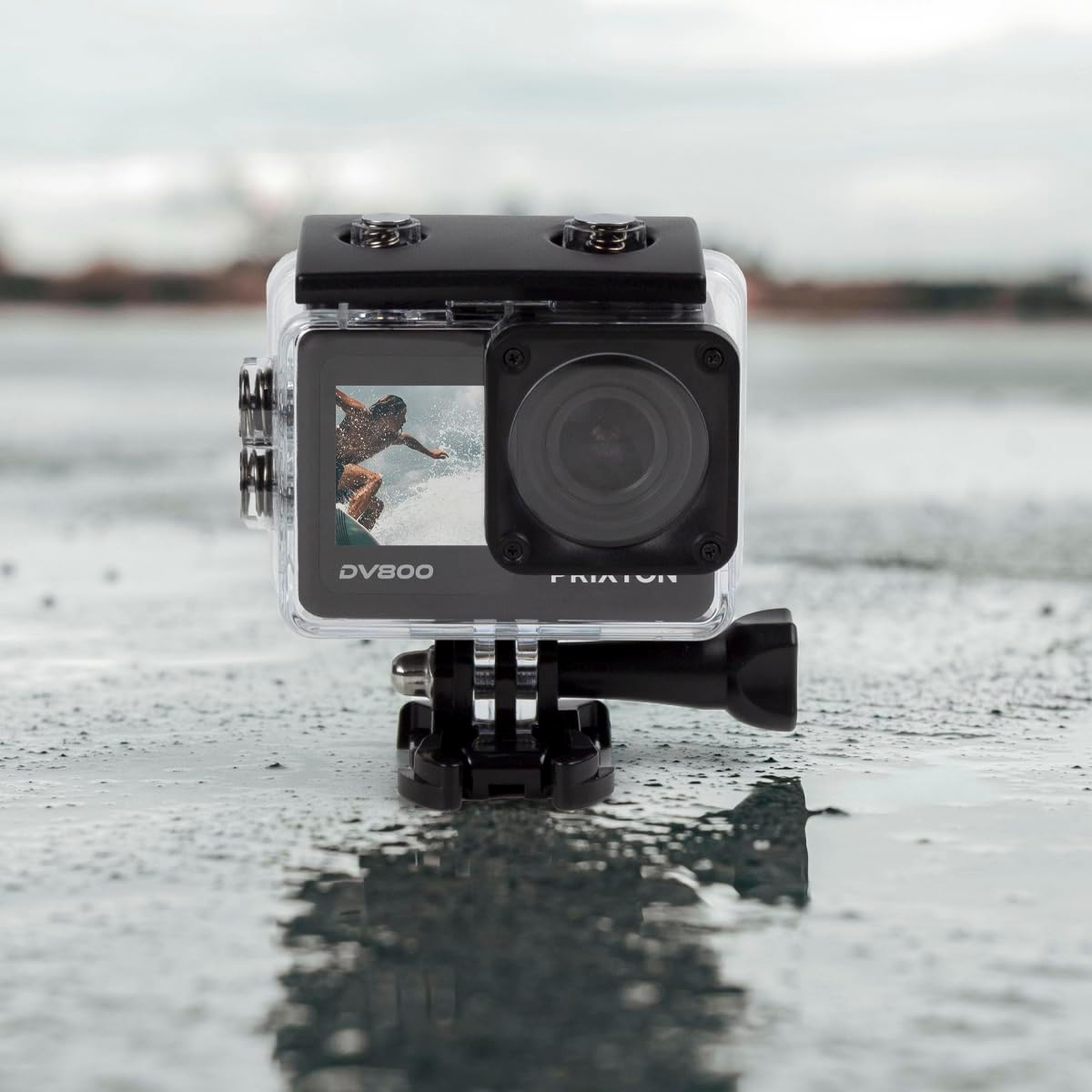
Image: The PRIXTON DV800 Action Camera securely housed within its waterproof casing, ready for use in aquatic environments.
5. പ്രവർത്തന നിർദ്ദേശങ്ങൾ
5.1. പവർ ഓൺ/ഓഫ്
- പവർ ഓണാക്കാൻ: സ്ക്രീൻ പ്രകാശിക്കുന്നത് വരെ പവർ/മോഡ് ബട്ടൺ കുറച്ച് സെക്കൻഡ് അമർത്തിപ്പിടിക്കുക.
- പവർ ഓഫ് ചെയ്യാൻ: സ്ക്രീൻ ഓഫാകുന്നത് വരെ പവർ/മോഡ് ബട്ടൺ വീണ്ടും അമർത്തിപ്പിടിക്കുക.
5.2. മോഡ് തിരഞ്ഞെടുക്കൽ
വീഡിയോ, ഫോട്ടോ, പ്ലേബാക്ക്, ക്രമീകരണങ്ങൾ എന്നിങ്ങനെ വ്യത്യസ്ത മോഡുകളിലൂടെ കടന്നുപോകാൻ പവർ/മോഡ് ബട്ടൺ ആവർത്തിച്ച് അമർത്തുക.
5.3. വീഡിയോ റെക്കോർഡിംഗ്
- Switch to Video Mode.
- റെക്കോർഡിംഗ് ആരംഭിക്കാൻ ഷട്ടർ/ശരി ബട്ടൺ അമർത്തുക. ഒരു ചുവന്ന ഇൻഡിക്കേറ്റർ ലൈറ്റ് മിന്നിമറയും.
- Press the Shutter/OK button again to stop recording. The indicator light will stop flashing.
5.4. ഫോട്ടോ എടുക്കൽ
- Switch to Photo Mode.
- സ്ക്രീൻ ഉപയോഗിച്ച് നിങ്ങളുടെ ഷോട്ട് ഫ്രെയിം ചെയ്യുക.
- ഒരു ഫോട്ടോ എടുക്കാൻ ഷട്ടർ/ശരി ബട്ടൺ അമർത്തുക.
5.5. Wi-Fi Connectivity and Mobile App
The camera can connect to your mobile device via Wi-Fi using the "XDV PRO" application.
- Download and install the "XDV PRO" app on your smartphone or tablet.
- On the camera, navigate to the settings menu and enable Wi-Fi.
- On your mobile device, connect to the camera's Wi-Fi network (SSID and password will be displayed on the camera screen).
- Open the "XDV PRO" app to control the camera, view തത്സമയംtage, ട്രാൻസ്ഫർ files.

Image: A close-up of the PRIXTON DV800 Action Camera's rear screen, showing its 5K Ultra HD capability and Wi-Fi connectivity.
5.6. Using as a Webക്യാമറ
ക്യാമറ ഒരു കമ്പ്യൂട്ടറിലേക്ക് USB വഴി ബന്ധിപ്പിക്കുക, അങ്ങനെ അത് ഒരു webക്യാം
- നൽകിയിരിക്കുന്ന USB കേബിൾ ഉപയോഗിച്ച് നിങ്ങളുടെ കമ്പ്യൂട്ടറിലേക്ക് ക്യാമറ ബന്ധിപ്പിക്കുക.
- Select the 'PC Camera' or 'Webcam' option on the camera's screen if prompted.
- നിങ്ങളുടെ കമ്പ്യൂട്ടർ ക്യാമറയെ ഒരു ആയി തിരിച്ചറിയണം webcam, which can then be selected in video conferencing applications.
6. പരിപാലനം
6.1. വൃത്തിയാക്കൽ
- Use a soft, lint-free cloth to clean the camera lens and screens.
- For the waterproof case, rinse with fresh water after saltwater use and allow it to air dry.
- കഠിനമായ രാസവസ്തുക്കളോ ഉരച്ചിലുകളോ ഉപയോഗിക്കുന്നത് ഒഴിവാക്കുക.
6.2. ബാറ്ററി പരിചരണം
- ആദ്യ ഉപയോഗത്തിന് മുമ്പ് ബാറ്ററി പൂർണ്ണമായും ചാർജ് ചെയ്യുക.
- അങ്ങേയറ്റത്തെ താപനിലയിലേക്ക് ബാറ്ററി തുറന്നുകാട്ടരുത്.
- ക്യാമറ ദീർഘനേരം സൂക്ഷിക്കുകയാണെങ്കിൽ, ബാറ്ററി നീക്കം ചെയ്യുക.
6.3. സംഭരണം
Store the camera in a cool, dry place away from direct sunlight and dust when not in use.
7. പ്രശ്നപരിഹാരം
- ക്യാമറ ഓണാക്കുന്നില്ല: ബാറ്ററി ചാർജ്ജ് ചെയ്തിട്ടുണ്ടെന്നും ശരിയായി ചേർത്തിട്ടുണ്ടെന്നും ഉറപ്പാക്കുക.
- റെക്കോർഡിംഗ് പ്രശ്നങ്ങൾ: Check if the MicroSD card is inserted correctly and has sufficient free space. Format the card if necessary (this will erase all data).
- വൈഫൈ കണക്ഷൻ പ്രശ്നങ്ങൾ: Ensure Wi-Fi is enabled on the camera and your mobile device. Restart both devices if issues persist.
- മോശം ഇമേജ്/വീഡിയോ ഗുണമേന്മ: ലെൻസ് വൃത്തിയാക്കുക. ആവശ്യത്തിന് വെളിച്ചം ഉറപ്പാക്കുക. റെസല്യൂഷൻ ക്രമീകരണങ്ങൾ പരിശോധിക്കുക.
8 സ്പെസിഫിക്കേഷനുകൾ
| മോഡലിൻ്റെ പേര് | DV800 |
| ബ്രാൻഡ് | പ്രിക്സ്റ്റൺ |
| വീഡിയോ ക്യാപ്ചർ റെസല്യൂഷൻ | 5K |
| ഫോട്ടോ സെൻസർ ടെക്നോളജി | മറ്റുള്ളവ |
| ഫ്ലാഷ് മെമ്മറി തരം | മൈക്രോഎസ്ഡി (128 ജിബി വരെ) |
| വീഡിയോ ക്യാപ്ചർ ഫോർമാറ്റ് | എംഒവി |
| പിന്തുണയ്ക്കുന്ന ഓഡിയോ ഫോർമാറ്റ് | MP4 |
| കണക്റ്റിവിറ്റി ടെക്നോളജി | വൈഫൈ |
| നിറം | കറുപ്പ് |
| കാംകോർഡർ തരം | ആക്ഷൻ ക്യാമറ |
| ബാറ്ററി ലൈഫ് | ഏകദേശം 90 മിനിറ്റ് |
9. വാറൻ്റിയും പിന്തുണയും
The PRIXTON Multisport DV800 Action Camera comes with a standard manufacturer's warranty. For detailed warranty information, technical support, or service inquiries, please refer to the warranty card included in your package or visit the official PRIXTON webവാറന്റി ക്ലെയിമുകൾക്കുള്ള വാങ്ങലിന്റെ തെളിവായി നിങ്ങളുടെ വാങ്ങൽ രസീത് സൂക്ഷിക്കുക.


