1. ആമുഖം
Thank you for choosing the Aigo Q2503 Mini-Tower PC Case. This manual provides detailed instructions for the proper installation, operation, and maintenance of your new computer chassis. Please read this guide thoroughly before beginning assembly to ensure optimal performance and longevity of your system components.
2. ഉൽപ്പന്നം കഴിഞ്ഞുview
The Aigo Q2503 is a compact Mini-Tower PC case designed for M-ATX and ITX motherboards. It offers a streamlined design with essential features for building a functional and efficient computer system. Its robust construction provides a secure environment for your components.
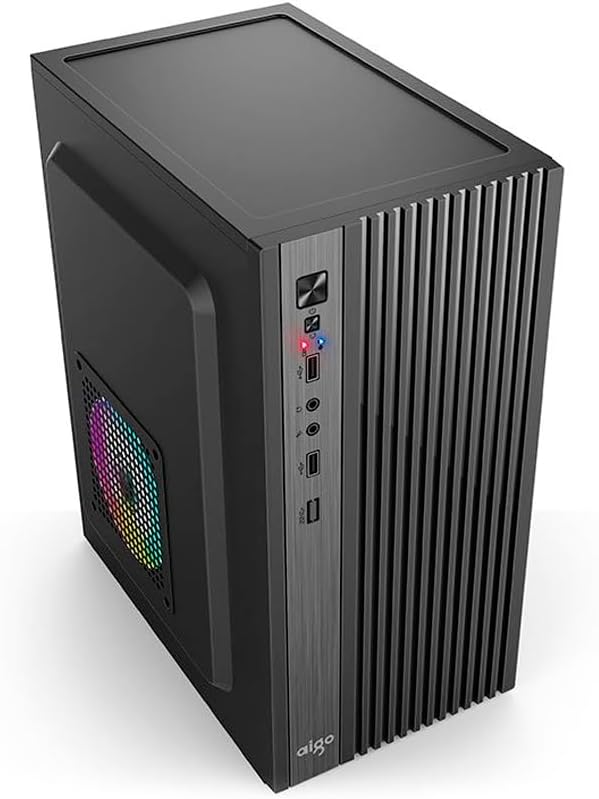
ചിത്രം 2.1: മുൻവശം view of the Aigo Q2503 Mini-Tower PC Case, showcasing its compact design and front panel I/O ports.
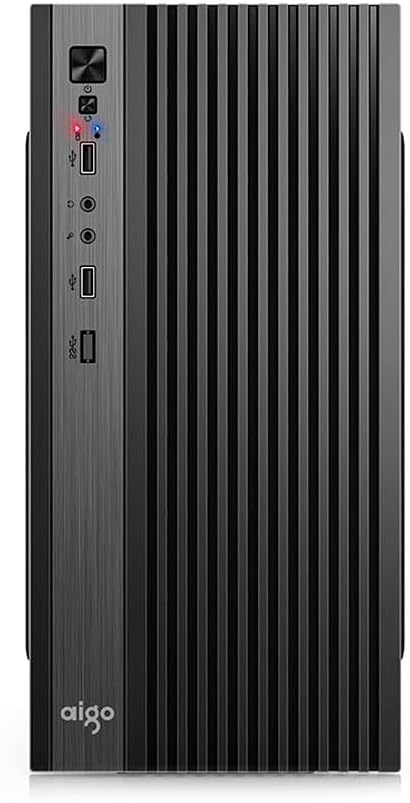
ചിത്രം 2.2: മുൻഭാഗം view of the Aigo Q2503 Mini-Tower PC Case, highlighting the vertical ventilation slats and front panel controls.
3. സജ്ജീകരണവും ഇൻസ്റ്റാളേഷനും
Follow these steps for proper component installation within the Aigo Q2503 case.
3.1 കേസ് തയ്യാറാക്കൽ
- Unpack the case and remove all packaging materials.
- Carefully remove the side panels by unscrewing the thumbscrews at the rear of the case and sliding the panels backward.
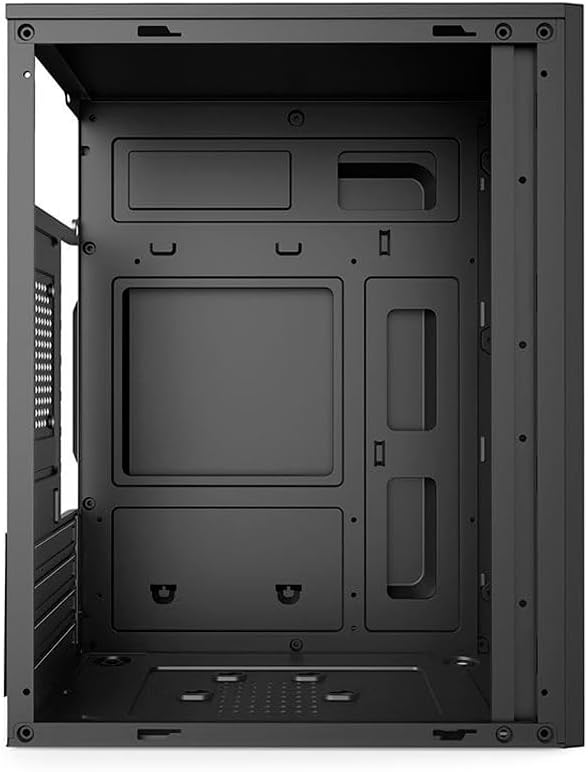
ചിത്രം 3.1: ആന്തരിക view of the Aigo Q2503 PC Case, showing the motherboard tray and drive mounting points.
3.2 മദർബോർഡ് ഇൻസ്റ്റാളേഷൻ
- നിങ്ങളുടെ മദർബോർഡിനൊപ്പം നൽകിയിരിക്കുന്ന I/O ഷീൽഡ് കേസിന്റെ പിൻഭാഗത്ത് സ്ഥാപിക്കുക.
- Align your M-ATX or ITX motherboard with the standoffs inside the case. Ensure all standoffs match the motherboard's mounting holes.
- ഉചിതമായ സ്ക്രൂകൾ ഉപയോഗിച്ച് മദർബോർഡ് ഉറപ്പിക്കുക.
3.3 ഡ്രൈവ് ഇൻസ്റ്റാളേഷൻ
- SSD (1x): Locate the dedicated SSD mounting point (typically on the motherboard tray or behind it). Secure the SSD using screws.
- HDD (1x): Locate the HDD bay. Slide the HDD into the bay and secure it with screws.
3.4 Expansion Card Installation (VGA)
- കേസിന്റെ പിൻഭാഗത്ത് നിന്ന് ആവശ്യമായ എക്സ്പാൻഷൻ സ്ലോട്ട് കവറുകൾ നീക്കം ചെയ്യുക.
- Insert your graphics card (VGA) or other expansion cards into the PCIe slots on your motherboard.
- Secure the expansion cards with screws. Note the maximum VGA length supported is 150 mm.
3.5 സിപിയു കൂളർ ഇൻസ്റ്റലേഷൻ
Install your CPU cooler according to its manufacturer's instructions. Ensure the cooler's height does not exceed the maximum supported height of 250 mm for this case.
3.6 പവർ സപ്ലൈ ഇൻസ്റ്റലേഷൻ
The Aigo Q2503 supports ATX power supplies. Mount your ATX power supply in the designated area, typically at the top or bottom rear of the case, and secure it with screws.
3.7 ഫാൻ ഇൻസ്റ്റലേഷൻ
The case supports the following fan configurations (fans are not included):
- പിൻഭാഗം: 1 x 80 mm fan
- വശം: 1 x 120 mm fan
Install fans in the specified locations to optimize airflow.
3.8 ഫ്രണ്ട് പാനൽ കണക്ഷനുകൾ
Connect the front panel cables (Power SW, Reset SW, HDD LED, Power LED, USB 2.0, Audio/Mic) to the corresponding headers on your motherboard. Refer to your motherboard manual for exact pin layouts.
4. നിങ്ങളുടെ പിസി കേസ് പ്രവർത്തിപ്പിക്കൽ
Once all components are installed and connected, replace the side panels and secure them. Connect your monitor, keyboard, mouse, and power cable to your system. Press the power button on the front panel to start your computer.
മുൻവശത്തെ പാനൽ ഇനിപ്പറയുന്നതിലേക്ക് സൗകര്യപ്രദമായ ആക്സസ് നൽകുന്നു:
- പവർ ബട്ടൺ
- റീസെറ്റ് ബട്ടൺ
- 2 x USB 2.0 പോർട്ടുകൾ
- Audio Out (Headphone) Jack
- ജാക്കിലെ മൈക്രോഫോൺ
5. പരിപാലനം
പതിവ് അറ്റകുറ്റപ്പണികൾ മികച്ച പ്രകടനം ഉറപ്പാക്കാൻ സഹായിക്കുകയും നിങ്ങളുടെ പിസി ഘടകങ്ങളുടെ ആയുസ്സ് വർദ്ധിപ്പിക്കുകയും ചെയ്യുന്നു.
5.1 വൃത്തിയാക്കൽ
- പുറം: ഒരു സോഫ്റ്റ് ഉപയോഗിക്കുക, ഡിamp പുറംഭാഗങ്ങൾ തുടയ്ക്കാൻ തുണി ഉപയോഗിക്കുക.
- ഇൻ്റീരിയർ: Periodically open the case and use compressed air to remove dust buildup from components, fans, and filters. Ensure the system is powered off and unplugged before cleaning the interior.
5.2 വായുപ്രവാഹം
Ensure that the case's ventilation openings are not obstructed to maintain proper airflow and prevent overheating.
6. പ്രശ്നപരിഹാരം
നിങ്ങളുടെ പിസി ബിൽഡിൽ പ്രശ്നങ്ങൾ നേരിടുകയാണെങ്കിൽ, ഇനിപ്പറയുന്ന പൊതുവായ ട്രബിൾഷൂട്ടിംഗ് ഘട്ടങ്ങൾ പരിഗണിക്കുക:
- ശക്തിയില്ല: Double-check all power connections, including the power supply to the wall, the power supply to the motherboard, and the front panel power switch cable to the motherboard.
- അമിത ചൂടാക്കൽ: Verify that all case fans and CPU cooler fans are spinning correctly. Ensure proper airflow within the case and that ventilation openings are clear.
- ഫ്രണ്ട് പാനൽ പോർട്ടുകൾ പ്രവർത്തിക്കുന്നില്ല: Confirm that the USB and Audio/Mic cables from the front panel are correctly connected to the motherboard headers.
- ഘടക ഫിറ്റ് പ്രശ്നങ്ങൾ: Ensure that all components, especially the graphics card and CPU cooler, are within the specified maximum dimensions for the case.
7 സ്പെസിഫിക്കേഷനുകൾ
Below are the detailed specifications for the Aigo Q2503 Mini-Tower PC Case:
| ഫീച്ചർ | സ്പെസിഫിക്കേഷൻ |
|---|---|
| ബ്രാൻഡ് | ഐഗോ |
| മോഡൽ | Q2503-BK |
| കേസ് തരം | മിനി-ടവർ |
| മദർബോർഡ് പിന്തുണ | M-ATX / ITX |
| മെറ്റീരിയലുകൾ | 0.4mm SPCC (Steel Alloy) |
| ഡ്രൈവ് ബേകൾ | 1 x SSD, 1 x HDD |
| വിപുലീകരണ സ്ലോട്ടുകൾ | 4 |
| ഫ്രണ്ട് ഐ / ഒ പോർട്ടുകൾ | 2 x USB 2.0, Audio/Mic |
| Max VGA Length | 150 മി.മീ |
| പരമാവധി സിപിയു കൂളർ ഉയരം | 250 മി.മീ |
| പവർ സപ്ലൈ സപ്പോർട്ട് | ATX |
| Supported Fans (not included) | Rear: 1 x 80 mm, Side: 1 x 120 mm |
| അളവുകൾ (L x W x H) | 265 x 165 x 340 മിമി |
| നിറം | കറുപ്പ് |
8. വാറൻ്റി വിവരങ്ങൾ
The Aigo Q2503 Mini-Tower PC Case comes with a manufacturer's warranty of 12 മാസം from the date of purchase. This warranty covers defects in materials and workmanship under normal use. Please retain your proof of purchase for warranty claims. The warranty does not cover damage caused by improper installation, misuse, accidents, modifications, or unauthorized repairs.
9. പിന്തുണ
For technical assistance, troubleshooting, or warranty inquiries, please contact your retailer or the official Aigo support channels. Refer to the Aigo official webഏറ്റവും കാലികമായ കോൺടാക്റ്റ് വിവരങ്ങൾക്കും പിന്തുണാ ഉറവിടങ്ങൾക്കുമുള്ള സൈറ്റ്.
Before contacting support, please have your product model (Q2503-BK) and proof of purchase readily available.


