ആമുഖം
The Focusrite Scarlett 18i20 4th Gen is a versatile USB audio interface designed for multitrack recording, music production, and podcasting. It offers high-fidelity, studio-quality recording capabilities and a comprehensive software suite to support your creative process. This manual provides essential information for setting up, operating, maintaining, and troubleshooting your device.
സജ്ജമാക്കുക
1. അൺബോക്സിംഗും പ്രാരംഭ പരിശോധനയും
Carefully remove all components from the packaging. Ensure the Scarlett 18i20 unit, USB cable, and power supply are present. Inspect the device for any visible damage.
2. നിങ്ങളുടെ കമ്പ്യൂട്ടറുമായി ബന്ധിപ്പിക്കുന്നു
Connect the Scarlett 18i20 to your computer using the provided USB cable. The interface is compatible with both Mac and Windows operating systems. Ensure a stable USB connection for optimal performance.
The Scarlett 18i20 requires external power. Connect the included power supply to the device and a power outlet. The unit will power on automatically.
3. സോഫ്റ്റ്വെയർ ഇൻസ്റ്റാളേഷൻ
Before using your Scarlett 18i20, download and install the necessary drivers and the Focusrite Control 2 application from the official Focusrite website. This software is crucial for managing inputs, outputs, routing, and other advanced features of your interface.
The Focusrite Control 2 app allows for remote adjustment of levels and settings, providing flexibility in your studio setup.
4. Physical Connections Overview
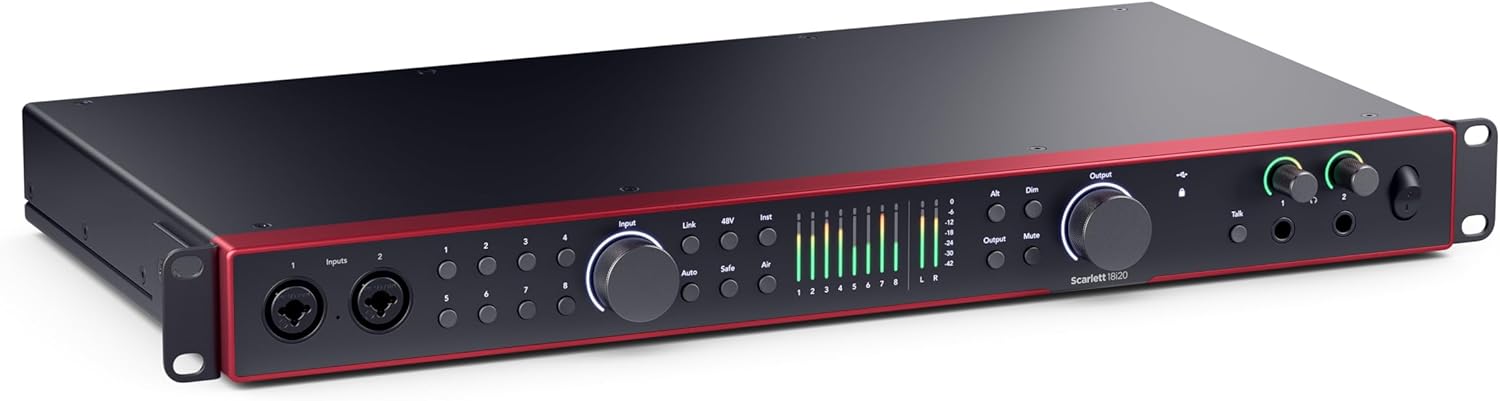
ചിത്രം 1: മുൻവശത്തെ പാനൽ മുകളിൽview. This image displays the front panel of the Scarlett 18i20 4th Gen audio interface, highlighting the input jacks, gain knobs, and monitoring controls.

ചിത്രം 2: പിൻ പാനൽ ഓവർview. This image shows the rear panel of the Scarlett 18i20 4th Gen, detailing the various output jacks, MIDI I/O, ADAT, S/PDIF, and USB connection port.
ഓപ്പറേഷൻ
ഇൻപുട്ടുകളും ഔട്ട്പുട്ടുകളും
The Scarlett 18i20 features 18 inputs and 20 outputs, providing extensive connectivity for your studio. This includes eight mic preamps, Hi-Z inputs for instruments, line inputs, ADAT, S/PDIF, MIDI I/O, and Word Clock for synchronization.
The front panel offers convenient access to primary inputs, while the rear panel accommodates a wider array of connections for a comprehensive studio setup.
പ്രീamps and Audio Quality
The 4th Generation preamps deliver 69dB of gain, ensuring clear and powerful signal capture. The device is equipped with 24-bit, 192kHz converters, derived from Focusrite's flagship RedNet range, offering a 122dB dynamic range for detailed and accurate recordings.
എയർ മോഡ്
Engage the "Air" mode to add presence and harmonic drive to your sound. This feature emulates the character of classic studio consoles, enhancing vocals and instruments with a rich, polished quality.
Video 1: Scarlett 4th Gen Overview. ഈ വീഡിയോ ഒരു ഓവർ നൽകുന്നുview of the Scarlett 4th Gen series, highlighting features like Air Mode, Auto Gain, and Clip Safe, and showcasing the range of interfaces available.
Professional Workflow Tools
- ഓട്ടോ ഗെയിൻ: This feature automatically sets optimal input levels, simplifying the setup process and ensuring your recordings are not too quiet or too loud.
- Clip Safe: Designed to prevent clipping, Clip Safe continuously monitors your input signals and automatically adjusts the gain in real-time if levels approach distortion, helping you avoid ruined takes.
നിരീക്ഷണം
The 18i20 includes two independent, high-powered headphone outputs for flexible monitoring. A built-in mic for talkback allows for easy communication within the studio environment. Direct monitoring capabilities ensure a low-latency listening experience during recording.
Focusrite Control 2 App
The Focusrite Control 2 application provides comprehensive control over your interface. Use it to quickly configure routings, set up monitor mixes, save presets, and manage levels directly from your computer or remotely from a mobile device.

Figure 3: Studio Setup with Scarlett 18i20. This image shows the Scarlett 18i20 integrated into a studio environment, connected to a computer and monitors, demonstrating its role as a central audio hub.
സോഫ്റ്റ്വെയർ ഉൾപ്പെടുത്തിയിട്ടുണ്ട്
The Scarlett 18i20 comes bundled with a suite of software to kickstart your production: Pro Tools Intro+ for Focusrite, Ableton Live Lite, six months of FL Studio Producer Edition, and the Hitmaker Expansion. The Hitmaker Expansion includes essential effects, powerful software instruments, and user-friendly mastering tools.
മെയിൻ്റനൻസ്
To ensure the longevity and optimal performance of your Scarlett 18i20, follow these general maintenance guidelines:
- മൃദുവായതും ഉണങ്ങിയതുമായ തുണി ഉപയോഗിച്ച് തുടച്ച് യൂണിറ്റ് വൃത്തിയായി സൂക്ഷിക്കുക. ഉരച്ചിലുകൾ ഉള്ള ക്ലീനറുകളോ ലായകങ്ങളോ ഉപയോഗിക്കുന്നത് ഒഴിവാക്കുക.
- പൊടി, ഈർപ്പം, കടുത്ത താപനില എന്നിവയിൽ നിന്ന് യൂണിറ്റിനെ സംരക്ഷിക്കുക.
- അമിതമായി ചൂടാക്കുന്നത് തടയാൻ ഉപകരണത്തിന് ചുറ്റും ശരിയായ വായുസഞ്ചാരം ഉറപ്പാക്കുക.
- Handle all cables and connectors with care to prevent damage.
ട്രബിൾഷൂട്ടിംഗ്
If you encounter issues with your Scarlett 18i20, consider the following common troubleshooting steps:
- ശക്തിയില്ല: Verify that the power adapter is securely connected to both the interface and a working power outlet.
- ശബ്ദ/ഇൻപുട്ട് സിഗ്നൽ ഇല്ല:
- എല്ലാ ഓഡിയോ കേബിൾ കണക്ഷനുകളും പരിശോധിക്കുക.
- Ensure the correct input is selected in your DAW and the Focusrite Control 2 app.
- Confirm that phantom power (48V) is enabled for condenser microphones.
- Adjust gain knobs to appropriate levels; utilize Auto Gain if available.
- സോഫ്റ്റ്വെയർ പ്രശ്നങ്ങൾ:
- Ensure you have the latest drivers and Focusrite Control 2 software installed.
- Restart your computer and the Scarlett 18i20.
- ക്ലിപ്പിംഗ്/വികൃതമാക്കൽ: Reduce input gain using the physical knobs or the Focusrite Control 2 app. The Clip Safe feature should help prevent this automatically.
For further assistance, refer to the comprehensive support resources on the official Focusrite webസൈറ്റ്.
സ്പെസിഫിക്കേഷനുകൾ
| ഫീച്ചർ | വിശദാംശങ്ങൾ |
|---|---|
| ബ്രാൻഡ് | ഫോക്കസ്റൈറ്റ് |
| മോഡൽ | Scarlett 18i20 4th Gen |
| അനുയോജ്യമായ ഉപകരണങ്ങൾ | Microphone, Instrument, Personal Computer, Headphones, Studio Monitors |
| പിന്തുണയ്ക്കുന്ന സോഫ്റ്റ്വെയർ | All audio recording software (including Pro Tools Intro+, Ableton Live Lite, FL Studio Producer Edition) |
| കണക്റ്റിവിറ്റി ടെക്നോളജി | USB |
| ചാനലുകളുടെ എണ്ണം | 18 ഇൻപുട്ടുകൾ, 20 ഔട്ട്പുട്ടുകൾ |
| മൈക്ക് പ്രീamps | 8 (4th Generation, 69dB gain) |
| ഡൈനാമിക് റേഞ്ച് | 122dB (RedNet converters) |
| പ്രത്യേക സവിശേഷതകൾ | Hi-Z inputs, Air Mode, Auto Gain, Clip Safe, MIDI I/O, ADAT, S/PDIF, Word Clock, Dual Headphone Outputs, Talkback Mic |
വാറൻ്റിയും പിന്തുണയും
For detailed information regarding warranty coverage, product registration, and technical support, please visit the official Focusrite webസൈറ്റ്. പതിവുചോദ്യങ്ങൾ, ഡ്രൈവർ ഡൗൺലോഡുകൾ, ഉപഭോക്തൃ സേവനത്തിനായുള്ള കോൺടാക്റ്റ് വിവരങ്ങൾ എന്നിവ നിങ്ങൾക്ക് അവിടെ കണ്ടെത്താൻ കഴിയും.
Official Focusrite Webസൈറ്റ്: www.focusrite.com


