ആമുഖം
Thank you for choosing the Tronsmart T7 Lite Portable Bluetooth Speaker. This manual provides essential information for setting up, operating, and maintaining your speaker to ensure optimal performance and longevity. Please read it thoroughly before use.
ബോക്സിൽ എന്താണുള്ളത്
- 1 x T7 ലൈറ്റ് പോർട്ടബിൾ ഔട്ട്ഡോർ സ്പീക്കർ
- 1 x ടൈപ്പ്-സി ചാർജിംഗ് കേബിൾ
- 1 x ഉപയോക്തൃ മാനുവൽ
- 1 x ലാനിയാർഡ്
- വാറൻ്റി കാർഡ്
ഉൽപ്പന്നം കഴിഞ്ഞുview
Familiarize yourself with the Tronsmart T7 Lite speaker's components and controls.
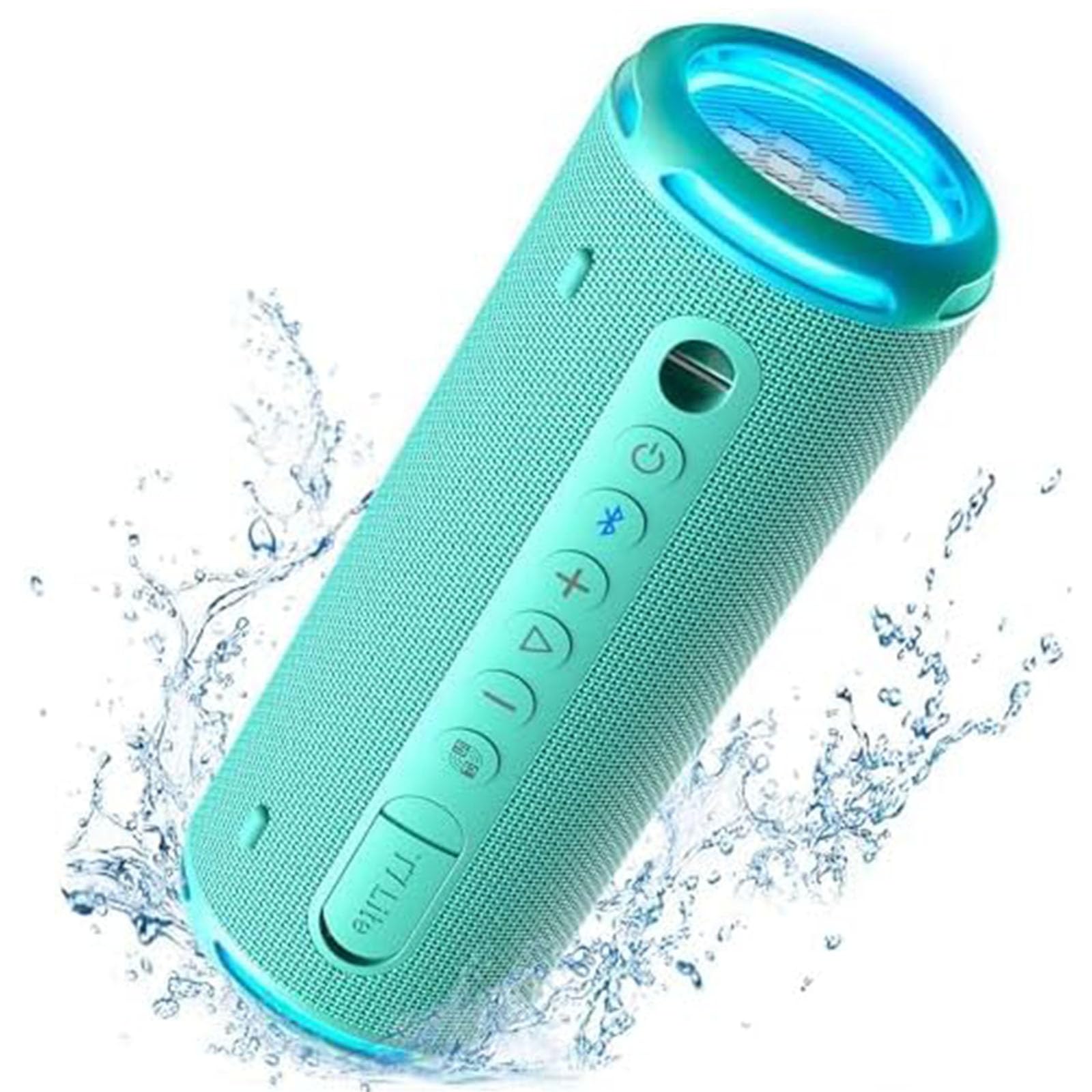
Control Buttons & Ports
- പവർ ബട്ടൺ: പവർ ഓൺ/ഓഫ് ചെയ്യാൻ അമർത്തിപ്പിടിക്കുക.
- ബ്ലൂടൂത്ത് ബട്ടൺ: ബ്ലൂടൂത്ത് ജോടിയാക്കൽ മോഡിൽ പ്രവേശിക്കാൻ അമർത്തുക.
- വോളിയം കൂട്ടുക (+): വോളിയം കൂട്ടുക.
- വോളിയം ഡൗൺ (-): വോളിയം കുറയ്ക്കുക.
- പ്ലേ/താൽക്കാലികമായി നിർത്തുക ബട്ടൺ: ഓഡിയോ പ്ലേ ചെയ്യുക അല്ലെങ്കിൽ താൽക്കാലികമായി നിർത്തുക.
- ഇക്യു ബട്ടൺ: Cycle through equalizer modes.
- ടൈപ്പ്-സി ചാർജിംഗ് പോർട്ട്: സ്പീക്കർ ചാർജ് ചെയ്തതിന്.
- AUX-ഇൻ പോർട്ട്: വയർഡ് ഓഡിയോ കണക്ഷന്.
- ടിഎഫ് കാർഡ് സ്ലോട്ട്: For playing music directly from a TF card.
സജ്ജമാക്കുക
1. സ്പീക്കറിൽ നിന്ന് നിരക്ക് ഈടാക്കുന്നു
Before first use, fully charge the speaker using the provided Type-C charging cable and a compatible USB power adapter (not included). The LED indicator will show charging status.
2. പവർ ഓൺ/ഓഫ്
Press and hold the Power button for 2 seconds to turn the speaker on or off. A sound prompt will indicate the power status.
3. ബ്ലൂടൂത്ത് ജോടിയാക്കൽ
- Turn on the speaker. The Bluetooth indicator will flash blue, indicating it's ready for pairing.
- നിങ്ങളുടെ ഉപകരണത്തിൽ (സ്മാർട്ട്ഫോൺ, ടാബ്ലെറ്റ് മുതലായവ) ബ്ലൂടൂത്ത് പ്രവർത്തനക്ഷമമാക്കുക.
- Select "Tronsmart T7 Lite" from the list of available Bluetooth devices.
- Once connected, the Bluetooth indicator will remain solid blue, and you will hear a confirmation sound.
The speaker features Bluetooth 5.3, offering a stable wireless connection up to 49 feet (15 meters).

സ്പീക്കർ പ്രവർത്തിപ്പിക്കുന്നു
അടിസ്ഥാന നിയന്ത്രണങ്ങൾ
- പ്ലേ/താൽക്കാലികമായി നിർത്തുക: പ്ലേ/പോസ് ബട്ടൺ ഹ്രസ്വമായി അമർത്തുക.
- വോളിയം കൂട്ടുക: '+' ബട്ടൺ ചുരുക്കി അമർത്തുക.
- വോളിയം താഴേക്ക്: '-' ബട്ടൺ ചുരുക്കി അമർത്തുക.
- അടുത്ത ട്രാക്ക്: '+' ബട്ടൺ ദീർഘനേരം അമർത്തുക.
- മുമ്പത്തെ ട്രാക്ക്: '-' ബട്ടൺ ദീർഘനേരം അമർത്തുക.
- ഉത്തരം/അവസാന കോൾ: പ്ലേ/പോസ് ബട്ടൺ ഹ്രസ്വമായി അമർത്തുക.
- കോൾ നിരസിക്കുക: പ്ലേ/പോസ് ബട്ടൺ ദീർഘനേരം അമർത്തുക.
EQ and App Control
Customize your audio experience using the Tronsmart app. The app allows you to adjust the equalizer settings and control the light show. Download the Tronsmart app from your device's app store.

Rainbow Light Show
The speaker features a dynamic rainbow light show that moves to the beat of your music. Press the EQ button to cycle through different light modes or turn the lights off. You can also control the light show via the Tronsmart app.

ട്രൂ വയർലെസ് സ്റ്റീരിയോ (ടിഡബ്ല്യുഎസ്) ജോടിയാക്കൽ
For an immersive stereo sound experience, you can pair two Tronsmart T7 Lite speakers together.
- രണ്ട് സ്പീക്കറുകളും ഓണാക്കിയിട്ടുണ്ടെന്നും മറ്റ് ബ്ലൂടൂത്ത് ഉപകരണങ്ങളുമായി ബന്ധിപ്പിച്ചിട്ടില്ലെന്നും ഉറപ്പാക്കുക.
- On one speaker (this will be the primary speaker), press and hold the Bluetooth button for 3 seconds until you hear a prompt.
- The two speakers will automatically connect to each other. Once connected, the primary speaker's Bluetooth indicator will flash blue, and the secondary speaker's indicator will be solid blue.
- Connect your device to the primary speaker via Bluetooth.

പ്രധാന സവിശേഷതകൾ
- Enhanced Bass & Versatility: The T7 Lite features a cutout design that reduces obstructions to sound transmission, boosting bass output. It delivers powerful audio with a maximum volume of 90dB.
- 24 മണിക്കൂർ കളിസമയം: Equipped with a built-in 4000mAh battery, the speaker can continuously play high-quality audio for up to 24 hours at 50% volume. Playtime may vary based on light display, audio content, and volume levels.
- IPX7 Waterproof & Durable Fabric: This wireless Bluetooth speaker is resistant to rain, splashes, and can be submerged in 3.3 feet of water for up to 30 minutes. Its durable fabric material and sturdy rubber cover provide protection for outdoor use.
- ഊർജ്ജസ്വലമായ വർണ്ണ ഓപ്ഷനുകൾ: The T7 Lite is available in various colors, allowing you to choose one that matches your style.


സ്പെസിഫിക്കേഷനുകൾ
| ബ്രാൻഡ് | ട്രോൺസ്മാർട്ട് |
| മോഡലിൻ്റെ പേര് | ടി7 ലൈറ്റ് |
| സ്പീക്കർ തരം | ഔട്ട്ഡോർ |
| പ്രത്യേക സവിശേഷതകൾ | LED Light, Lightweight, Portable, Stereo Pairing, Waterproof |
| കണക്റ്റിവിറ്റി ടെക്നോളജി | ബ്ലൂടൂത്ത് 5.3 |
| വയർലെസ് ശ്രേണി | 49 അടി (15 മീറ്റർ) |
| പരമാവധി ഔട്ട്പുട്ട് പവർ | 24 വാട്ട്സ് |
| കളിസമയം | 24 മണിക്കൂർ വരെ (50% വോളിയത്തിൽ) |
| വാട്ടർപ്രൂഫ് റേറ്റിംഗ് | IPX7 |
| നിയന്ത്രണ രീതി | ആപ്പ്, ബട്ടണുകൾ |
| ഉൽപ്പന്ന അളവുകൾ | 2.83"D x 2.83"W x 7.68"H (7.2സെ.മീ x 7.2സെ.മീ x 19.5സെ.മീ) |
| ഇനത്തിൻ്റെ ഭാരം | 1.04 പൗണ്ട് (0.47 കി.ഗ്രാം) |
| ബാറ്ററി | 1 ലിഥിയം അയോൺ ബാറ്ററി (ഉൾപ്പെടുത്തിയിരിക്കുന്നു) |
മെയിൻ്റനൻസ്
- വൃത്തിയാക്കൽ: മൃദുവായ സ്പീക്കർ തുടയ്ക്കുക, ഡിamp തുണി. കഠിനമായ രാസവസ്തുക്കളോ ഉരച്ചിലുകളുള്ള ക്ലീനറുകളോ ഉപയോഗിക്കരുത്.
- സംഭരണം: നേരിട്ടുള്ള സൂര്യപ്രകാശത്തിൽ നിന്നും കടുത്ത താപനിലയിൽ നിന്നും മാറി തണുത്തതും വരണ്ടതുമായ സ്ഥലത്ത് സ്പീക്കർ സൂക്ഷിക്കുക.
- ബാറ്ററി കെയർ: To prolong battery life, charge the speaker fully at least once every three months if not in regular use.
- വാട്ടർ എക്സ്പോഷർ: While IPX7 rated, ensure the charging port cover is securely closed before exposing the speaker to water. After exposure, dry the speaker thoroughly before charging.
ട്രബിൾഷൂട്ടിംഗ്
- സ്പീക്കർ പവർ ഓൺ ചെയ്യുന്നില്ല:
- സ്പീക്കർ പൂർണ്ണമായും ചാർജ് ചെയ്തിട്ടുണ്ടെന്ന് ഉറപ്പാക്കുക. ഒരു പവർ സ്രോതസ്സുമായി ബന്ധിപ്പിച്ച് വീണ്ടും ശ്രമിക്കുക.
- ബ്ലൂടൂത്ത് ഉപകരണവുമായി ജോടിയാക്കാൻ കഴിയില്ല:
- Make sure the speaker is in pairing mode (Bluetooth indicator flashing blue). Ensure your device's Bluetooth is enabled and within range. Forget previous pairings on your device and try reconnecting.
- ശബ്ദമില്ല അല്ലെങ്കിൽ കുറഞ്ഞ ശബ്ദം:
- Check the volume levels on both the speaker and your connected device. Ensure the speaker is not muted. If using AUX-in, check the cable connection.
- TWS ജോടിയാക്കൽ പരാജയപ്പെട്ടു:
- Ensure both speakers are Tronsmart T7 Lite models and are not connected to any other Bluetooth devices. Try resetting both speakers and repeating the TWS pairing steps.
വാറൻ്റിയും പിന്തുണയും
The Tronsmart T7 Lite Portable Bluetooth Speaker comes with a limited warranty. Please refer to the included Warranty Card for detailed terms and conditions. For technical support, product inquiries, or warranty claims, please visit the official Tronsmart webസൈറ്റ് അല്ലെങ്കിൽ അവരുടെ ഉപഭോക്തൃ സേവനവുമായി നേരിട്ട് ബന്ധപ്പെടുക.
Official Tronsmart Store: Tronsmart Store on Amazon