ആമുഖം
Thank you for choosing the SOOMFON Bluetooth 5.2 Transmitter Receiver. This device is designed to enhance your audio experience by providing seamless wireless connectivity for various audio systems. It functions as both a Bluetooth transmitter (TX) to send audio from non-Bluetooth devices to Bluetooth headphones/speakers, and a Bluetooth receiver (RX) to stream audio from your Bluetooth-enabled devices to wired speakers or home stereo systems. Featuring aptX Low Latency and aptX HD support, it ensures high-quality audio with minimal delay.
സുരക്ഷാ വിവരങ്ങൾ
പരിക്കുകളോ കേടുപാടുകളോ തടയുന്നതിന് ഈ ഉൽപ്പന്നം ഉപയോഗിക്കുന്നതിന് മുമ്പ് ദയവായി എല്ലാ സുരക്ഷാ നിർദ്ദേശങ്ങളും ശ്രദ്ധാപൂർവ്വം വായിച്ച് പാലിക്കുക.
- Dispose of batteries properly to avoid environmental harm.
- തീവ്രമായ ഊഷ്മാവ്, ഈർപ്പം, നേരിട്ടുള്ള സൂര്യപ്രകാശം എന്നിവയിൽ ഉപകരണം തുറന്നുകാട്ടരുത്.
- ഉപകരണം സ്വയം ഡിസ്അസംബ്ലിംഗ് ചെയ്യുകയോ നന്നാക്കാൻ ശ്രമിക്കുകയോ ചെയ്യരുത്. എല്ലാ സേവനങ്ങളും യോഗ്യതയുള്ള ഉദ്യോഗസ്ഥരെ ഏൽപ്പിക്കുക.
- ഉപകരണം വെള്ളത്തിൽ നിന്നും മറ്റ് ദ്രാവകങ്ങളിൽ നിന്നും അകറ്റി നിർത്തുക.
- Use only the provided or recommended power adapter.
ഉൽപ്പന്നം കഴിഞ്ഞുview
The SOOMFON Bluetooth 5.2 Transmitter Receiver (Model: XF-B9203A) is a versatile audio adapter. It features a sleek design with a wood grain finish, an intuitive LCD screen, and a multi-function rotary knob for easy operation.
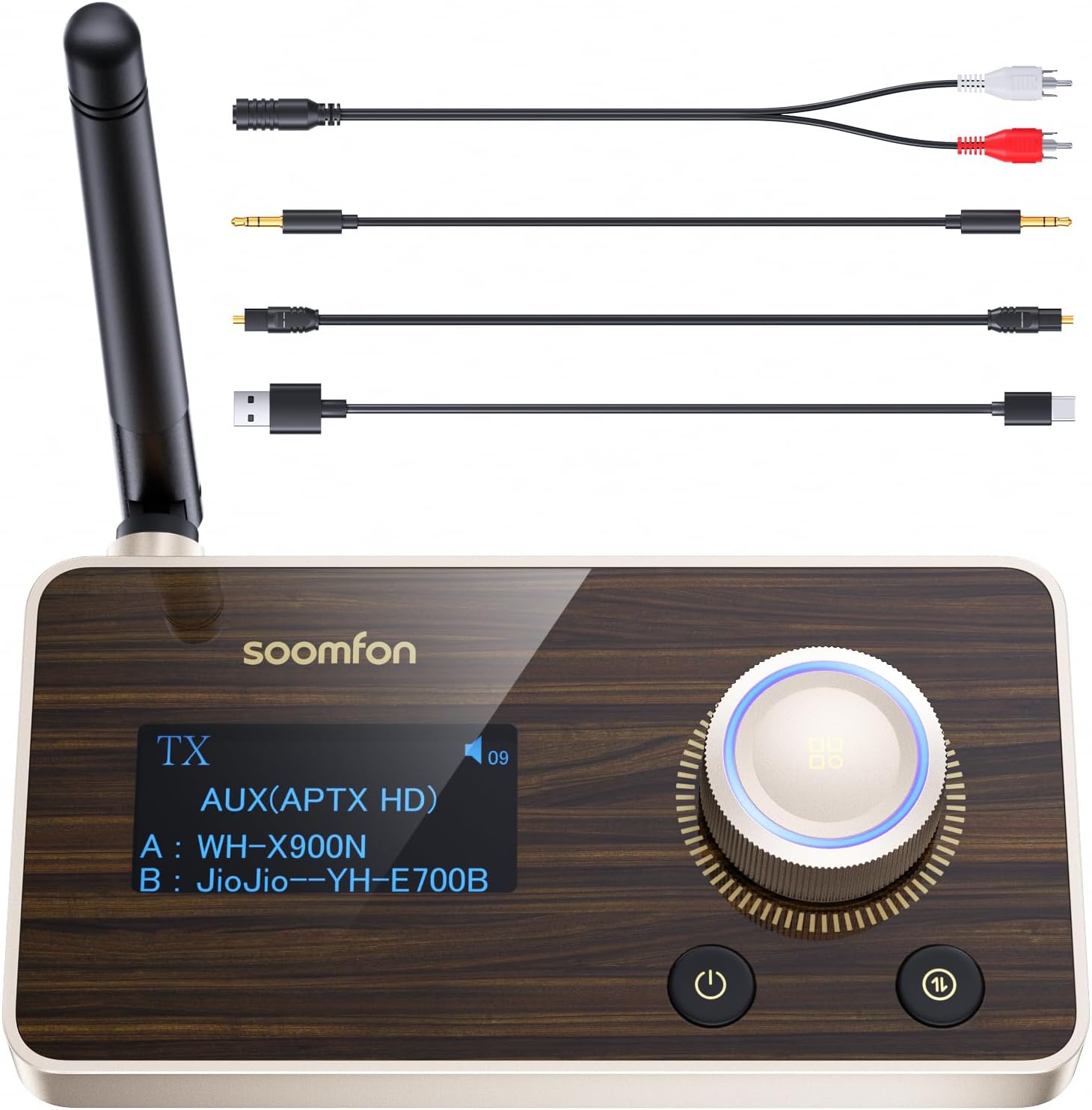
Image: The SOOMFON Bluetooth 5.2 Transmitter Receiver unit, showcasing its front panel with an LCD display, rotary knob, and buttons. Various audio cables (RCA, AUX, USB-C) are displayed above the unit, indicating connectivity options.
പ്രധാന സവിശേഷതകൾ:
- ബ്ലൂടൂത്ത് 5.2 സാങ്കേതികവിദ്യ: സ്ഥിരവും കാര്യക്ഷമവുമായ വയർലെസ് കണക്ഷൻ നൽകുന്നു.
- Transmitter (TX) & Receiver (RX) Modes: Easily switch between sending and receiving audio.
- aptX Low Latency & aptX HD: Ensures synchronized audio for videos and high-fidelity sound quality.
- നീണ്ട ശ്രേണി: Up to 30 meters (RX) and 15 meters (TX) indoors with the external antenna.
- ഇരട്ട ജോടിയാക്കൽ: TX മോഡിൽ രണ്ട് ബ്ലൂടൂത്ത് ഹെഡ്ഫോണുകളോ സ്പീക്കറുകളോ ഒരേസമയം ബന്ധിപ്പിക്കുക.
- Multiple Audio Inputs/Outputs: Supports Optical (SPDIF), AUX (3.5mm), and RCA connections.
- LCD ഡിസ്പ്ലേ: Provides clear information on connection status, mode, and codec.
- ഉപയോക്തൃ സൗഹൃദ നിയന്ത്രണങ്ങൾ: Intuitive rotary knob for volume adjustment and mode switching.

ചിത്രം: വിശദമായ ഒരു ചിത്രം view of the SOOMFON unit's top panel, highlighting the wood grain design, the LCD screen displaying "TX AUX(APTX HD)", and the illuminated rotary volume knob, along with the power and mode buttons.
സജ്ജീകരണ ഗൈഡ്
1. Unpacking and Initial Inspection:
Carefully remove all components from the packaging. Ensure all items listed in the "Packing List" section are present and undamaged.

Image: The SOOMFON Bluetooth 5.2 Transceiver, its green packaging box, and all included accessories: an optical cable, a 3.5mm AUX audio cable, a 3.5mm to RCA audio cable, a USB-A to USB-C charging cable, and the user manual.
2. പവർ കണക്ഷൻ:
Connect the provided USB-A to USB-C charging cable to the USB-C power input port on the back of the SOOMFON unit. Plug the other end into a USB power adapter (not included) or a USB port on your device (e.g., TV, computer) for power.
3. ആന്റിന ഘടിപ്പിക്കൽ:
Screw the external antenna firmly into the antenna port on the back of the unit. Ensure it is upright for optimal signal reception and transmission.
4. ഓഡിയോ കണക്ഷൻ:
Choose the appropriate audio cable based on your source device (in TX mode) or audio system (in RX mode):
- Optical (SPDIF): For digital audio connection, use the optical cable. Connect one end to the Optical IN/OUT port on the SOOMFON and the other to your TV, soundbar, or ampജീവൻ.
- ഓക്സിജൻ (3.5 മിമി): For analog audio connection, use the 3.5mm AUX cable. Connect one end to the AUX IN/OUT port on the SOOMFON and the other to your device's headphone jack or AUX port.
- ആർസിഎ: For analog audio connection to devices with RCA ports, use the 3.5mm to RCA audio cable. Connect the 3.5mm end to the AUX IN/OUT port on the SOOMFON and the RCA ends to the corresponding L/R audio input/output on your stereo system or TV.
Ensure the correct input/output ports are selected on both the SOOMFON unit and your connected audio device.
പ്രവർത്തന നിർദ്ദേശങ്ങൾ
പവർ ഓൺ/ഓഫ്:
പവർ ബട്ടൺ അമർത്തിപ്പിടിക്കുക (⏻) for approximately 3 seconds to turn the device on or off. The LCD screen will illuminate upon power-on.
Switching Modes (TX/RX):
Press the mode switch button (⇆) to toggle between Transmitter (TX) mode and Receiver (RX) mode. The current mode will be displayed on the LCD screen.
ട്രാൻസ്മിറ്റർ മോഡ് (TX):
In TX mode, the SOOMFON unit sends audio from your non-Bluetooth device (e.g., TV, PC, CD player) to Bluetooth headphones or speakers.

Image: A person wearing headphones watching TV, with the SOOMFON unit connected to the TV, illustrating the Transmitter (TX) mode for wireless audio transmission.
- Set the SOOMFON to TX mode.
- Connect the SOOMFON to your audio source (TV, PC, etc.) using an Optical, AUX, or RCA cable.
- നിങ്ങളുടെ ബ്ലൂടൂത്ത് ഹെഡ്ഫോണുകളോ സ്പീക്കറുകളോ പെയറിംഗ് മോഡിൽ ഇടുക.
- The SOOMFON will automatically search for and display available Bluetooth devices on its LCD screen.
- Use the rotary knob to select the desired device and press the knob to confirm pairing.
- Once connected, the LCD will show the connected device's name and the active audio codec (e.g., aptX HD, aptX LL).
- To connect a second device, put the second device into pairing mode, then short press the mode switch button on the SOOMFON to initiate a new search and pair.
For optimal low latency, ensure your headphones also support aptX Low Latency (aptX LL).

Image: A graph illustrating audio delay comparisons between different Bluetooth codecs (aptX LL, aptX, AAC, SBC), showing aptX LL provides the lowest latency for synchronized audio.
റിസീവർ മോഡ് (RX):
In RX mode, the SOOMFON unit receives audio from your Bluetooth-enabled device (e.g., smartphone, tablet, laptop) and plays it through your wired speakers or home stereo system.

Image: A person relaxing on a sofa, listening to music through a home stereo system connected wirelessly via the SOOMFON unit in Receiver (RX) mode.
- Set the SOOMFON to RX mode.
- Connect the SOOMFON to your wired audio system (speakers, amplifier, etc.) using an Optical, AUX, or RCA cable.
- On your Bluetooth-enabled device (smartphone, tablet), search for "SOOMFON XF-B9203A" in the Bluetooth settings and pair.
- Once connected, the LCD will show the connected device's name and the active audio codec.
- You can now stream audio wirelessly from your device to your wired audio system.
The SOOMFON supports aptX HD in RX mode for high-quality audio streaming.
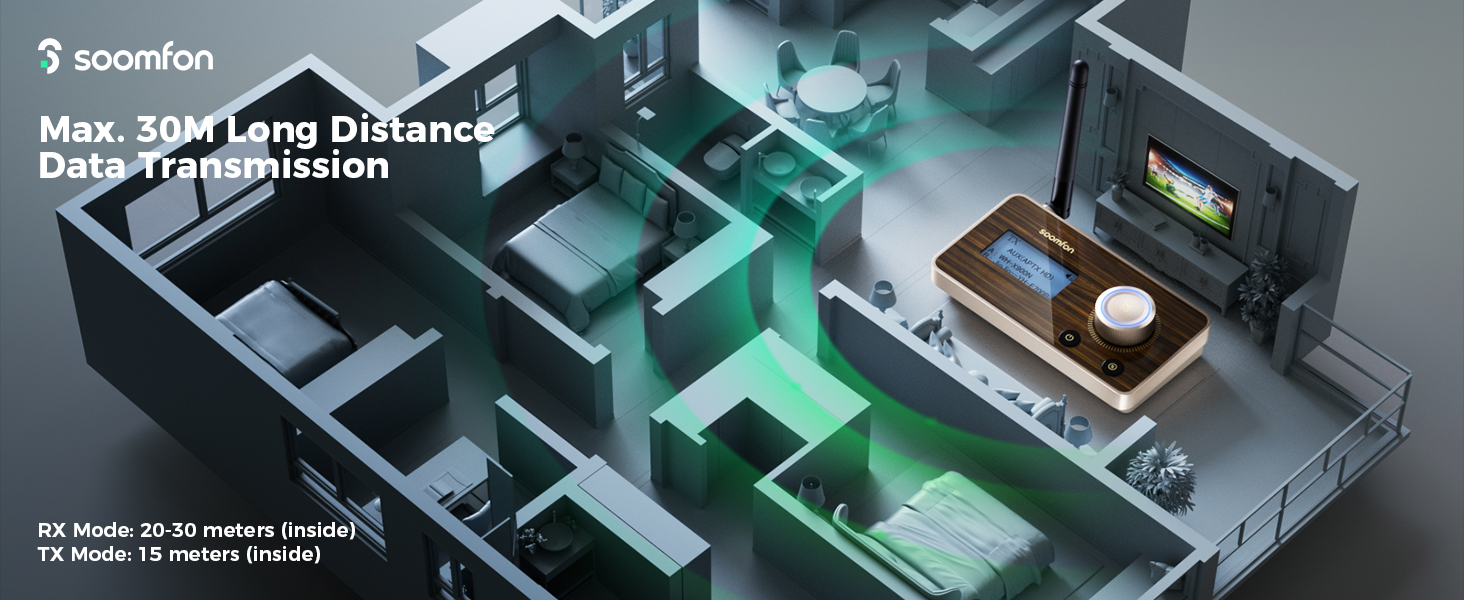
Image: A bar chart comparing audio bitrates for different codecs (SBC, aptX, aptX HD), demonstrating that aptX HD provides the highest bitrate for CD-like sound quality.
വോളിയം നിയന്ത്രണം:
Rotate the multi-function knob clockwise to increase volume and counter-clockwise to decrease volume. Press the knob to pause/play audio or confirm selections during pairing.
മെയിൻ്റനൻസ്
- മൃദുവായതും ഉണങ്ങിയതുമായ തുണി ഉപയോഗിച്ച് ഉപകരണം വൃത്തിയാക്കുക. ലിക്വിഡ് ക്ലീനറുകളോ എയറോസോളുകളോ ഉപയോഗിക്കരുത്.
- ഉപകരണം പൊടിയിൽ നിന്നും അവശിഷ്ടങ്ങളിൽ നിന്നും മുക്തമാക്കുക.
- ഉപയോഗത്തിലില്ലാത്തപ്പോൾ തണുത്തതും ഉണങ്ങിയതുമായ സ്ഥലത്ത് ഉപകരണം സൂക്ഷിക്കുക.
- ശക്തമായ ആഘാതങ്ങൾക്ക് ഉപകരണം ഇടുകയോ ഇടുകയോ ചെയ്യുന്നത് ഒഴിവാക്കുക.
ട്രബിൾഷൂട്ടിംഗ്
| പ്രശ്നം | സാധ്യമായ കാരണം | പരിഹാരം |
|---|---|---|
| ശക്തിയില്ല | Power cable not connected properly; faulty power source. | Ensure USB-C cable is securely connected. Try a different USB power adapter or USB port. |
| ഉപകരണം ജോടിയാക്കാൻ കഴിയില്ല | Device not in pairing mode; too far from SOOMFON; interference. | Ensure your Bluetooth device is in pairing mode. Move devices closer. Restart both devices. Clear previous pairings on your Bluetooth device. |
| ഓഡിയോ കാലതാമസം/കാലതാമസം | Connected device does not support aptX Low Latency; environmental interference. | For minimal delay, ensure both the SOOMFON and your connected headphones/speakers support aptX Low Latency (aptX LL). Reduce distance between devices. |
| ശബ്ദമില്ല | Incorrect audio cable connection; wrong input/output selected; volume too low. | Verify audio cables are correctly connected to the SOOMFON and your audio system. Ensure the correct input/output is selected on both devices. Increase volume on both the SOOMFON and your connected device. |
| ഹ്രസ്വ ബ്ലൂടൂത്ത് ശ്രേണി | Obstructions; antenna not properly attached. | Ensure the antenna is securely attached and upright. Minimize obstructions (walls, large furniture) between the SOOMFON and your Bluetooth device. |
സ്പെസിഫിക്കേഷനുകൾ
| ഫീച്ചർ | വിശദാംശങ്ങൾ |
|---|---|
| മോഡൽ നമ്പർ | എക്സ്എഫ്-ബി9203എ |
| ബ്ലൂടൂത്ത് പതിപ്പ് | 5.2 |
| പിന്തുണയ്ക്കുന്ന കോഡെക്കുകൾ | aptX HD, aptX Low Latency, aptX, SBC, AAC |
| ഓപ്പറേറ്റിംഗ് മോഡുകൾ | ട്രാൻസ്മിറ്റർ (TX), റിസീവർ (RX) |
| ഓഡിയോ ഇൻ്റർഫേസുകൾ | Optical (SPDIF) IN/OUT, 3.5mm AUX IN/OUT, RCA IN/OUT |
| പവർ ഇൻപുട്ട് | യുഎസ്ബി ടൈപ്പ്-സി |
| Indoor Range (RX Mode) | 20-30 മീറ്റർ (ഏകദേശം 65-98 അടി) |
| Indoor Range (TX Mode) | 15 മീറ്റർ (ഏകദേശം 49 അടി) |
| പാക്കേജ് അളവുകൾ | 14.7 x 12 x 4 സെ.മീ |
| ഭാരം | 240 ഗ്രാം |
പായ്ക്കിംഗ് ലിസ്റ്റ്
The following items are included in your SOOMFON Bluetooth 5.2 Transmitter Receiver package:
- 1 x SOOMFON Bluetooth 5.2 Transceiver Unit
- 1 x ഒപ്റ്റിക്കൽ കേബിൾ
- 1 x 3.5mm AUX Audio Cable
- 1 x 3.5mm മുതൽ RCA ഓഡിയോ കേബിൾ വരെ
- 1 x USB-A മുതൽ USB-C ചാർജിംഗ് കേബിൾ വരെ
- 1 x ഉപയോക്തൃ മാനുവൽ
വാറൻ്റിയും പിന്തുണയും
SOOMFON ഒരു നൽകുന്നു 2 വർഷത്തെ ഉൽപ്പന്ന ഗ്യാരണ്ടി for this device. If you encounter any issues or have questions regarding the product, please contact SOOMFON customer support. We aim to provide a prompt response within 24 hours.
For support, please refer to the contact information provided in the packaging or on the official SOOMFON webസൈറ്റ്.


