1. ഉൽപ്പന്നം കഴിഞ്ഞുview
The TECKNET Wireless Keyboard and Mouse KB006 is a versatile input device combo designed for enhanced productivity and convenience. This set offers multiple connection options, including 2.4G wireless via a USB dongle and Bluetooth, allowing seamless switching between up to four different devices. Its compact design, quiet keys, and long-lasting rechargeable battery make it suitable for various computing environments.

ചിത്രം 1.1: The TECKNET Wireless Keyboard and Mouse KB006, showcasing the keyboard and the included USB receiver.
2. പാക്കേജ് ഉള്ളടക്കം
- TECKNET Wireless Keyboard (KB006)
- ടെക്നെറ്റ് വയർലെസ് മൗസ്
- USB 2.4G റിസീവർ
- USB-C ചാർജിംഗ് കേബിൾ
- ഉപയോക്തൃ മാനുവൽ
3. ആരംഭിക്കൽ (സജ്ജീകരണം)
3.1 ഉപകരണം ചാർജ് ചെയ്യുന്നു
Before initial use, ensure the keyboard and mouse are fully charged. Connect the provided USB-C charging cable to the charging port on the keyboard and a USB power source. A full charge typically takes approximately 2 hours and can provide up to 180 days of use, depending on usage.

ചിത്രം 3.1: The Type-C charging port on the keyboard, highlighting its quick charge capability and battery life.
3.2 2.4G USB റിസീവർ വഴി ബന്ധിപ്പിക്കുന്നു
- Locate the USB 2.4G receiver, usually stored in a compartment on the mouse or keyboard.
- നിങ്ങളുടെ കമ്പ്യൂട്ടറിലോ ഉപകരണത്തിലോ ലഭ്യമായ ഒരു USB പോർട്ടിലേക്ക് USB റിസീവർ പ്ലഗ് ചെയ്യുക.
- Turn on the keyboard and mouse. They should automatically connect to the receiver. The indicator light for 2.4G will illuminate.
3.3 ബ്ലൂടൂത്ത് വഴി ബന്ധിപ്പിക്കുന്നു
The keyboard supports Bluetooth 4.0/5.0 connectivity and can pair with up to three Bluetooth devices.
- കീബോർഡ് ഓണാക്കുക.
- അമർത്തിപ്പിടിക്കുക Fn key along with one of the Bluetooth keys (1@, 2@, അല്ലെങ്കിൽ 3#) for over 3 seconds. The corresponding indicator light (BT1, BT2, or BT3) will flash rapidly, indicating pairing mode.
- നിങ്ങളുടെ ഉപകരണത്തിൽ (കമ്പ്യൂട്ടർ, ടാബ്ലെറ്റ്, സ്മാർട്ട്ഫോൺ), ബ്ലൂടൂത്ത് ക്രമീകരണങ്ങളിലേക്ക് പോയി പുതിയ ഉപകരണങ്ങൾക്കായി തിരയുക.
- Select "TECKNET KB006" (or similar name) from the list of available devices to complete the pairing process. The indicator light will stop flashing and remain solid once connected.
- Repeat for other Bluetooth devices using different Bluetooth channels.

ചിത്രം 3.2: Instructions for connecting the keyboard to your device, including Bluetooth pairing steps and indicator light locations.
4. പ്രവർത്തന നിർദ്ദേശങ്ങൾ
4.1 Switching Between Connected Devices (4 Modes Connection)
The keyboard supports connection to up to four devices: one via 2.4G USB receiver and three via Bluetooth. To switch between connected devices:
- 2.4G കണക്ഷന്: അമർത്തുക Fn + 4$.
- For Bluetooth connections: Press Fn + 1@, Fn + 2@, അല്ലെങ്കിൽ Fn + 3# to switch to the corresponding Bluetooth channel.
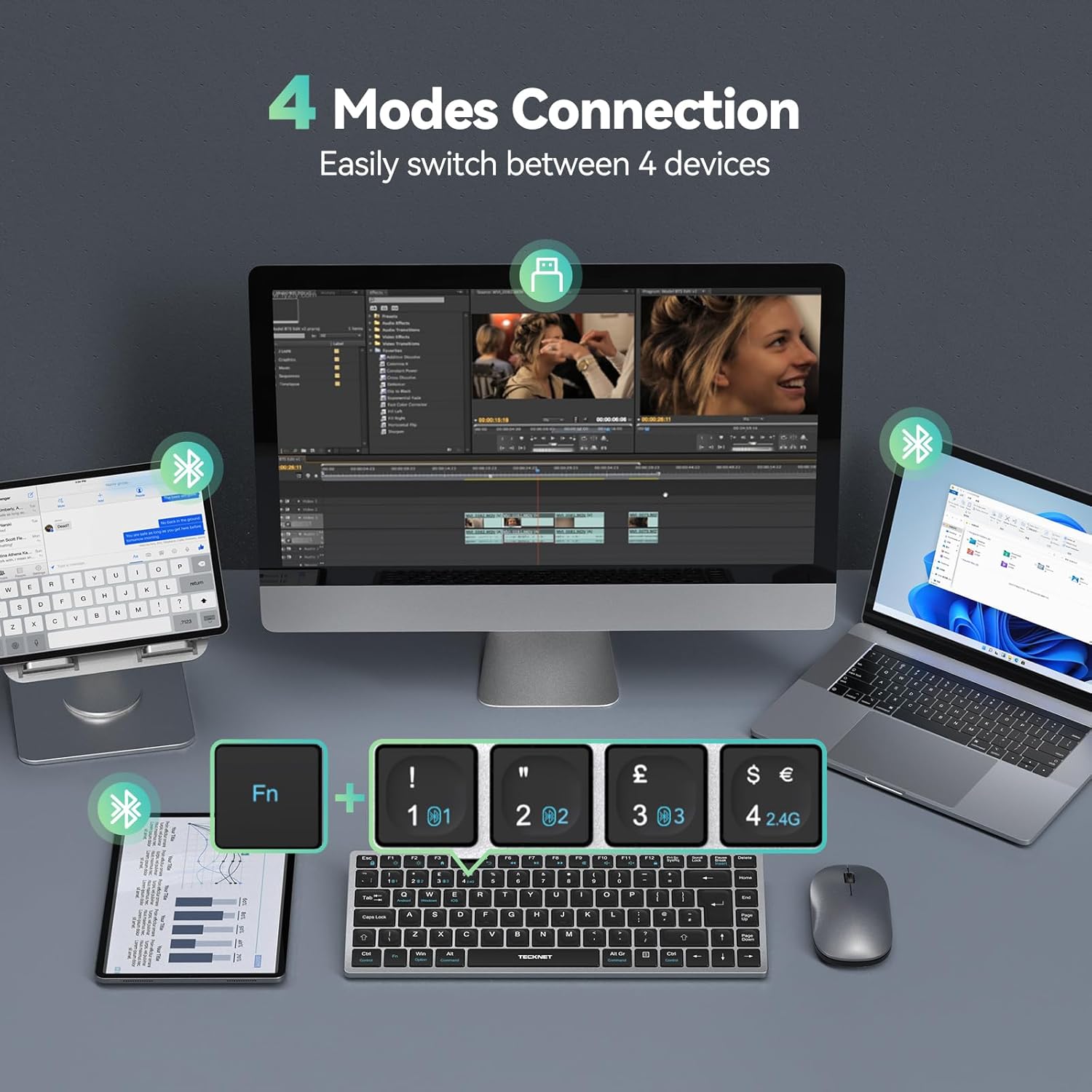
ചിത്രം 4.1: Visual representation of the keyboard's ability to easily switch between four connected devices (laptop, desktop, tablet, smartphone).
4.2 ഓപ്പറേറ്റിംഗ് സിസ്റ്റങ്ങൾ മാറൽ
The keyboard is compatible with Android, Windows, and iOS operating systems. To optimize key functions for your specific OS:
- For Android: Press Fn + Q.
- വിൻഡോസിനായി: അമർത്തുക Fn + W.
- For iOS: Press Fn + E. (Note: iOS compatibility may be limited for iPhones.)
4.3 ഓട്ടോ-സ്ലീപ്പ് ഫംഗ്ഷൻ
To conserve battery life, the keyboard features an auto-sleep mode. If inactive for a period, it will enter sleep mode. To wake it up, simply press any key. There might be a slight delay for the first character to register after waking from sleep.
4.4 Comfortable and Quiet Typing
The keyboard is designed for comfortable typing with rapid responsiveness and reduced noise, minimizing typing sounds by up to 90% compared to standard keyboards.
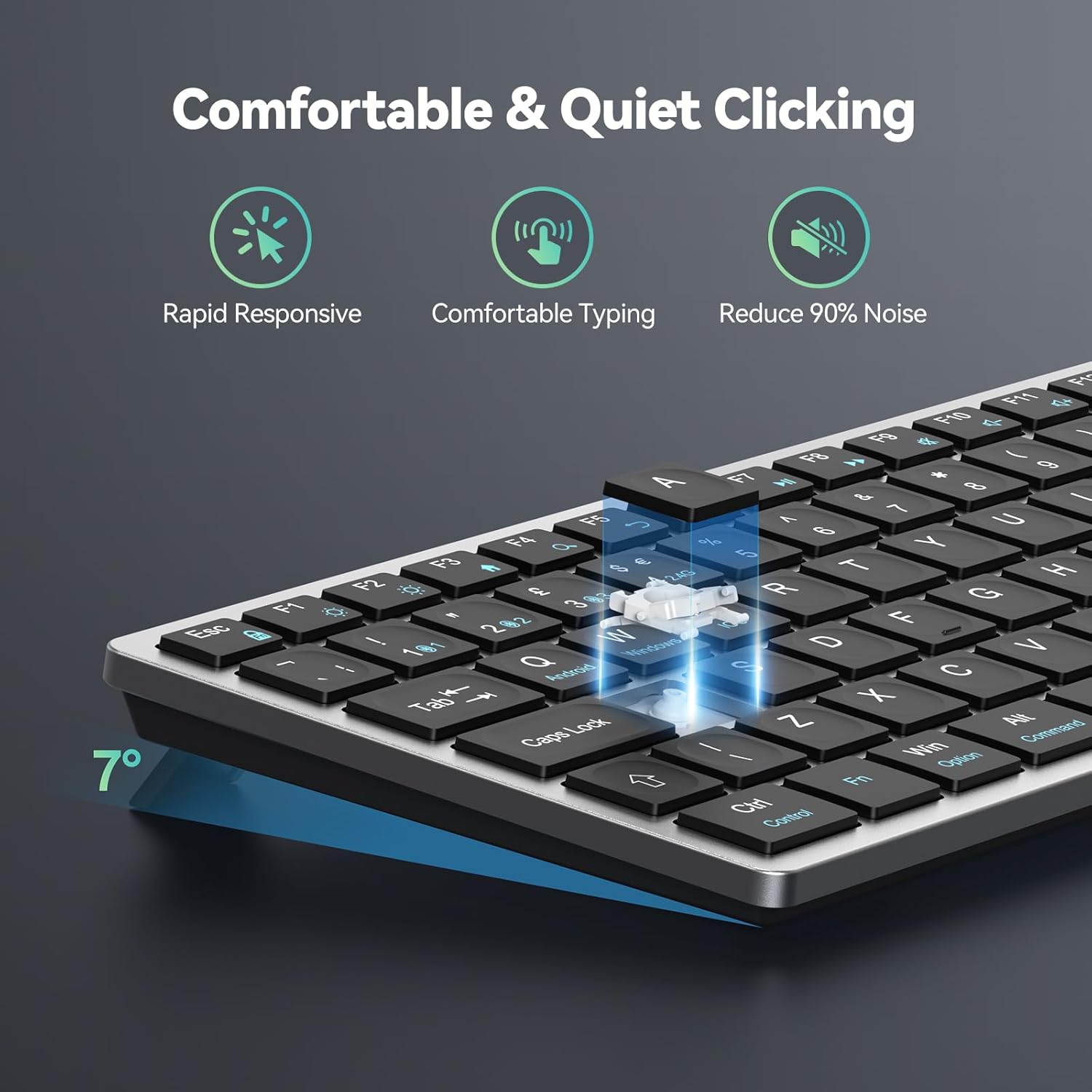
ചിത്രം 4.2: Illustration of the keyboard's design for comfortable and quiet typing, emphasizing reduced noise.
4.5 വൈഡ് കോംപാറ്റിബിലിറ്റി
The TECKNET KB006 is broadly compatible with various devices and operating systems, including Android, Windows, Mac OS 10.15 and above, and iOS (invalid in iPhone).

ചിത്രം 4.3: Icons representing the wide compatibility of the keyboard with Android, Windows, Mac OS, and iOS devices.
5. പരിപാലനം
To ensure the longevity and optimal performance of your TECKNET Wireless Keyboard and Mouse:
- ചാർജിംഗ്: Regularly charge the keyboard and mouse using the provided USB-C cable to maintain battery health. Avoid prolonged periods of complete discharge.
- വൃത്തിയാക്കൽ: കീബോർഡിന്റെയും മൗസിന്റെയും പ്രതലങ്ങൾ വൃത്തിയാക്കാൻ മൃദുവായതും ഉണങ്ങിയതുമായ തുണി ഉപയോഗിക്കുക. കഠിനമായ അഴുക്കിന്, അല്പം ഡി.amp cloth with mild soap can be used, ensuring no liquid enters the device. Avoid abrasive cleaners or solvents.
- സംഭരണം: Store the devices in a cool, dry place away from direct sunlight, extreme temperatures, and high humidity when not in use for extended periods.
6. പ്രശ്നപരിഹാരം
If you encounter issues with your TECKNET Wireless Keyboard and Mouse, please refer to the following common solutions:
- ഉപകരണം കണക്റ്റുചെയ്യുന്നില്ല:
- Ensure the keyboard and mouse are turned on and fully charged.
- For 2.4G connection, ensure the USB receiver is securely plugged into a working USB port. Try a different USB port.
- For Bluetooth connection, ensure Bluetooth is enabled on your device and the keyboard is in pairing mode (indicator light flashing). Remove previous pairings from your device's Bluetooth list and try re-pairing.
- Ensure you are on the correct connection channel (2.4G or BT1/BT2/BT3) on the keyboard.
- Lag or unresponsive input:
- ബാറ്ററി ലെവലുകൾ പരിശോധിച്ച് ആവശ്യമെങ്കിൽ റീചാർജ് ചെയ്യുക.
- Ensure there are no strong wireless interferences (e.g., other 2.4GHz devices, Wi-Fi routers) nearby.
- കീബോർഡും മൗസും റിസീവറിന്റെയോ ബ്ലൂടൂത്ത് ഉപകരണത്തിന്റെയോ അടുത്തേക്ക് നീക്കുക.
- If the keyboard was in auto-sleep mode, the first key press might have a slight delay.
- Keys not working or incorrect characters:
- Verify that the correct operating system mode (Fn+Q/W/E) is selected for your device.
- Restart your computer/device and reconnect the keyboard.
7 സ്പെസിഫിക്കേഷനുകൾ
| മോഡൽ | KB006 |
| കണക്റ്റിവിറ്റി ടെക്നോളജി | 2.4G Wireless, Bluetooth 4.0/5.0 |
| കീകളുടെ എണ്ണം | 108 |
| കീബോർഡ് വിവരണം | റീചാർജ് ചെയ്യാവുന്നത് |
| പ്രത്യേക ഫീച്ചർ | Rechargeable, Multi-Device Switching, Quiet Clicking, Auto-Sleep |
| അനുയോജ്യമായ ഉപകരണങ്ങൾ | PC, Android, Windows, Mac OS 10.15+, iOS (invalid in iPhone) |
| പാക്കേജ് അളവുകൾ | 12.76 x 6.38 x 1.06 ഇഞ്ച് |
| ഇനത്തിൻ്റെ ഭാരം | 1.17 പൗണ്ട് |
8. വാറൻ്റിയും പിന്തുണയും
TECKNET products are designed to meet high-quality standards. For warranty information or technical support, please refer to the warranty card included in your package or visit the official TECKNET website. You can also contact TECKNET customer service directly for assistance with product setup, troubleshooting, or general inquiries.
കൂടുതൽ വിവരങ്ങൾക്ക്, സന്ദർശിക്കുക ആമസോണിലെ TECKNET സ്റ്റോർ.


