ആമുഖം
കറുപ്പ് തിരഞ്ഞെടുത്തതിന് നന്ദിview AirBuds 4 Wireless Earbuds. This manual provides essential information for setting up, operating, and maintaining your earbuds. Please read it carefully to ensure optimal performance and longevity of your device.
പാക്കേജ് ഉള്ളടക്കം
നിങ്ങളുടെ പാക്കേജിൽ എല്ലാ ഇനങ്ങളും ഉണ്ടെന്ന് ഉറപ്പാക്കുക:
- കറുപ്പ്view എയർബഡ്സ് 4 ഇയർബഡുകൾ (ഇടതും വലതും)
- ചാർജിംഗ് കേസ്
- ഉപയോക്തൃ ഗൈഡ്
- ടൈപ്പ്-സി ചാർജിംഗ് കേബിൾ
- Two additional pairs of silicone ear tips (total of 3 sizes: S, M, L)

ഉൽപ്പന്നം കഴിഞ്ഞുview
ബ്ലാക്ക്view AirBuds 4 feature an ergonomic in-ear design for comfortable wear and stable fit. The charging case provides convenient storage and extends battery life.

സജ്ജമാക്കുക
1. ഇയർബഡുകളും കേസും ചാർജ് ചെയ്യുന്നു
Before first use, fully charge the earbuds and charging case. Connect the provided Type-C charging cable to the charging port on the case and a USB power source.
- The charging case can provide up to 5 full charges for the earbuds.
- കേസ് മുഴുവൻ ചാർജ് ചെയ്യാൻ ഏകദേശം 1.5 മണിക്കൂർ എടുക്കും.

2. ബ്ലൂടൂത്ത് ജോടിയാക്കൽ
- ചാർജിംഗ് കേസ് തുറക്കുക. ഇയർബഡുകൾ സ്വയമേവ ജോടിയാക്കൽ മോഡിലേക്ക് പ്രവേശിക്കും.
- നിങ്ങളുടെ ഉപകരണത്തിൽ (സ്മാർട്ട്ഫോൺ, ടാബ്ലെറ്റ്, പിസി), ബ്ലൂടൂത്ത് പ്രവർത്തനക്ഷമമാക്കുക.
- ഇതിനായി തിരയുക available Bluetooth devices and select "AirBuds 4" from the list.
- കണക്റ്റ് ചെയ്തുകഴിഞ്ഞാൽ, ഒരു സ്ഥിരീകരണ ടോൺ നിങ്ങൾ കേൾക്കും, ഇയർബഡുകൾ ഉപയോഗത്തിന് തയ്യാറാണ്.
The earbuds feature automatic re-connection to the last paired device when removed from the case.

പ്രവർത്തന നിർദ്ദേശങ്ങൾ
ഇയർബഡുകൾ ധരിക്കുന്നു
Choose the silicone ear tips that provide the most comfortable and secure fit for your ears. Insert the earbuds gently into your ear canal and rotate slightly to ensure a snug seal for optimal sound quality and stability.

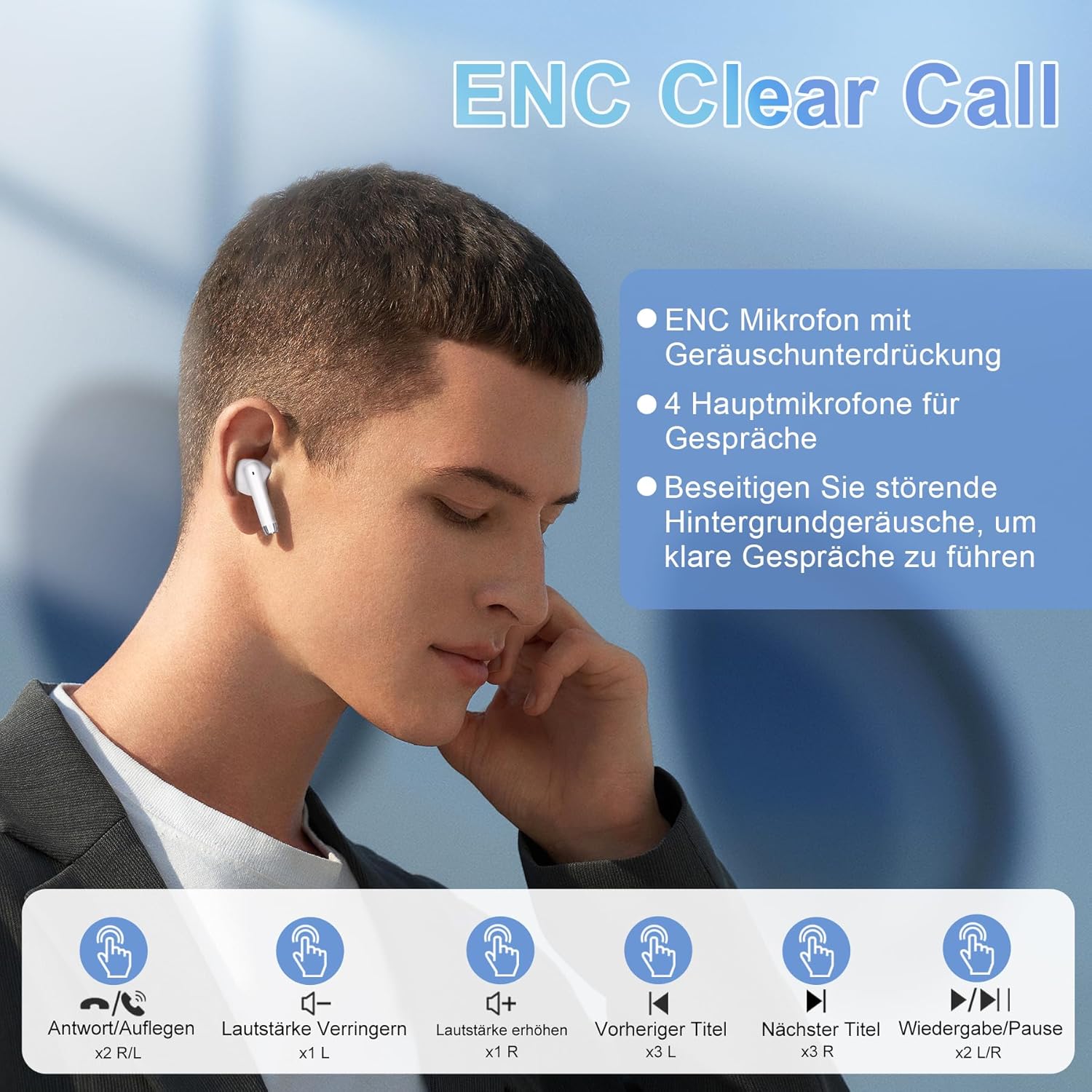
ടച്ച് നിയന്ത്രണങ്ങൾ
ബ്ലാക്ക്view AirBuds 4 feature intuitive touch controls on each earbud. The functions are as follows:
| ആക്ഷൻ | നിയന്ത്രണം | ഫംഗ്ഷൻ |
|---|---|---|
| ഡബിൾ ടാപ്പ് (ഇടത്/ചുവട്) | Earbud Touch Sensor | സംഗീതം പ്ലേ ചെയ്യുക/താൽക്കാലികമായി നിർത്തുക, കോൾ സ്വീകരിക്കുക/അവസാനിപ്പിക്കുക |
| ട്രിപ്പിൾ ടാപ്പ് (ഇടത്) | Left Earbud Touch Sensor | മുമ്പത്തെ ട്രാക്ക് |
| ട്രിപ്പിൾ ടാപ്പ് (R) | Right Earbud Touch Sensor | അടുത്ത ട്രാക്ക് |
| സിംഗിൾ ടാപ്പ് (ഇടത്) | Left Earbud Touch Sensor | വോളിയം ഡൗൺ |
| സിംഗിൾ ടാപ്പ് (R) | Right Earbud Touch Sensor | വോളിയം കൂട്ടുക |
| ലോംഗ് പ്രസ്സ് (L/R) | Earbud Touch Sensor | വോയ്സ് അസിസ്റ്റൻ്റ് സജീവമാക്കുക |
ഫീച്ചറുകൾ
വിപുലമായ ബ്ലൂടൂത്ത് 5.3 സാങ്കേതികവിദ്യ
The AirBuds 4 utilize Bluetooth 5.3, offering a faster and more stable wireless connection. This technology ensures lower power consumption and reduced latency for a seamless audio experience.

Hi-Fi Stereo Sound & ENC Noise Reduction
Equipped with 13mm dynamic drivers and a three-layer composite diaphragm, the AirBuds 4 deliver high-resolution audio with strong bass and clear highs. Each earbud includes an Environmental Noise Cancellation (ENC) microphone to enhance voice clarity and reduce background noise during calls.

IPX7 വാട്ടർപ്രൂഫ് റേറ്റിംഗ്
The earbuds are IPX7 waterproof, making them resistant to sweat, rain, and splashes. This protection allows for use during workouts or in light rain conditions.
വിപുലീകരിച്ച ബാറ്ററി ലൈഫ്
Enjoy up to 8 hours of music playback on a single charge. With the included charging case, the total listening time extends to approximately 36 hours.
ട്രബിൾഷൂട്ടിംഗ്
No Sound from Earbuds
- ഇയർബഡുകൾ ചാർജ് ചെയ്തിട്ടുണ്ടെന്ന് ഉറപ്പാക്കുക.
- Check Bluetooth connection on your device. Re-pair if necessary.
- Adjust volume on both your device and via earbud touch controls.
ഇയർബഡുകൾ ജോടിയാക്കുന്നില്ല
- Make sure both earbuds are in the charging case and have sufficient charge.
- Remove "AirBuds 4" from your device's Bluetooth list and attempt to pair again.
- മറ്റ് ബ്ലൂടൂത്ത് ഉപകരണങ്ങളൊന്നും കണക്ഷനെ തടസ്സപ്പെടുത്തുന്നില്ലെന്ന് ഉറപ്പാക്കുക.
ചാർജിംഗ് പ്രശ്നങ്ങൾ
- Verify the Type-C cable is securely connected to both the case and the power source.
- മറ്റൊരു ചാർജിംഗ് കേബിളോ പവർ അഡാപ്റ്ററോ പരീക്ഷിച്ചുനോക്കൂ.
- ഇയർബഡുകളിലെയും കേസിനുള്ളിലെയും ചാർജിംഗ് കോൺടാക്റ്റുകൾ വൃത്തിയാക്കുക.
സ്പെസിഫിക്കേഷനുകൾ
| ഫീച്ചർ | വിശദാംശങ്ങൾ |
|---|---|
| മോഡലിൻ്റെ പേര് | എയർബഡ്സ് 4 |
| കണക്റ്റിവിറ്റി ടെക്നോളജി | വയർലെസ്സ് (ബ്ലൂടൂത്ത് 5.3) |
| ചെവി പ്ലേസ്മെൻ്റ് | ഇൻ-ഇയർ |
| ഫോം ഫാക്ടർ | ഇൻ-ഇയർ |
| ശബ്ദ നിയന്ത്രണം | പരിസ്ഥിതി ശബ്ദം റദ്ദാക്കൽ (ENC) |
| ജല പ്രതിരോധം | IPX7 |
| ബാറ്ററി ലൈഫ് (ഇയർബഡുകൾ) | 8 മണിക്കൂർ വരെ |
| ആകെ പ്ലേടൈം (കേസിനൊപ്പം) | 36 മണിക്കൂർ വരെ |
| ചാർജിംഗ് പോർട്ട് | ടൈപ്പ്-സി |
| ഭാരം | 100 grams (packaging dimensions) |
മെയിൻ്റനൻസ്
- വൃത്തിയാക്കൽ: ഇയർബഡുകളും ചാർജിംഗ് കെയ്സും മൃദുവായതും ഉണങ്ങിയതുമായ തുണി ഉപയോഗിച്ച് പതിവായി വൃത്തിയാക്കുക. കഠിനമായ രാസവസ്തുക്കളോ ഉരച്ചിലുകളോ ഉള്ള വസ്തുക്കൾ ഉപയോഗിക്കുന്നത് ഒഴിവാക്കുക.
- സംഭരണം: ഉപയോഗത്തിലില്ലാത്തപ്പോൾ, പൊടിയിൽ നിന്നും കേടുപാടുകളിൽ നിന്നും സംരക്ഷിക്കാൻ ഇയർബഡുകൾ അവയുടെ ചാർജിംഗ് കേസിൽ സൂക്ഷിക്കുക.
- ബാറ്ററി കെയർ: To prolong battery life, avoid fully discharging the earbuds or case frequently. Charge them regularly, even if not in constant use.
വാറൻ്റിയും പിന്തുണയും
നിങ്ങളുടെ കറുപ്പ്view AirBuds 4 are covered by a manufacturer's warranty. For detailed warranty information, please refer to the warranty card included in your package or visit the official Blackview website. For technical support or service inquiries, please contact Blackview customer service through their official channels.
വാറൻ്റി ക്ലെയിമുകൾക്കായി നിങ്ങളുടെ വാങ്ങിയതിൻ്റെ തെളിവ് സൂക്ഷിക്കുക.


