1 അനുയോജ്യത
This keyboard case is designed exclusively for the iPad Pro 11-inch (M4) 2024. അനുയോജ്യമായ ഐപാഡ് മോഡലുകളിൽ ഇവ ഉൾപ്പെടുന്നു A2836, A2837, A3006.
NOTE: This product is NOT compatible with iPad Air 11 (M2) 2024 or iPad Pro 11 4th/3rd/2nd/1st Generation models.

Image: Compatibility details for the keyboard case.
2 പ്രധാന സവിശേഷതകൾ
- മാഗ്നറ്റിക് സ്റ്റാൻഡ്: Securely attaches your iPad, transforming it into a floating stand for a laptop-like experience.
- Multi-Touch Trackpad: Integrated trackpad with full multi-touch gesture support for precise navigation and enhanced productivity.
- 11-Color Backlit Keyboard: Features 11 vibrant backlight colors and 4 adjustable brightness levels for comfortable typing in any lighting condition.
- പെൻസിൽ ഹോൾഡർ: Conveniently stores your Apple Pencil.
- Durable Hinge: Constructed with a tough aluminum alloy hinge, tested for over 20,000 open/close cycles, allowing for a smooth adjustable view135° വരെ ആംഗിൾ.
- നീണ്ട ബാറ്ററി ലൈഫ്: Equipped with a 700mAh battery, providing up to 200 hours of continuous use (with backlight off) on a single 2.5-hour charge via USB-C.

Image: Magnetic stand, durable hinge, and adjustable viewing ആംഗിൾ.
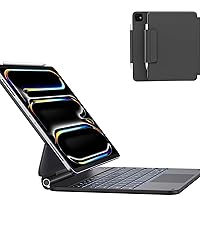
Image: Integrated pencil holder.
3. സജ്ജീകരണ നിർദ്ദേശങ്ങൾ
3.1 Attaching Your iPad
- കീബോർഡ് കേസ് തുറക്കുക.
- Align your iPad Pro 11-inch (M4) with the magnetic back cover. The iPad will snap securely into place.
- ക്രമീകരിക്കുക viewing angle by tilting the iPad to your desired position (up to 135°).
3.2 ബ്ലൂടൂത്ത് ജോടിയാക്കൽ
- Ensure the keyboard is charged (see section 3.3).
- Turn on the keyboard by sliding the power switch. The power indicator light will illuminate.
- നിങ്ങളുടെ iPad-ൽ, പോകുക ക്രമീകരണങ്ങൾ > ബ്ലൂടൂത്ത് ബ്ലൂടൂത്ത് ഓണാക്കുക.
- The iPad will search for nearby devices. Select "Foliokey11" from the list of available devices.
- Once connected, the pairing indicator light on the keyboard will turn off.
3.3 കീബോർഡ് ചാർജ് ചെയ്യുന്നു
The keyboard uses a USB-C port for charging. Connect the provided USB-C cable to the charging port on the side of the keyboard and to a power source.
- Charging Indicator (Red Light): Flashes rapidly when battery is low, solid red when charging.
- Fully Charged (Green Light): Illuminates green when charging is complete.

ചിത്രം: USB-C ചാർജിംഗ് പോർട്ടും ഇൻഡിക്കേറ്റർ ലൈറ്റുകളും.
4. പ്രവർത്തന നിർദ്ദേശങ്ങൾ
4.1 കീബോർഡ് ഉപയോഗിക്കുന്നു
Once paired, the keyboard functions like a standard laptop keyboard. Type directly into any text field on your iPad.
4.2 Multi-Touch Trackpad Gestures
The integrated trackpad supports various multi-touch gestures for efficient navigation:
- ഒറ്റ വിരൽ ടാപ്പ്: Click/Select.
- രണ്ട് വിരലുകളുള്ള സ്ക്രോൾ: മുകളിലേക്കും/താഴേക്കും അല്ലെങ്കിൽ ഇടത്തോട്ടും/വലത്തോട്ടും സ്ക്രോൾ ചെയ്യുക.
- സൂം ചെയ്യാൻ പിഞ്ച് ചെയ്യുക: ഉള്ളടക്കം സൂം ഇൻ/ഔട്ട് ചെയ്യുക.
- മൂന്ന് വിരലുകൾ ഉപയോഗിച്ച് മുകളിലേക്ക് സ്വൈപ്പ് ചെയ്യുക: ഹോം സ്ക്രീനിലേക്ക് പോകുക.
- മൂന്ന് വിരലുകൾ ഉപയോഗിച്ച് ഇടത്തോട്ടോ വലത്തോട്ടോ സ്വൈപ്പ് ചെയ്യുക: തുറന്ന അപ്ലിക്കേഷനുകൾക്കിടയിൽ മാറുക.
- Four-Finger Swipe Up: Open App Switcher.

Image: Multi-Touch Trackpad gestures.
4.3 ബാക്ക്ലൈറ്റ് നിയന്ത്രണം
The keyboard features an 11-color RGB backlight with 4 levels of adjustable brightness.
- തെളിച്ചം ക്രമീകരിക്കുക: അമർത്തുക Fn + ↑ or Fn + ↓ തെളിച്ചം കൂട്ടാനോ കുറയ്ക്കാനോ.
- നിറം മാറ്റുക: അമർത്തുക Fn + → to cycle through the 11 backlight colors.

Image: Backlit keyboard in use.
4.4 Keyboard Shortcuts
Utilize the following function key combinations for quick actions:

Image: Keyboard shortcut guide.
| കീ കോമ്പിനേഷൻ | ഫംഗ്ഷൻ |
|---|---|
| Fn + Esc | മടങ്ങിപ്പോവുക |
| Fn + ↑ | തെളിച്ചം വർദ്ധിപ്പിക്കുക |
| Fn + ↓ | തെളിച്ചം കുറയ്ക്കുക |
| Fn + 4 | സിരി തുറക്കുക |
| Fn + → | ബാക്ക്ലൈറ്റിന്റെ നിറം മാറുക |
| Fn + 8 | പ്ലേ/താൽക്കാലികമായി നിർത്തുക |
| Fn + 9 | വോളിയം ഡൗൺ |
| Fn + 0 | Turn Off/On Trackpad |
| Fn + 3 | വെർച്വൽ കീബോർഡ് തുറക്കുക |
| Fn + 5 | ബാക്ക്ലൈറ്റിന്റെ തെളിച്ചം ക്രമീകരിക്കുക |
| Fn + 7 | മുമ്പത്തെ ട്രാക്ക് |
| Fn + - | അടുത്ത ട്രാക്ക് |
| Fn + = | വോളിയം കൂട്ടുക |
| Fn + ഇല്ലാതാക്കുക | ലോക്ക് സ്ക്രീൻ |
5. പരിപാലനം
- വൃത്തിയാക്കൽ: ഒരു സോഫ്റ്റ് ഉപയോഗിക്കുക, ഡിamp കേസിന്റെയും കീബോർഡിന്റെയും പുറംഭാഗം തുടയ്ക്കാൻ തുണി ഉപയോഗിക്കുക. കഠിനമായ രാസവസ്തുക്കളോ ഉരച്ചിലുകളോ ഉള്ള വസ്തുക്കൾ ഒഴിവാക്കുക.
- സംഭരണം: When not in use for extended periods, ensure the keyboard is fully charged and stored in a cool, dry place.
- ദ്രാവകങ്ങൾ ഒഴിവാക്കുക: Keep the keyboard case away from liquids to prevent damage to electronic components.
6. പ്രശ്നപരിഹാരം
6.1 കീബോർഡ് കണക്റ്റുചെയ്യുന്നില്ല
- കീബോർഡ് ഓണാക്കിയിട്ടുണ്ടെന്നും പൂർണ്ണമായും ചാർജ് ചെയ്തിട്ടുണ്ടെന്നും ഉറപ്പാക്കുക.
- Check your iPad's Bluetooth settings to confirm Bluetooth is enabled and "Foliokey11" is selected.
- If already paired, try unpairing and re-pairing the keyboard.
- നിങ്ങളുടെ ഐപാഡും കീബോർഡും പുനരാരംഭിക്കുക.
6.2 ബാക്ക്ലൈറ്റ് പ്രവർത്തിക്കുന്നില്ല
- Ensure the keyboard is charged. Low battery can affect backlight functionality.
- ഉപയോഗിക്കുക Fn + ↑ or Fn + ↓ keys to adjust brightness.
6.3 Trackpad Not Responding
- Ensure the trackpad is not accidentally turned off. Press Fn + 0 to toggle the trackpad on/off.
- ബ്ലൂടൂത്ത് കണക്ഷൻ പരിശോധിക്കുക.
- കീബോർഡും ഐപാഡും പുനരാരംഭിക്കുക.
7 സ്പെസിഫിക്കേഷനുകൾ
| ഫീച്ചർ | വിശദാംശങ്ങൾ |
|---|---|
| മോഡൽ നമ്പർ | ഫോളിയോകി11 |
| അനുയോജ്യമായ ഉപകരണങ്ങൾ | iPad Pro 11-inch (M4) 2024 (A2836, A2837, A3006) |
| കണക്റ്റിവിറ്റി ടെക്നോളജി | ബ്ലൂടൂത്ത് |
| ബാറ്ററി ശേഷി | 700mAh ലിഥിയം പോളിമർ |
| ചാർജിംഗ് സമയം | ഏകദേശം 2.5 മണിക്കൂർ |
| തുടർച്ചയായ ജോലി സമയം | 200 hours (backlight off) |
| കീബോർഡ് ബാക്ക്ലൈറ്റിംഗ് | 11 Colors RGB, 4 Brightness Levels |
| പ്രത്യേക സവിശേഷതകൾ | Backlit, Ergonomic, Portable, Rechargeable, Full-area Trackpad |
| ഉൽപ്പന്ന അളവുകൾ | 9.99 x 7.2 x 0.77 ഇഞ്ച് |
| ഇനത്തിൻ്റെ ഭാരം | 2 പൗണ്ട് |
| നിർമ്മാതാവ് | ആസ്ഡോം |
8. ഉൽപ്പന്ന വീഡിയോകൾ
8.1 AUSDOM iPad Pro 11 Inch Case with Keyboard (M4, 2024) Overview
Video: This official product video provides a comprehensive overview of the AUSDOM iPad Pro 11-inch M4 Keyboard Case, demonstrating its features, design, and functionality.
9. വാറൻ്റിയും പിന്തുണയും
For warranty information, technical support, or any inquiries regarding your AUSDOM iPad Pro M4 11-inch Keyboard Case, please refer to the contact details provided in the packaging or visit the official AUSDOM webസൈറ്റ്.
A detailed user manual is included in the product packaging for additional guidance.


