1. ആമുഖം
This manual provides essential information for the safe and efficient use of your SPC Discovery 2 ME smartphone. Please read this guide thoroughly before operating the device to ensure proper functionality and to prevent damage.
2 സുരക്ഷാ വിവരങ്ങൾ
- ബാറ്ററി സുരക്ഷ: Do not disassemble, puncture, or modify the battery. Use only approved chargers and cables. Avoid extreme temperatures.
- ജല പ്രതിരോധം: ഈ ഉപകരണം ജല പ്രതിരോധശേഷിയുള്ളതല്ല. ദ്രാവകങ്ങളുമായി സമ്പർക്കം പുലർത്തുന്നത് ഒഴിവാക്കുക.
- ശ്രവണ സംരക്ഷണം: കേൾവിക്ക് കേടുപാടുകൾ സംഭവിക്കാതിരിക്കാൻ ഉയർന്ന ശബ്ദത്തിൽ ദീർഘനേരം കേൾക്കുന്നത് ഒഴിവാക്കുക.
- ഡ്രൈവിംഗ് സുരക്ഷ: Do not use your phone while driving. Follow local laws and regulations regarding mobile device use.
- മെഡിക്കൽ ഉപകരണങ്ങൾ: Maintain a safe distance between the phone and medical implants like pacemakers. Consult your physician and medical device manufacturer for specific guidelines.
- നീക്കം ചെയ്യൽ: Dispose of the device and battery responsibly according to local regulations. Do not dispose of with household waste.
3. പാക്കേജ് ഉള്ളടക്കം
നിങ്ങളുടെ ഉൽപ്പന്ന പാക്കേജിൽ എല്ലാ ഇനങ്ങളും ഉണ്ടെന്ന് ഉറപ്പാക്കുക:
- SPC Discovery 2 ME Smartphone
- USB-C മുതൽ USB-C കേബിൾ വരെ
- സിം എജക്ടർ ഉപകരണം
- ക്വിക്ക് സ്റ്റാർട്ട് ഗൈഡ് (ബാധകമെങ്കിൽ)
Note: A power adapter is not included and must be purchased separately. For optimal charging, use an 18W USB Power Delivery (PD) compatible charger.
4. ഉപകരണ ലേഔട്ട്
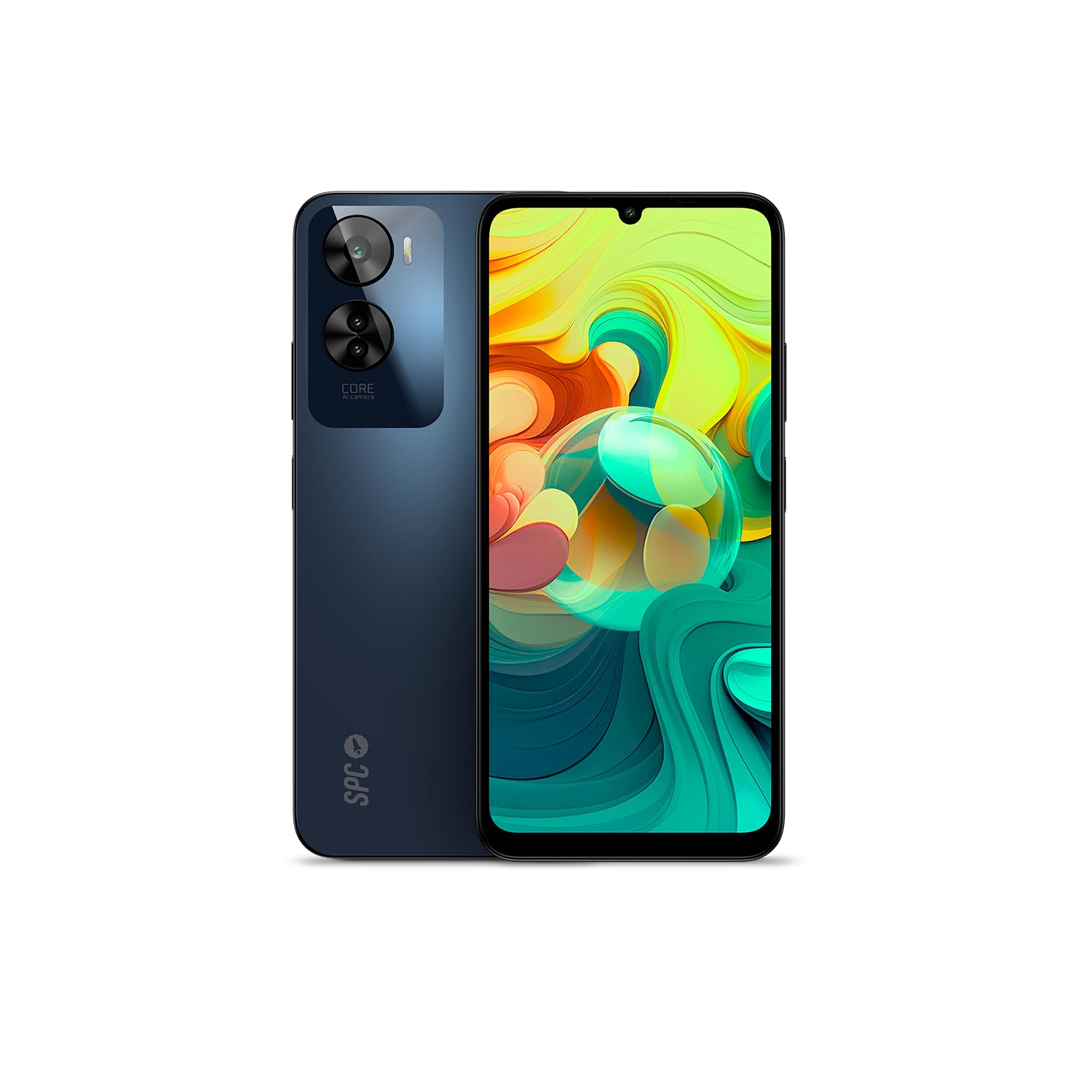
ചിത്രം 4.1: ഫ്രണ്ട് view of the SPC Discovery 2 ME, showing the display and front camera.

ചിത്രം 4.2: തിരികെ view of the SPC Discovery 2 ME, highlighting the triple camera module and fingerprint sensor.

ചിത്രം 4.3: കോണാകൃതിയിലുള്ളത് view of the SPC Discovery 2 ME, showing both front and back, and side buttons.
- മുൻ ക്യാമറ: ഡിസ്പ്ലേയുടെ മുകൾ ഭാഗത്ത് മധ്യഭാഗത്തായി സ്ഥിതിചെയ്യുന്നു.
- ഡിസ്പ്ലേ: 6.75-ഇഞ്ച് HD+ IPS InCell സ്ക്രീൻ.
- വോളിയം ബട്ടണുകൾ: ഉപകരണത്തിന്റെ വലതുവശത്ത്.
- പവർ ബട്ടൺ/ഫിംഗർപ്രിന്റ് സെൻസർ: On the right side, below the volume buttons.
- യുഎസ്ബി-സി പോർട്ട്: ചാർജിംഗിനും ഡാറ്റ കൈമാറ്റത്തിനുമായി താഴെ.
- 3.5mm ഓഡിയോ ജാക്ക്: ഹെഡ്ഫോണുകൾക്കായി.
- സിം/മൈക്രോ എസ്ഡി കാർഡ് ട്രേ: On the left side of the device.
- ട്രിപ്പിൾ പിൻ ക്യാമറ: പിൻ പാനലിന്റെ മുകളിൽ ഇടതുവശത്ത് സ്ഥിതിചെയ്യുന്നു.
5. സജ്ജീകരണം
5.1. സിം, മൈക്രോ എസ്ഡി കാർഡുകൾ ചേർക്കൽ
- Locate the SIM/MicroSD card tray on the left side of the phone.
- Insert the SIM ejector tool into the small hole on the tray and press firmly until the tray pops out.
- Place your Nano-SIM card(s) and/or MicroSD card into the designated slots on the tray. Ensure the gold contacts face downwards. The device supports dual SIM and MicroSD expansion up to 512GB.
- ട്രേ അതിന്റെ സ്ഥാനത്ത് ക്ലിക്കായി വരുന്നത് വരെ ശ്രദ്ധാപൂർവ്വം ഫോണിലേക്ക് വീണ്ടും തിരുകുക.
5.2. പ്രാരംഭ പവർ ഓണും അടിസ്ഥാന സജ്ജീകരണവും
- Press and hold the Power button on the right side of the device until the SPC logo appears.
- പ്രാരംഭ സജ്ജീകരണം പൂർത്തിയാക്കാൻ ഓൺ-സ്ക്രീൻ നിർദ്ദേശങ്ങൾ പാലിക്കുക:
- നിങ്ങളുടെ ഭാഷ തിരഞ്ഞെടുക്കുക.
- ഒരു Wi-Fi നെറ്റ്വർക്കിലേക്ക് കണക്റ്റുചെയ്യുക.
- Review നിബന്ധനകളും വ്യവസ്ഥകളും അംഗീകരിക്കുക.
- നിങ്ങളുടെ Google അക്കൗണ്ട് ഉപയോഗിച്ച് സൈൻ ഇൻ ചെയ്യുക അല്ലെങ്കിൽ പുതിയൊരെണ്ണം സൃഷ്ടിക്കുക.
- Set up screen lock (PIN, pattern, password) and biometric security (fingerprint, facial recognition).
6. പ്രവർത്തന നിർദ്ദേശങ്ങൾ
6.1. അടിസ്ഥാന നാവിഗേഷൻ
- സ്പർശന ആംഗ്യങ്ങൾ: തിരഞ്ഞെടുക്കാൻ ടാപ്പ് ചെയ്യുക, സ്ക്രോൾ ചെയ്യാൻ സ്വൈപ്പ് ചെയ്യുക, സൂം ചെയ്യാൻ പിഞ്ച് ചെയ്യുക.
- ഹോം സ്ക്രീൻ: ആപ്പുകൾ, വിജറ്റുകൾ, അറിയിപ്പുകൾ എന്നിവ ആക്സസ് ചെയ്യുക.
- അറിയിപ്പ് പാനൽ: സ്ക്രീനിന്റെ മുകളിൽ നിന്ന് താഴേക്ക് സ്വൈപ്പ് ചെയ്യുക view അറിയിപ്പുകളും ദ്രുത ക്രമീകരണങ്ങളും.
- ആപ്പ് ഡ്രോയർ: ഇൻസ്റ്റാൾ ചെയ്ത എല്ലാ ആപ്ലിക്കേഷനുകളും ആക്സസ് ചെയ്യാൻ സ്ക്രീനിന്റെ താഴെ നിന്ന് മുകളിലേക്ക് സ്വൈപ്പ് ചെയ്യുക.
6.2. കോളുകൾ ചെയ്യുക, സന്ദേശങ്ങൾ അയയ്ക്കുക
- കോളുകൾ: "ഫോൺ" ആപ്പ് തുറന്ന് നമ്പർ നൽകി കോൾ ഐക്കണിൽ ടാപ്പ് ചെയ്യുക.
- സന്ദേശങ്ങൾ: Open the "Messages" app, tap the new message icon, enter the recipient and your message.
- ഇരട്ട സിം: If using two SIM cards, you can select which SIM to use for calls or messages from the respective app settings.
6.3. ക്യാമറ ഉപയോഗം
The SPC Discovery 2 ME features a triple AI camera system, including a 50MP main sensor.
- Open the "Camera" app.
- നിങ്ങൾക്ക് ആവശ്യമുള്ള മോഡ് തിരഞ്ഞെടുക്കുക (ഫോട്ടോ, വീഡിയോ, പോർട്രെയ്റ്റ്, മാക്രോ, മുതലായവ).
- ഒരു ചിത്രം പകർത്താൻ ഷട്ടർ ബട്ടൺ ടാപ്പ് ചെയ്യുക അല്ലെങ്കിൽ വീഡിയോ റെക്കോർഡിംഗ് ആരംഭിക്കുക/നിർത്തുക.
- Use the AI scene detection for optimized settings.
- For close-up shots, switch to Macro mode.
6.4. NFC for Contactless Payments
Your device supports NFC (Near Field Communication) for secure contactless payments.
- നിങ്ങളുടെ ഫോണിന്റെ ക്രമീകരണങ്ങളിൽ NFC പ്രവർത്തനക്ഷമമാക്കിയിട്ടുണ്ടെന്ന് ഉറപ്പാക്കുക (ക്രമീകരണങ്ങൾ > കണക്റ്റുചെയ്ത ഉപകരണങ്ങൾ > കണക്ഷൻ മുൻഗണനകൾ > NFC).
- Set up your preferred payment app (e.g., Google Pay) and add your credit/debit cards.
- To make a payment, unlock your phone and hold the back of the device near the contactless payment terminal.
6.5. Biometric Unlock
The device offers both fingerprint and facial recognition for secure unlocking.
- ഫിംഗർപ്രിന്റ് സെൻസർ: Located on the side power button. Register your fingerprints via Settings > Security & privacy > Device unlock > Fingerprint unlock.
- മുഖം തിരിച്ചറിയൽ: Register your face via Settings > Security & privacy > Device unlock > Face unlock. Ensure good lighting when setting up and using this feature.
6.6. ബാറ്ററി മാനേജ്മെന്റ്
The 5000 mAh battery provides extended usage. For optimal battery life:
- Charge your device using the provided USB-C cable and an 18W PD compatible charger.
- ബാറ്ററി ഇടയ്ക്കിടെ പൂർണ്ണമായും ഡിസ്ചാർജ് ചെയ്യുന്നത് ഒഴിവാക്കുക.
- ബാറ്ററി ചാർജ് കുറവായിരിക്കുമ്പോൾ ബാറ്ററി സേവർ മോഡ് പ്രവർത്തനക്ഷമമാക്കുക.
- പശ്ചാത്തലത്തിൽ പ്രവർത്തിക്കുന്ന ഉപയോഗിക്കാത്ത ആപ്പുകൾ അടയ്ക്കുക.
7. പരിപാലനം
- വൃത്തിയാക്കൽ: സ്ക്രീനും ബോഡിയും വൃത്തിയാക്കാൻ മൃദുവായ, ലിന്റ് രഹിത തുണി ഉപയോഗിക്കുക. ഉരച്ചിലുകളുള്ള വസ്തുക്കളോ കഠിനമായ രാസവസ്തുക്കളോ ഒഴിവാക്കുക.
- സോഫ്റ്റ്വെയർ അപ്ഡേറ്റുകൾ: Regularly check for and install system updates (Settings > System > System update) to ensure optimal performance and security. The device runs on Android 14.
- സംഭരണം: Manage your 256GB internal storage by regularly deleting unnecessary files or moving them to the expandable MicroSD card (up to 512GB).
8. പ്രശ്നപരിഹാരം
| ഇഷ്യൂ | സാധ്യമായ പരിഹാരം |
|---|---|
| ഉപകരണം ഓണാക്കില്ല. | ബാറ്ററി ചാർജ് ചെയ്തിട്ടുണ്ടെന്ന് ഉറപ്പാക്കുക. കുറഞ്ഞത് 15 മിനിറ്റെങ്കിലും ചാർജറുമായി കണക്റ്റ് ചെയ്യുക, തുടർന്ന് വീണ്ടും പവർ ചെയ്യാൻ ശ്രമിക്കുക. |
| ബാറ്ററി പെട്ടെന്ന് തീരുന്നു. | Reduce screen brightness, close background apps, disable unused features like GPS or Bluetooth, or enable battery saver mode. |
| ആപ്പുകൾ ക്രാഷ് ചെയ്യുകയോ മരവിക്കുകയോ ചെയ്യുന്നു. | Clear the app's cache (Settings > Apps > [App Name] > Storage & cache > Clear cache). If the issue persists, restart the device. |
| Wi-Fi-ലേക്ക് കണക്റ്റ് ചെയ്യാൻ കഴിയില്ല. | Restart your router and phone. Forget the network and reconnect. Ensure Wi-Fi is enabled on your device. |
| ഫിംഗർപ്രിന്റ് സെൻസർ പ്രവർത്തിക്കുന്നില്ല. | Ensure your finger is clean and dry. Re-register your fingerprints in settings. |
9 സ്പെസിഫിക്കേഷനുകൾ
| ഫീച്ചർ | വിശദാംശങ്ങൾ |
|---|---|
| മോഡലിൻ്റെ പേര് | Discovery 2 ME |
| മോഡൽ നമ്പർ | 25246256D |
| ഓപ്പറേറ്റിംഗ് സിസ്റ്റം | ആൻഡ്രോയിഡ് 14 |
| ഡിസ്പ്ലേ വലിപ്പം | 6.75 ഇഞ്ച് |
| ഡിസ്പ്ലേ റെസല്യൂഷൻ | 1600 x 720 (എച്ച്ഡി+) |
| പുതുക്കിയ നിരക്ക് | 90 Hz |
| സിപിയു വേഗത | 1.6 GHz (Octa-core) |
| റാം | 6 GB (expandable up to 14 GB virtual RAM) |
| ആന്തരിക സംഭരണം | 256 ജിബി |
| വികസിപ്പിക്കാവുന്ന സംഭരണം | 512 ജിബി വരെ മൈക്രോ എസ്ഡി |
| പിൻ ക്യാമറ റെസല്യൂഷൻ | 50 Megapixels (Main) |
| ബാറ്ററി ശേഷി | 5000 mAh (ലിഥിയം-അയോൺ) |
| ചാർജിംഗ് | 18W Fast Charge (USB PD) |
| കണക്റ്റിവിറ്റി | 4G, ബ്ലൂടൂത്ത്, വൈ-ഫൈ, NFC |
| തുറമുഖങ്ങൾ | യുഎസ്ബി ടൈപ്പ്-സി, 3.5 എംഎം ജാക്ക് |
| പ്രത്യേക സവിശേഷതകൾ | Dual SIM, Integrated GPS, Expandable Memory, USB OTG Support, Biometric Unlock (Fingerprint, Facial Recognition) |
10. വാറൻ്റിയും പിന്തുണയും
Your SPC Discovery 2 ME smartphone is covered by a standard manufacturer's warranty. For detailed warranty terms and conditions, please refer to the warranty card included in your package or visit the official SPC webസൈറ്റ്.
For technical support, troubleshooting assistance, or service requests, please contact SPC customer support through their official channels. Contact information can typically be found on the SPC webസൈറ്റിലോ ക്വിക്ക് സ്റ്റാർട്ട് ഗൈഡിലോ.


