1. ആമുഖം
This manual provides detailed instructions for the installation, operation, and maintenance of your Reobiux D20-1P 2K Outdoor Surveillance Camera. Please read this manual thoroughly before using the product to ensure proper functionality and safety.
2. പാക്കേജ് ഉള്ളടക്കം
താഴെ ലിസ്റ്റ് ചെയ്തിരിക്കുന്ന എല്ലാ ഇനങ്ങളും നിങ്ങളുടെ പാക്കേജിൽ ഉൾപ്പെടുത്തിയിട്ടുണ്ടെന്ന് ഉറപ്പാക്കുക. ഏതെങ്കിലും ഇനങ്ങൾ നഷ്ടപ്പെട്ടിട്ടുണ്ടെങ്കിലോ കേടായിട്ടുണ്ടെങ്കിലോ, ദയവായി ഉപഭോക്തൃ പിന്തുണയുമായി ബന്ധപ്പെടുക.
- 1x Reobiux D20-1P Solar PTZ Camera
- 1x Solar Collector
- 1x ഉപയോക്തൃ മാനുവൽ
- 1x മൗണ്ടിംഗ് ബേസ്
- 1x Power Supply (for initial charging)
- 1x Screws Bag (for installation)
- 1x Type-C Charging Line
3. ഉൽപ്പന്നം കഴിഞ്ഞുview
The Reobiux D20-1P is a 2K outdoor surveillance camera designed for comprehensive home security. It features dual lenses, 360° Pan-Tilt-Zoom (PTZ) capabilities, and operates wirelessly via Wi-Fi. Key features include PIR motion detection, color night vision, two-way audio, and an IP66 weatherproof rating, powered by a solar panel and rechargeable battery.
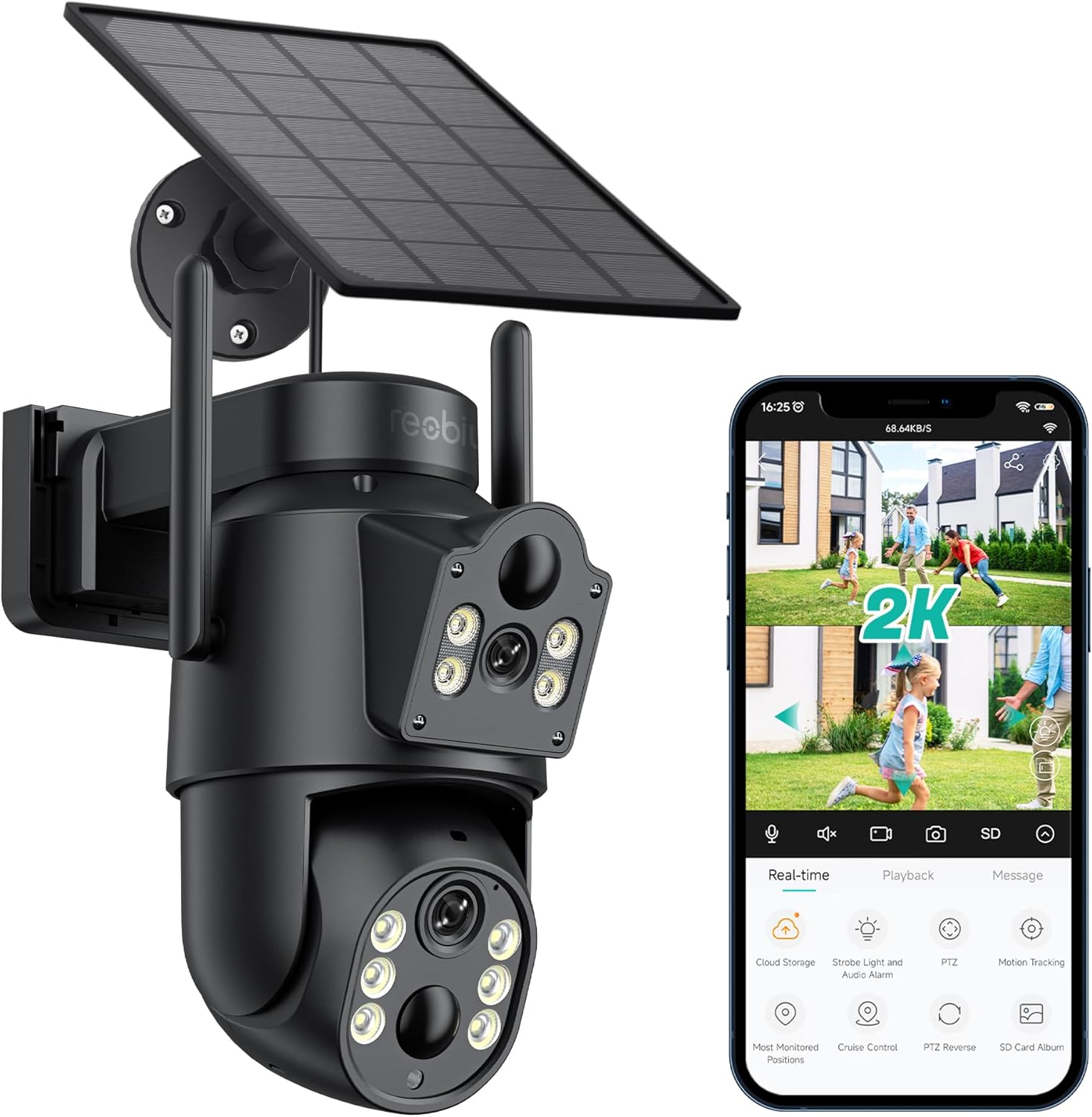
ചിത്രം 3.1: Reobiux D20-1P Solar PTZ Camera and its mobile application interface showing real-time monitoring, playback, and various control options.
പ്രധാന സവിശേഷതകൾ:
- 2K QHD High Resolution: വ്യക്തവും വിശദവുമായ വീഡിയോ ഫൂ നൽകുന്നുtage.
- Dual-Lens Design: Combines a fixed lens with a rotating lens for comprehensive coverage.
- 360° PTZ Functionality: Allows remote control of pan, tilt, and zoom for flexible viewകോണുകൾ.
- Solar Powered with Rechargeable Battery: Ensures continuous operation with minimal manual charging.
- പിആർ മോഷൻ കണ്ടെത്തൽ: Intelligently detects human movement to reduce false alarms.
- കളർ നൈറ്റ് വിഷൻ: Offers full-color video even in low-light conditions, alongside infrared night vision.
- ടു-വേ ഓഡിയോ: Enables communication with visitors or deterrence of intruders.
- IP66 കാലാവസ്ഥാ പ്രതിരോധം: വിവിധ ബാഹ്യ കാലാവസ്ഥകളെ നേരിടാൻ രൂപകൽപ്പന ചെയ്തിരിക്കുന്നു.
- Wireless Wi-Fi Connectivity: Easy setup and remote access via smartphone.
4. സജ്ജീകരണ ഗൈഡ്
4.1 പ്രാരംഭ ചാർജിംഗ്
Before first use, fully charge the camera's internal battery using the provided Type-C charging line and power supply. This ensures the camera has sufficient power for initial setup and operation, especially if solar charging conditions are not optimal immediately after installation.
4.2 ആപ്പ് ഇൻസ്റ്റാളേഷനും അക്കൗണ്ട് സൃഷ്ടിയും
- ഡൗൺലോഡ് ചെയ്യുക iCSee നിങ്ങളുടെ സ്മാർട്ട്ഫോണിന്റെ ആപ്പ് സ്റ്റോറിൽ (iOS ആപ്പ് സ്റ്റോർ അല്ലെങ്കിൽ ഗൂഗിൾ പ്ലേ സ്റ്റോർ) നിന്നുള്ള ആപ്പ്.
- ആപ്പ് ഇൻസ്റ്റാൾ ചെയ്ത് തുറക്കുക.
- Follow the on-screen instructions to create a new account or log in if you already have one.
4.3 Camera Connection to Wi-Fi
- Ensure your camera is powered on.
- In the iCSee app, tap the "+" icon to add a new device.
- Select the option for "Wi-Fi Camera" or "Add Device by AP Hotspot" (refer to app for exact wording).
- Follow the app's instructions to connect the camera to your 2.4GHz Wi-Fi network. You may need to scan a QR code displayed on your phone with the camera, or listen for a sound prompt.
- Once connected, you can name your camera and begin monitoring.
4.4 ക്യാമറ മൗണ്ടിംഗ്
Choose a location that provides optimal surveillance coverage and receives direct sunlight for the solar panel. Ensure the camera is within range of your Wi-Fi network.
- ലൊക്കേഷൻ തിരഞ്ഞെടുക്കുക: Identify a suitable wall or surface for mounting. Consider the camera's viewing angle (355° pan, 90° tilt) and the solar panel's exposure to sunlight.
- ഡ്രില്ലിംഗ് പോയിന്റുകൾ അടയാളപ്പെടുത്തുക: Use the mounting base as a template to mark the screw holes on the wall.
- തുളകൾ: Drill pilot holes at the marked positions. Insert wall anchors if necessary.
- മൗണ്ടിംഗ് ബേസ് അറ്റാച്ചുചെയ്യുക: നൽകിയിരിക്കുന്ന സ്ക്രൂകൾ ഉപയോഗിച്ച് മൗണ്ടിംഗ് ബേസ് ഭിത്തിയിൽ ഉറപ്പിക്കുക.
- ക്യാമറ ഘടിപ്പിക്കുക: Mount the camera onto the secured base.
- സോളാർ പാനൽ ക്രമീകരിക്കുക: Position the solar panel to maximize sunlight exposure throughout the day.

ചിത്രം 4.1: Illustration of the camera mounted with its solar panel, highlighting the fixed and rotating lenses and the benefit of continuous solar power.
5. പ്രവർത്തന നിർദ്ദേശങ്ങൾ
5.1 തത്സമയം View ഒപ്പം പ്ലേബാക്ക്
Open the iCSee app and select your camera to access the live view. ഇവിടെ നിന്ന്, നിങ്ങൾക്ക് ഇവ ചെയ്യാനാകും:
- തത്സമയ നിരീക്ഷണം: View തത്സമയ വീഡിയോ ഫീഡ്.
- PTZ നിയന്ത്രണം: Use the on-screen joystick to pan (355°) and tilt (90°) the camera.
- ഡിജിറ്റൽ സൂം: Pinch to zoom on the live feed.
- പ്ലേബാക്ക്: റെക്കോർഡ് ചെയ്ത foo ആക്സസ് ചെയ്യുകtage stored on the SD card or cloud storage.

ചിത്രം 5.1: Demonstrates the superior clarity of 2K QHD resolution compared to 1080P, providing more details for monitoring.
5.2 മോഷൻ ഡിറ്റക്ഷനും അലേർട്ടുകളും
The camera utilizes PIR (Passive Infrared) intelligent detection to identify human movement, minimizing false alarms from pets or swaying branches.
- പ്രവർത്തനക്ഷമമാക്കുക/പ്രവർത്തനരഹിതമാക്കുക: Activate or deactivate motion detection in the app settings.
- സെൻസിറ്റിവിറ്റി അഡ്ജസ്റ്റ്മെന്റ്: Adjust the PIR sensor's sensitivity to suit your environment.
- അലാറം അറിയിപ്പുകൾ: Receive instant push notifications on your smartphone when motion is detected.
- സൗണ്ട് ആൻഡ് ലൈറ്റ് അലാറം: Configure the camera to trigger a strobe light and audible alarm upon detection.

ചിത്രം 5.2: The camera's PIR intelligent detection distinguishes human movement from other objects, reducing unnecessary alerts.

ചിത്രം 5.3: When motion is detected, the camera can send real-time push notifications and activate a sound and light alarm to deter intruders.
5.3 നൈറ്റ് വിഷൻ മോഡുകൾ
The camera offers two night vision modes for clear visibility in the dark:
- Spotlight Full Color Night Vision: Utilizes built-in spotlights to provide full-color video in low-light conditions.
- Spotlight Infrared Night Vision: Uses infrared LEDs for black-and-white video in complete darkness, with a range of up to 30 meters.
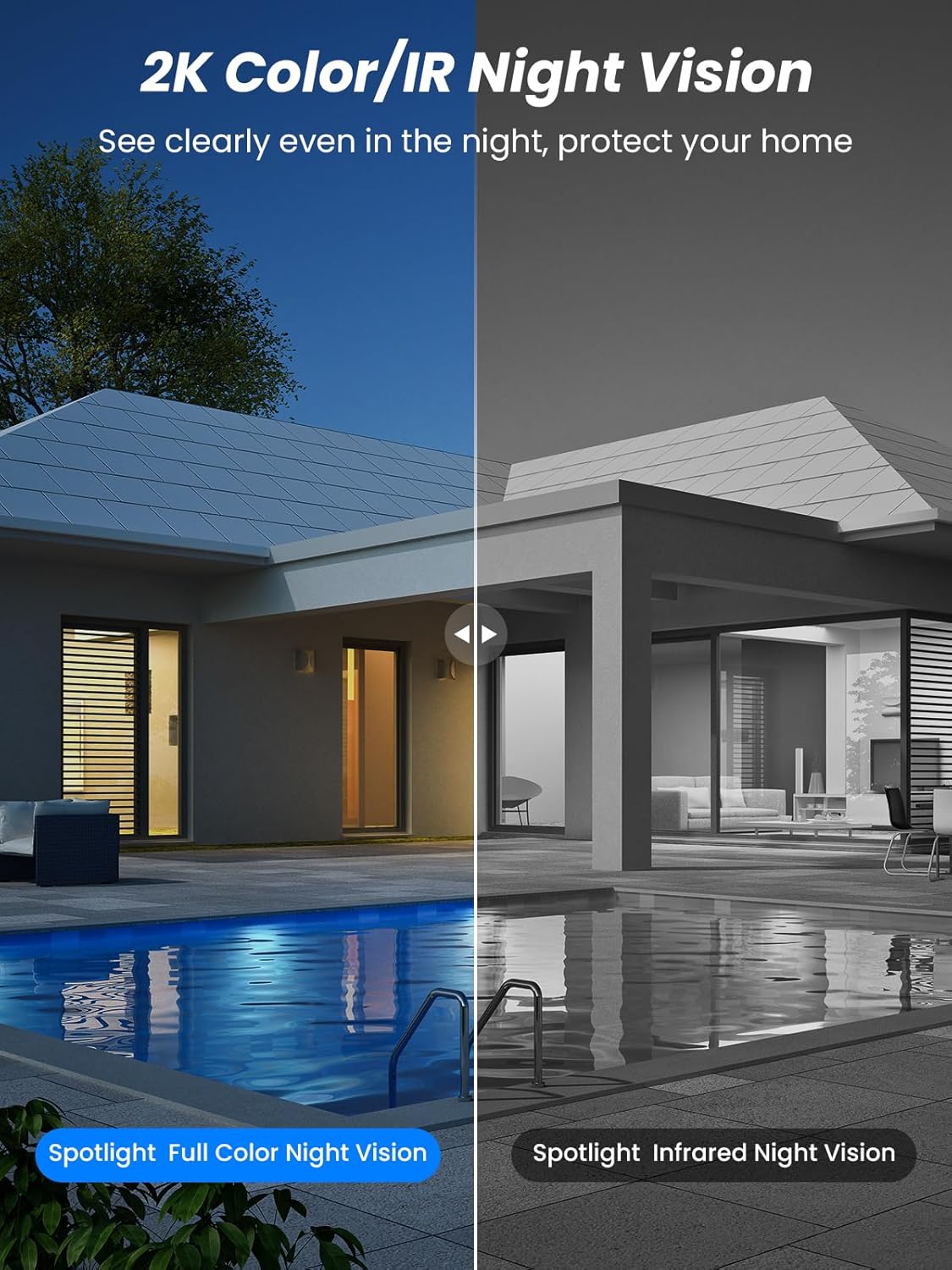
ചിത്രം 5.4: Illustrates the difference between full-color night vision, enabled by spotlights, and traditional infrared night vision.
5.4 ടു-വേ ഓഡിയോ
The integrated microphone and speaker allow for two-way communication.
- സംസാരിക്കുക: ക്യാമറയുടെ സ്പീക്കറിലൂടെ സംസാരിക്കാൻ ആപ്പിലെ മൈക്രോഫോൺ ഐക്കണിൽ ടാപ്പ് ചെയ്യുക.
- കേൾക്കുക: The camera's microphone captures audio from its surroundings.

ചിത്രം 5.5: The two-way audio function allows for direct communication through the camera, useful for interacting with visitors or delivery personnel.
6. പരിപാലനം
- വൃത്തിയാക്കൽ: ക്യാമറ ലെൻസും സോളാർ പാനലും ഇടയ്ക്കിടെ മൃദുവായ, ഡി-ടച്ച് ഉപയോഗിച്ച് വൃത്തിയാക്കുക.amp cloth to ensure optimal performance and clear image quality. Avoid abrasive cleaners.
- ബാറ്ററി ആരോഗ്യം: While solar-powered, extreme weather or prolonged periods of low sunlight may require manual charging. Monitor battery levels via the app.
- ഫേംവെയർ അപ്ഡേറ്റുകൾ: Check the iCSee app regularly for available firmware updates to ensure your camera has the latest features and security enhancements.
- കാലാവസ്ഥ സംരക്ഷണം: The camera is IP66 weatherproof, designed to withstand rain, snow, and sun. However, ensure all connections are secure to maintain water resistance.

ചിത്രം 6.1: The IP66 rating ensures the camera's durability and functionality in various outdoor weather conditions, including snow, rain, and direct sunlight.
7. പ്രശ്നപരിഹാരം
- ക്യാമറ വൈഫൈയിലേക്ക് കണക്റ്റ് ചെയ്യുന്നില്ല:
- Ensure the camera is within range of your 2.4GHz Wi-Fi network. 5GHz networks are not supported.
- നിങ്ങളുടെ വൈഫൈ പാസ്വേഡ് ശരിയാണോ എന്ന് പരിശോധിക്കുക.
- നിങ്ങളുടെ റൂട്ടറും ക്യാമറയും പുനരാരംഭിക്കുക.
- If issues persist, try resetting the camera (refer to app or product for reset button location).
- Battery not charging or draining quickly:
- സോളാർ പാനൽ വൃത്തിയുള്ളതാണെന്നും ദിവസേന മണിക്കൂറുകളോളം നേരിട്ട് സൂര്യപ്രകാശം ലഭിക്കുന്നുണ്ടെന്നും ഉറപ്പാക്കുക.
- സോളാർ പാനലും ക്യാമറയും തമ്മിലുള്ള കണക്ഷൻ പരിശോധിക്കുക.
- If in a low-light environment, manually charge the camera using the Type-C cable.
- Frequent motion detection events or live view streaming can consume battery faster. Adjust settings if needed.
- False motion detection alarms:
- Adjust the PIR motion detection sensitivity in the iCSee app.
- Ensure the camera is not pointed at areas with constant movement (e.g., busy roads, swaying trees) if not intended for monitoring.
- മോശം ചിത്ര നിലവാരം:
- ക്യാമറ ലെൻസ് വൃത്തിയാക്കുക.
- പ്രത്യേകിച്ച് രാത്രിയിൽ, മികച്ച ഇമേജ് ക്യാപ്ചറിന് മതിയായ വെളിച്ചം ഉറപ്പാക്കുക.
- നിങ്ങളുടെ വൈഫൈ സിഗ്നൽ ശക്തി പരിശോധിക്കുക; ദുർബലമായ സിഗ്നൽ വീഡിയോ സ്ട്രീമിംഗ് ഗുണനിലവാരത്തെ ബാധിച്ചേക്കാം.
8 സ്പെസിഫിക്കേഷനുകൾ
| ഫീച്ചർ | വിശദാംശങ്ങൾ |
|---|---|
| മോഡലിൻ്റെ പേര് | D20-1P |
| വീഡിയോ ക്യാപ്ചർ റെസല്യൂഷൻ | 2.5K |
| ഫലപ്രദമായ വീഡിയോ റെസല്യൂഷൻ | 2K QHD |
| വയർലെസ് കമ്മ്യൂണിക്കേഷൻ ടെക്നോളജി | വൈഫൈ (2.4GHz) |
| ഫോം ഫാക്ടർ | താഴികക്കുടം |
| Viewing ആംഗിൾ | 355 ഡിഗ്രി (പാൻ), 90 ഡിഗ്രി (ടിൽറ്റ്) |
| ഇൻസ്റ്റലേഷൻ തരം | വാൾ മൗണ്ടഡ് |
| നൈറ്റ് വിഷൻ റേഞ്ച് | 30 മീറ്റർ |
| ഫ്രെയിം റേറ്റ് | 25 fps |
| മെറ്റീരിയൽ | പ്ലാസ്റ്റിക് |
| വാല്യംtage | 12 വോൾട്ട് (DC) |
| വാട്ട്tage | 5 വാട്ട്സ് |
| പവർ ഉറവിടം | ബാറ്ററിയിൽ പ്രവർത്തിക്കുന്ന, സൗരോർജ്ജത്തിൽ പ്രവർത്തിക്കുന്ന |
| ബാറ്ററികൾ | 3 ലിഥിയം അയോൺ ബാറ്ററികൾ (ഉൾപ്പെട്ടിരിക്കുന്നു) |
| കണക്റ്റിവിറ്റി പ്രോട്ടോക്കോൾ | വൈഫൈ |
| കൺട്രോളർ തരം | iCSee ആപ്പ് |
| പ്രത്യേക സവിശേഷതകൾ | Night Vision (Color/IR), PIR Motion Detection, Two-Way Audio, IP66 Weatherproof |
| ഇനത്തിൻ്റെ ഭാരം | 1.06 കി.ഗ്രാം |
| പാഴ്സൽ അളവുകൾ | 21.7 x 19.5 x 13.8 സെ.മീ |
9. വാറൻ്റിയും പിന്തുണയും
Reobiux offers a 1 വർഷത്തെ വാറൻ്റി for this product. For any issues or inquiries, please do not hesitate to reach out to our customer service. We provide 20 hours of online service to assist you.
For support, please refer to the contact information provided with your purchase or within the iCSee application.


