1. ആമുഖം
This manual provides instructions for the safe and efficient use of your KW-Trio 050LAN Heavy Duty Stapler. This stapler is designed for binding booklets, presentations, and reports, offering a robust solution for high-volume stapling tasks. Please read this manual thoroughly before operating the device and retain it for future reference.

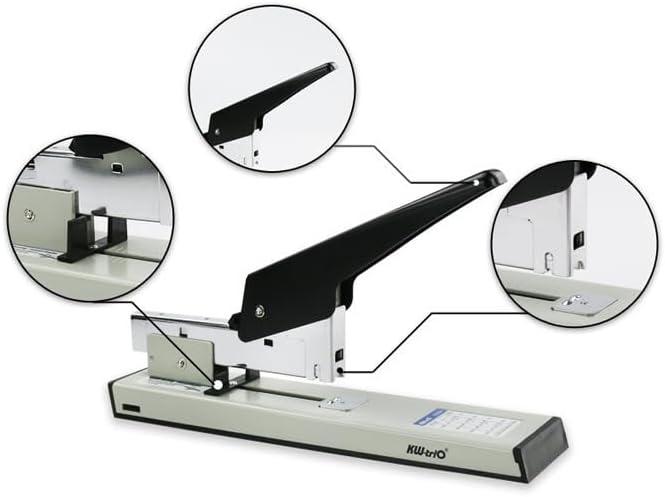
ചിത്രം 1.1: The KW-Trio 050LAN Heavy Duty Stapler. This image displays the overall design of the stapler, featuring a black handle and a light-colored base with a metal stapling mechanism.
2. സജ്ജീകരണവും സ്റ്റേപ്പിൾ ലോഡിംഗും
Before using the stapler, ensure it is placed on a stable, flat surface.
2.1 സ്റ്റേപ്പിൾസ് ലോഡുചെയ്യുന്നു
- Open the Staple Magazine: Gently pull the staple magazine (the metal tray where staples are loaded) outwards from the front of the stapler until it fully extends.
- സ്റ്റേപ്പിൾസ് ചേർക്കുക: Place a strip of compatible staples (e.g., 23/6 to 23/23) into the magazine with the staple points facing downwards. The stapler has a capacity of 100 staples.
- മാഗസിൻ അടയ്ക്കുക: Push the staple magazine back into the stapler until it clicks securely into place.

ചിത്രം 2.1: വിശദമായി view of the stapler's components, including the staple loading area and adjustable depth guide. This image highlights key functional parts of the stapler.
2.2 Adjusting Stapling Depth
The stapler features an adjustable depth guide to control how far from the edge of the paper the staple is placed.
- Locate the adjustable depth guide on the base of the stapler.
- Slide the guide to the desired depth. The maximum depth is 70mm.
2.3 Rotating Anvil for Different Staple Types
The stapler is equipped with a rotatable anvil to accommodate different staple sizes and types, ensuring optimal stapling for various paper thicknesses.
- Identify the anvil located beneath the stapling mechanism.
- Rotate the anvil to select the appropriate setting for your chosen staple size (e.g., 23/6, 23/10, 23/13, etc.).
3. ഓപ്പറേഷൻ
Once the staples are loaded and the depth is set, the stapler is ready for use.
- രേഖകൾ തയ്യാറാക്കുക: Align the pages you wish to staple, ensuring they are neatly stacked.
- Position Documents: Slide the aligned documents under the stapling head, against the adjustable depth guide, to the desired stapling position.
- പ്രധാനം: Firmly press down on the stapler handle until the stapler mechanism fully engages and releases a staple. The ergonomic rubber grip on the handle provides comfort during use.
- റിലീസ്: Lift the handle to release the stapled documents.
ചിത്രം 3.1: The KW-Trio 050LAN stapler in action, demonstrating its use for binding documents. The image shows a hand pressing the handle to staple a stack of papers.
4. പരിപാലനം
പതിവ് അറ്റകുറ്റപ്പണികൾ നിങ്ങളുടെ സ്റ്റാപ്ലറിന്റെ ദീർഘായുസ്സും മികച്ച പ്രകടനവും ഉറപ്പാക്കുന്നു.
- വൃത്തിയാക്കൽ: Periodically wipe the exterior of the stapler with a soft, dry cloth to remove dust and debris. Avoid using abrasive cleaners or solvents.
- സ്റ്റേപ്പിൾ ജാമുകൾ: If a staple jam occurs, carefully open the staple magazine and remove any bent or misfed staples. Ensure the correct staple size is being used for the paper thickness.
- സംഭരണം: Store the stapler in a clean, dry environment when not in use.
5. പ്രശ്നപരിഹാരം
| പ്രശ്നം | സാധ്യമായ കാരണം | പരിഹാരം |
|---|---|---|
| കടലാസിൽ തുളച്ചുകയറാത്ത സ്റ്റേപ്പിൾസ് |
|
|
| പ്രധാന ജാമുകൾ |
|
|
| Staples not feeding |
|
|
6 സ്പെസിഫിക്കേഷനുകൾ
The following table details the technical specifications and stapling capacities of the KW-Trio 050LAN Heavy Duty Stapler.
| ഫീച്ചർ | മൂല്യം |
|---|---|
| ബൈൻഡിംഗ് കപ്പാസിറ്റി | 230 ഷീറ്റുകൾ വരെ |
| ക്രമീകരിക്കാവുന്ന ആഴം | 70 മി.മീ |
| അളവുകൾ (L x W x H) | 300mm x 90mm x 245mm |
| മൊത്തം ഭാരം | 2.8 കി.ഗ്രാം |
| Staple Magazine Capacity | 100 സ്റ്റേപ്പിൾസ് |
| അനുയോജ്യമായ സ്റ്റേപ്പിൾ തരങ്ങൾ | 23/6 - 23/23 |
| ബോഡി മെറ്റീരിയൽ | ലോഹം |
| ഹാൻഡിൽ ഗ്രിപ്പ് | റബ്ബർ |
6.1 Staple Size and Sheet Capacity Guide
| Staple Length (mm) | Staple Length (inch) | സ്റ്റേപ്പിൾ തരം | ഷീറ്റ് ശേഷി |
|---|---|---|---|
| 6 മി.മീ | 1/4" | 23/6 | 2-30 |
| 10 മി.മീ | 3/8" | 23/10 | 30-70 |
| 13 മി.മീ | 1/2" | 23/13 | 50-100 |
| 15 മി.മീ | 9/16" | 23/15 | 70-120 |
| 17 മി.മീ | 5/8" | 23/17 | 90-150 |
| 20 മി.മീ | 3/4" | 23/20 | 120-180 |
| 23 മി.മീ | 15/16" | 23/23 | 170-240 |
7. വാറണ്ടിയും പിന്തുണയും
The KW-Trio 050LAN Heavy Duty Stapler comes with a 2 വർഷത്തെ വാറൻ്റി from the date of purchase. This warranty covers manufacturing defects under normal use. It does not cover damage resulting from misuse, accidents, or unauthorized modifications.
For warranty claims, technical support, or inquiries, please contact your retailer or the official KW-Trio customer service. Please have your proof of purchase and the product model number (050LAN) available when contacting support.


