1. ആമുഖം
Thank you for choosing the Briidea BR-134 Temperature Controlled Outlet. This device is designed to automatically regulate the temperature in your environment by controlling connected heating or cooling appliances. It features both heating and cooling modes, a wide temperature range, and a power failure memory function for convenience and efficiency. Please read this manual carefully before use to ensure proper operation and safety.
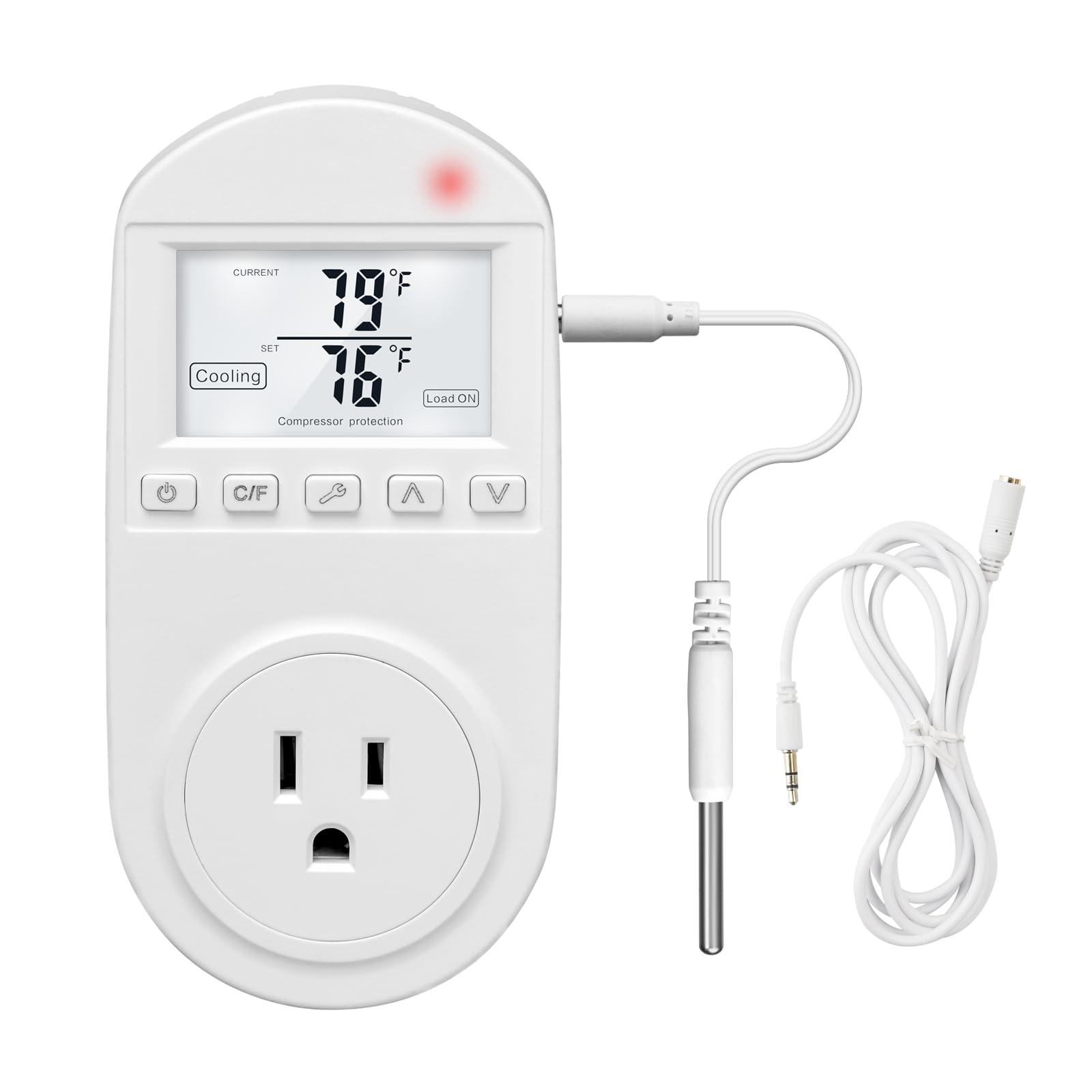
Figure 1: Briidea BR-134 Temperature Controlled Outlet
2 സുരക്ഷാ വിവരങ്ങൾ
- ഉപകരണം പ്രവർത്തിപ്പിക്കുന്നതിന് മുമ്പ് എല്ലാ നിർദ്ദേശങ്ങളും വായിക്കുക.
- This device is intended for indoor use only. Do not expose to water or high humidity.
- Do not exceed the maximum electrical ratings of 110V, 15A.
- ഉപകരണം ഒരു ഗ്രൗണ്ടഡ് ഔട്ട്ലെറ്റിൽ സുരക്ഷിതമായി പ്ലഗ് ചെയ്തിട്ടുണ്ടെന്ന് ഉറപ്പാക്കുക.
- Do not disassemble or attempt to repair the device. Contact customer support if service is required.
- കുട്ടികൾക്ക് ലഭ്യമാകാതെ സൂക്ഷിക്കുക.
3. പാക്കേജ് ഉള്ളടക്കം
- 1 x Briidea BR-134 Thermostat Outlet
- 2 x 5ft Temperature Sensor Wires
- 1 x ഇൻസ്ട്രക്ഷൻ മാനുവൽ (ഈ ഡോക്യുമെന്റ്)
4. ഉൽപ്പന്ന സവിശേഷതകൾ
- Dual Sensor Wires: Includes two 5ft sensor wires for versatile placement.
- Heat and Cool Modes: Supports both heating and cooling applications with a temperature range of 0-100℃ (32-212℉).
- യാന്ത്രിക സജീവമാക്കൽ: Automatically turns connected equipment on or off to maintain a stable set temperature.
- ഊർജ്ജ സംരക്ഷണം: Activates appliances only when necessary, contributing to reduced electricity consumption.
- High-Precision Temperature Sensor: Provides accurate temperature readings.
- പവർ പരാജയ മെമ്മറി: Retains all settings during power outages, eliminating the need for reprogramming.
- പ്ലഗ് ആൻഡ് പ്ലേ ഡിസൈൻ: Simple to use by plugging directly into an outlet.
- വലിയ LCD സ്ക്രീൻ: Displays current and set temperatures clearly.
- Advanced Compressor Protection: (In cooling mode) Helps extend the lifespan of connected air conditioners.

ചിത്രം 2: പ്രധാന സവിശേഷതകൾ കഴിഞ്ഞുview

Figure 3: Detailed Feature Explanations

Figure 4: Advanced Compressor Protection

ചിത്രം 5: ഉപകരണ അനുയോജ്യത
5 സ്പെസിഫിക്കേഷനുകൾ
| സ്പെസിഫിക്കേഷൻ | മൂല്യം |
|---|---|
| മോഡൽ നമ്പർ | BR-134 |
| ഇൻപുട്ട് വോളിയംtage | 110V |
| പരമാവധി കറന്റ് | 15എ |
| താപനില പരിധി | 0-100℃ / 32-212℉ |
| ഇനത്തിൻ്റെ ഭാരം | 7.8 ഔൺസ് |
| പാക്കേജ് അളവുകൾ | 5.51 x 2.95 x 2.52 ഇഞ്ച് |
| നിയന്ത്രണ തരം | ബട്ടൺ നിയന്ത്രണം |

ചിത്രം 6: ഉൽപ്പന്ന അളവുകൾ
6. സജ്ജീകരണം
- അൺപാക്ക്: Carefully remove the Briidea BR-134 thermostat outlet and its components from the packaging.
- സെൻസർ ബന്ധിപ്പിക്കുക: Plug one of the provided temperature sensor wires into the dedicated port on the side of the thermostat outlet.
- ചുമരിലേക്ക് പ്ലഗ് ചെയ്യുക: Insert the Briidea BR-134 into a standard 110V wall outlet.
- പൊസിഷൻ സെൻസർ: Place the temperature sensor in the area where you wish to monitor and control the temperature. Ensure it is not directly exposed to heat sources, cold drafts, or moisture, which could affect accuracy.
- ഉപകരണം ബന്ധിപ്പിക്കുക: Plug your heating or cooling appliance (e.g., space heater, window air conditioner, fan) into the outlet located on the front of the BR-134.

Figure 7: Thermostat Outlet Setup
7. പ്രവർത്തന നിർദ്ദേശങ്ങൾ
7.1 പവർ ഓൺ/ഓഫ്
അമർത്തുക പവർ ബട്ടൺ () once to turn the device on or off. The LCD screen will illuminate when powered on.
7.2 Setting Temperature Units (℃/℉)
അമർത്തുക സി/എഫ് ബട്ടൺ to toggle between Celsius (℃) and Fahrenheit (℉) temperature displays.
7.3 Selecting Operating Mode (Heating/Cooling)
അമർത്തുക മോഡ് ബട്ടൺ (wrench symbol) to switch between Heating Mode and Cooling Mode. The selected mode will be indicated on the LCD screen.

Figure 8: Heating and Cooling Modes

Figure 9: Mode Selection Visual
7.4 Setting Target Temperature
ഉപയോഗിക്കുക മുകളിലേക്ക് (▲) ഒപ്പം Down (▼) arrow buttons to adjust the desired target temperature. The set temperature will be displayed on the LCD screen. The device will automatically activate or deactivate the connected appliance to maintain this set temperature.

Figure 10: Thermostat Control Interface

Figure 11: Large LCD Screen Display
7.5 Power Failure Memory Function
The Briidea BR-134 is equipped with a power failure memory function. In the event of a power outage, the device will retain all your previously set configurations (mode, target temperature, units) and resume operation automatically once power is restored.
8. വ്യാപകമായ ഉപയോഗം
The Briidea BR-134 Thermostat Outlet is suitable for a variety of applications, including but not limited to:
- Controlling space heaters and window air conditioners in households.
- Regulating temperature in greenhouses for plant growth.
- Maintaining optimal conditions for reptiles and incubators.
- Temperature control for aquariums and terrariums.
- Managing temperatures for home brewing and fermentation processes.
- Controlling heat mats and pharmaceutical storage.

Figure 12: Diverse Applications of the Thermostat Outlet

Figure 13: Additional Application Exampലെസ്
9. പരിപാലനം
- വൃത്തിയാക്കൽ: മൃദുവായതും ഉണങ്ങിയതുമായ തുണി ഉപയോഗിച്ച് ഉപകരണം തുടയ്ക്കുക. അബ്രാസീവ് ക്ലീനറുകളോ ലായകങ്ങളോ ഉപയോഗിക്കരുത്, അല്ലെങ്കിൽ ഉപകരണം വെള്ളത്തിൽ മുക്കിവയ്ക്കരുത്.
- സംഭരണം: When not in use for extended periods, unplug the device and store it in a cool, dry place away from direct sunlight and extreme temperatures.
- സെൻസർ പരിചരണം: Keep the temperature sensor clean and free from debris to ensure accurate readings. Avoid bending or damaging the sensor wire.
10. പ്രശ്നപരിഹാരം
- ഉപകരണം ഓണാക്കുന്നില്ല:
- Ensure the thermostat outlet is securely plugged into a live wall outlet.
- Check if the wall outlet is functioning correctly by plugging in another device. - Connected appliance not activating:
- Verify that the appliance is correctly plugged into the Briidea BR-134 outlet.
- Confirm that the thermostat is in the correct operating mode (Heating for a heater, Cooling for an AC/fan).
- Check if the set temperature is appropriate for activation. For heating, the set temperature should be higher than the current temperature to activate. For cooling, the set temperature should be lower than the current temperature to activate. - കൃത്യമല്ലാത്ത താപനില വായനകൾ:
- Ensure the temperature sensor is properly connected to the device.
- Reposition the sensor away from direct heat sources, cold drafts, or areas with poor air circulation.
- Clean any dust or debris from the sensor tip. - Settings are lost after a power outage:
- The Briidea BR-134 features a power failure memory function. If settings are consistently lost after power interruptions, please contact customer support.
11. വാറൻ്റിയും പിന്തുണയും
For warranty information, technical support, or any questions not covered in this manual, please refer to the official Briidea webസൈറ്റിൽ നൽകുകയോ അവരുടെ ഉപഭോക്തൃ സേവന വിഭാഗവുമായി ബന്ധപ്പെടുകയോ ചെയ്യുക. കോൺടാക്റ്റ് വിശദാംശങ്ങൾ സാധാരണയായി ഉൽപ്പന്ന പാക്കേജിംഗിലോ നിർമ്മാതാവിന്റെയോ webസൈറ്റ്.


