ആമുഖം
This manual provides comprehensive instructions for the OneBom Replacement Remote Control for Roku TVs. It covers product features, setup, operation, maintenance, and troubleshooting to ensure optimal performance and longevity of your remote controls.
The package includes two replacement Roku remotes and two silicone covers, designed for convenience and durability. These remotes are compatible with a wide range of Roku series TVs from various brands.
ഉൽപ്പന്നം കഴിഞ്ഞുview
The OneBom Replacement Remote Control is designed to be a direct replacement for your original Roku TV remote, offering immediate functionality without complex setup. The included silicone covers provide protection and enhance visibility in low light conditions.
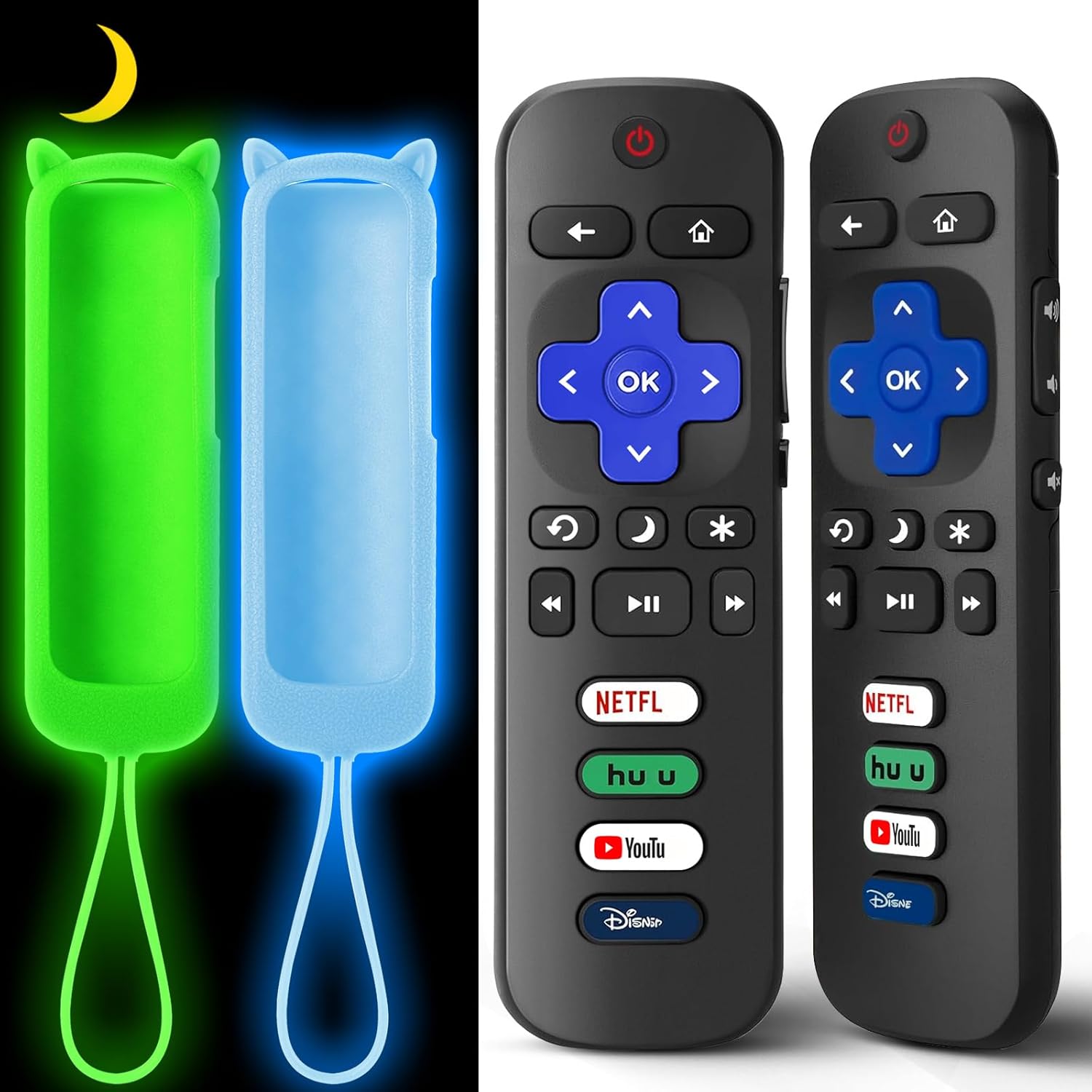
Image: Two OneBom Roku TV replacement remotes with their respective glow-in-the-dark silicone covers. The remotes are black with standard Roku button layouts, and the covers are bright green and light blue, designed to glow in the dark.
പ്രധാന സവിശേഷതകൾ:
- 2 Remotes + 2 Covers: Provides a convenient backup or replacement set.
- വിശാലമായ അനുയോജ്യത: Works with all Roku series TVs from brands like TCL, Hisense, Onn, Sharp, Element, Westinghouse, Philips, Insignia, JVC, RCA, and Sanyo.
- No Pairing/Setup Required: Ready to use immediately after battery insertion.
- Glow-in-the-Dark Covers: Silicone covers (Glow Green & Glow Blue) make remotes easy to locate in the dark and include wrist straps for added security.
- മോടിയുള്ള ബിൽഡ്: Constructed from sturdy ABS+plastic, tested for over 160,000 clicks.
- പ്രതികരിക്കുന്ന പ്രകടനം: Features a responsive chip for fast action (under 0.3 seconds) with a range of up to 25 feet.
- Convenient Shortcut Keys: Includes 4 dedicated shortcut keys for quick access to popular streaming channels.

Image: Illustration of compatible Roku TV models. The remote is compatible with TCL, Hisense, Onn, Sharp, Element, Westinghouse, Philips, Insignia, JVC, RCA, and Sanyo Roku TVs.

Image: Visual representation of compatibility. The remote is compatible with Roku TVs and does not require pairing or setup. It is explicitly stated that it is not compatible with Roku Stick or Roku Box models.
സജ്ജമാക്കുക
Setting up your OneBom Replacement Remote Control is a straightforward process, requiring no complex pairing or programming.
ബാറ്ററി ഇൻസ്റ്റാളേഷൻ:
- റിമോട്ട് കൺട്രോളിന്റെ പിൻഭാഗത്ത് ബാറ്ററി കമ്പാർട്ട്മെന്റ് കണ്ടെത്തുക.
- സ്ലൈഡ് ചെയ്ത് ബാറ്ററി കവർ തുറക്കുക.
- Insert two (2) AAA batteries (not included), ensuring correct polarity (+ and - ends match the indicators inside the compartment).
- ബാറ്ററി കവർ സുരക്ഷിതമായി അടയ്ക്കുക.
Once batteries are installed, the remote is ready for immediate use with your compatible Roku TV.

Image: Diagram illustrating the battery compartment of the remote control, showing where to insert two AAA batteries. Batteries are not included with the product.
Applying the Silicone Cover:
- Gently slide the remote control into the silicone cover, starting from the top (power button end).
- Ensure the remote fits snugly and all buttons align with the cover's cutouts.
- The cover features a cat ear design at the top and an anti-slip texture for improved grip.
- Attach the wrist strap to the designated loop on the cover to prevent accidental drops.
Video: This video demonstrates the ease of battery installation and how to properly place the remote control into its protective silicone cover. It also highlights the various color options for the covers and the anti-slip texture.
പ്രവർത്തന നിർദ്ദേശങ്ങൾ
The OneBom Replacement Remote Control functions identically to your original Roku TV remote. Point the remote directly at your Roku TV for optimal signal transmission.
ബട്ടൺ പ്രവർത്തനങ്ങൾ:

Image: Detailed diagram of the remote control buttons and their corresponding functions, including power, navigation, volume, and dedicated channel shortcuts.
- പവർ ബട്ടൺ: ടിവി ഓണാക്കുകയോ ഓഫാക്കുകയോ ചെയ്യുന്നു.
- നാവിഗേഷൻ പാഡ് (മുകളിലേക്ക്, താഴേക്ക്, ഇടത്തേക്ക്, വലത്തേക്ക്, ശരി): മെനുകൾ നാവിഗേറ്റ് ചെയ്യാനും ഓപ്ഷനുകൾ തിരഞ്ഞെടുക്കാനും ഉപയോഗിക്കുന്നു.
- ബാക്ക് ബട്ടൺ: മുമ്പത്തെ സ്ക്രീനിലേക്കോ മെനുവിലേക്കോ മടങ്ങുന്നു.
- ഹോം ബട്ടണ്: റോക്കു ടിവി ഹോം സ്ക്രീനിലേക്ക് മടങ്ങുന്നു.
- വോളിയം നിയന്ത്രണം (+/-): ടിവി വോളിയം ക്രമീകരിക്കുന്നു.
- നിശബ്ദ ബട്ടൺ: ടിവി ഓഡിയോ നിശബ്ദമാക്കുകയോ അൺമ്യൂട്ടുചെയ്യുകയോ ചെയ്യുന്നു.
- തൽക്ഷണ റീപ്ലേ: വീഡിയോ പ്ലേബാക്കിൽ കുറച്ച് സെക്കൻഡ് പിന്നോട്ട് പോകുന്നു.
- Sleep Mode (Moon icon): Puts the TV into sleep mode.
- Options (Asterisk icon): Accesses additional options within an app or menu.
- Rewind (RWD Scan), Play/Pause, Fast Forward (FWD Scan): മീഡിയ പ്ലേബാക്ക് നിയന്ത്രണങ്ങൾ.
- Channel Shortcuts (Netflix, Hulu, YouTube, Disney+): Direct access buttons to popular streaming services.
ഗ്ലോ-ഇൻ-ദി-ഡാർക്ക് ഫീച്ചർ:
The silicone covers are designed to glow in the dark, making your remote easy to find in dimly lit rooms. To activate or recharge the glow effect:
- Expose the cover to direct light for an extended period. This can be natural sunlight, incandescent lamps, ഫ്ലൂറസെന്റ് എൽamps, or blue light.
- The phosphorescent elements in the cover absorb light energy and then emit it as a glow in the dark.
- If the glow intensity decreases over time, simply re-expose the cover to light.
- Note that excessive ambient light can diminish the perceived intensity of the glow.

Image: Visual guide on how to activate the glow-in-the-dark feature by exposing the silicone cover to light sources like a desk lamp or sunlight. The image also shows the remote glowing in a dark room.
മെയിൻ്റനൻസ്
Proper maintenance will extend the life of your OneBom Replacement Remote Control and its silicone cover.
വൃത്തിയാക്കൽ:
- To clean the remote, gently wipe it with a soft, dry cloth.
- For the silicone cover, you can remove it from the remote and wash it with mild soap and water. Ensure it is completely dry before placing the remote back inside.
- Avoid using harsh chemicals or abrasive cleaners, as these can damage the remote or cover.
ബാറ്ററി മാറ്റിസ്ഥാപിക്കൽ:
Replace batteries when the remote's responsiveness decreases or it stops functioning. Always use new AAA batteries and dispose of old batteries responsibly according to local regulations.
ട്രബിൾഷൂട്ടിംഗ്
If you encounter issues with your OneBom Replacement Remote Control, try the following troubleshooting steps:
| പ്രശ്നം | സാധ്യമായ കാരണം | പരിഹാരം |
|---|---|---|
| റിമോട്ട് പ്രതികരിക്കുന്നില്ല. | ഡെഡ് അല്ലെങ്കിൽ തെറ്റായി ഇൻസ്റ്റാൾ ചെയ്ത ബാറ്ററികൾ. | ബാറ്ററികൾ പുതിയ AAA ബാറ്ററികൾ ഉപയോഗിച്ച് മാറ്റിസ്ഥാപിക്കുക, ശരിയായ പോളാരിറ്റി ഉറപ്പാക്കുക. |
| റിമോട്ട് പ്രതികരിക്കുന്നില്ല. | Obstruction between remote and TV's infrared sensor. | Ensure a clear line of sight between the remote and the TV. Remove any objects blocking the signal. |
| റിമോട്ട് പ്രതികരിക്കുന്നില്ല. | റിമോട്ട് പരിധിക്ക് പുറത്താണ്. | Move closer to the TV. The remote has a range of up to 25 feet. |
| പ്രത്യേക ബട്ടണുകൾ പ്രവർത്തിക്കുന്നില്ല. | Dirt or debris under the button. | Clean the remote. If the issue persists, the button may be worn out. |
| Glow-in-the-dark cover not glowing. | ആവശ്യത്തിന് പ്രകാശം ലഭിക്കാത്തത്. | Expose the cover to direct light (sunlight, lamp) for a period to recharge its luminescence. |
ഈ ഘട്ടങ്ങൾ പ്രശ്നം പരിഹരിക്കുന്നില്ലെങ്കിൽ, കൂടുതൽ സഹായത്തിനായി "വാറന്റിയും പിന്തുണയും" വിഭാഗം പരിശോധിക്കുക.
സ്പെസിഫിക്കേഷനുകൾ
- മോഡൽ നമ്പർ: റോക്കു ടിവി റിമോട്ട്
- ASIN: B0D926TJB4
- പാക്കേജ് അളവുകൾ: 7.52 x 7.52 x 0.94 ഇഞ്ച്
- ഇനത്തിൻ്റെ ഭാരം: 5.6 ഔൺസ്
- ആവശ്യമായ ബാറ്ററികൾ: 2 x AAA (ഉൾപ്പെടുത്തിയിട്ടില്ല)
- അനുയോജ്യമായ ഉപകരണങ്ങൾ: Roku TV, TCL/Hisense/Onn/Westinghouse/Philips Roku Smart TVs
- പ്രത്യേക സവിശേഷതകൾ: Ergonomic, Glow In The Dark Cover, Lightweight, Universal
- പിന്തുണയ്ക്കുന്ന ഉപകരണങ്ങളുടെ പരമാവധി എണ്ണം: 10
- നിർമ്മാതാവ്: വൺബോം
- ആദ്യം ലഭ്യമായ തീയതി: ജൂലൈ 8, 2024
വാറൻ്റിയും പിന്തുണയും
OneBom stands behind its products with reliable after-sales service. Your purchase includes a 60-day trial period.
If you have any questions, issues, or require further assistance with your OneBom Replacement Remote Control, please reach out to our customer support team. Contact information can typically be found on the product packaging or through the retailer's webഉൽപ്പന്നം വാങ്ങിയ സൈറ്റ്.


