1. ആമുഖം
This manual provides essential information for setting up, operating, maintaining, and troubleshooting your Lenovo ThinkPad X1 Carbon Gen 12 Business Laptop. Please read this guide thoroughly to ensure optimal performance and longevity of your device.
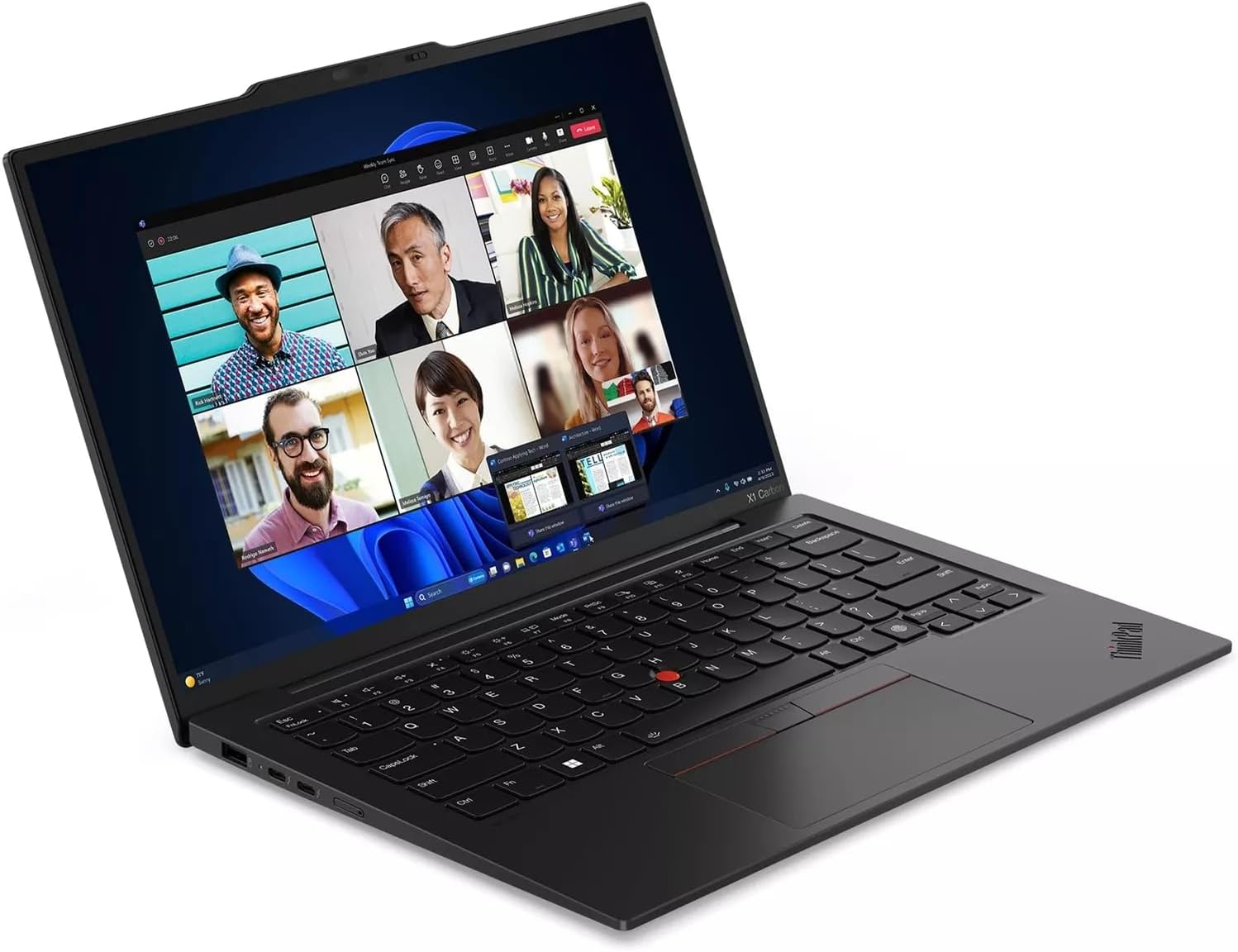
Figure 1.1: Lenovo ThinkPad X1 Carbon Gen 12 in use, showing a video conference.
2. സജ്ജീകരണം
2.1 അൺബോക്സിംഗും പ്രാരംഭ പരിശോധനയും
പാക്കേജിംഗിൽ നിന്ന് എല്ലാ ഘടകങ്ങളും ശ്രദ്ധാപൂർവ്വം നീക്കം ചെയ്യുക. ഇനിപ്പറയുന്ന ഇനങ്ങൾ ഉണ്ടെന്ന് ഉറപ്പാക്കുക:
- ThinkPad X1 Carbon Gen 12 laptop
- 65W Slim Tip AC power adapter
- Internal Battery (pre-installed)
- ദ്രുത ആരംഭ ഗൈഡ്
ലാപ്ടോപ്പിന് എന്തെങ്കിലും ഭൗതിക കേടുപാടുകൾ സംഭവിച്ചിട്ടുണ്ടോ എന്ന് പരിശോധിക്കുക. എന്തെങ്കിലും കേടുപാടുകൾ കണ്ടെത്തിയാൽ അല്ലെങ്കിൽ ഘടകങ്ങൾ നഷ്ടപ്പെട്ടാൽ, ഉടൻ തന്നെ നിങ്ങളുടെ വെണ്ടറെ ബന്ധപ്പെടുക.
2.2 പവർ അഡാപ്റ്റർ ബന്ധിപ്പിക്കുന്നു
Connect the 65W Slim Tip AC power adapter to the laptop's power input port and then to a power outlet. The laptop can be used while charging.
2.3 പ്രാരംഭ പവർ ഓണും ഓപ്പറേറ്റിംഗ് സിസ്റ്റം സജ്ജീകരണവും
Press the power button located on the side of the laptop to turn it on. Follow the on-screen instructions to complete the Windows 11 Pro setup process. This includes setting up your user account, network connection, and initial preferences.
3. നിങ്ങളുടെ ലാപ്ടോപ്പ് പ്രവർത്തിപ്പിക്കുക
3.1 അടിസ്ഥാന പ്രവർത്തനങ്ങൾ
- പവർ ബട്ടൺ: Located on the side, used to turn the laptop on/off or put it to sleep.
- കീബോർഡ്: The backlit keyboard features standard QWERTY layout and function keys.
- TrackPad: Use the integrated TrackPad with three buttons for navigation and interaction.
- ഫിംഗർപ്രിന്റ് റീഡർ: For secure login, located near the keyboard. Follow Windows Hello setup for configuration.
- ക്യാമറ: The 1080P FHD IR+RGB camera includes a privacy shutter. Slide the shutter to cover the camera when not in use for enhanced privacy.
3.2 പോർട്ടുകളും കണക്ടറുകളും
Your ThinkPad X1 Carbon Gen 12 is equipped with various ports for connectivity. Refer to the diagram below for port identification.

Figure 3.1: Port Layout of ThinkPad X1 Carbon Gen 12
- USB-A (USB 5Gpbs)
- 2 x USB-C (Thunderbolt 4, USB 40Gbps)
- Optional SIM slot (Availability may vary by configuration)
- പവർ ബട്ടൺ
- ഹെഡ്ഫോൺ / മൈക്ക് കോംബോ
- USB-A (USB 5Gpbs)
- HDMI 2.1
- കെൻസിംഗ്ടൺ നാനോ സെക്യൂരിറ്റി സ്ലോട്ട്
3.3 വയർലെസ് കണക്റ്റിവിറ്റി
- വൈഫൈ: The laptop supports Intel Wi-Fi 6E AX211 2x2 AX vPro for high-speed wireless internet access. Connect to available Wi-Fi networks through Windows settings.
- ബ്ലൂടൂത്ത്: Integrated Bluetooth 5.1 (Windows 10) or Bluetooth 5.3 (Windows 11) allows connection to wireless peripherals such as mice, keyboards, and headphones.
4. പരിപാലനം
4.1 നിങ്ങളുടെ ലാപ്ടോപ്പ് വൃത്തിയാക്കൽ
- മൃദുവായ, ലിൻ്റ് രഹിത തുണി ഉപയോഗിക്കുകampഡിസ്പ്ലേ വൃത്തിയാക്കാൻ വെള്ളമോ സ്ക്രീൻ ക്ലീനറോ ഉപയോഗിച്ച് നനയ്ക്കുക.
- കീബോർഡിനും ഷാസിക്കും മൃദുവായ തുണി ഉപയോഗിക്കുക. കഠിനമായ രാസവസ്തുക്കളോ ഉരച്ചിലുകളോ ഉള്ള വസ്തുക്കൾ ഒഴിവാക്കുക.
- വൃത്തിയാക്കുന്നതിനുമുമ്പ് ലാപ്ടോപ്പ് പവർ ഓഫ് ചെയ്തിട്ടുണ്ടെന്നും പ്ലഗ് ഊരിവെച്ചിട്ടുണ്ടെന്നും ഉറപ്പാക്കുക.
4.2 ബാറ്ററി കെയർ
- ബാറ്ററി ആയുസ്സ് വർദ്ധിപ്പിക്കുന്നതിന്, ഉയർന്ന താപനില ഒഴിവാക്കുക.
- റീചാർജ് ചെയ്യുന്നതിന് മുമ്പ് ഇടയ്ക്കിടെ ബാറ്ററി ഏകദേശം 20% വരെ ഡിസ്ചാർജ് ചെയ്യുക.
- If storing the laptop for an extended period, charge the battery to approximately 50% and store in a cool, dry place.
4.3 സോഫ്റ്റ്വെയർ അപ്ഡേറ്റുകൾ
ഓപ്പറേറ്റിംഗ് സിസ്റ്റം അപ്ഡേറ്റുകൾ (വിൻഡോസ് അപ്ഡേറ്റ്) ഡ്രൈവർ അപ്ഡേറ്റുകൾ (ലെനോവോ വാൻ) എന്നിവ പതിവായി പരിശോധിച്ച് ഇൻസ്റ്റാൾ ചെയ്യുക.tagഇ സോഫ്റ്റ്വെയർ അല്ലെങ്കിൽ ലെനോവോ പിന്തുണ webസൈറ്റ്) ഒപ്റ്റിമൽ പ്രകടനവും സുരക്ഷയും ഉറപ്പാക്കാൻ.
5. പ്രശ്നപരിഹാരം
നിങ്ങൾ നേരിട്ടേക്കാവുന്ന പൊതുവായ പ്രശ്നങ്ങളെ ഈ വിഭാഗം അഭിസംബോധന ചെയ്യുന്നു.
5.1 വൈദ്യുതി പ്രശ്നങ്ങൾ
- ലാപ്ടോപ്പ് ഓണാകുന്നില്ല: Ensure the power adapter is securely connected and the power outlet is functional. Try a different outlet. If the battery is completely drained, it may take a few minutes of charging before the laptop can power on.
- ബാറ്ററി ചാർജ്ജുചെയ്യുന്നില്ല: Verify the power adapter is correctly connected. Check for any damage to the adapter or charging port.
5.2 ഡിസ്പ്ലേ പ്രശ്നങ്ങൾ
- ഡിസ്പ്ലേ ഇല്ല: Connect an external monitor to the HDMI port to check if the issue is with the laptop's internal display. Ensure the display brightness is not set to minimum.
- മിന്നുന്ന സ്ക്രീൻ: നിങ്ങളുടെ ഗ്രാഫിക്സ് ഡ്രൈവറുകൾ അപ്ഡേറ്റ് ചെയ്യുക.
5.3 കണക്റ്റിവിറ്റി പ്രശ്നങ്ങൾ
- വൈഫൈ കണക്റ്റ് ചെയ്യുന്നില്ല: വിൻഡോസ് ക്രമീകരണങ്ങളിൽ വൈ-ഫൈ പ്രവർത്തനക്ഷമമാക്കിയിട്ടുണ്ടെന്ന് ഉറപ്പാക്കുക. നിങ്ങളുടെ റൂട്ടറും ലാപ്ടോപ്പും പുനരാരംഭിക്കുക. അപ്ഡേറ്റ് ചെയ്ത വൈ-ഫൈ ഡ്രൈവറുകൾക്കായി പരിശോധിക്കുക.
- ബ്ലൂടൂത്ത് ഉപകരണം ജോടിയാക്കുന്നില്ല: ബ്ലൂടൂത്ത് ഉപകരണം ജോടിയാക്കൽ മോഡിലാണെന്നും പരിധിക്കുള്ളിലാണെന്നും ഉറപ്പാക്കുക. നിങ്ങളുടെ ലാപ്ടോപ്പിലെ ബ്ലൂടൂത്ത് ക്രമീകരണങ്ങൾ പരിശോധിക്കുക.
5.4 സിസ്റ്റം പ്രകടനം
- മന്ദഗതിയിലുള്ള പ്രകടനം: Close unnecessary applications. Check Task Manager for processes consuming high CPU or memory. Ensure sufficient free storage space.
- അമിത ചൂടാക്കൽ: വെന്റിലേഷൻ വെന്റുകൾ അടഞ്ഞിട്ടില്ലെന്ന് ഉറപ്പാക്കുക. ലാപ്ടോപ്പ് കട്ടിയുള്ളതും പരന്നതുമായ പ്രതലത്തിൽ ഉപയോഗിക്കുക.
കൂടുതൽ സങ്കീർണ്ണമായ പ്രശ്നങ്ങൾക്ക്, ലെനോവോ പിന്തുണ പരിശോധിക്കുക. webസൈറ്റ് അല്ലെങ്കിൽ സാങ്കേതിക പിന്തുണയുമായി ബന്ധപ്പെടുക.
6 സ്പെസിഫിക്കേഷനുകൾ
| ഘടകം | വിശദാംശങ്ങൾ |
|---|---|
| പ്രോസസ്സർ | Intel Core Ultra 7 165U vPro (E-cores up to 3.80 GHz, P-cores up to 4.90 GHz) |
| പ്രദർശിപ്പിക്കുക | 14" WUXGA (1920 x 1200), IPS, Anti-Glare, Touch, 100%sRGB, 400 nits, 60Hz, Low Power |
| മെമ്മറി | 32 GB LPDDR5X-6400MHz (Soldered) |
| സംഭരണം | 2 TB SSD M.2 2280 PCIe Gen4 |
| ഗ്രാഫിക്സ് | ഇന്റഗ്രേറ്റഡ് ഇന്റൽ ഗ്രാഫിക്സ് |
| ഓപ്പറേറ്റിംഗ് സിസ്റ്റം | വിൻഡോസ് 11 പ്രോ 64 |
| ക്യാമറ | 1080P FHD IR+RGB with Privacy Shutter |
| കീബോർഡ് | Backlit, Black - English (US) |
| WLAN | Intel Wi-Fi 6E AX211 2x2 AX vPro |
| ബ്ലൂടൂത്ത് | Bluetooth 5.1 (Windows 10) or Bluetooth 5.3 (Windows 11) |
| തുറമുഖങ്ങൾ | 2x USB-A (5Gpbs), 2x USB-C (Thunderbolt 4, 40Gbps), 1x HDMI 2.1, 1x Headphone/Mic Combo, 1x Kensington Nano Security Slot, Optional SIM slot |
| അളവുകൾ (LxWxH) | 12.31 x 0.59 x 8.45 ഇഞ്ച് |
| ഭാരം | 2.37 പൗണ്ട് |
7. വാറൻ്റി വിവരങ്ങൾ
Your Lenovo ThinkPad X1 Carbon Gen 12 laptop comes with a One Year Onsite Warranty. This warranty covers manufacturing defects and hardware failures under normal use conditions. For detailed terms and conditions, please refer to the warranty documentation included with your product or visit the official Lenovo support webസൈറ്റ്.
8. പിന്തുണ
For further assistance, technical support, or to download the latest drivers and software, please visit the official Lenovo Support webസൈറ്റ്:
You can also find contact information for customer service and technical support in your region on the Lenovo webസൈറ്റ്.


