1. ആമുഖം
This manual provides essential information for setting up, operating, and maintaining your NIMO Mini-PC MPL2R. Please read it thoroughly before use to ensure optimal performance and longevity of your device.

ചിത്രം 1.1: മുന്നിലും പിന്നിലും view of the NIMO Mini-PC MPL2R, showcasing അതിന്റെ ഒതുക്കമുള്ള രൂപകൽപ്പനയും വിവിധ പോർട്ടുകളും.
The NIMO Mini-PC MPL2R is a compact and powerful computing solution, equipped with a 12th Gen Intel N100 processor, 16GB DDR5 RAM, and 768GB storage (512GB M.2 SSD + 256GB Micro SD). It supports triple 4K display output, WiFi 6, and Bluetooth 5.2, making it suitable for a variety of applications from home entertainment to business and educational tasks.

ചിത്രം 1.2: കഴിഞ്ഞുview of key features including Intel 12th Gen N100 processor, 4K triple-screen display support, Bluetooth 5.2, LPDDR5 RAM, WiFi 6, and PCIe SSD.
2. ബോക്സിൽ എന്താണുള്ളത്?
പാക്കേജ് തുറക്കുമ്പോൾ, ഇനിപ്പറയുന്ന എല്ലാ ഇനങ്ങളും ഉൾപ്പെടുത്തിയിട്ടുണ്ടെന്ന് ഉറപ്പാക്കുക:
- NIMO Mini-PC MPL2R
- പവർ അഡാപ്റ്റർ
- വെസെ മൌണ്ട്
- ഉപയോക്തൃ ഗൈഡ്

Image 2.1: Visual representation of the items included in the NIMO Mini-PC MPL2R packaging: the Mini PC unit, power adapter, VESA mount, and user guide.
3. സജ്ജീകരണ ഗൈഡ്
3.1 ഒരു ഡിസ്പ്ലേയിലേക്ക് ബന്ധിപ്പിക്കുന്നു
- Connect one end of an HDMI cable to an HDMI port on the NIMO Mini-PC.
- Connect the other end of the HDMI cable to an HDMI input on your monitor or TV.
- For triple display setup, use the second HDMI port and the full-function Type-C port with appropriate adapters/cables.

Image 3.1: The NIMO Mini-PC MPL2R connected to three external monitors, demonstrating its triple 4K display capability.
3.2 പെരിഫറലുകൾ ബന്ധിപ്പിക്കുന്നു
- USB ഉപകരണങ്ങൾ: Connect your keyboard, mouse, and other USB devices to the available USB 3.0 ports.
- ഓഡിയോ: 3.5mm ഓഡിയോ ജാക്കിലേക്ക് സ്പീക്കറുകളോ ഹെഡ്ഫോണുകളോ ബന്ധിപ്പിക്കുക.
- നെറ്റ്വർക്ക്: For a wired connection, connect an Ethernet cable to the Gigabit Ethernet port.
3.3 പവർ കണക്ഷൻ
- Connect the power adapter to the DC input port on the Mini-PC.
- ഒരു മതിൽ ഔട്ട്ലെറ്റിലേക്ക് പവർ അഡാപ്റ്റർ പ്ലഗ് ചെയ്യുക.
3.4 VESA മൗണ്ട് ഇൻസ്റ്റലേഷൻ (ഓപ്ഷണൽ)
The included VESA mount allows you to attach the Mini-PC to the back of a compatible monitor, saving desk space.
- Attach the VESA mount bracket to the back of your monitor using the provided screws.
- Slide the NIMO Mini-PC onto the mounted bracket until it clicks securely into place.
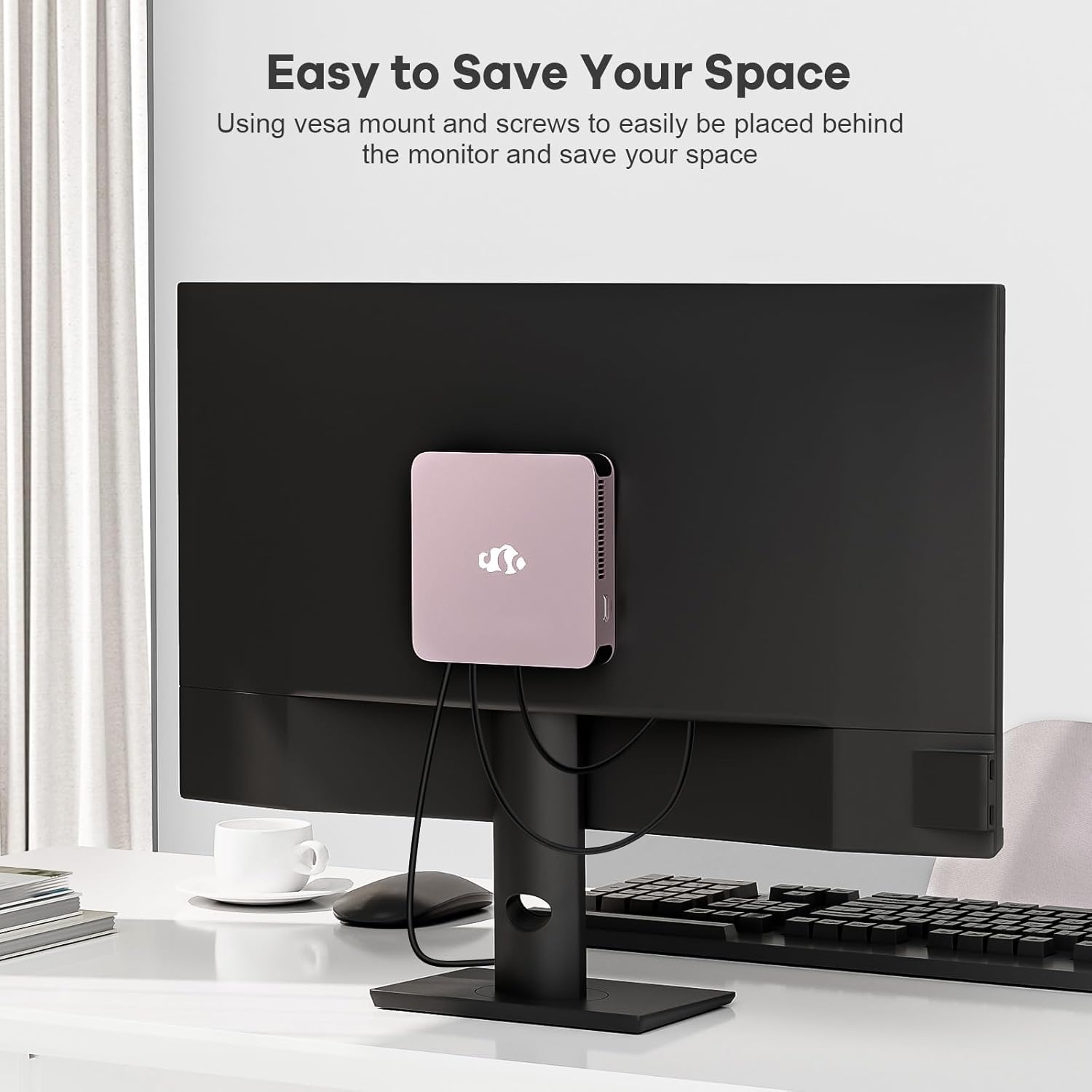
Image 3.2: The NIMO Mini-PC MPL2R shown mounted on the back of a monitor, illustrating its space-saving VESA mount capability.
4. പ്രവർത്തന നിർദ്ദേശങ്ങൾ
4.1 പവർ ഓൺ/ഓഫ്
- പവർ ഓൺ: Press the power button located on the front of the Mini-PC. The power indicator light will illuminate.
- പവർ ഓഫ്: To shut down the system, use the operating system's shutdown function. For a forced shutdown, press and hold the power button for approximately 5 seconds.
4.2 Initial Boot and Operating System
The NIMO Mini-PC comes with a pre-installed operating system. Upon first boot, follow the on-screen instructions to complete the initial setup, including language selection, network configuration, and user account creation.
4.3 വയർലെസ് കണക്റ്റിവിറ്റി
- വൈഫൈ 6: To connect to a wireless network, access the network settings in your operating system, select your desired WiFi network, and enter the password.
- ബ്ലൂടൂത്ത് 5.2: To pair Bluetooth devices (e.g., keyboard, mouse, headphones), enable Bluetooth in your operating system settings and follow the pairing instructions for your specific device.

Image 4.1: The NIMO Mini-PC MPL2R depicted in multiple usage scenarios, including business meetings, graphic design, home theater, and office work, highlighting its versatility.
5 സ്പെസിഫിക്കേഷനുകൾ
Detailed technical specifications for the NIMO Mini-PC MPL2R:
| ഫീച്ചർ | സ്പെസിഫിക്കേഷൻ |
|---|---|
| പ്രോസസ്സർ | Intel N100 (4 Cores, 4 Threads, up to 3.4GHz, 6MB Cache) |
| ഗ്രാഫിക്സ് | ഇന്റൽ UHD ഗ്രാഫിക്സ് (750MHz വരെ) |
| റാം | 16GB DDR5 (LPDDR5) |
| സംഭരണം | 512GB M.2 SSD (PCIe x2) + 256GB Micro SD |
| ഡിസ്പ്ലേ ഔട്ട്പുട്ട് | 2x HDMI (4K@60Hz), 1x Full-function Type-C (4K@60Hz) - Triple Display Support |
| വയർലെസ് കണക്റ്റിവിറ്റി | വൈഫൈ 6, ബ്ലൂടൂത്ത് 5.2 |
| തുറമുഖങ്ങൾ | 4x USB 3.0, 1x Full-function Type-C, 2x HDMI, 1x Gigabit Ethernet, 1x 3.5mm Audio Jack, 1x Micro SD Card Slot |
| ഓപ്പറേറ്റിംഗ് സിസ്റ്റം | System (Pre-installed) |
| അളവുകൾ (LxWxH) | 4.72 x 4.72 x 0.91 ഇഞ്ച് |
| ഇനത്തിൻ്റെ ഭാരം | 1.65 പൗണ്ട് |
| പവർ ഉറവിടം | DC |

Image 5.1: Dimensions of the NIMO Mini-PC MPL2R, illustrating its compact size relative to common objects like a pen and a coin.

Image 5.2: Diagram illustrating the internal cooling structure of the NIMO Mini-PC MPL2R, featuring a fan with speeds up to 5300 RPM for efficient heat dissipation.
6. പരിപാലനം
- വൃത്തിയാക്കൽ: Use a soft, dry cloth to clean the exterior of the Mini-PC. Avoid using liquid cleaners or abrasive materials. Ensure ventilation openings are free from dust and debris.
- സോഫ്റ്റ്വെയർ അപ്ഡേറ്റുകൾ: Regularly update your operating system and drivers to ensure optimal performance and security.
- വെൻ്റിലേഷൻ: Ensure the Mini-PC is placed in a well-ventilated area to prevent overheating. Do not block the air vents.
- സംഭരണം: Avoid placing heavy objects on the Mini-PC. Store it in a cool, dry environment when not in use.
7. പ്രശ്നപരിഹാരം
This section addresses common issues you might encounter with your NIMO Mini-PC.
7.1 വൈദ്യുതിയില്ല
- Ensure the power adapter is securely connected to both the Mini-PC and a working power outlet.
- മറ്റൊരു ഉപകരണം പ്ലഗ് ഇൻ ചെയ്ത് പവർ ഔട്ട്ലെറ്റ് പ്രവർത്തനക്ഷമമാണെന്ന് ഉറപ്പാക്കുക.
7.2 ഡിസ്പ്ലേ ഔട്ട്പുട്ട് ഇല്ല
- Check that the HDMI or Type-C cable is firmly connected to both the Mini-PC and the monitor.
- Ensure the monitor is powered on and set to the correct input source (e.g., HDMI 1, HDMI 2).
- Try connecting to a different display or using a different cable to rule out faulty components.
7.3 ഇന്റർനെറ്റ് കണക്ഷൻ ഇല്ല
- വയർ: Ensure the Ethernet cable is properly connected and your router is functioning.
- വയർലെസ്: Verify that WiFi is enabled in the operating system, you are connected to the correct network, and the password is entered correctly. Restart your router if necessary.
7.4 പെരിഫറലുകൾ പ്രതികരിക്കുന്നില്ല
- Try connecting USB devices to different USB ports.
- For Bluetooth devices, ensure they are in pairing mode and Bluetooth is enabled on the Mini-PC.
- Check device drivers in the operating system's device manager.
8. വാറൻ്റിയും പിന്തുണയും
NIMO is committed to providing reliable products and excellent customer service.
8.1 വാറൻ്റി വിവരങ്ങൾ
Your NIMO Mini-PC MPL2R comes with a 2-year technical support warranty. This warranty covers manufacturing defects and technical issues under normal use conditions.
8.2 റിട്ടേൺ പോളിസി
A 90 ദിവസത്തെ റിട്ടേൺ പോളിസി is offered, allowing for returns or exchanges within 90 days of purchase.
8.3 സാങ്കേതിക പിന്തുണ
If you encounter any problems or have questions regarding your NIMO Mini-PC, please contact our professional after-sales team. Our computer experts are available to provide technical support and repair services.
- ബന്ധപ്പെടാനുള്ള ഇമെയിൽ: service@nimopc.com
- സേവന ലഭ്യത: 24 മണിക്കൂർ സേവനം

ചിത്രം 8.1: കഴിഞ്ഞുview of NIMO's customer service, highlighting domestically partial assembly, 90-day returns, and 2-year support.


