ആമുഖം
Thank you for choosing the Oakcastle HIFI150 Stereo System. This manual provides essential information for setting up, operating, and maintaining your device. Please read it thoroughly before use and retain it for future reference.
സുരക്ഷാ വിവരങ്ങൾ
സുരക്ഷിതമായ പ്രവർത്തനം ഉറപ്പാക്കുന്നതിനും കേടുപാടുകൾ തടയുന്നതിനും, ദയവായി ഇനിപ്പറയുന്ന സുരക്ഷാ മുൻകരുതലുകൾ പാലിക്കുക:
- മഴ, ഈർപ്പം, അല്ലെങ്കിൽ തീവ്രമായ താപനില എന്നിവയിൽ യൂണിറ്റ് തുറന്നുകാട്ടരുത്.
- സി തുറക്കരുത്.asing. എല്ലാ സേവനങ്ങളും യോഗ്യതയുള്ള ഉദ്യോഗസ്ഥർക്ക് റഫർ ചെയ്യുക.
- യൂണിറ്റിന് ചുറ്റും ശരിയായ വായുസഞ്ചാരം ഉറപ്പാക്കുക. വെന്റിലേഷൻ ദ്വാരങ്ങളൊന്നും തടയരുത്.
- യൂണിറ്റിനൊപ്പം നൽകിയിട്ടുള്ള പവർ അഡാപ്റ്റർ മാത്രം ഉപയോഗിക്കുക.
- Keep the unit away from heat sources such as radiators, stoves, or other heat-producing appliances.
- ഉണങ്ങിയ തുണി ഉപയോഗിച്ച് മാത്രം യൂണിറ്റ് വൃത്തിയാക്കുക.
പാക്കേജ് ഉള്ളടക്കം
നിങ്ങളുടെ പാക്കേജിൽ എല്ലാ ഇനങ്ങളും ഉണ്ടോ എന്ന് ദയവായി പരിശോധിക്കുക:
- Oakcastle HIFI150 Stereo System
- റിമോട്ട് കൺട്രോൾ
- റിമോട്ട് കൺട്രോളിനുള്ള ബാറ്ററികൾ
- പവർ കേബിൾ
- ഉപയോക്തൃ മാനുവൽ
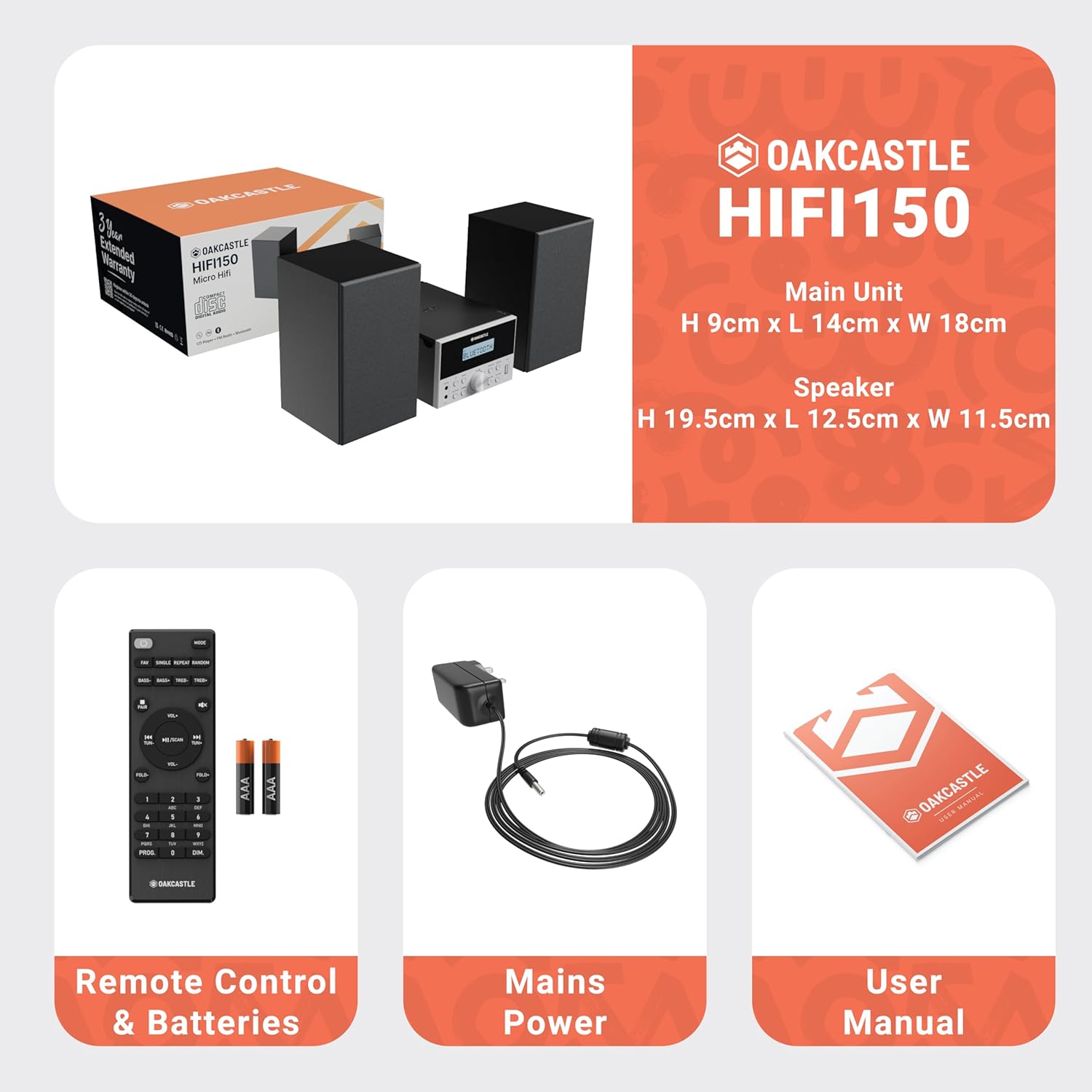
Image: The Oakcastle HIFI150 package contents, showing the main unit, two speakers, remote control with batteries, power adapter, and user manual.
ഉൽപ്പന്നം കഴിഞ്ഞുview
The Oakcastle HIFI150 features a compact design with intuitive controls and multiple connectivity options.
ഫ്രണ്ട് പാനൽ നിയന്ത്രണങ്ങളും ഡിസ്പ്ലേയും

Image: A close-up of the Oakcastle HIFI150 main unit's front panel, highlighting the digital display, central volume knob, mode selection buttons, and front-facing AUX In and USB ports. The display shows 'BLUETOOTH'.
- ഡിസ്പ്ലേ: നിലവിലെ മോഡ്, ട്രാക്ക് വിവരങ്ങൾ, റേഡിയോ ഫ്രീക്വൻസി എന്നിവ കാണിക്കുന്നു.
- പവർ ബട്ടൺ: യൂണിറ്റ് ഓണാക്കുകയോ ഓഫാക്കുകയോ ചെയ്യുന്നു.
- മോഡ് ബട്ടൺ: Cycles through input sources (CD, FM, Bluetooth, AUX, USB).
- വോളിയം നോബ്: മാസ്റ്റർ വോളിയം ക്രമീകരിക്കുന്നു.
- പ്ലേ/താൽക്കാലികമായി നിർത്തുക ബട്ടൺ: സിഡി, യുഎസ്ബി, ബ്ലൂടൂത്ത് എന്നിവയ്ക്കുള്ള പ്ലേബാക്ക് നിയന്ത്രിക്കുന്നു.
- സ്കിപ്പ്/ട്യൂൺ ബട്ടണുകൾ: Navigates tracks or tunes radio frequencies.
- AUX പോർട്ടിൽ: 3.5mm കേബിൾ വഴി ബാഹ്യ ഓഡിയോ ഉപകരണങ്ങൾ ബന്ധിപ്പിക്കുന്നതിന്.
- USB പോർട്ട്: ഓഡിയോ പ്ലേ ചെയ്യുന്നതിന് fileഒരു USB ഡ്രൈവിൽ നിന്നുള്ള എസ്.
പിൻ പാനൽ കണക്ഷനുകൾ
The rear panel includes connections for speakers and power.
സജ്ജമാക്കുക
1. സ്പീക്കറുകൾ ബന്ധിപ്പിക്കുന്നു
Connect the included speakers to the speaker terminals on the rear of the main unit. Ensure correct polarity (red to red, black to black) for optimal sound quality.
2. പവർ കണക്ഷൻ
Plug the power cable into the AC inlet on the rear of the main unit, then plug the other end into a standard wall outlet.
പ്രവർത്തന നിർദ്ദേശങ്ങൾ
പവർ ഓൺ/ഓഫ്
അമർത്തുക ശക്തി യൂണിറ്റ് ഓണാക്കാനോ ഓഫാക്കാനോ ഫ്രണ്ട് പാനലിലെ ബട്ടണോ റിമോട്ട് കൺട്രോളോ അമർത്തുക.
മോഡ് തിരഞ്ഞെടുക്കൽ
അമർത്തുക മോഡ് button on the front panel or remote control repeatedly to cycle through the available input sources: CD, എഫ്എം റേഡിയോ, ബ്ലൂടൂത്ത്, ഓക്സ്, ഒപ്പം USB.
ബ്ലൂടൂത്ത് പ്രവർത്തനം
- തിരഞ്ഞെടുക്കുക ബ്ലൂടൂത്ത് mode using the Mode button. The display will show 'BLUETOOTH' and the unit will enter pairing mode.
- നിങ്ങളുടെ സ്മാർട്ട്ഫോണിലോ മറ്റ് ബ്ലൂടൂത്ത് ഉപകരണത്തിലോ, ബ്ലൂടൂത്ത് പ്രവർത്തനക്ഷമമാക്കി ലഭ്യമായ ഉപകരണങ്ങൾക്കായി തിരയുക.
- Select 'OAKCASTLE HIFI150' from the list. Once connected, the unit will confirm the connection.
- You can now stream audio wirelessly from your device to the HIFI150.
സിഡി പ്ലേബാക്ക്

Image: The Oakcastle HIFI150 with its top-loading CD player mechanism open, revealing a compact disc placed inside. The display shows 'CD'.
- സിഡി കമ്പാർട്ട്മെന്റ് കവർ തുറക്കുക.
- Place a CD (MP3, CD, WMA, or CD-R format) onto the spindle with the label side facing up.
- സിഡി കമ്പാർട്ട്മെന്റ് കവർ അടയ്ക്കുക.
- തിരഞ്ഞെടുക്കുക CD mode. The unit will read the disc and begin playback automatically.
- പ്ലേബാക്ക് നിയന്ത്രിക്കാൻ പ്ലേ/പോസ്, സ്കിപ്പ് ബട്ടണുകൾ ഉപയോഗിക്കുക.
എഫ്എം റേഡിയോ ഓപ്പറേഷൻ

Image: The Oakcastle HIFI150 main unit with its telescopic antenna extended, displaying an FM radio frequency on its screen. The unit is placed between two speakers.
- തിരഞ്ഞെടുക്കുക എഫ്എം റേഡിയോ മോഡ്.
- മികച്ച സ്വീകരണത്തിനായി ടെലിസ്കോപ്പിക് ആന്റിന നീട്ടുക.
- ഓട്ടോ സ്കാൻ: Press and hold the Play/Pause button to automatically scan and save available FM stations (up to 30 presets).
- സ്വമേധയാലുള്ള ട്യൂണിംഗ്: Use the Skip/Tune buttons to manually adjust the frequency.
- പ്രീസെറ്റുകൾ തിരിച്ചുവിളിക്കുക: Use the 'FAV/PROG' button on the remote to cycle through saved stations.
USB പ്ലേബാക്ക്
- മുൻ പാനലിലെ USB പോർട്ടിലേക്ക് ഒരു USB ഡ്രൈവ് ചേർക്കുക.
- തിരഞ്ഞെടുക്കുക USB mode. The unit will automatically detect and begin playing compatible audio file(എംപി 3, ഡബ്ല്യുഎംഎ).
- പ്ലേബാക്ക് നിയന്ത്രിക്കാൻ പ്ലേ/പോസ്, സ്കിപ്പ് ബട്ടണുകൾ ഉപയോഗിക്കുക.
AUX ഇൻപുട്ട്
- ഒരു ബാഹ്യ ഓഡിയോ ഉപകരണം (ഉദാ. MP3 പ്ലെയർ, സ്മാർട്ട്ഫോൺ) ഇതിലേക്ക് ബന്ധിപ്പിക്കുക ഓക്സ് ഇൻ port on the front panel using a 3.5mm audio cable (not included).
- തിരഞ്ഞെടുക്കുക ഓക്സ് മോഡ്.
- Control playback from your connected external device.
വോളിയം നിയന്ത്രണം
തിരിക്കുക വോളിയം നോബ് on the front panel or use the വോൾ +/- ശബ്ദ നില ക്രമീകരിക്കുന്നതിന് റിമോട്ട് കൺട്രോളിലെ ബട്ടണുകൾ.
റിമോട്ട് കൺട്രോൾ ഉപയോഗം
The included remote control provides full functionality for the HIFI150. Ensure batteries are correctly inserted. Point the remote control towards the front panel of the main unit for optimal response.
മെയിൻ്റനൻസ്
വൃത്തിയാക്കൽ
- മൃദുവായതും ഉണങ്ങിയതുമായ തുണി ഉപയോഗിച്ച് യൂണിറ്റ് തുടയ്ക്കുക.
- അബ്രാസീവ് ക്ലീനറുകൾ, മെഴുക് അല്ലെങ്കിൽ ലായകങ്ങൾ എന്നിവ ഉപയോഗിക്കരുത്, കാരണം അവ ഫിനിഷിന് കേടുവരുത്തും.
സംഭരണം
If the unit is not used for an extended period, unplug it from the power outlet and store it in a cool, dry place.
ട്രബിൾഷൂട്ടിംഗ്
If you encounter issues with your HIFI150, please refer to the following common problems and solutions:
| പ്രശ്നം | സാധ്യമായ കാരണം | പരിഹാരം |
|---|---|---|
| ശക്തിയില്ല | പവർ കേബിൾ ബന്ധിപ്പിച്ചിട്ടില്ല; പവർ ഔട്ട്ലെറ്റ് തകരാറിലാണ് | പവർ കേബിൾ സുരക്ഷിതമായി ബന്ധിപ്പിച്ചിട്ടുണ്ടെന്ന് ഉറപ്പാക്കുക; മറ്റൊരു പവർ ഔട്ട്ലെറ്റ് പരീക്ഷിക്കുക. |
| ശബ്ദമില്ല | Volume too low; Incorrect input mode; Speakers not connected | Increase volume; Select correct input mode; Check speaker connections. |
| സിഡി പ്ലേ ചെയ്യുന്നില്ല | CD inserted incorrectly; Disc scratched/dirty; Incorrect format | Reinsert CD correctly; Clean or replace disc; Ensure disc is compatible (MP3, CD, WMA, CD-R). |
| ബ്ലൂടൂത്ത് കണക്റ്റ് ചെയ്യുന്നില്ല | Bluetooth mode not selected; Device too far; Device already connected to another unit | Select Bluetooth mode; Move device closer; Disconnect from other devices and try again. |
| മോശം എഫ്എം സ്വീകരണം | ആന്റിന നീട്ടിയിട്ടില്ല; ദുർബലമായ സിഗ്നൽ | Fully extend the telescopic antenna; Try repositioning the unit. |
സ്പെസിഫിക്കേഷനുകൾ
| മോഡൽ നമ്പർ | 1000002971 |
| ബ്രാൻഡ് | ഓക്ക്കാസിൽ |
| കണക്റ്റിവിറ്റി | ബ്ലൂടൂത്ത് 5.2, യുഎസ്ബി, ഓക്സ് |
| ഓഡിയോ ഔട്ട്പുട്ട് | 20W |
| പിന്തുണയ്ക്കുന്ന മീഡിയ | CD, MP3, WMA, CD-R, USB |
| റേഡിയോ | FM Radio with 30 Presets |
| അനുയോജ്യമായ ഉപകരണങ്ങൾ | എംപി3 പ്ലെയർ, സ്മാർട്ട്ഫോൺ, ടാബ്ലെറ്റ് |
| കാബിനറ്റ് മെറ്റീരിയൽ | മരം |
| നിറം | കറുപ്പ് |
| ഇനത്തിന്റെ അളവുകൾ (L x W x H) | 13.7 x 17.8 x 9 സെ.മീ |
| ഇനത്തിൻ്റെ ഭാരം | 2 കിലോഗ്രാം |
വാറൻ്റിയും പിന്തുണയും
The Oakcastle HIFI150 comes with an extended 3-year warranty. Registration is required to activate the full warranty period. Please refer to the warranty card included in your package or visit the official Oakcastle website for registration details and support information.
For technical assistance or further inquiries, please contact Oakcastle customer support through their official channels.


