1. ആമുഖം
This manual provides essential instructions for the safe and efficient use of your Maxcom MM334 4G mobile phone. The Maxcom MM334 is a user-friendly classic mobile phone featuring a large 3.2-inch screen, 4G network connectivity, and a modern USB-C connector for convenient charging. It is designed for straightforward communication and includes a 2MP camera with LED flash.

Image 1.1: The Maxcom MM334 4G mobile phone displayed on a desk setup.
2. പാക്കേജ് ഉള്ളടക്കം
താഴെ പറയുന്ന ഇനങ്ങൾക്കായി ബോക്സ് ചെക്ക് ചെയ്യുക:
- Maxcom MM334 4G Mobile Phone
- ബാറ്ററി (ലിഥിയം-അയൺ)
- USB-C ചാർജിംഗ് കേബിൾ
- ഉപയോക്തൃ മാനുവൽ (ഈ പ്രമാണം)
3. ഡിവൈസ് ഓവർview
Familiarize yourself with the physical components of your Maxcom MM334 phone.

ചിത്രം 3.1: മുൻഭാഗം view of the Maxcom MM334, showing the 3.2-inch screen, keypad, and navigation buttons.
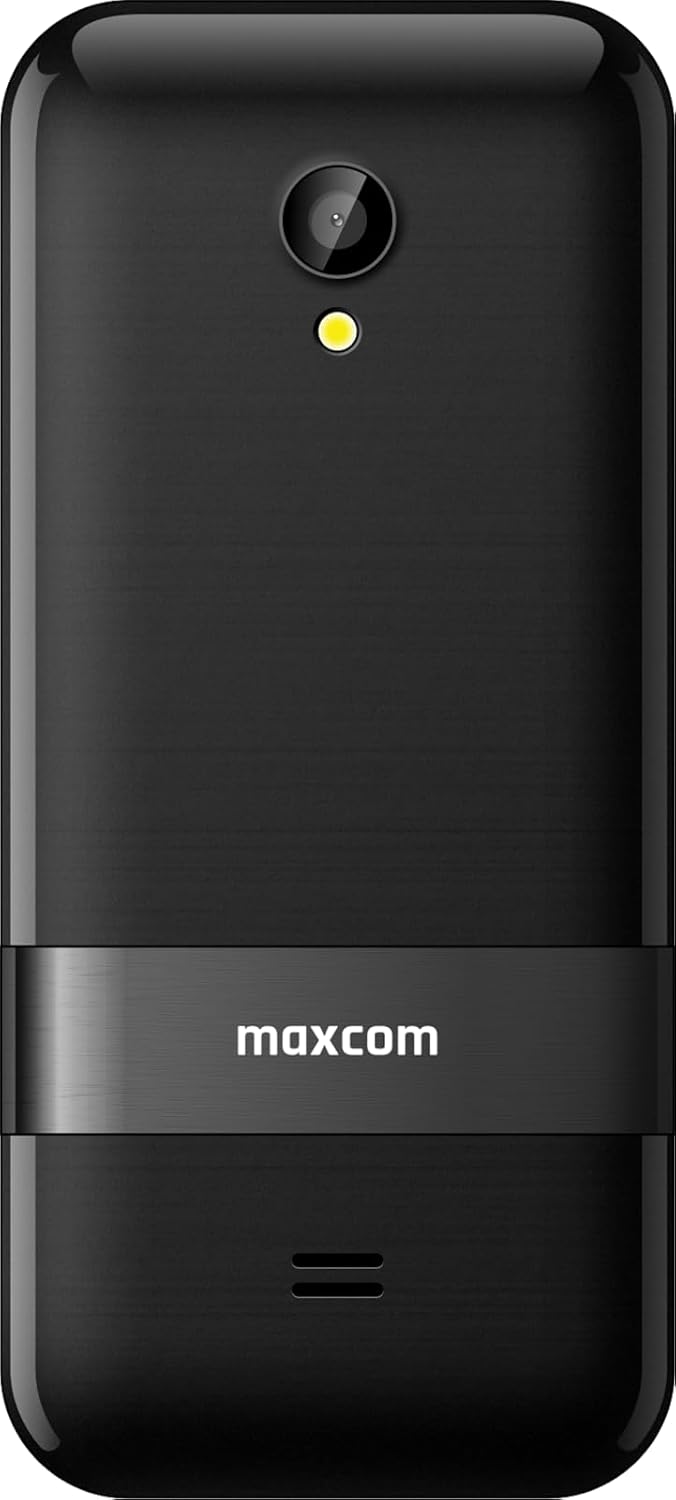
ചിത്രം 3.2: പിന്നിലേക്ക് view of the Maxcom MM334, highlighting the 2MP camera with LED flash and the Maxcom branding.

ചിത്രം 3.3: സൈഡ് പ്രോfile of the Maxcom MM334 phone.
പ്രധാന ഘടകങ്ങൾ:
- സ്ക്രീൻ: 3.2-inch display for viewവിവരങ്ങൾ.
- കീപാഡ്: Alphanumeric keys for dialing and text input, navigation keys, call/end buttons.
- ക്യാമറ: 2 Megapixel camera with LED flash on the rear.
- യുഎസ്ബി-സി പോർട്ട്: ചാർജ് ചെയ്യുന്നതിനും ഡാറ്റ കൈമാറ്റത്തിനുമായി താഴെയായി സ്ഥിതിചെയ്യുന്നു.
- സ്പീക്കർ/മൈക്രോഫോൺ: ഓഡിയോ ഇൻപുട്ടിനും ഔട്ട്പുട്ടിനും.
4. സജ്ജീകരണം
4.1. സിം കാർഡും ബാറ്ററിയും ചേർക്കുന്നു
- ഫോണിന്റെ പിൻ കവർ ശ്രദ്ധാപൂർവ്വം നീക്കം ചെയ്യുക.
- Locate the SIM card slot(s). Insert your SIM card(s) into the designated slot(s) with the gold contacts facing down, ensuring it clicks into place.
- Insert the Lithium-ion battery into its compartment, aligning the contacts.
- Replace the back cover, pressing gently until it snaps securely.
4.2 ബാറ്ററി ചാർജ് ചെയ്യുന്നു
- Connect the USB-C charging cable to the USB-C port at the bottom of the phone.
- Plug the other end of the cable into a compatible USB power adapter and then into a wall outlet.
- The battery indicator on the screen will show charging status. For first use, charge the phone fully.
4.3. പവർ ഓൺ/ഓഫ്
- പവർ ഓണാക്കാൻ: സ്ക്രീൻ പ്രകാശിക്കുന്നത് വരെ ചുവന്ന എൻഡ് കോൾ/പവർ ബട്ടൺ അമർത്തിപ്പിടിക്കുക.
- പവർ ഓഫ് ചെയ്യാൻ: Press and hold the red End Call/Power button until the power-off options appear, then select 'Power Off'.
5. പ്രവർത്തന നിർദ്ദേശങ്ങൾ
5.1. അടിസ്ഥാന നാവിഗേഷൻ
- ഉപയോഗിക്കുക നാവിഗേഷൻ കീകൾ മെനുകളിലൂടെയും ഓപ്ഷനുകളിലൂടെയും സ്ക്രോൾ ചെയ്യുന്നതിന് (മുകളിലേക്ക്, താഴേക്ക്, ഇടത്തേക്ക്, വലത്തേക്ക്).
- അമർത്തുക Center Key to select an option or confirm an action.
- ദി ഇടത് സോഫ്റ്റ് കീ typically accesses the 'Menu' or context-sensitive options.
- ദി വലത് സോഫ്റ്റ് കീ typically accesses 'Contacts' or a back function.
5.2. കോളുകൾ ചെയ്യലും സ്വീകരിക്കലും
- ഒരു കോൾ ചെയ്യാൻ: കീപാഡ് ഉപയോഗിച്ച് ഫോൺ നമ്പർ നൽകി പച്ച കോൾ ബട്ടൺ അമർത്തുക.
- ഒരു കോളിന് ഉത്തരം നൽകാൻ: When the phone rings, press the green Call button.
- ഒരു കോൾ അവസാനിപ്പിക്കാൻ: ചുവന്ന എൻഡ് കോൾ ബട്ടൺ അമർത്തുക.
5.3. കോൺടാക്റ്റുകൾ
- Access 'Contacts' from the main menu or by pressing the Right Soft Key.
- Select 'Add New Contact' to save a new number with a name.
- Scroll through your saved contacts to find and call a person.
5.4. സന്ദേശമയയ്ക്കൽ (എസ്എംഎസ്)
- Go to 'Messages' from the main menu.
- Select 'New Message' to compose an SMS. Enter the recipient's number and your message.
- സന്ദേശം അയയ്ക്കാൻ 'അയയ്ക്കുക' അമർത്തുക.
5.5. ക്യാമറ
The Maxcom MM334 features a 2 Megapixel camera with an LED flash.
- Access the 'Camera' application from the main menu.
- സ്ക്രീൻ ഉപയോഗിച്ച് നിങ്ങളുടെ ഷോട്ട് ഫ്രെയിം ചെയ്യുക a ആയി viewഫൈൻഡർ.
- Press the Center Key or a designated camera button to take a photo.
- Photos are saved to the phone's memory or an inserted memory card (if applicable).
5.6. ക്രമീകരണങ്ങൾ
The 'Settings' menu allows you to customize various phone functions.
- സൗണ്ട് പ്രോfiles: Adjust ringtones, volume, and alert types.
- ഡിസ്പ്ലേ: Configure wallpaper, backlight, and screen brightness.
- നെറ്റ്വർക്ക് ക്രമീകരണങ്ങൾ: Manage 4G connectivity and other network preferences.
- സുരക്ഷ: Set PIN codes, phone lock, etc.
5.7. മറ്റ് സവിശേഷതകൾ
- ബ്ലൂടൂത്ത്: Connect to compatible Bluetooth devices like headsets.
- മെമ്മറി: The phone supports expandable memory for additional storage.
6. പരിപാലനം
- വൃത്തിയാക്കൽ: Use a soft, dry cloth to clean the phone's screen and body. Avoid liquid cleaners.
- ബാറ്ററി കെയർ: Avoid extreme temperatures. Do not puncture or damage the battery. If the battery appears swollen or damaged, discontinue use and replace it.
- സംഭരണം: ദീർഘനേരം ഉപയോഗിക്കാത്തപ്പോൾ ഫോൺ തണുത്തതും വരണ്ടതുമായ സ്ഥലത്ത് സൂക്ഷിക്കുക.
7. പ്രശ്നപരിഹാരം
If you encounter issues with your Maxcom MM334, refer to the following common problems and solutions:
| പ്രശ്നം | സാധ്യമായ പരിഹാരം |
|---|---|
| ഫോൺ ഓണാക്കുന്നില്ല | ബാറ്ററി ശരിയായി ഇട്ടിട്ടുണ്ടെന്നും ചാർജ്ജ് ചെയ്തിട്ടുണ്ടെന്നും ഉറപ്പാക്കുക. ചാർജർ കണക്റ്റ് ചെയ്ത് വീണ്ടും ശ്രമിക്കുക. |
| നെറ്റ്വർക്ക് സിഗ്നൽ ഇല്ല | Check if the SIM card is properly inserted. Verify network settings. Move to an area with better signal coverage. |
| കോളുകൾ വിളിക്കാനോ സ്വീകരിക്കാനോ കഴിയില്ല | Check network signal. Ensure your SIM card is active and has sufficient credit/plan. |
| ബാറ്ററി ചാർജ് ചെയ്യുന്നില്ല | Ensure the USB-C cable and charger are properly connected and functional. Try a different charger or cable. |
| കീപാഡ് പ്രതികരിക്കുന്നില്ല | Restart the phone. If the issue persists, contact support. |
8 സ്പെസിഫിക്കേഷനുകൾ
| ഫീച്ചർ | വിശദാംശങ്ങൾ |
|---|---|
| ബ്രാൻഡ് | മാക്സ്കോം |
| മോഡൽ നമ്പർ | MM334 |
| സ്ക്രീൻ വലിപ്പം | 3.2 ഇഞ്ച് |
| ഓപ്പറേറ്റിംഗ് സിസ്റ്റം | സിംബിയൻ 9.3 |
| സെല്ലുലാർ ടെക്നോളജി | 4G |
| കണക്റ്റിവിറ്റി | ബ്ലൂടൂത്ത്, യുഎസ്ബി ടൈപ്പ് സി |
| ക്യാമറ റെസല്യൂഷൻ | 2 മെഗാപിക്സലുകൾ |
| പ്രത്യേക സവിശേഷതകൾ | Expandable Memory, Always On Display, Basic Phone Functionality |
| ബാറ്ററി കോമ്പോസിഷൻ | ലിഥിയം-അയൺ |
| മെമ്മറി സ്റ്റോറേജ് കപ്പാസിറ്റി | 2 ജിബി |
| റെസലൂഷൻ | 320 x 240 |
9. വാറൻ്റിയും പിന്തുണയും
Your Maxcom MM334 mobile phone is covered by a manufacturer's warranty. Please refer to the warranty card included in your package for specific terms and conditions. For technical support, service, or further inquiries, please contact your retailer or the Maxcom customer service department.


