Hollyland Lark M2 Wireless Lavalier Microphone User Manual
മോഡൽ: LARK M2
1. ആമുഖവും അവസാനവുംview
The Hollyland Lark M2 is an ultra-lightweight wireless lavalier microphone system designed for professional audio recording. Weighing only 9 grams, it is ideal for content creators such as vloggers, podcasters, and filmmakers. The system delivers lossless sound reproduction with 48 kHz/24-bit audio quality, a signal-to-noise ratio of over 70dB, and a maximum sound pressure level of 115dB. It features a long battery life, effective noise cancellation, and versatile connectivity options.
The Lark M2 Combo includes:
- 2 x Button-sized Transmitters (TX)
- 1 x 3.5mm Audio Receiver (RX)
- 1 x Lightning Receiver (RX)
- 1 x USB Type-C Receiver (RX)
- Charging Case (for Camera Version or Mobile Version)
- Other accessories (wind muffs, magnetic clips, necklace, charging cable)

Image: Hollyland Lark M2 Combo components.
പ്രധാന സവിശേഷതകൾ:
- വളരെ ഭാരം കുറഞ്ഞ ഡിസൈൻ: Transmitters weigh only 9g.
- ഉയർന്ന വിശ്വാസ്യതയുള്ള ഓഡിയോ: 48 kHz/24-bit audio, >70dB SNR, 115dB SPL.
- വിപുലീകരിച്ച ബാറ്ററി ലൈഫ്: Up to 40 hours with charging case (Camera Version), 30 hours (Mobile Version).
- Intelligent Noise Cancellation (ENC): One-click activation.
- സ്ഥിരതയുള്ള ട്രാൻസ്മിഷൻ: Up to 300m (1000ft) Line-of-Sight (LOS).
- തൽക്ഷണ ജോടിയാക്കൽ: Pre-paired from the factory for immediate use.
- UAC Compatibility: Connect directly to computers without an external sound card.
- ബഹുമുഖ കണക്റ്റിവിറ്റി: Compatible with iPhone, Android, cameras, PCs, and laptops.
2. സജ്ജീകരണം
2.1 പ്രാരംഭ ചാർജിംഗ്
Before first use, ensure all components (transmitters and receivers) are fully charged. Place the transmitters and receivers into their respective charging cases. The charging indicators will show the charging status. Charging time for TX and Camera Version RX is approximately 1.5 hours. Mobile Version Charging Case takes less than 1.5 hours, and Camera Version Charging Case takes less than 2 hours.
2.2 ഓട്ടോമാറ്റിക് ജോടിയാക്കൽ
The Lark M2 system is pre-paired at the factory. Simply remove the insulating film from the devices and place them back into the charging case. The TX and RX units will automatically pair, allowing you to begin recording immediately.
2.3 ഉപകരണങ്ങളിലേക്ക് ബന്ധിപ്പിക്കുന്നു
Select the appropriate receiver for your device:
- iPhone-ന്: Use the Lightning receiver.
- For Android/PC/Laptop: Use the USB Type-C receiver.
- ക്യാമറകൾക്കായി: Use the 3.5mm audio receiver.
Plug the chosen receiver directly into your recording device's port. The system is plug-and-play, requiring no complex setup procedures.

Image: Hollyland Lark M2 receiver connected to a laptop.
3. പ്രവർത്തന നിർദ്ദേശങ്ങൾ
3.1 പവർ ഓൺ/ഓഫ്
The transmitters and receivers typically power on automatically when removed from the charging case and power off when returned. Refer to the device's specific indicators for power status.
3.2 നോയ്സ് റദ്ദാക്കൽ (ENC)
To activate or deactivate noise cancellation, press the yellow button on the transmitter (TX). On the camera version receiver (RX), the indicator lights on top will remain green when noise cancellation is active. This feature helps to ensure clear audio by reducing ambient noise.
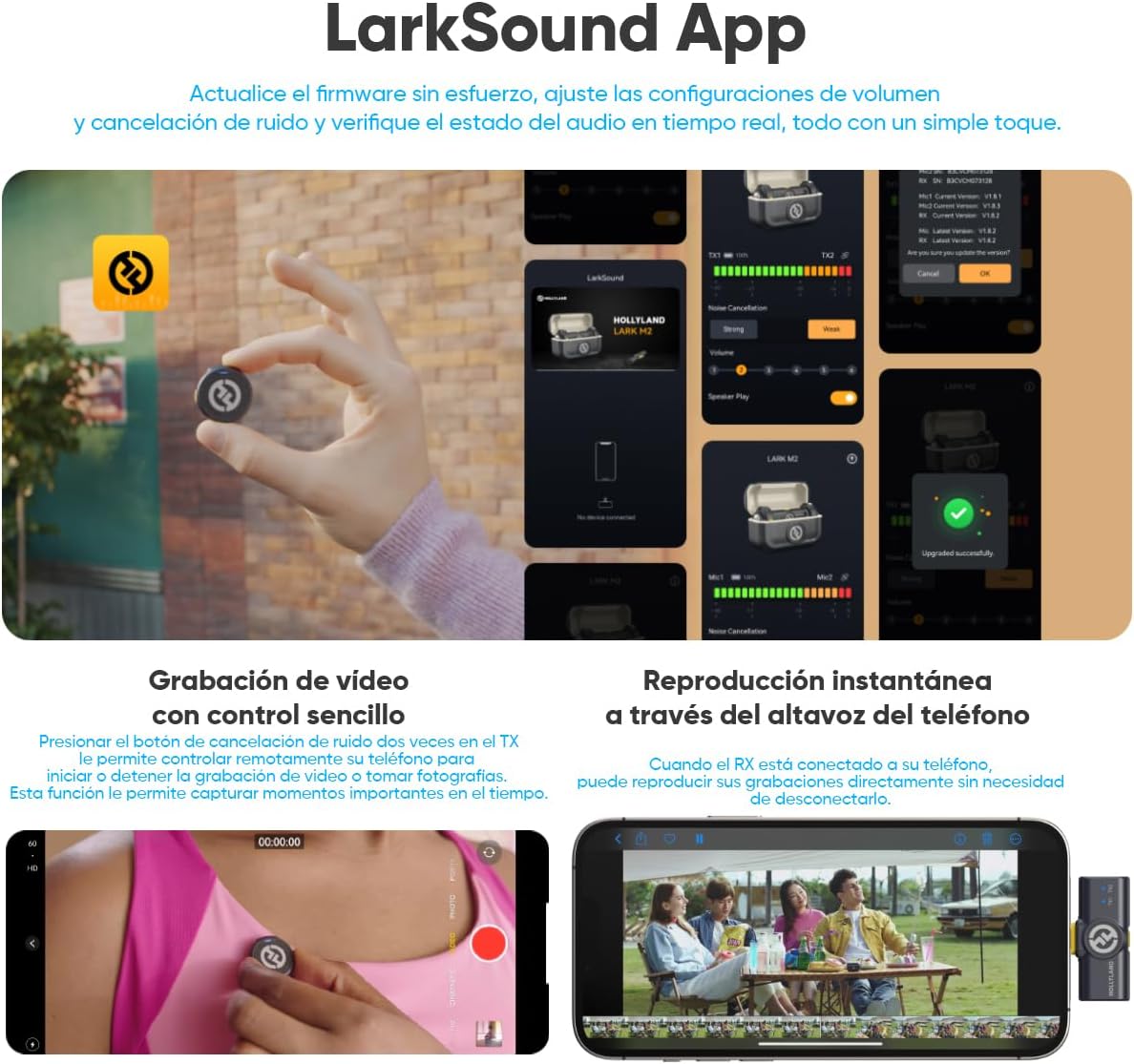
Image: LarkSound App showing noise cancellation settings.
3.3 വോളിയം ക്രമീകരണം
For the camera version receiver (RX), you can easily adjust volume levels using the intuitive knob. Three LED indicators clearly display the current volume level.
3.4 Mono/Stereo Switching
The camera version Lark M2 receiver supports both mono and stereo recording modes. You can switch between these modes by pressing the mode switch and pairing button on the receiver. കുറിപ്പ്: This function is only available when the 3.5mm audio jack is connected to a camera.
3.5 Remote Video Recording Control
The transmitter (TX) can be used to remotely start or stop video recording, or take photos, on compatible smartphones. This functionality relies on the phone's ability to initiate and end video recording or photo capture by pressing a volume button.
Image: Transmitter controlling phone video recording.
3.6 തൽക്ഷണ പ്ലേബാക്ക്
When the receiver (RX) is connected to your smartphone, you can play back your recordings directly through the phone's speaker without needing to disconnect the receiver.
3.7 LarkSound App
The LarkSound App allows for firmware updates, volume adjustments, noise cancellation settings, and real-time monitoring of audio status. This provides enhanced control and customization options for your Lark M2 system.
4. പരിപാലനം
4.1 വൃത്തിയാക്കൽ
Gently wipe the transmitters, receivers, and charging case with a soft, dry cloth. Avoid using liquid cleaners or solvents, as these can damage the device.
4.2 സംഭരണം
Store the Lark M2 system in its charging case when not in use to protect it from dust and damage. Keep the device in a cool, dry place, away from direct sunlight and extreme temperatures. The recommended operating temperature range is -10°C to 45°C (14°F to 113°F).
4.3 ബാറ്ററി കെയർ
To prolong battery life, avoid fully discharging the batteries frequently. Charge the devices regularly, even if not in constant use. The charging temperature range is 0°C to 45°C (32°F to 113°F).
5. പ്രശ്നപരിഹാരം
If you encounter issues with your Hollyland Lark M2, refer to the following common troubleshooting tips:
- ഓഡിയോ ഔട്ട്പുട്ട് ഇല്ല:
- Ensure both TX and RX units are powered on and properly paired.
- Check that the correct receiver (Lightning, USB-C, or 3.5mm) is securely connected to your recording device.
- Verify the volume levels on both the receiver (if applicable) and your recording device.
- Confirm that your recording device is set to use the external microphone input.
- മോശം ഓഡിയോ നിലവാരം/അമിതമായ ശബ്ദം:
- Activate the Intelligent Noise Cancellation (ENC) feature by pressing the yellow button on the TX.
- Ensure the TX is positioned correctly on the speaker, ideally within 15-30 cm (6-12 inches) of the mouth.
- Check for potential interference sources (e.g., Wi-Fi routers, other wireless devices) and move away from them.
- Use the included wind muffs when recording outdoors or in windy conditions.
- കണക്ഷൻ പ്രശ്നങ്ങൾ:
- Ensure the TX and RX are within the specified transmission range (up to 300m LOS).
- Obstacles between TX and RX can reduce range; try to maintain a clear line of sight.
- If pairing issues occur, place both TX and RX back into the charging case to re-initiate automatic pairing.
- Remote Video Recording Control Not Working:
- This feature is only compatible with smartphones that allow video recording or photo capture to be controlled by pressing a volume button. Verify your phone's settings.
- Mono/Stereo Switching Not Working (Camera Version RX):
- Ensure the 3.5mm audio jack is securely connected to a camera. This function is only supported in camera connection mode.
6 സ്പെസിഫിക്കേഷനുകൾ
| ഫീച്ചർ | സ്പെസിഫിക്കേഷൻ |
|---|---|
| മൈക്ക് സെൻസിറ്റിവിറ്റി | -37 dBV ± 2dB @ 1 KHz, 94dB SPL |
| വയർലെസ് മോഡുലേഷൻ മോഡ് | GFSK 2 Mbps |
| വയർലെസ് ട്രാൻസ്മിഷൻ | 2.4 GHz അഡാപ്റ്റീവ് ഫ്രീക്വൻസി ഹോപ്പിംഗ് (AFH) |
| Transmission Range (Mobile Version) | Up to 300m (1000ft) LOS / 60m (200ft) NLOS |
| Transmission Range (Camera Version) | Up to 300m (1000ft) LOS / 40m (130ft) NLOS |
| മൈക്ക് പോളാർ പാറ്റേൺ | ഓമ്നിഡയറക്ഷണൽ |
| ഫ്രീക്വൻസി പ്രതികരണം | 20 Hz–20 kHz |
| സിഗ്നൽ-ടു-നോയിസ് അനുപാതം | > 70dB |
| സൗണ്ട് പ്രഷർ ലെവൽ | 115dB SPL |
| ബിറ്റ് ഡെപ്ത് | 24-ബിറ്റ് |
| Sample നിരക്ക് | 48 kHz |
| TX Battery Capacity | 97 mAh |
| Camera Version RX Battery Capacity | 145 mAh |
| Mobile Version Charging Case Capacity | 750 mAh |
| Camera Version Charging Case Capacity | 1950 mAh |
| TX പ്രവർത്തന സമയം | About 10 hours (ENC off) |
| Camera Version RX Operating Time | ഏകദേശം 9 മണിക്കൂർ |
| Total Battery Life (Camera Version with Case) | 40 മണിക്കൂർ വരെ |
| Total Battery Life (Mobile Version with Case) | 30 മണിക്കൂർ വരെ |
| TX Dimensions | Approx. D26mm x 9.9mm (1.0” x 0.4”) |
| TX ഭാരം | ഏകദേശം. 9 ഗ്രാം (0.3oz) |
| Mobile Version RX Dimensions | Approx. 40mm x 16.5mm x 9mm (1.6” x 0.6” x 0.4”) |
| Mobile Version RX Weight | ഏകദേശം. 6 ഗ്രാം (0.2oz) |
| Camera Version RX Dimensions | Approx. 40mm x 25.7mm x 20.5mm (1.6” x 1.0” x 0.8”) |
| Camera Version RX Weight | ഏകദേശം. 14.8 ഗ്രാം (0.5oz) |
| Mobile Version Charging Case Dimensions | Approx. 75.8mm x 49.8mm x 35mm (3.0” x 2.0” x 1.4”) |
| Mobile Version Charging Case Weight | ഏകദേശം. 65.6 ഗ്രാം (2.3oz) |
| Camera Version Charging Case Dimensions | Approx. 86mm x 54mm x 39mm (3.4” x 2.1” x 1.5”) |
| Camera Version Charging Case Weight | ഏകദേശം. 111 ഗ്രാം (3.9oz) |
7. വാറൻ്റിയും പിന്തുണയും
For detailed warranty information, please refer to the official Hollyland website or the warranty card included with your product. Keep your purchase receipt as proof of purchase for warranty claims.
ഉപഭോക്തൃ പിന്തുണ:
If you require technical assistance or have questions about your Hollyland Lark M2, please contact Hollyland customer support through their official website or the retailer where you purchased the product. You can also visit the Hollyland Store on Amazon കൂടുതൽ വിവരങ്ങൾക്കും വിഭവങ്ങൾക്കും.
8. ഉൽപ്പന്ന വീഡിയോ കഴിഞ്ഞുview
Watch this official video for a visual guide to the Hollyland Lark M2 Wireless Lavalier Microphone's features and usage.
വീഡിയോ: ഔദ്യോഗിക ഉൽപ്പന്നം അവസാനിച്ചുview of the Hollyland Lark M2 Wireless Lavalier Microphone.


