1. ആമുഖം
The BuzzTV HD5 Android 11 TV Box is a high-performance streaming device designed to transform your television into a smart entertainment hub. Featuring 4GB RAM, 128GB storage, a quad-core processor, and dual-band Wi-Fi, it delivers smooth 4K streaming and responsive navigation. This manual provides essential information for setting up, operating, and maintaining your device.
2. ബോക്സിൽ എന്താണുള്ളത്?
സജ്ജീകരണവുമായി മുന്നോട്ടുപോകുന്നതിനുമുമ്പ് എല്ലാ ഇനങ്ങളും ഉണ്ടെന്ന് ഉറപ്പാക്കുക:
- BuzzTV HD5 Android 11 TV Box
- വോയ്സ് റിമോട്ട് കൺട്രോൾ
- HDMI കേബിൾ
- പവർ അഡാപ്റ്റർ
- ടൈപ്പ്-സി കേബിൾ
- ഉപയോക്തൃ മാനുവൽ (ഈ പ്രമാണം)
3. സജ്ജീകരണ ഗൈഡ്
3.1 ഉപകരണം ബന്ധിപ്പിക്കുന്നു
- HDMI കേബിൾ ബന്ധിപ്പിക്കുക: Insert one end of the HDMI cable into the HDMI port on the BuzzTV HD5 and the other end into an available HDMI input on your television.
- പവർ അഡാപ്റ്റർ ബന്ധിപ്പിക്കുക: Plug the power adapter into the DC-12V port on the BuzzTV HD5 and then into a power outlet. The device will typically power on automatically.
- നെറ്റ്വർക്കിലേക്ക് കണക്റ്റുചെയ്യുക (ഓപ്ഷണൽ): For a wired connection, connect an Ethernet cable from your router to the LAN port on the BuzzTV HD5. For Wi-Fi, you will configure this during the initial software setup.
- റിമോട്ടിലേക്ക് ബാറ്ററികൾ ഇടുക: Open the battery compartment on the back of the voice remote control and insert the provided batteries, ensuring correct polarity.

Image: The BuzzTV HD5 device and its accompanying remote control, showcasinഅവയുടെ ഒതുക്കമുള്ള ഡിസൈൻ.
Video: A demonstration of connecting an Android TV box to a monitor, including HDMI and power connections. Note: This video is for a related product (UGOOS AM9) and illustrates the general connection process.
3.2 പ്രാരംഭ സോഫ്റ്റ്വെയർ സജ്ജീകരണം
- ടിവി ഇൻപുട്ട് തിരഞ്ഞെടുക്കുക: Turn on your television and select the correct HDMI input source corresponding to where your BuzzTV HD5 is connected.
- ഓൺ-സ്ക്രീൻ നിർദ്ദേശങ്ങൾ പിന്തുടരുക: The device will guide you through the initial setup process, which includes language selection, connecting to Wi-Fi (if not using Ethernet), and logging into your Google account (optional for basic functionality, but required for Google Play Store access).
- റിമോട്ട് ജോടിയാക്കൽ: If your voice remote is not automatically paired, follow the on-screen instructions to pair it via Bluetooth. This usually involves holding down specific buttons on the remote.
4. Operating Your BuzzTV HD5
4.1 വിദൂര നിയന്ത്രണ പ്രവർത്തനങ്ങൾ
The voice remote control provides intuitive navigation and control over your BuzzTV HD5. Key functions include:
- പവർ ബട്ടൺ: Turns the device on/off or puts it into standby mode.
- നാവിഗേഷൻ പാഡ് (ദിശാസൂചന ബട്ടണുകളും ശരിയും): മെനുകളിലൂടെ നീങ്ങാനും ഇനങ്ങൾ തിരഞ്ഞെടുക്കാനും ഉപയോഗിക്കുന്നു.
- ബാക്ക് ബട്ടൺ: മുമ്പത്തെ സ്ക്രീനിലേക്കോ മെനുവിലേക്കോ മടങ്ങുന്നു.
- ഹോം ബട്ടണ്: പ്രധാന ഹോം സ്ക്രീനിലേക്ക് മടങ്ങുന്നു.
- വോയ്സ് അസിസ്റ്റന്റ് ബട്ടൺ: Activates the Google Assistant for voice commands.
- വോളിയം ബട്ടണുകൾ: ടെലിവിഷൻ വോളിയം ക്രമീകരിക്കുന്നു.
- ഇഷ്ടാനുസൃതമാക്കാവുന്ന ബട്ടണുകൾ: Four programmable buttons on the bottom can be assigned to frequently used apps or functions.

Image: Close-up of the BuzzTV HD5 remote control, highlighting its layout and customizable buttons.
4.2 ഉപയോക്തൃ ഇന്റർഫേസ് നാവിഗേറ്റ് ചെയ്യൽ
The BuzzTV HD5 runs on Android 11, offering a user-friendly interface. The home screen typically displays your favorite apps, recommended content, and quick access to settings. You can customize the app rows and shortcuts for personalized access.
4.3 ആപ്ലിക്കേഷനുകൾ ഇൻസ്റ്റാൾ ചെയ്യുന്നു
Access the Google Play Store from the home screen to download and install a wide variety of streaming apps, games, and utilities. A Google account is required for Play Store access.
Video: Demonstration of installing applications from the Google Play Store on a similar Android TV box. Note: This video is for a related product (MECOOL KM9 Pro Max) and illustrates the general process.
5 പ്രധാന സവിശേഷതകൾ
- High-Performance Android 11: Enjoy smooth operation and access to a wide range of apps with the latest Android 11 OS.
- Powerful Quad-Core Processor: Provides fast processing speeds for seamless multitasking and responsive navigation.
- 4K Streaming Device: Watch your favorite movies and shows in stunning 4K resolution for crisp visuals and vibrant colors.
- വോയ്സ് റിമോട്ട് കൺട്രോൾ: Navigate through menus, search for content, and control your TV box with voice commands, offering hands-free operation.
- Ample സംഭരണം: 4GB RAM and 128GB internal storage for apps, media, and recordings.
- Dual-Band Wi-Fi & BT 5: Ensures fast, stable connectivity and easy pairing with Bluetooth devices.
- ഒതുക്കമുള്ളതും സ്റ്റൈലിഷ് ഡിസൈൻ: Sleek design that complements any entertainment setup, blending seamlessly into your living space.
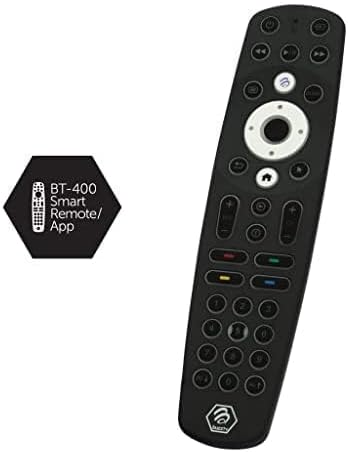
Image: The BuzzTV HD5 device with an overlay highlighting its key specifications like Android 11, 4K, 4GB RAM, and 128GB storage.
6. പരിപാലനം
- സോഫ്റ്റ്വെയർ അപ്ഡേറ്റുകൾ: Regularly check for and install system updates to ensure optimal performance and security. Navigate to Settings > Device Preferences > About > System Update.
- വൃത്തിയാക്കൽ: ഉപകരണവും റിമോട്ടും വൃത്തിയാക്കാൻ മൃദുവായതും ഉണങ്ങിയതുമായ തുണി ഉപയോഗിക്കുക. ദ്രാവക ക്ലീനറുകളോ ഉരച്ചിലുകളുള്ള വസ്തുക്കളോ ഒഴിവാക്കുക.
- സ്റ്റോറേജ് മാനേജ്മെന്റ്: ആനുകാലികമായി റീview installed apps and media to free up storage space if needed.
7. പ്രശ്നപരിഹാരം
| പ്രശ്നം | പരിഹാരം |
|---|---|
| ഒരു പവറും/ഉപകരണവും ഓണാകുന്നില്ല. | പവർ അഡാപ്റ്റർ ഉപകരണത്തിലേക്കും പ്രവർത്തിക്കുന്ന ഒരു പവർ ഔട്ട്ലെറ്റിലേക്കും സുരക്ഷിതമായി ബന്ധിപ്പിച്ചിട്ടുണ്ടെന്ന് ഉറപ്പാക്കുക. മറ്റൊരു ഔട്ട്ലെറ്റ് പരീക്ഷിക്കുക. |
| ടിവിയിൽ ചിത്രമില്ല. | Verify the HDMI cable is securely connected to both the device and the TV. Ensure the correct HDMI input is selected on your TV. Try a different HDMI cable or port. |
| റിമോട്ട് കൺട്രോൾ പ്രതികരിക്കുന്നില്ല | Check battery levels and replace if necessary. Re-pair the remote control with the device following the initial setup instructions. |
| Wi-Fi കണക്ഷൻ പ്രശ്നങ്ങൾ | Ensure your router is on and working. Re-enter the Wi-Fi password. Try moving the device closer to the router or using a wired Ethernet connection. |
8 സ്പെസിഫിക്കേഷനുകൾ
| ഫീച്ചർ | വിശദാംശങ്ങൾ |
|---|---|
| ബ്രാൻഡ് | ബസ് ടിവി |
| മോഡലിൻ്റെ പേര് | HD5 |
| ഓപ്പറേറ്റിംഗ് സിസ്റ്റം | ആൻഡ്രോയിഡ് 11 |
| റാം | 4 ജിബി |
| ആന്തരിക സംഭരണം | 128 ജിബി |
| പ്രോസസ്സർ | ക്വാഡ് കോർ പ്രോസസർ |
| റെസലൂഷൻ | 4K |
| കണക്റ്റിവിറ്റി | Dual-Band Wi-Fi, Bluetooth 5.0, HDMI, Ethernet |
| അളവുകൾ | 10 x 10 x 1 ഇഞ്ച് |
| ഭാരം | 1.21 പൗണ്ട് |
9. വാറൻ്റിയും പിന്തുണയും
For warranty information and technical support, please refer to the official BuzzTV webസൈറ്റിൽ ബന്ധപ്പെടുക അല്ലെങ്കിൽ അവരുടെ ഉപഭോക്തൃ സേവനവുമായി ബന്ധപ്പെടുക. വാങ്ങിയതിന്റെ തെളിവായി നിങ്ങളുടെ വാങ്ങൽ രസീത് സൂക്ഷിക്കുക.
കൂടുതൽ വിവരങ്ങളും പിന്തുണാ ഉറവിടങ്ങളും നിങ്ങൾക്ക് ഇവിടെ കണ്ടെത്താനാകും BuzzTV Amazon Store.


