1. ആമുഖം
This user manual provides important information for the safe and efficient operation of your Parkside 4V Cordless Screwdriver, model PAS 4 D7. Please read this manual thoroughly before first use and keep it for future reference. Proper use and maintenance will ensure the longevity and optimal performance of your tool.
2. സുരക്ഷാ നിർദ്ദേശങ്ങൾ
Always observe basic safety precautions to reduce the risk of fire, electric shock, and personal injury. Keep the work area clean and well-lit. Do not operate power tools in explosive atmospheres, such as in the presence of flammable liquids, gases, or dust. Always wear appropriate personal protective equipment, including eye protection.
2.1 പൊതു സുരക്ഷാ മുന്നറിയിപ്പുകൾ
- വർക്ക് ഏരിയ സുരക്ഷ: നിങ്ങളുടെ ജോലിസ്ഥലം വൃത്തിയായും നല്ല വെളിച്ചത്തിലും സൂക്ഷിക്കുക. അലങ്കോലമായതോ ഇരുണ്ടതോ ആയ പ്രദേശങ്ങൾ അപകടങ്ങൾ ക്ഷണിച്ചുവരുത്തുന്നു.
- ഇലക്ട്രിക്കൽ സുരക്ഷ: എർത്ത് അല്ലെങ്കിൽ ഗ്രൗണ്ടഡ് പ്രതലങ്ങളുമായി ശരീര സമ്പർക്കം ഒഴിവാക്കുക.
- വ്യക്തിഗത സുരക്ഷ: ജാഗ്രത പാലിക്കുക, നിങ്ങൾ എന്താണ് ചെയ്യുന്നതെന്ന് കാണുക, പവർ ടൂൾ പ്രവർത്തിപ്പിക്കുമ്പോൾ സാമാന്യബുദ്ധി ഉപയോഗിക്കുക. നിങ്ങൾ ക്ഷീണിതനായിരിക്കുമ്പോഴോ മയക്കുമരുന്ന്, മദ്യം അല്ലെങ്കിൽ മരുന്നിൻ്റെ സ്വാധീനത്തിലായിരിക്കുമ്പോൾ ഒരു പവർ ടൂൾ ഉപയോഗിക്കരുത്.
- ഉപകരണ ഉപയോഗവും പരിചരണവും: പവർ ടൂൾ നിർബന്ധിക്കരുത്. നിങ്ങളുടെ ആപ്ലിക്കേഷനായി ശരിയായ പവർ ടൂൾ ഉപയോഗിക്കുക.
3. ഉൽപ്പന്നം കഴിഞ്ഞുview
The Parkside 4V Cordless Screwdriver PAS 4 D7 is a compact and versatile tool designed for various screwdriving tasks. It features an integrated LED work light, an LED display for rotation direction, and a battery charge indicator. The ergonomic Softgrip ensures comfortable handling.
3.1 ഘടകങ്ങൾ
- Cordless Screwdriver Unit
- 14 Bits (25 mm)
- 1 Bit Extension (60 mm)
- 1 USB-C Charging Cable (1.50 m)

Image 3.1: The Parkside 4V Cordless Screwdriver PAS 4 D7, showing its compact design and integrated LED light.

Image 3.2: The complete set of accessories included with the screwdriver, featuring 14 different bits, a bit extension, and the USB-C charging cable.
4. സജ്ജീകരണം
4.1 ബാറ്ററി ചാർജ് ചെയ്യുന്നു
Before first use, fully charge the screwdriver's internal battery. The device is powered by a built-in battery and charges via a USB-C port.
- Connect the provided USB-C charging cable to the screwdriver's USB-C port.
- Connect the other end of the USB-C cable to a suitable USB power adapter (not included) or a USB port on a computer.
- The LED battery charge indicator will show the charging status. Allow the battery to charge completely before use.

Image 4.1: The screwdriver connected to its USB-C charging cable, demonstrating the charging setup.
4.2 Inserting Bits
The screwdriver is compatible with standard 1/4-inch hex bits. Use the included bit extension for reaching recessed screws.
- സ്ക്രൂഡ്രൈവർ ഓഫാക്കിയിട്ടുണ്ടെന്ന് ഉറപ്പാക്കുക.
- Insert the desired bit directly into the magnetic bit holder at the front of the tool.
- For extended reach, first insert the bit into the 60mm bit extension, then insert the extension into the screwdriver's bit holder.
5. പ്രവർത്തന നിർദ്ദേശങ്ങൾ
5.1 Powering On/Off and Rotation Direction
The screwdriver features an LED display to indicate the rotation direction (forward/reverse).
- To activate the screwdriver, press the trigger.
- To select forward (clockwise) rotation for tightening screws, push the direction switch to the left.
- To select reverse (counter-clockwise) rotation for loosening screws, push the direction switch to the right.
- The integrated LED work light will illuminate the work area when the trigger is pressed.

Image 5.1: A hand demonstrating the use of the screwdriver to drive a screw into a wooden surface, highlighting its ease of use.
5.2 Screwdriving Tips
- Always select the correct bit for the screw head to prevent stripping.
- Apply firm, steady pressure to the screwdriver to keep the bit engaged with the screw.
- Start at a low speed if available (this model has a fixed speed) and increase as needed for better control.
- Avoid over-tightening screws, especially in soft materials.

Image 5.2: A person using the screwdriver for assembly work, illustrating its practical application in various tasks.
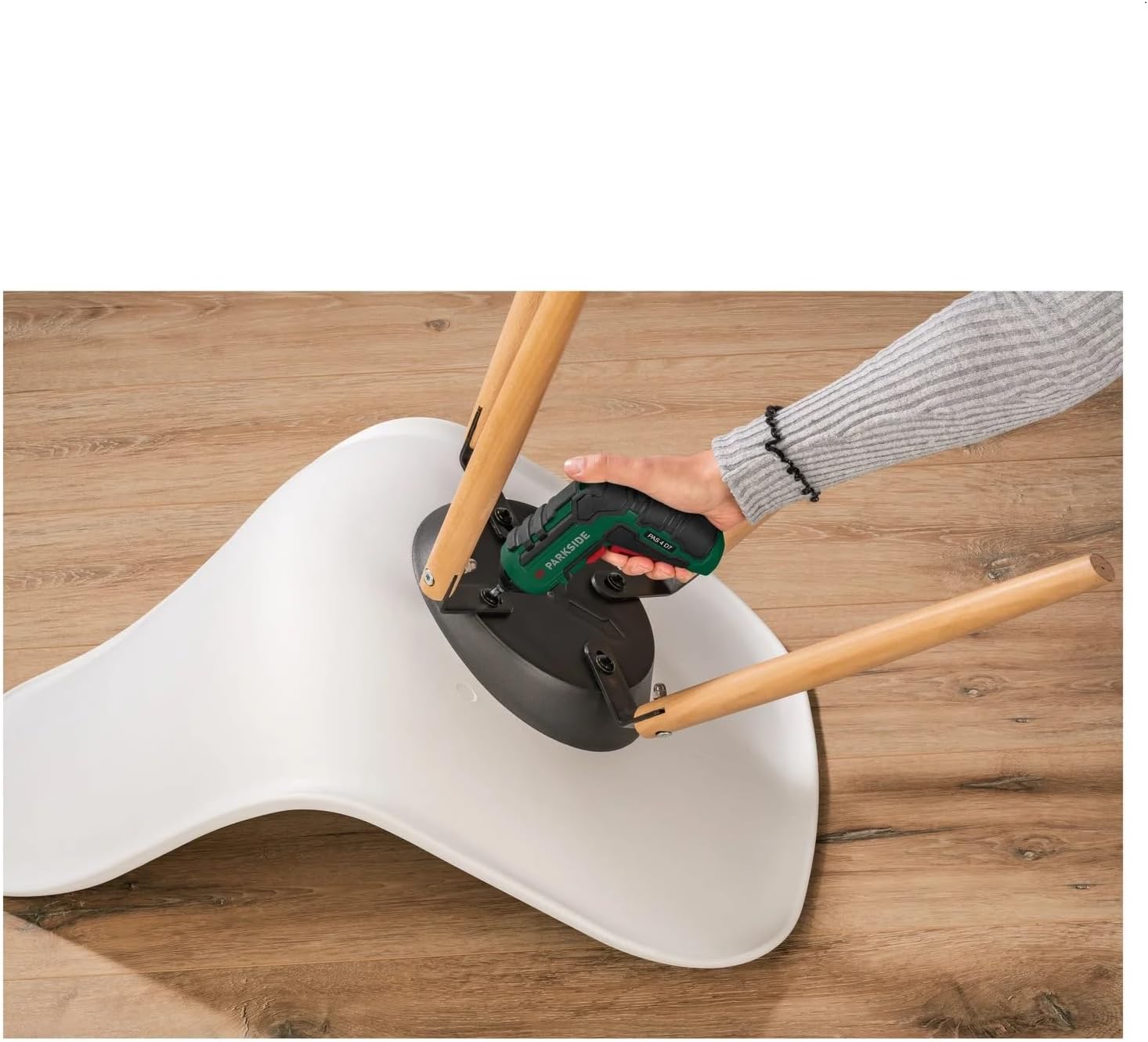
Image 5.3: The screwdriver being used to tighten screws on a chair, demonstrating its utility for furniture assembly and repairs.
6. പരിപാലനം
Regular maintenance ensures the longevity and safe operation of your screwdriver.
6.1 വൃത്തിയാക്കൽ
- വൃത്തിയാക്കുന്നതിന് മുമ്പ് എല്ലായ്പ്പോഴും ചാർജറിൽ നിന്ന് ഉപകരണം വിച്ഛേദിക്കുക.
- ഉപകരണത്തിന്റെ പുറംഭാഗം മൃദുവായ, ഡി ക്ലീനർ ഉപയോഗിച്ച് തുടയ്ക്കുക.amp തുണി. കഠിനമായ രാസവസ്തുക്കളോ ഉരച്ചിലുകളുള്ള ക്ലീനറുകളോ ഉപയോഗിക്കരുത്.
- വെന്റിലേഷൻ ഓപ്പണിംഗുകൾ പൊടിയിൽ നിന്നും അവശിഷ്ടങ്ങളിൽ നിന്നും മുക്തമാക്കുക.
6.2 സംഭരണം
- Store the screwdriver and its accessories in a clean, dry place, out of reach of children.
- നേരിട്ടുള്ള സൂര്യപ്രകാശത്തിലോ ഉയർന്ന താപനിലയിലോ സൂക്ഷിക്കുന്നത് ഒഴിവാക്കുക.
- ദീർഘകാല സംഭരണത്തിനായി, ബാറ്ററിയുടെ ആരോഗ്യം നിലനിർത്താൻ ബാറ്ററി ഭാഗികമായി (ഏകദേശം 50%) ചാർജ്ജ് ചെയ്തിട്ടുണ്ടെന്ന് ഉറപ്പാക്കുക.
7. പ്രശ്നപരിഹാരം
| പ്രശ്നം | സാധ്യമായ കാരണം | പരിഹാരം |
|---|---|---|
| സ്ക്രൂഡ്രൈവർ ഓണാക്കുന്നില്ല. | ബാറ്ററി തീർന്നു. | ബാറ്ററി പൂർണ്ണമായും ചാർജ് ചെയ്യുക. |
| Screwdriver loses power quickly. | ബാറ്ററി പൂർണ്ണമായും ചാർജ് ചെയ്തിട്ടില്ല അല്ലെങ്കിൽ ബാറ്ററി പഴകിയിരിക്കുന്നു. | Ensure full charge. If problem persists, battery may need replacement (contact support). |
| സ്ക്രൂ ഹെഡിൽ നിന്ന് ബിറ്റ് തെന്നിമാറുന്നു. | Incorrect bit size or insufficient pressure. | Use the correct bit. Apply firm, steady pressure. |
8 സ്പെസിഫിക്കേഷനുകൾ
| ഫീച്ചർ | വിശദാംശങ്ങൾ |
|---|---|
| മോഡൽ നമ്പർ | PAS 4 D7 |
| ബ്രാൻഡ് | Crivit (Parkside) |
| വാല്യംtage | 4 വോൾട്ട് |
| പവർ ഉറവിടം | ബാറ്ററി പവർ |
| വേഗത | 2E+2 (RPM) |
| അളവുകൾ (L x W x H) | 11.5 x 4.5 x 14 സെ.മീ |
| മെറ്റീരിയൽ | അലോയ് സ്റ്റീൽ, പ്ലാസ്റ്റിക് |
| ഉൾപ്പെടുത്തിയ ഘടകങ്ങൾ | 14 bits (25 mm), 1 bit extension (60 mm), 1 USB-C charging cable (1.50 m) |
9. വാറൻ്റിയും പിന്തുണയും
Information regarding warranty and availability of spare parts is not provided in the product details. For any issues or support inquiries, please refer to the retailer or manufacturer's official webഏറ്റവും കാലികമായ ബന്ധപ്പെടാനുള്ള വിവരങ്ങൾക്കായി സൈറ്റ്.
നിർമ്മാതാവ്: ക്രിവിറ്റ്


