1. ഉൽപ്പന്നം കഴിഞ്ഞുview
The Antec Flux Wood White is a high-performance mid-tower E-ATX PC case designed for optimal airflow and aesthetic appeal. It features a unique front panel crafted with a combination of metal mesh and birch wood, providing both superior ventilation and a premium look. The case supports a wide range of components, including large radiators and back-connect motherboards, making it suitable for high-end gaming and professional builds.
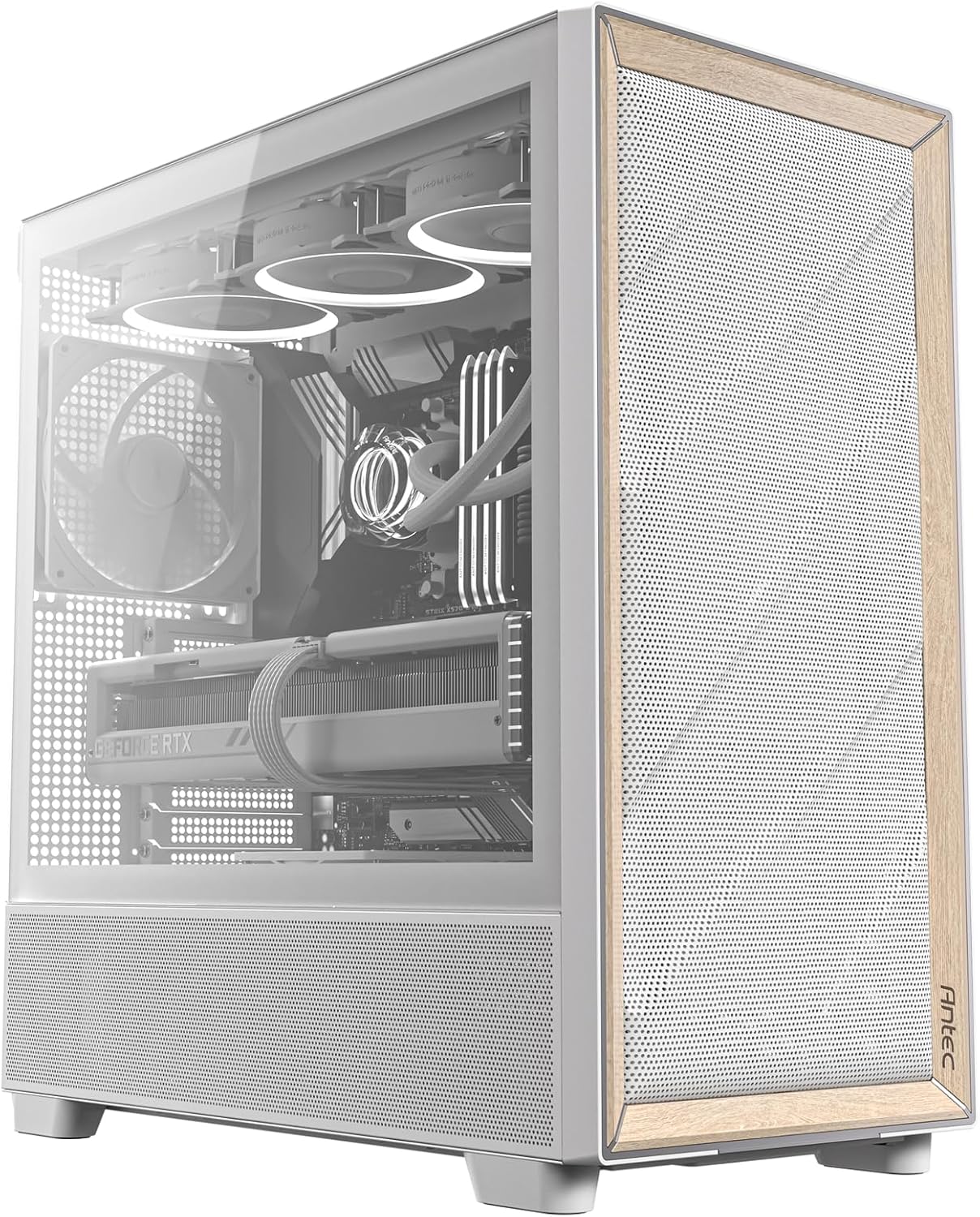
Figure 1: Antec Flux Wood White PC Case with internal components visible.
പ്രധാന സവിശേഷതകൾ:
- പ്രീമിയം മെറ്റീരിയലുകൾ: Crafted with metal, glass, and birch wood for a high-quality texture.
- ഒപ്റ്റിമൈസ് ചെയ്ത വായുപ്രവാഹം: Multi-directional vent design with extensive air intakes and support for up to 9 fans simultaneously.
- മുൻകൂട്ടി ഇൻസ്റ്റാൾ ചെയ്ത ഫാനുകൾ: Includes 3 x P12 PWM fans at the front, 1 x P12R PWM reverse fan at the PSU chamber, and 1 x P14 PWM fan in the rear.
- റേഡിയേറ്റർ പിന്തുണ: Supports simultaneous installation of Front 360mm/Top 360mm radiators or Front 420mm/Top 280mm radiators.
- ബാക്ക്-കണക്റ്റ് മദർബോർഡ് പിന്തുണ: Widely compatible with various back-connect motherboards for cleaner cable management.
- Tool-Free Panel Design: Simplifies assembly and maintenance.
2. സജ്ജീകരണം
2.1 Unboxing & Initial Inspection
Carefully remove the PC case from its packaging. Inspect the case for any signs of damage during transit. The Antec Flux Wood White comes securely packed with protective foam. Locate the accessory box which contains essential tools and components for assembly.
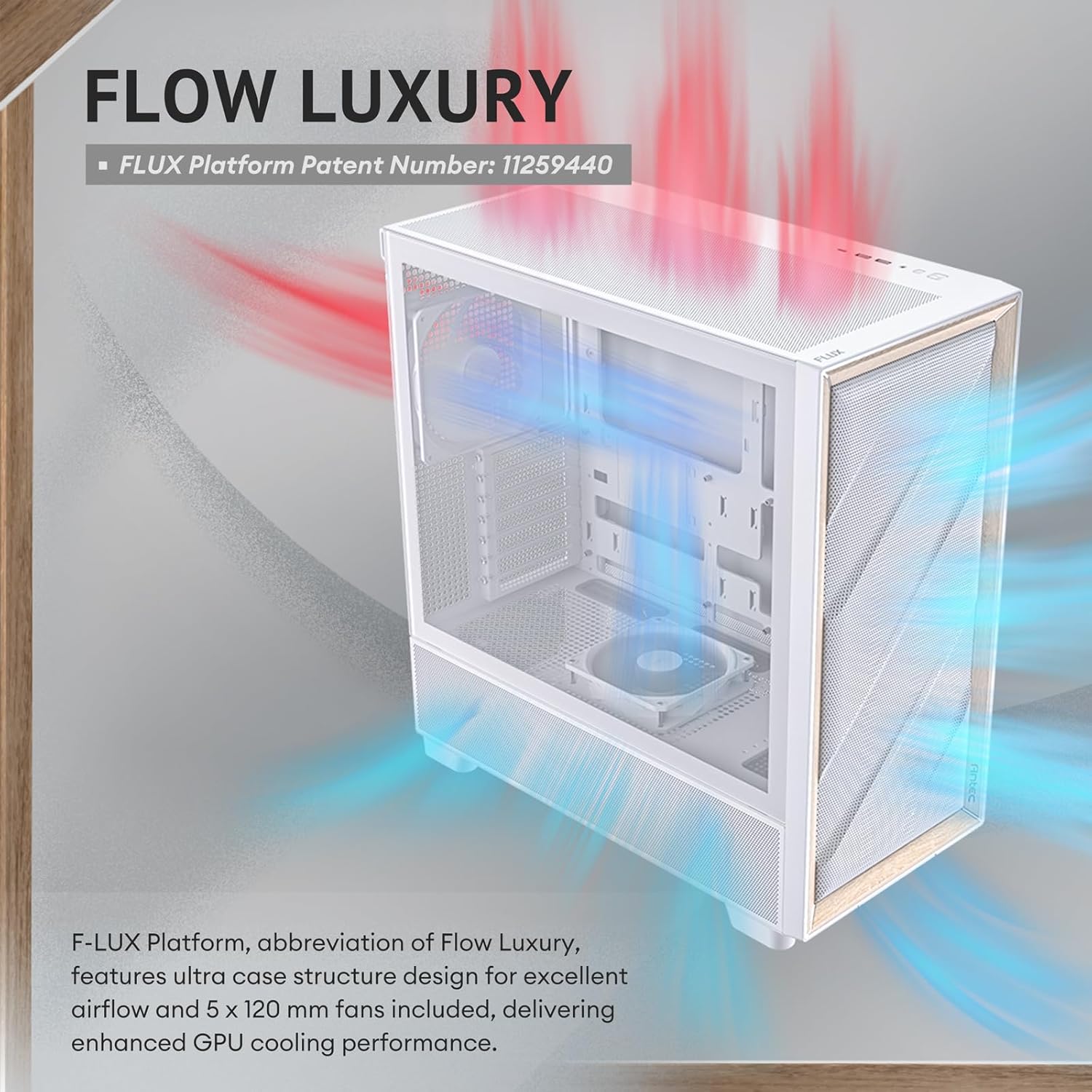
Figure 2: The Antec Flux Wood White PC Case being carefully removed from its packaging.
2.2 അളവുകൾ
Before beginning assembly, ensure your space accommodates the case dimensions:
- ആഴം: ഏകദേശം 530 mm (20.86 ഇഞ്ച്)
- വീതി: ഏകദേശം 245 mm (9.64 ഇഞ്ച്)
- ഉയരം: ഏകദേശം 545 mm (21.45 ഇഞ്ച്)
2.3 പാനൽ നീക്കം
The Antec Flux Wood White features a tool-free panel design for easy access to internal components. The side glass panel and top panel can be removed by gently pulling them off. The front panel can also be removed for fan access or cleaning.

Figure 3: Illustration of the multi-directional vent design and removable panels.
3. ഇൻസ്റ്റലേഷൻ
3.1 Motherboard Compatibility
This case supports a variety of motherboard form factors, including E-ATX (up to 330 mm), ATX, Micro-ATX, and ITX. It also widely supports back-connect motherboards, allowing for cleaner cable routing and improved airflow.

Figure 4: Internal layout highlighting motherboard, CPU, and GPU areas.
3.2 Fan & Radiator Support
The Antec Flux Wood White comes with 5 high-performance PWM fans pre-installed:
- 3 x P12 PWM fans at the front (120mm)
- 1 x P12R PWM reverse fan at the power supply chamber (120mm)
- 1 x P14 PWM fan in the rear (140mm)
The case supports up to 9 fans simultaneously. For liquid cooling, it allows for simultaneous installation of a Front 360mm radiator + Top 360mm radiator, or a Front 420mm radiator + Top 280mm radiator.

Figure 5: Diagram illustrating the FLUX Airflow design and included fans.

Figure 6: Detailed fan and radiator support configurations for top, front, rear, and power supply shroud.
3.3 സംഭരണ ഇൻസ്റ്റാളേഷൻ
കേസ് നൽകുന്നു ample storage options:
- 2 x 3.5" / 2.5" drive bays
- 1 x 2.5" drive bay
These bays are located behind the motherboard tray for efficient space utilization.

ചിത്രം 7: പിൻഭാഗം view of the case interior showing HDD/SSD and Power Supply locations.
3.4 PSU ഇൻസ്റ്റലേഷൻ
The power supply unit (PSU) is rear-mounted. The case includes a PSU adapter bracket to accommodate various power supply orientations. Refer to the included power supply installation guide for detailed instructions on wiring and cable routing.
3.5 ജിപിയു ഇൻസ്റ്റലേഷൻ
The Antec Flux Wood White supports vertical GPU mounting with a vertical bracket. Fully-open PCI slot covers can be removed to install your graphics card vertically, providing a clean look and potentially better thermal performance.

Figure 8: Illustration of vertical GPU mounting support with removable PCI slot covers.
3.6 കേബിൾ മാനേജ്മെന്റ്
The case offers excellent cable management solutions to keep your build tidy and improve airflow. It includes pre-installed velcro straps and additional cable ties to secure cables behind the motherboard tray. Numerous routing holes are strategically placed for efficient cable organization.

ചിത്രം 9: പിൻഭാഗം view of the motherboard tray showcasing cable management features like velcro straps and cable ties.
4. പ്രവർത്തിക്കുന്നു
4.1 I/O പാനൽ
The top-mounted I/O panel provides convenient access to essential ports and controls. It includes dust plugs for protection.
- 1 x Type-C 10Gbps port
- 2 x USB 3.0 പോർട്ടുകൾ
- 1 x Headphone/Mic Combo Jack
- റീസെറ്റ് ബട്ടൺ
- പവർ ബട്ടൺ

ചിത്രം 10: ക്ലോസപ്പ് view of the top I/O panel with port labels.
4.2 Cooling System (FLUX Airflow)
The Antec Flux Wood White utilizes a multi-directional vent design to create a dedicated FLUX airflow channel. This design features extensive air intakes at the bottom, power supply chamber, and lower sides, along with top vents and large-area mesh at the front. This optimized design fosters better airflow and reduces wind noise.

Figure 11: Illustration of FLUX Vertical Cooling and FLUX Horizontal Cooling paths within the case.
The pre-installed PWM fans are controlled via a built-in ARGB & PWM fan control hub, which can sync with your motherboard for unified system management.
5. പരിപാലനം
5.1 പൊടി ഫിൽറ്റർ വൃത്തിയാക്കൽ
The case is equipped with a bottom full-size pull-out dust filter for easy cleaning and strong dust prevention. Regularly remove and clean this filter to maintain optimal airflow and prevent dust buildup inside your system.

Figure 12: The bottom full-size pull-out dust filter for convenient maintenance.
5.2 പൊതുവായ ശുചീകരണം
For general cleaning of the case exterior, use a soft, damp cloth. Avoid abrasive cleaners or harsh chemicals that could damage the finish, especially the birch wood accents.
6 സ്പെസിഫിക്കേഷനുകൾ
| ഫീച്ചർ | സ്പെസിഫിക്കേഷൻ |
|---|---|
| ബ്രാൻഡ് | Antec |
| മോഡലിൻ്റെ പേര് | FLUX White |
| ഇനം മോഡൽ നമ്പർ | FLUX White |
| ഇനത്തിൻ്റെ ഭാരം | 9.27 കിലോഗ്രാം (20.4 പൗണ്ട്) |
| ഉൽപ്പന്ന അളവുകൾ (LxWxH) | 19.05 x 19.76 x 9.4 ഇഞ്ച് |
| നിറം | FLUX W |
| മെറ്റീരിയൽ | ലോഹം |
| മദർബോർഡ് അനുയോജ്യത | E-ATX, ATX, Micro-ATX, ITX |
| കേസ് തരം | മിഡ് ടവർ |
| തണുപ്പിക്കൽ രീതി | വായു |
| USB 2.0 പോർട്ടുകളുടെ എണ്ണം | 1 |
| USB 3.0 പോർട്ടുകളുടെ എണ്ണം | 2 |
| പവർ സപ്ലൈ മൗണ്ടിംഗ് തരം | റിയർ മൗണ്ട് |
7. പ്രശ്നപരിഹാരം
If you encounter any issues with your Antec Flux Wood White PC case, please refer to the following common troubleshooting steps:
- ശക്തിയില്ല: Double-check all power connections from the PSU to the motherboard and components. Ensure the power button cable is correctly connected to the motherboard's front panel header.
- Fans Not Spinning/No RGB: Verify fan connections to the fan hub and the hub's connection to the motherboard. Ensure the fan hub is receiving power. Note that this model does not feature RGB lighting.
- അമിത ചൂടാക്കൽ: Ensure all pre-installed fans are spinning correctly and oriented for optimal airflow (intake at front/bottom, exhaust at rear/top). Clean dust filters regularly.
- ശബ്ദം: Check for loose screws on fans or panels. Ensure cables are properly managed and not obstructing fan blades.
8. വാറൻ്റിയും പിന്തുണയും
For warranty information and technical support, please visit the official Antec webസൈറ്റിൽ ബന്ധപ്പെടുക അല്ലെങ്കിൽ അവരുടെ ഉപഭോക്തൃ സേവനവുമായി ബന്ധപ്പെടുക. വാറന്റി ക്ലെയിമുകൾക്കായി നിങ്ങളുടെ വാങ്ങിയതിന്റെ തെളിവ് സൂക്ഷിക്കുക.
Antec Store: https://www.amazon.com/stores/Antec/page/6B94B4FE-CB08-4A35-B360-30D8A0DFB86B


