ആമുഖം
This manual provides essential instructions for the setup, operation, and maintenance of your Bose QuietComfort 3 Acoustic Noise Cancelling Headphones. These headphones are designed to deliver high-fidelity audio while significantly reducing unwanted ambient noise, enhancing your listening experience in various environments.
Please read this manual thoroughly before using your headphones to ensure proper function and longevity.

Image: A pair of Bose QuietComfort 3 Acoustic Noise Cancelling Headphones in black, shown with the audio cable connected and the inline remote visible.
പാക്കേജ് ഉള്ളടക്കം
താഴെ കൊടുത്തിരിക്കുന്ന എല്ലാ ഇനങ്ങളും നിങ്ങളുടെ പാക്കേജിൽ ഉണ്ടെന്ന് ഉറപ്പാക്കുക:
- Bose QuietComfort 3 അക്കോസ്റ്റിക് നോയിസ് ക്യാൻസലിംഗ് ഹെഡ്ഫോണുകൾ
- റീചാർജ് ചെയ്യാവുന്ന ലിഥിയം-അയൺ ബാറ്ററി
- ബാറ്ററി ചാർജർ
- Audio Cable (standard)
- Audio Cable with Inline Remote and Microphone (for iPhone/iPod control and hands-free calling)
- എയർലൈൻ അഡാപ്റ്റർ
- ചുമക്കുന്ന കേസ്

Image: All components of the Bose QuietComfort 3 package laid out, including the headphones, a zippered carrying case, two audio cables, an airline adapter, and the battery charger.
സജ്ജമാക്കുക
1. ബാറ്ററി ചേർക്കുന്നു
- വലതുവശത്തെ ഇയർകപ്പിൽ ബാറ്ററി കമ്പാർട്ട്മെന്റ് കണ്ടെത്തുക.
- കമ്പാർട്ട്മെന്റ് കവർ പതുക്കെ തുറക്കുക.
- Insert the rechargeable Lithium-ion battery, ensuring the contacts align correctly.
- കമ്പാർട്ട്മെൻ്റ് കവർ സുരക്ഷിതമായി അടയ്ക്കുക.
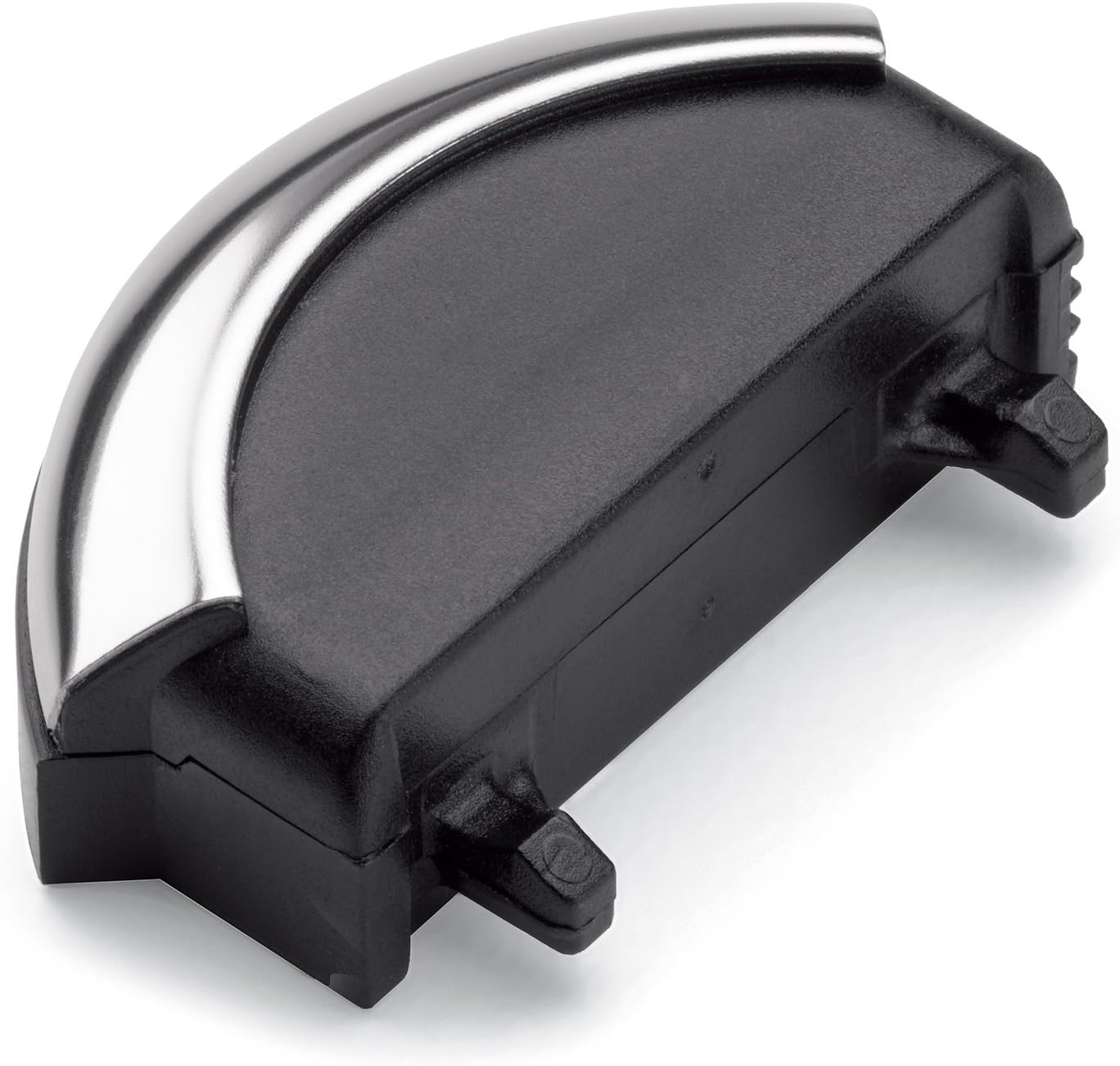
ചിത്രം: വിശദമായ ഒരു ചിത്രം view of the battery module for the Bose QuietComfort 3 headphones, showing its shape and connection points.
2. Connecting the Audio Cable
- Identify the audio input jack on the left earcup.
- Insert the smaller end of your chosen audio cable (standard or with remote/mic) into the headphone jack until it clicks into place.
- Connect the larger end of the audio cable to your audio source (e.g., smartphone, tablet, MP3 player).
3. Powering On/Off Noise Cancellation
The noise cancellation feature is activated by a switch located on the right earcup. Slide the switch to the 'On' position to enable noise cancellation and to the 'Off' position to disable it. A green indicator light will illuminate when noise cancellation is active.
ഹെഡ്ഫോണുകൾ പ്രവർത്തിപ്പിക്കുന്നു
ഓഡിയോ കേൾക്കുന്നു
Once the headphones are connected to your audio source and noise cancellation is activated, you can begin listening to music or other audio content. Adjust the volume using your audio source's controls.
Using the Inline Remote and Microphone
If you are using the audio cable with the inline remote and microphone (compatible with select Apple devices):
- പ്ലേ/താൽക്കാലികമായി നിർത്തുക: സെന്റർ ബട്ടൺ ഒരിക്കൽ അമർത്തുക.
- ട്രാക്ക് ഒഴിവാക്കുക: മധ്യ ബട്ടൺ രണ്ടുതവണ വേഗത്തിൽ അമർത്തുക.
- മുമ്പത്തെ ട്രാക്ക്: മധ്യ ബട്ടൺ മൂന്ന് തവണ വേഗത്തിൽ അമർത്തുക.
- ഉത്തരം/അവസാന കോൾ: ഇൻകമിംഗ് കോളിലോ സജീവ കോളിലോ മധ്യ ബട്ടൺ ഒരിക്കൽ അമർത്തുക.
- വോളിയം നിയന്ത്രണം: വോളിയം ക്രമീകരിക്കാൻ '+', '-' ബട്ടണുകൾ ഉപയോഗിക്കുക.

Image: A man wearing Bose QuietComfort 3 headphones, seated and looking at a mobile device, illustrating typical usage.
ബാറ്ററി ചാർജ് ചെയ്യുന്നു
The Bose QuietComfort 3 headphones operate on a rechargeable Lithium-ion battery, providing approximately 25 hours of use on a full charge.
- ഒരു പവർ let ട്ട്ലെറ്റിലേക്ക് ബാറ്ററി ചാർജർ ബന്ധിപ്പിക്കുക.
- Connect the charger cable to the charging port on the battery.
- Allow the battery to charge fully. The indicator light on the charger will change to indicate a full charge.
- ചാർജിംഗ് പൂർത്തിയായിക്കഴിഞ്ഞാൽ ചാർജർ വിച്ഛേദിക്കുക.
It is recommended to fully charge the battery before initial use.
പരിപാലനവും പരിചരണവും
വൃത്തിയാക്കൽ
- Wipe the headphone surfaces with a soft, dry cloth.
- ലിക്വിഡ് ക്ലീനറുകളോ ലായകങ്ങളോ ഉപയോഗിക്കരുത്.
- ഏതെങ്കിലും ദ്വാരങ്ങളിൽ ഈർപ്പം കയറുന്നത് ഒഴിവാക്കുക.
സംഭരണം
When not in use, store your headphones in the provided carrying case to protect them from dust and damage. Ensure the noise cancellation switch is in the 'Off' position to conserve battery life.

ചിത്രം: മുകളിൽ നിന്ന് താഴേക്ക് view of the Bose QuietComfort 3 headphones, showing their design and how they can fold flat for storage.
ട്രബിൾഷൂട്ടിംഗ്
| പ്രശ്നം | സാധ്യമായ കാരണം | പരിഹാരം |
|---|---|---|
| ശബ്ദമില്ല | Audio cable not fully connected; audio source volume too low; noise cancellation off. | Ensure cable is secure; increase audio source volume; turn on noise cancellation. |
| നോയ്സ് റദ്ദാക്കൽ പ്രവർത്തിക്കുന്നില്ല | Noise cancellation switch is off; battery is low or not inserted correctly. | Slide switch to 'On'; check battery charge and insertion. |
| ബാറ്ററി ചാർജ് ചെയ്യുന്നില്ല | Charger not connected properly; faulty charger or battery. | Ensure charger is securely connected to outlet and battery; try a different outlet. If problem persists, contact support. |
സ്പെസിഫിക്കേഷനുകൾ
- ബ്രാൻഡ്: ബോസ്
- മോഡൽ: ശാന്തമായ ആശ്വാസം 3
- നിറം: കറുപ്പ്
- ചെവി സ്ഥാപിക്കൽ: ചെവിയിൽ
- ഫോം ഘടകം: ചെവിക്ക് മുകളിൽ
- ശബ്ദ നിയന്ത്രണം: സജീവ നോയ്സ് റദ്ദാക്കൽ
- കണക്റ്റിവിറ്റി ടെക്നോളജി: വയർഡ്
- ബാറ്ററി ലൈഫ്: Approximately 25 hours (rechargeable Li-ion)
വാറൻ്റിയും പിന്തുണയും
For warranty information or technical support, please refer to the documentation included with your purchase or visit the official Bose support webസൈറ്റ്. വാറന്റി ക്ലെയിമുകൾക്കായി നിങ്ങളുടെ വാങ്ങലിന്റെ തെളിവ് സൂക്ഷിക്കുക.
ബോസ് ഒഫീഷ്യൽ Webസൈറ്റ്: www.bose.com


