1. ആമുഖം
This manual provides detailed instructions for the setup, operation, maintenance, and troubleshooting of your AULA F98 Tri-Mode Mechanical Keyboard. Please read this manual thoroughly to ensure proper use and to maximize your keyboard's performance and lifespan.

ചിത്രം 1.1: കഴിഞ്ഞുview of the AULA F98 Tri-Mode Mechanical Keyboard.
2. ഉൽപ്പന്ന സവിശേഷതകൾ
- ട്രൈ-മോഡ് കണക്റ്റിവിറ്റി: ബ്ലൂടൂത്ത് 5.0, 2.4GHz വയർലെസ്, യുഎസ്ബി-സി വയർഡ് കണക്ഷനുകൾ പിന്തുണയ്ക്കുന്നു.
- ഹോട്ട്-സ്വാപ്പബിൾ സ്വിച്ചുകൾ: Compatible with 3-pin/5-pin mechanical switches for easy customization and maintenance.
- RGB ബാക്ക്ലൈറ്റിംഗ്: Features 16.8 million colors with multiple preset lighting effects and music rhythm modes.
- Programmable Keys & Macros: All keys support macro customization via driver software.
- 99-കീ ലേഔട്ട്: Compact design with a numeric keypad, N-key rollover, and WIN key lock.
- നീണ്ട ബാറ്ററി ലൈഫ്: Equipped with a 4000mAh battery.
- Premium Keycaps: Side-printed PBT keycaps for durability and comfort.
- ഗാസ്കറ്റ് ഘടന: Enhances typing feel and sound.
3. സജ്ജീകരണ ഗൈഡ്
3.1 പാക്കേജ് ഉള്ളടക്കം
തുടരുന്നതിന് മുമ്പ്, എല്ലാ ഇനങ്ങളും ഉണ്ടെന്ന് ഉറപ്പാക്കുക:
- AULA F98 മെക്കാനിക്കൽ കീബോർഡ്
- യുഎസ്ബി-സി കേബിൾ
- 2.4GHz Wireless Receiver (stored in the keyboard)
- ഉപയോക്തൃ മാനുവൽ (ഈ പ്രമാണം)
3.2 കീബോർഡ് ബന്ധിപ്പിക്കുന്നു
The AULA F98 keyboard supports three connection modes: USB-C wired, 2.4GHz wireless, and Bluetooth 5.0. You can switch between up to 5 connected devices.
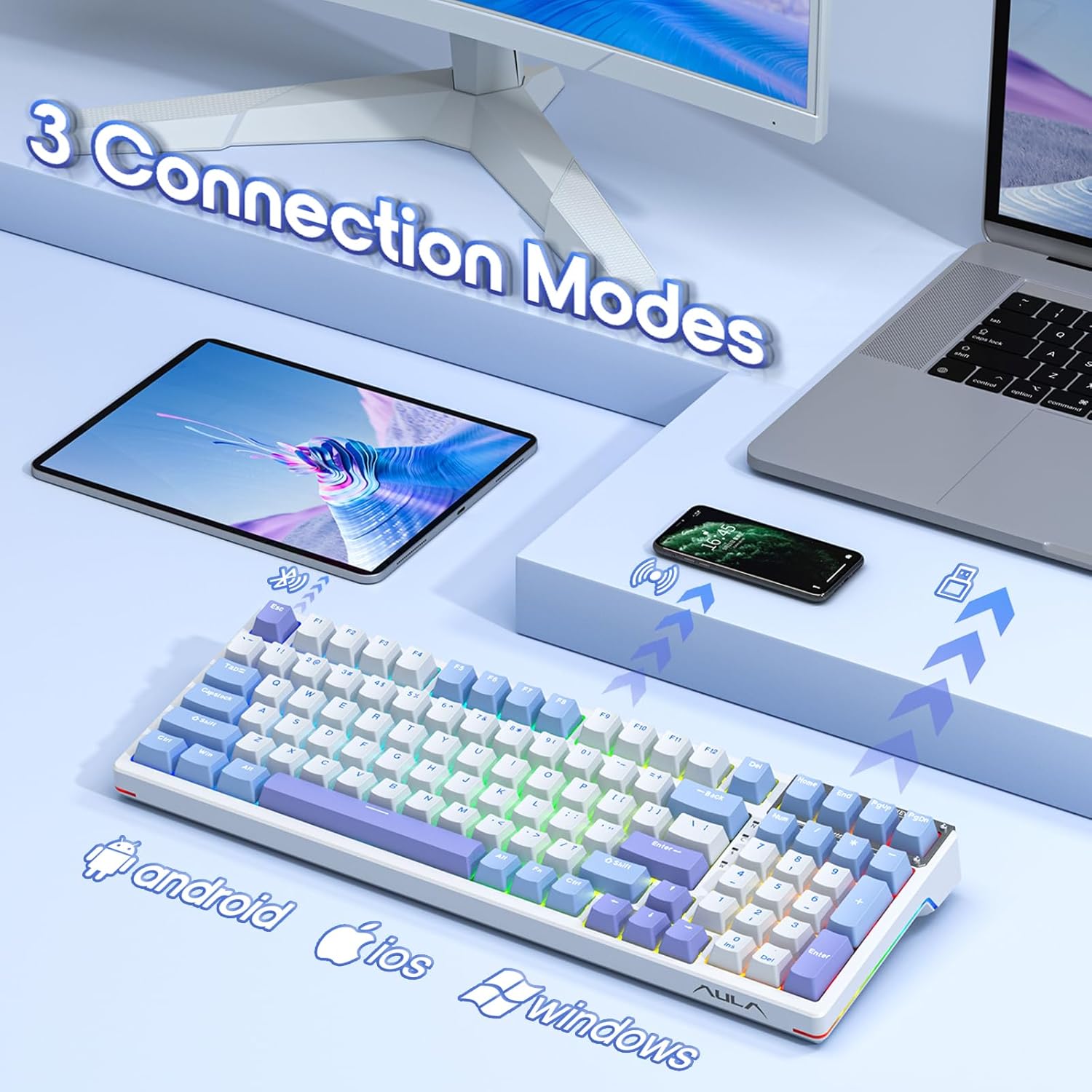
Image 3.1: The AULA F98 keyboard supports three connection modes for various devices.
3.2.1 USB-C വയർഡ് കണക്ഷൻ
- കീബോർഡിൽ USB-C പോർട്ട് കണ്ടെത്തുക.
- Connect the provided USB-C cable to the keyboard and to an available USB port on your computer.
- കീബോർഡ് യാന്ത്രികമായി തിരിച്ചറിയപ്പെടുകയും ഉപയോഗത്തിന് തയ്യാറാകുകയും ചെയ്യും.
3.2.2 2.4GHz വയർലെസ് കണക്ഷൻ
- Locate the 2.4GHz wireless receiver, typically stored in a magnetic compartment on the keyboard's underside or side.
- നിങ്ങളുടെ കമ്പ്യൂട്ടറിൽ ലഭ്യമായ ഒരു USB പോർട്ടിലേക്ക് 2.4GHz റിസീവർ പ്ലഗ് ചെയ്യുക.
- Turn on the keyboard using the power switch (usually located on the back or side).
- കീബോർഡ് യാന്ത്രികമായി കണക്ട് ചെയ്യണം. ഇല്ലെങ്കിൽ, അമർത്തുക FN + ~ 2.4GHz മോഡ് സജീവമാക്കാൻ.
3.2.3 ബ്ലൂടൂത്ത് 5.0 കണക്ഷൻ
- കീബോർഡ് ഓണാക്കുക.
- അമർത്തിപ്പിടിക്കുക FN + 1, FN + 2, അല്ലെങ്കിൽ FN + 3 for 3-5 seconds until the indicator light flashes rapidly. This indicates pairing mode.
- നിങ്ങളുടെ ഉപകരണത്തിൽ (കമ്പ്യൂട്ടർ, ടാബ്ലെറ്റ്, ഫോൺ), ബ്ലൂടൂത്ത് ക്രമീകരണങ്ങൾ തുറന്ന് പുതിയ ഉപകരണങ്ങൾക്കായി തിരയുക.
- Select "AULA F98" from the list of available devices to pair.
- ജോടിയാക്കിക്കഴിഞ്ഞാൽ, ഇൻഡിക്കേറ്റർ ലൈറ്റ് മിന്നുന്നത് നിർത്തുകയും ദൃഢമായി തുടരുകയും ചെയ്യും.
- ജോടിയാക്കിയ ബ്ലൂടൂത്ത് ഉപകരണങ്ങൾക്കിടയിൽ മാറാൻ, അമർത്തുക FN + 1/2/3 ചുരുക്കത്തിൽ.
3.3 ബാറ്ററി ചാർജ് ചെയ്യുന്നു
The keyboard is equipped with a 4000mAh rechargeable battery. Connect the USB-C cable to the keyboard and a power source (computer USB port or USB wall adapter) to charge. The indicator light will show charging status and turn off when fully charged.
4. പ്രവർത്തന നിർദ്ദേശങ്ങൾ
4.1 അടിസ്ഥാന കീ പ്രവർത്തനങ്ങൾ
- എൻ-കീ റോൾഓവർ: Allows multiple keys to be pressed simultaneously without conflict.
- വിൻ കീ ലോക്ക്: അമർത്തുക FN + വിൻ to lock/unlock the Windows key, preventing accidental presses during gaming.
4.2 RGB ബാക്ക്ലൈറ്റിംഗ് നിയന്ത്രണം
The AULA F98 features extensive RGB backlighting. Use the following FN key combinations to control lighting effects:
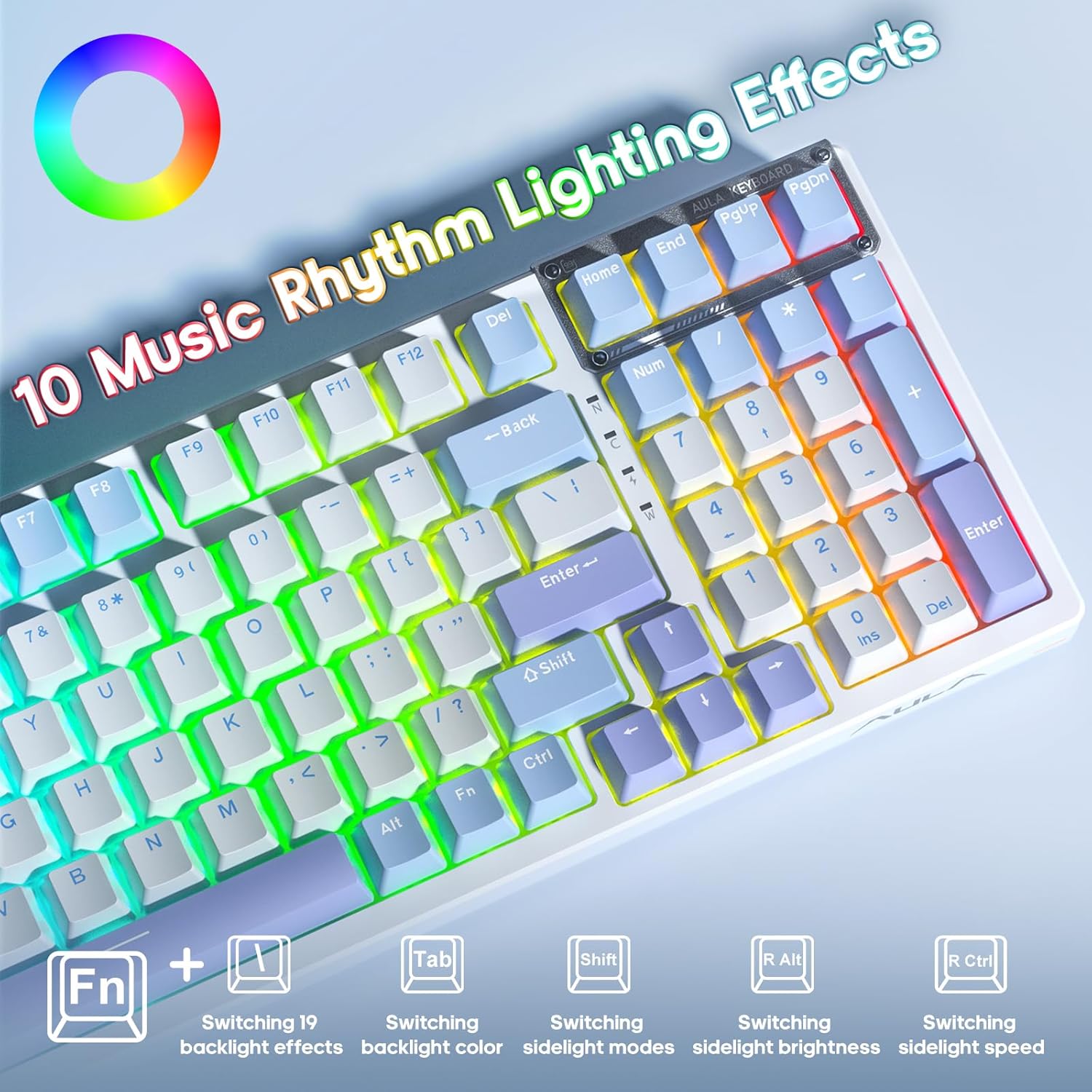
Image 4.1: FN key combinations for controlling RGB lighting effects and music rhythm modes.
- FN + \|: Switch between 19 preset backlight effects.
- FN + TAB: ബാക്ക്ലൈറ്റ് നിറങ്ങൾ മാറ്റുക.
- FN + R Shift: Switch sidelight modes.
- FN + R Alt: Adjust sidelight brightness.
- FN + R Ctrl: Adjust sidelight speed.
- എഫ്എൻ + ↑ / ↓: ബാക്ക്ലൈറ്റിന്റെ തെളിച്ചം ക്രമീകരിക്കുക.
- FN + → / ←: ബാക്ക്ലൈറ്റ് വേഗത ക്രമീകരിക്കുക.

Image 4.2: The keyboard features customizable RGB side lighting.
4.3 മാക്രോ പ്രോഗ്രാമിംഗ്
The AULA F98 keyboard supports macro customization for all keys using the dedicated driver software. The driver software is compatible with Windows operating systems.
- Download and install the AULA F98 driver software from the official AULA webസൈറ്റ്.
- സോഫ്റ്റ്വെയർ സമാരംഭിക്കുക.
- Navigate to the 'Macro Manager' section.
- Record or edit macros as desired.
- Assign macros to specific keys.
- Save your configurations. The keyboard has onboard memory to store these settings.
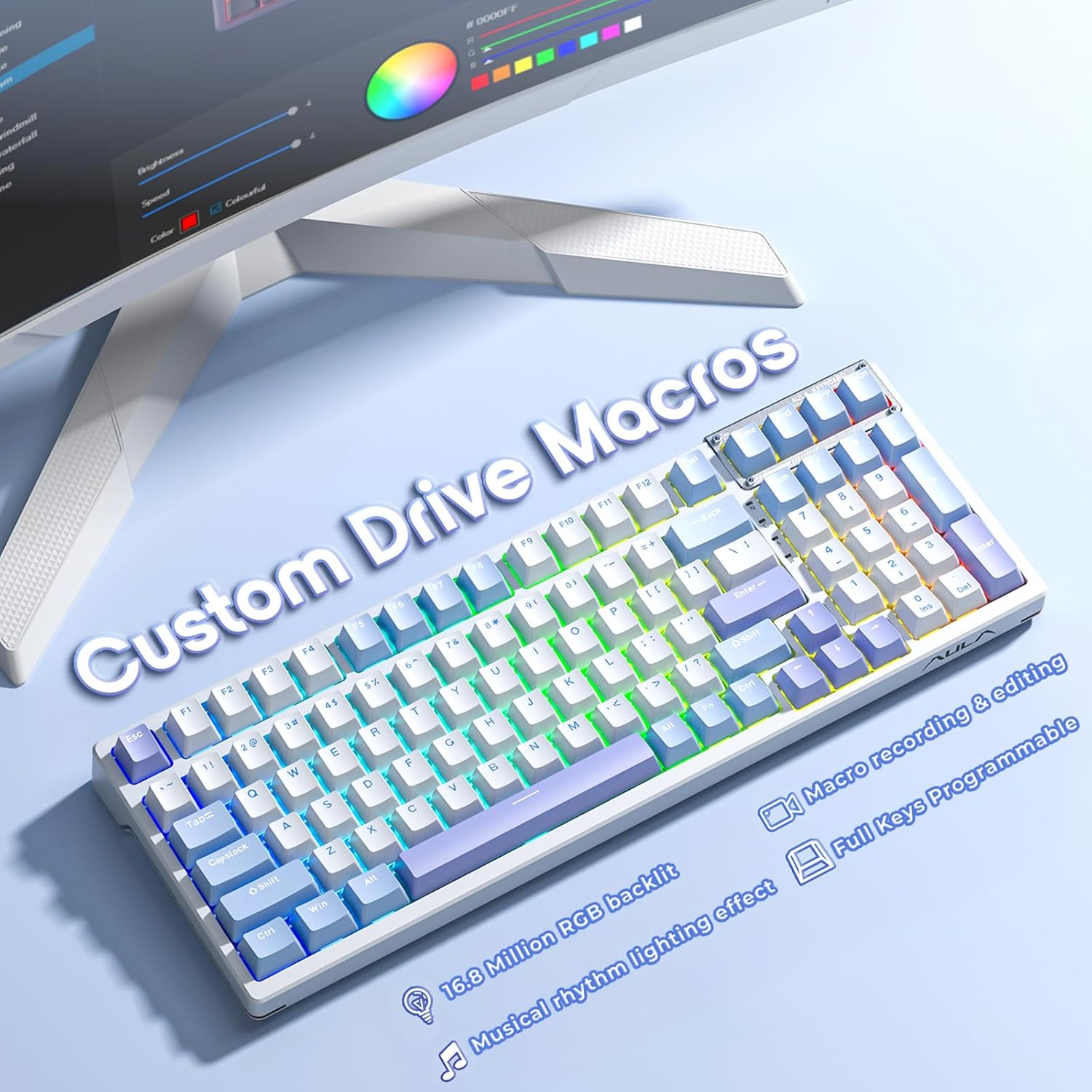
Image 4.3: The keyboard supports custom macros and is fully programmable via software.
4.4 ഹോട്ട്-സ്വാപ്പിംഗ് സ്വിച്ചുകളും കീക്യാപ്പുകളും
The AULA F98 is designed with hot-swappable sockets, allowing you to easily change mechanical switches and keycaps without soldering.

Image 4.4: The hot-swappable design allows for easy switch replacement, supporting 3-pin/5-pin switches.
4.4.1 Replacing Keycaps
- ആവശ്യമുള്ള കീക്യാപ്പ് സൌമ്യമായി നീക്കം ചെയ്യാൻ ഒരു കീക്യാപ്പ് പുള്ളർ ഉപയോഗിക്കുക.
- Align the new keycap with the switch stem and press down firmly until it clicks into place.
4.4.2 സ്വിച്ചുകൾ മാറ്റിസ്ഥാപിക്കൽ
- First, remove the keycap using a keycap puller.
- Use a switch puller to carefully grip the top and bottom clips of the switch.
- Gently pull the switch upwards to remove it from the PCB.
- പുതിയ സ്വിച്ചിന്റെ പിന്നുകൾ പിസിബിയിലെ ദ്വാരങ്ങളുമായി വിന്യസിക്കുക. പിന്നുകൾ നേരെയാണെന്ന് ഉറപ്പാക്കുക.
- Press the new switch down firmly until it is seated correctly. Do not force it if resistance is met; check pin alignment.
- Test the new switch to ensure it functions correctly before replacing the keycap.
5. പരിപാലനം
5.1 കീബോർഡ് വൃത്തിയാക്കൽ
കീബോർഡിന്റെ രൂപവും പ്രവർത്തനക്ഷമതയും നിലനിർത്താൻ പതിവായി വൃത്തിയാക്കൽ സഹായിക്കുന്നു.
- കീബോർഡ് വൃത്തിയാക്കുന്നതിന് മുമ്പ് എല്ലാ വൈദ്യുതി സ്രോതസ്സുകളിൽ നിന്നും വിച്ഛേദിക്കുക.
- കീക്യാപ്പുകൾക്കിടയിൽ നിന്ന് പൊടിയും അവശിഷ്ടങ്ങളും നീക്കം ചെയ്യാൻ മൃദുവായ ബ്രഷ് അല്ലെങ്കിൽ കംപ്രസ് ചെയ്ത വായു ഉപയോഗിക്കുക.
- For stubborn dirt, gently wipe the keycaps and surface with a slightly damp, ലിന്റ് രഹിത തുണി. അമിതമായ ഈർപ്പം ഒഴിവാക്കുക.
- കഠിനമായ രാസവസ്തുക്കളോ ഉരച്ചിലുകൾ ഉപയോഗിക്കരുത്.
5.2 പൊതു പരിചരണം
- Avoid exposing the keyboard to extreme temperatures, direct sunlight, or liquids.
- Do not drop or subject the keyboard to strong impacts.
- Store the 2.4GHz receiver in its designated magnetic compartment when not in use to prevent loss.
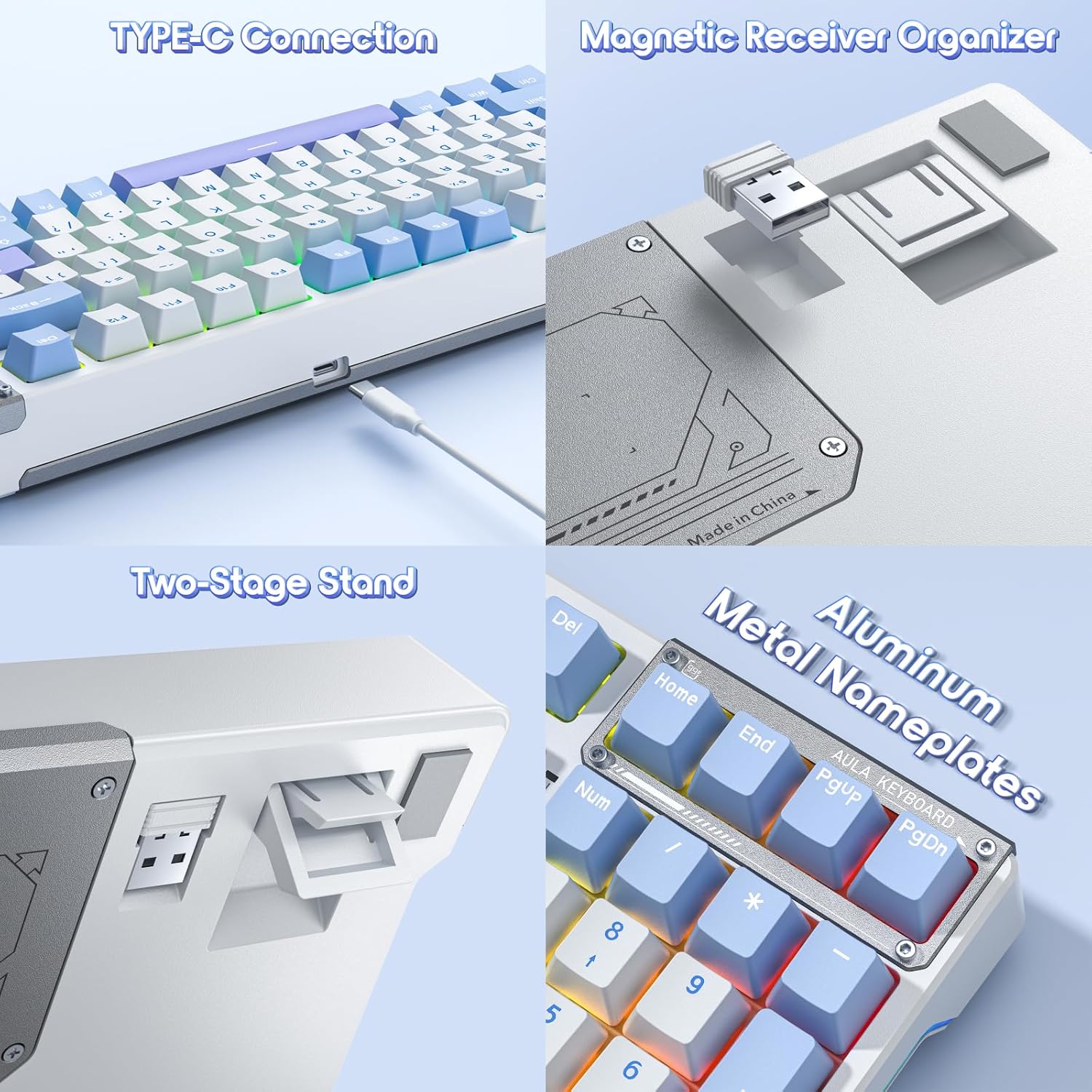
Image 5.1: Features like the Type-C connection, magnetic receiver organizer, two-stage stand, and aluminum nameplates contribute to the keyboard's design and functionality.
6. പ്രശ്നപരിഹാരം
If you encounter issues with your AULA F98 keyboard, refer to the following common problems and solutions:
| പ്രശ്നം | സാധ്യമായ കാരണം | പരിഹാരം |
|---|---|---|
| കീബോർഡ് പ്രതികരിക്കുന്നില്ല (വയർ മുഖേന) | Loose USB-C cable connection; faulty USB port. | Ensure the USB-C cable is securely connected. Try a different USB port or cable. |
| കീബോർഡ് പ്രതികരിക്കുന്നില്ല (2.4GHz വയർലെസ്) | Receiver not plugged in; low battery; incorrect mode. | Plug in the 2.4GHz receiver. Charge the keyboard. Press FN + ~ to ensure 2.4GHz mode is active. |
| കീബോർഡ് പ്രതികരിക്കുന്നില്ല (ബ്ലൂടൂത്ത്) | Not paired; low battery; incorrect mode; device Bluetooth off. | Ensure Bluetooth is enabled on your device. Re-pair the keyboard (see Section 3.2.3). Charge the keyboard. Press FN + 1/2/3 ശരിയായ ബ്ലൂടൂത്ത് ചാനൽ തിരഞ്ഞെടുക്കാൻ. |
| ബാക്ക്ലൈറ്റിംഗ് പ്രവർത്തിക്കുന്നില്ല അല്ലെങ്കിൽ തെറ്റാണ് | Backlight turned off; brightness too low; software conflict. | ഉപയോഗിച്ച് തെളിച്ചം ക്രമീകരിക്കുക FN + ↑. Cycle through effects with FN + \|. Check driver software settings. |
| Keys not registering input | Faulty switch; debris under keycap. | Remove keycap and clean. If hot-swappable, replace the switch (see Section 4.4.2). |
| Macros not working | Macro not saved; driver software issue. | Ensure macros are correctly configured and saved in the driver software. Reinstall the driver if necessary. |
7 സ്പെസിഫിക്കേഷനുകൾ
| ഫീച്ചർ | വിശദാംശങ്ങൾ |
|---|---|
| മോഡൽ നമ്പർ | F98 |
| കണക്റ്റിവിറ്റി ടെക്നോളജി | 2.4GHz വയർലെസ്, ബ്ലൂടൂത്ത് 5.0, യുഎസ്ബി-സി വയേർഡ് |
| കീബോർഡ് വിവരണം | മെക്കാനിക്കൽ |
| സ്വിച്ച് തരം | LEOBOG Reaper Linear Switches (Pre-lubed), Hot-Swappable (3-pin/5-pin) |
| കീകാപ്പുകൾ | Side-printed PBT |
| ബാക്ക്ലൈറ്റിംഗ് | RGB (16.8 Million Colors), 19 Preset Effects, 10 Music Rhythm Effects |
| ബാറ്ററി ശേഷി | 4000mAh |
| ഉൽപ്പന്ന അളവുകൾ | 38.98 x 13.82 x 0.4 ഇഞ്ച് (99 x 35.1 x 1.0 സെ.മീ) |
| ഇനത്തിൻ്റെ ഭാരം | 3.01 പൗണ്ട് (1.36 കി.ഗ്രാം) |
| അനുയോജ്യമായ ഉപകരണങ്ങൾ | പിസി, ലാപ്ടോപ്പ്, ഗെയിമിംഗ് കൺസോൾ |
| ഉൾപ്പെടുത്തിയ ഘടകങ്ങൾ | USB കേബിൾ |
8. വാറൻ്റിയും പിന്തുണയും
AULA products are designed for reliability and performance. For warranty information, please refer to the documentation included with your purchase or visit the official AULA website. For technical support or further assistance, please contact AULA customer service through their official channels.
വാറൻ്റി ക്ലെയിമുകൾക്കായി നിങ്ങളുടെ വാങ്ങിയതിൻ്റെ തെളിവ് സൂക്ഷിക്കുക.


