ആമുഖം
Thank you for choosing the Oraimo Traveler Link 20 Power Bank. This device is designed to provide reliable portable power for your electronic devices. With a high capacity of 20000mAh and multiple built-in charging cables, it offers convenient and efficient charging on the go. Please read this manual carefully to ensure proper use and optimal performance.
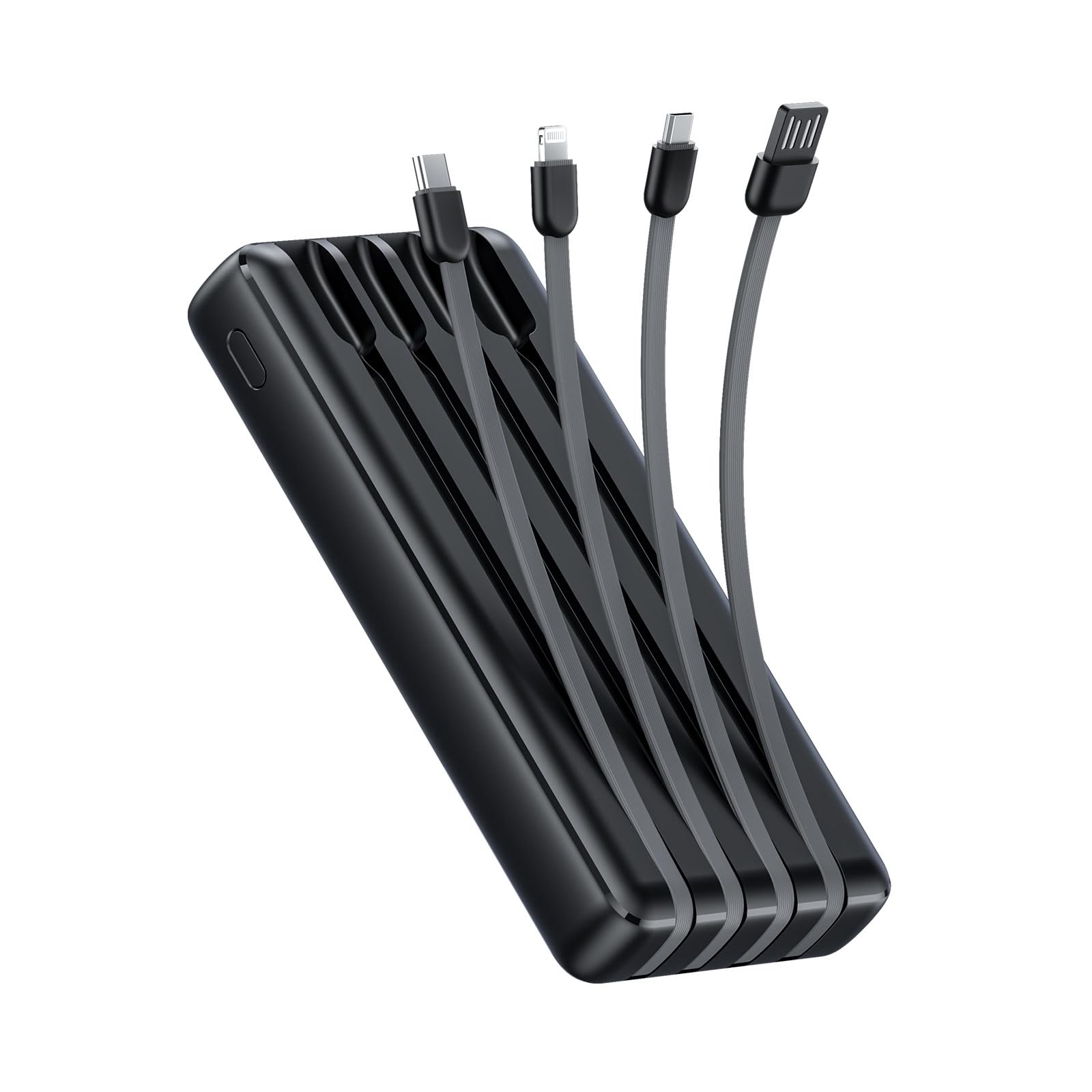
Image: The Oraimo Traveler Link 20 Power Bank, showcasing its compact design and integrated cables.
സജ്ജമാക്കുക
പ്രാരംഭ ചാർജിംഗ്
Before first use, fully charge your Oraimo Traveler Link 20 Power Bank. This ensures the battery is calibrated and ready for optimal performance.
- Connect the power bank to a power source using one of the built-in recharging cables (USB-A, Type-C, or Micro-USB) or an external USB-A to Type-C/Micro-USB cable.
- The LED indicators on the power bank will illuminate to show the charging status.
- Once all LED indicators are solid, the power bank is fully charged. Disconnect it from the power source.
ഘടകങ്ങൾ തിരിച്ചറിയൽ
Familiarize yourself with the power bank's features:
- Built-in Charging Cables: Includes Type-C, Micro-USB, and Lightning cables for charging various devices.
- Built-in Recharging Cable: A USB-A cable is integrated for convenient recharging of the power bank itself.
- USB-A ഔട്ട്പുട്ട് പോർട്ട്: An additional USB-A port for charging devices using your own cable.
- LED സൂചകങ്ങൾ: ശേഷിക്കുന്ന ബാറ്ററി നിലയും ചാർജിംഗ് നിലയും പ്രദർശിപ്പിക്കുക.
- പവർ ബട്ടൺ: Activates the power bank and controls the LED flashlight.
- LED ഫ്ലാഷ്ലൈറ്റ്: Integrated light for emergency use.
പ്രവർത്തന നിർദ്ദേശങ്ങൾ
നിങ്ങളുടെ ഉപകരണങ്ങൾ ചാർജ് ചെയ്യുന്നു
The Traveler Link 20 allows you to charge up to four devices simultaneously using its built-in cables and USB-A output port.
- Select the appropriate built-in cable (Type-C, Micro-USB, or Lightning) for your device.
- Connect the cable to your device's charging port.
- Alternatively, use your own USB charging cable with the dedicated USB-A output port.
- The power bank will automatically begin charging your device(s). The LED indicators will show the power bank's remaining charge.

ചിത്രം: ക്ലോസ്-അപ്പ് view of the Oraimo Traveler Link 20 showing its integrated Type-C, Micro-USB, and Lightning charging cables.

Image: The power bank simultaneously charging a smartphone, a smartwatch, and a portable toothbrush, demonstrating its multi-output capability.

Image: The Oraimo Traveler Link 20 demonstrating wide compatibility with various devices including iOS smartphones, Android smartphones, and accessories like earbuds.

Image: An illustration highlighting the 20000mAh capacity of the Oraimo Traveler Link 20, capable of fully charging a phone multiple times.
പവർ ബാങ്ക് റീചാർജ് ചെയ്യുന്നു
The power bank can be recharged using its built-in USB-A cable or via its Type-C or Micro-USB input ports.
- Using Built-in USB-A Cable: Plug the integrated USB-A cable into a USB wall adapter, computer USB port, or other USB power source.
- Using Type-C or Micro-USB Input: Connect a compatible cable (not included for these inputs) to the respective port on the power bank and then to a power source.
- ചാർജ് ചെയ്യുമ്പോൾ LED ഇൻഡിക്കേറ്ററുകൾ മിന്നിമറയുകയും പൂർണ്ണമായി ചാർജ് ചെയ്യുമ്പോൾ ദൃഢമായി തുടരുകയും ചെയ്യും.

Image: The power bank being recharged via its built-in USB-A cable connected to a power strip, and also showing an alternative recharge method using a Type-C cable and wall adapter.
LED ഫ്ലാഷ്ലൈറ്റ് ഫംഗ്ഷൻ
The power bank includes a built-in LED flashlight with an SOS light alarm function for emergencies.
- To turn on/off the flashlight: Long press the power button for approximately 3 seconds.
- SOS മോഡ് സജീവമാക്കാൻ: While the flashlight is on, short press the power button to cycle through modes (steady light, SOS flashing).

Image: The Oraimo Traveler Link 20 with its LED flashlight illuminated, demonstrating its emergency lighting capability.
കുറഞ്ഞ കറന്റ് ചാർജിംഗ് മോഡ്
The power bank automatically detects and switches to low current charging mode for small devices like wireless earbuds or smartwatches, preventing damage from overcurrent.
- Simply connect your low-current device. The power bank will intelligently adjust the output.
മെയിൻ്റനൻസ്
To ensure the longevity and safe operation of your Oraimo Traveler Link 20 Power Bank, follow these maintenance guidelines:
- സംഭരണം: നേരിട്ടുള്ള സൂര്യപ്രകാശവും കടുത്ത താപനിലയും ഏൽക്കാത്ത തണുത്തതും വരണ്ടതുമായ സ്ഥലത്ത് പവർ ബാങ്ക് സൂക്ഷിക്കുക.
- വൃത്തിയാക്കൽ: Use a soft, dry cloth to clean the exterior of the power bank. Do not use liquid cleaners or abrasive materials.
- ശാരീരിക നാശം ഒഴിവാക്കുക: Do not drop, puncture, or disassemble the power bank. Avoid exposing it to water or high humidity.
- പതിവ് ചാർജിംഗ്: ദീർഘനേരം ഉപയോഗിച്ചിട്ടില്ലെങ്കിൽ, ബാറ്ററിയുടെ ആരോഗ്യം നിലനിർത്താൻ കുറഞ്ഞത് മൂന്ന് മാസത്തിലൊരിക്കലെങ്കിലും പവർ ബാങ്ക് ചാർജ് ചെയ്യുക.
ട്രബിൾഷൂട്ടിംഗ്
നിങ്ങളുടെ പവർ ബാങ്കിൽ പ്രശ്നങ്ങൾ നേരിടുകയാണെങ്കിൽ, താഴെപ്പറയുന്ന പൊതുവായ പ്രശ്നങ്ങളും പരിഹാരങ്ങളും പരിശോധിക്കുക:
| പ്രശ്നം | സാധ്യമായ കാരണം | പരിഹാരം |
|---|---|---|
| ഉപകരണങ്ങൾ ചാർജ് ചെയ്യാത്ത പവർ ബാങ്ക്. | Low battery; incorrect cable connection; device incompatibility. | Ensure power bank is charged. Check cable connections. Verify device compatibility. |
| പവർ ബാങ്ക് റീചാർജ് ചെയ്യുന്നില്ല. | Faulty charging cable/adapter; power source issue. | Try a different charging cable and wall adapter. Ensure the power source is active. |
| സ്ലോ ചാർജിംഗ്. | Using a non-fast charging adapter; multiple devices connected; cable quality. | Use a compatible fast-charging adapter. Disconnect other devices. Use high-quality cables. |
| LED ഫ്ലാഷ്ലൈറ്റ് പ്രവർത്തിക്കുന്നില്ല. | Incorrect operation; low battery. | Long press the power button for 3 seconds. Recharge the power bank. |
The Oraimo Traveler Link 20 features a multi-protection system (over-current, short-circuit, over-discharge, high/low-temperature charging/discharge, overcharge, output overvoltage) to protect itself and your devices. If the power bank stops functioning, it might be due to one of these protection mechanisms activating. Disconnect all devices and cables, then try again after a few minutes.

Image: Diagram illustrating the multi-protection system of the Oraimo Traveler Link 20, highlighting various safety features.
ഉൽപ്പന്ന സവിശേഷതകൾ
| ഫീച്ചർ | വിശദാംശങ്ങൾ |
|---|---|
| മോഡലിൻ്റെ പേര് | Traveler Link 20 |
| മോഡൽ നമ്പർ | OPB-P5201 |
| ബ്രാൻഡ് | ഒറൈമോ |
| ബാറ്ററി ശേഷി | 20000mAh (ലിഥിയം അയോൺ) |
| ഔട്ട്പുട്ട് പവർ | Up to 12W (5V/2.4A Max) |
| ഇൻപുട്ട് വോളിയംtage | 5V |
| കണക്റ്റർ തരം | USB Type-C, USB Type-A, Micro USB (built-in cables: Type-C, Micro-USB, Lightning; built-in recharging cable: USB-A) |
| പ്രത്യേക സവിശേഷതകൾ | 4 Built-in Charging & Recharging Cables, Charge up to 4 devices simultaneously, Multi-protection System, LED Flashlight with SOS, Low Current Protection |
| അളവുകൾ | 20.5 x 3 x 11 സെ.മീ |
| ഭാരം | 200 ഗ്രാം |
| നിറം | കറുപ്പ് |
വാറൻ്റിയും പിന്തുണയും
Oraimo products are manufactured to the highest quality standards. This product is covered by a limited warranty from the date of purchase. Please refer to the warranty card included in your product packaging for specific terms and conditions.
For technical support, troubleshooting assistance, or warranty claims, please contact Oraimo customer service through their official website or the contact information provided in your product documentation. Keep your proof of purchase for warranty validation.


