1. ആമുഖം
The Bluesound Node Nano is a compact, high-resolution multi-room music streamer designed to integrate seamlessly with your existing audio system. It allows you to access and stream music from various sources, including online streaming services, network-attached storage, and local libraries, all controlled via the intuitive BluOS app. Experience pristine audio quality with support for up to 24-bit/192 kHz resolution.

ഫ്രണ്ട് view of the Bluesound Node Nano, showcasing its sleek design and touch controls.
2. ബോക്സിൽ എന്താണുള്ളത്?
Carefully unpack your Bluesound Node Nano. The package should contain the following items:
- Bluesound Node Nano Unit
- യുഎസ്ബി പവർ അഡാപ്റ്റർ
- 4x International Plug Adapters
- USB-C പവർ കേബിൾ
- സ്റ്റീരിയോ ആർസിഎ മുതൽ ആർസിഎ കേബിൾ വരെ
- ഇഥർനെറ്റ് കേബിൾ
3. ഫിസിക്കൽ ഓവർview
3.1 ഫ്രണ്ട് പാനൽ നിയന്ത്രണങ്ങൾ
The top surface of the Node Nano features touch-sensitive controls for basic playback and volume adjustments:
- പ്ലേ/താൽക്കാലികമായി നിർത്തുക ബട്ടൺ: Initiates or pauses playback.
- മുമ്പത്തെ/അടുത്ത ട്രാക്ക് ബട്ടണുകൾ: Skips to the previous or next track.
- വോളിയം മുകളിലേക്കും താഴേക്കും ബട്ടണുകൾ: ഔട്ട്പുട്ട് വോളിയം ക്രമീകരിക്കുന്നു.
- സ്റ്റാറ്റസ് ഇൻഡിക്കേറ്റർ LED: Displays the current operational status of the device.

മുകളിൽ view of the Node Nano, showing the touch-sensitive controls and status LED.
3.2 പിൻ പാനൽ കണക്ഷനുകൾ
The rear panel provides all necessary input and output ports for connecting the Node Nano to your audio system and network.
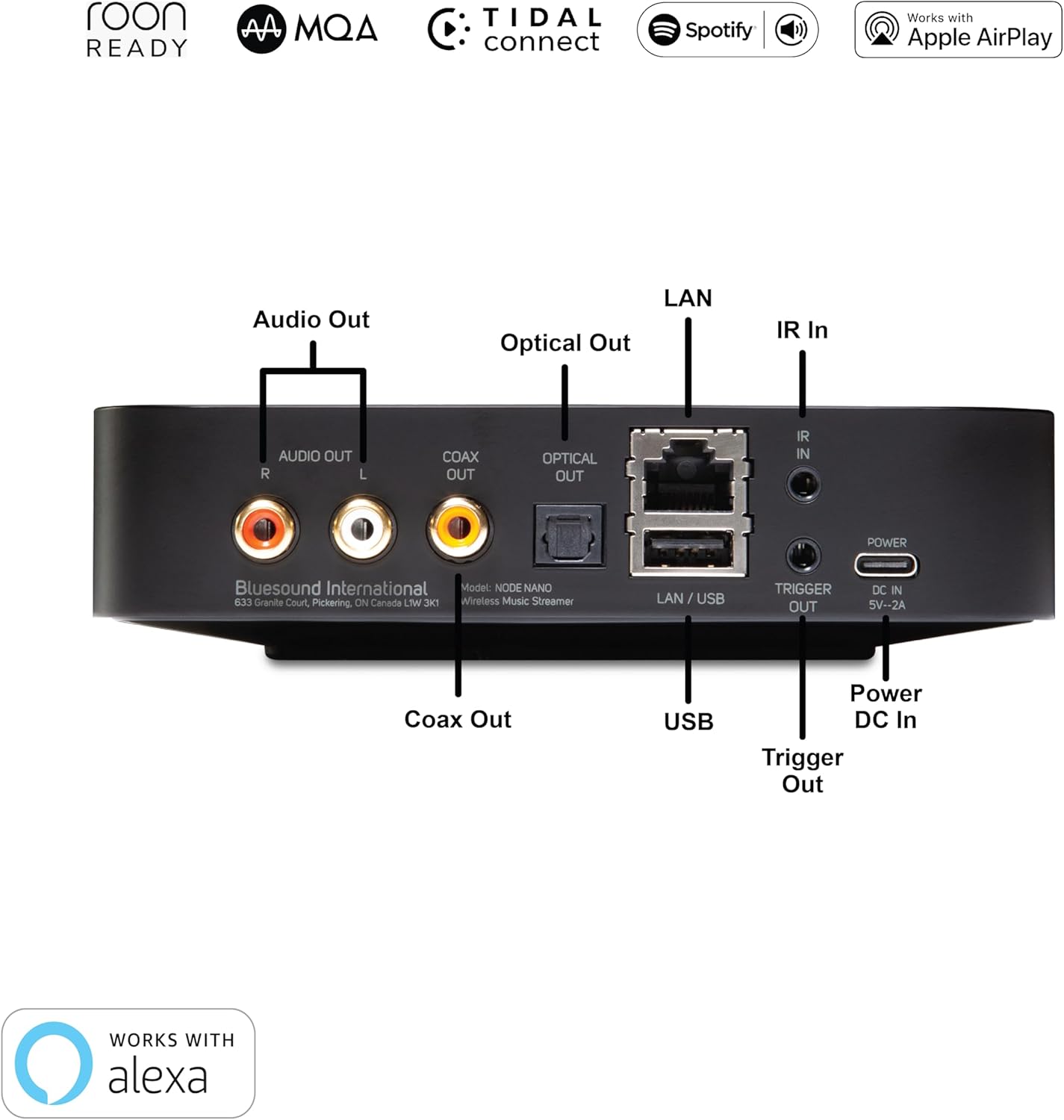
വിശദമായി view of the Node Nano's rear panel, illustrating all available connection ports.
- ഓഡിയോ ഔട്ട് (RCA): Stereo analog output for connecting to an ampലൈഫയർ അല്ലെങ്കിൽ പവർഡ് സ്പീക്കറുകൾ.
- ഒപ്റ്റിക്കൽ ഔട്ട്: Digital optical audio output.
- കോക്സ് Outട്ട്: Digital coaxial audio output.
- LAN / USB: Ethernet port for wired network connection and USB port for external storage.
- IR ഇൻ: Infrared input for external IR receivers.
- ട്രിഗർ ഔട്ട്: 12V trigger output for controlling other audio components.
- Power DC In: Power input for the included USB-C power adapter.
4. പ്രാരംഭ സജ്ജീകരണം
Follow these steps to set up your Bluesound Node Nano for the first time:
- പ്ലേസ്മെൻ്റ്: Place the Node Nano on a stable, flat surface near your audio system and a power outlet. Ensure adequate ventilation.
- ഓഡിയോ സിസ്റ്റത്തിലേക്ക് ബന്ധിപ്പിക്കുക:
- For analog connection, use the supplied Stereo RCA to RCA cable to connect the Audio Out (RCA) ports on the Node Nano to an available analog input (e.g., AUX, CD) on your ampലൈഫയർ അല്ലെങ്കിൽ പവർഡ് സ്പീക്കറുകൾ.
- For digital connection, use an optical or coaxial cable (not supplied) to connect the ഒപ്റ്റിക്കൽ ഔട്ട് or Coax Out port on the Node Nano to a corresponding digital input on your DAC or ampജീവൻ.
- നെറ്റ്വർക്കിലേക്ക് കണക്റ്റ് ചെയ്യുക:
- വയർഡ് കണക്ഷൻ: Connect one end of the supplied Ethernet cable to the LAN / USB port on the Node Nano and the other end to an available LAN port on your router or network switch.
- വയർലെസ് കണക്ഷൻ: The Node Nano supports dual-band Wi-Fi. For initial setup, a wired connection is recommended, but you can configure Wi-Fi later via the BluOS app.
- പവർ ഓൺ: Connect the USB-C power cable to the Power DC In port on the Node Nano and plug the USB power adapter into a wall outlet. The status indicator LED will illuminate.
- Download BluOS App: Download the BluOS Controller app from the Apple App Store (for iOS devices) or Google Play Store (for Android devices). The app is essential for controlling your Node Nano.
- Complete Setup in App: Open the BluOS app and follow the on-screen instructions to discover and configure your Node Nano. This includes naming your player and connecting to your Wi-Fi network if you chose a wireless setup.

The Node Nano connected to an amplifier, ready for audio playback.
5. പ്രവർത്തന നിർദ്ദേശങ്ങൾ
5.1 Using the BluOS App
The BluOS app is your primary interface for controlling the Node Nano. It allows you to browse music, manage playlists, select inputs, and control multi-room audio.
- സംഗീത സേവനങ്ങൾ: Access integrated streaming services like Spotify Connect, Tidal Connect, and more.
- പ്രാദേശിക ലൈബ്രറി: Browse and play music from your local network shares or USB-connected storage.
- കളിക്കാരന്റെ തിരഞ്ഞെടുപ്പ്: Select the Node Nano or other Bluesound players in your system.
- വോളിയം നിയന്ത്രണം: Adjust volume directly from the app.
- പ്രീസെറ്റുകൾ: Utilize the two programmable quick-touch presets for instant access to favorite stations or playlists.

Screenshots illustrating the user interface of the BluOS app for music control.
5.2 Direct Control
For quick adjustments, use the touch controls on the top panel of the Node Nano:
- ടാപ്പ് ചെയ്യുക പ്ലേ/താൽക്കാലികമായി നിർത്തുക icon to toggle playback.
- ടാപ്പ് ചെയ്യുക മുമ്പത്തേത്/അടുത്തത് icons to change tracks.
- ടാപ്പ് ചെയ്യുക വോളിയം കൂട്ടുക/താഴ്ത്തുക icons to adjust volume.
5.3 മൾട്ടി-റൂം ഓഡിയോ
The Node Nano is part of the BluOS multi-room ecosystem. You can group it with other Bluesound players (e.g., PULSE speakers, POWERNODE amplifiers) to play the same music synchronously across multiple rooms or play different music in each zone. This is managed entirely within the BluOS app.

The Node Nano integrated into a multi-room audio setup, providing high-resolution streaming to connected speakers.
6. കണക്റ്റിവിറ്റിയും സവിശേഷതകളും
The Node Nano offers a wide array of connectivity options and advanced features:
- ഉയർന്ന മിഴിവുള്ള ഓഡിയോ: Supports up to 24-bit/192 kHz audio playback, including MQA (Master Quality Authenticated) and DSD (via future update).
- വയർലെസ് കണക്റ്റിവിറ്റി: Dual-band Wi-Fi (802.11ac) for robust wireless streaming.
- വയർഡ് കണക്റ്റിവിറ്റി: Gigabit Ethernet for stable network connection.
- ബ്ലൂടൂത്ത്: Two-way aptX Adaptive Bluetooth for high-quality wireless audio transmission and reception.
- സ്ട്രീമിംഗ് സേവനങ്ങൾ: Native support for popular services like Spotify Connect, Tidal Connect, and Apple AirPlay 2.
- Local Server Mode: Access and stream music from local network storage.
- യുഎസ്ബി ഇൻപുട്ട്: Connect external USB drives for music playback.
- IR Remote Learning: Configure the Node Nano to respond to commands from your existing IR remote control.
7. പരിചരണവും പരിപാലനവും
To ensure the longevity and optimal performance of your Bluesound Node Nano, follow these care guidelines:
- വൃത്തിയാക്കൽ: Use a soft, dry cloth to clean the exterior. Avoid abrasive cleaners, solvents, or strong detergents.
- പ്ലേസ്മെൻ്റ്: Keep the device away from direct sunlight, heat sources, and excessive moisture. Ensure proper ventilation around the unit.
- ശക്തി: Always use the supplied power adapter. Disconnect power during electrical storms or when unused for extended periods.
- കൈകാര്യം ചെയ്യൽ: ഉപകരണം ശ്രദ്ധയോടെ കൈകാര്യം ചെയ്യുക. താഴെ വീഴുകയോ ശക്തമായ ആഘാതങ്ങൾക്ക് വിധേയമാക്കുകയോ ചെയ്യരുത്.
8. പ്രശ്നപരിഹാരം
If you encounter issues with your Node Nano, refer to the following common problems and solutions:
| പ്രശ്നം | സാധ്യമായ പരിഹാരം |
|---|---|
| No Power / Status LED Off | Ensure the power adapter is securely connected to the Node Nano and a working power outlet. Try a different outlet. |
| Cannot Find Player in BluOS App | Ensure your mobile device and the Node Nano are connected to the same Wi-Fi network. Restart both the Node Nano and your mobile device. If using a wired connection, verify the Ethernet cable is properly connected. |
| സൗണ്ട് ഔട്ട്പുട്ട് ഇല്ല | Check all audio cable connections (RCA, Optical, Coaxial) between the Node Nano and your amplifier/speakers. Ensure the correct input is selected on your amplifier. Verify the volume level on both the Node Nano and your audio system is not muted or too low. |
| Intermittent Playback / Dropouts | Check your network connection. For Wi-Fi, ensure the Node Nano is within range of your router and there is no interference. Consider a wired Ethernet connection for optimal stability. Ensure your internet speed is sufficient for streaming high-resolution audio. |
| App is Slow or Unresponsive | Close and reopen the BluOS app. Ensure your app is updated to the latest version. Restart your mobile device. Check your network stability. |
For more detailed troubleshooting or persistent issues, please visit the Bluesound support webസൈറ്റ് അല്ലെങ്കിൽ അവരുടെ ഉപഭോക്തൃ സേവനവുമായി ബന്ധപ്പെടുക.
9 സാങ്കേതിക സവിശേഷതകൾ
| ഫീച്ചർ | സ്പെസിഫിക്കേഷൻ |
|---|---|
| മോഡലിൻ്റെ പേര് | Node Nano |
| ഇനം മോഡൽ നമ്പർ | NODE-N030BLKUNV |
| പ്രോസസ്സർ | QUAD-CORE 1.8GHz ARM Cortex A53 |
| ഡിഎസി | ESS ES9039Q2M SABRE DAC |
| റെസലൂഷൻ | Up to 24-bit/192 kHz |
| കണക്റ്റിവിറ്റി ടെക്നോളജി | RCA, Ethernet, Wi-Fi (Dual-band), Bluetooth (aptX Adaptive) |
| കണക്റ്റർ തരങ്ങൾ | RCA, Optical, Coaxial, USB |
| പിന്തുണയ്ക്കുന്ന ഇന്റർനെറ്റ് സേവനങ്ങൾ | Spotify Connect, AirPlay 2, Tidal Connect, MQA, DSD playback (via future update), Local server mode |
| കൺട്രോളർ തരം | App Control (BluOS) |
| നിറം | കറുപ്പ് |
| ഇനത്തിൻ്റെ ഭാരം | 1.26 പൗണ്ട് |
| ഉൽപ്പന്ന അളവുകൾ | 5.6 x 5.6 x 1.38 ഇഞ്ച് |
10. വാറൻ്റിയും പിന്തുണയും
For warranty information, product registration, and technical support, please refer to the official Bluesound webസൈറ്റിൽ ബന്ധപ്പെടുകയോ അവരുടെ ഉപഭോക്തൃ സേവന വിഭാഗവുമായി ബന്ധപ്പെടുകയോ ചെയ്യുക. വാറന്റി ക്ലെയിമുകൾക്കായി നിങ്ങളുടെ വാങ്ങിയതിന്റെ തെളിവ് സൂക്ഷിക്കുക.
Bluesound Official Webസൈറ്റ്: www.bluesound.com


