1. ആമുഖം
This manual provides essential instructions for setting up, operating, and maintaining your HONOR 200 5G ELI-NX9 smartphone. Please read this guide thoroughly to ensure proper use and to maximize the device's capabilities. Keep this manual for future reference.
2 സുരക്ഷാ വിവരങ്ങൾ
To prevent injury to yourself or others, and to avoid damage to your device, read all safety information before using the product. This includes:
- തീവ്രമായ താപനിലയിലോ നേരിട്ടുള്ള സൂര്യപ്രകാശത്തിലോ ഉപകരണം തുറന്നുകാട്ടരുത്.
- Avoid using the device in wet or dusty environments.
- Use only HONOR-approved chargers and accessories.
- ഉപകരണം സ്വയം ഡിസ്അസംബ്ലിംഗ് ചെയ്യാനോ നന്നാക്കാനോ ശ്രമിക്കരുത്.
- മൊബൈൽ ഫോൺ ഉപയോഗം സംബന്ധിച്ച എല്ലാ പ്രാദേശിക നിയമങ്ങളും ചട്ടങ്ങളും പാലിക്കുക, പ്രത്യേകിച്ച് വാഹനമോടിക്കുമ്പോൾ.
3. ഡിവൈസ് ഓവർview
Familiarize yourself with the physical components of your HONOR 200 5G ELI-NX9.

ചിത്രം 3.1: മുന്നിലും പിന്നിലും view of the HONOR 200 5G ELI-NX9 smartphone. The front displays the large screen with a punch-hole camera, while the back features a distinctive camera module and the HONOR branding.

ചിത്രം 3.2: പിൻഭാഗം view of the HONOR 200 5G ELI-NX9, highlighting the oval-shaped triple camera system and the textured Moonlight White finish.
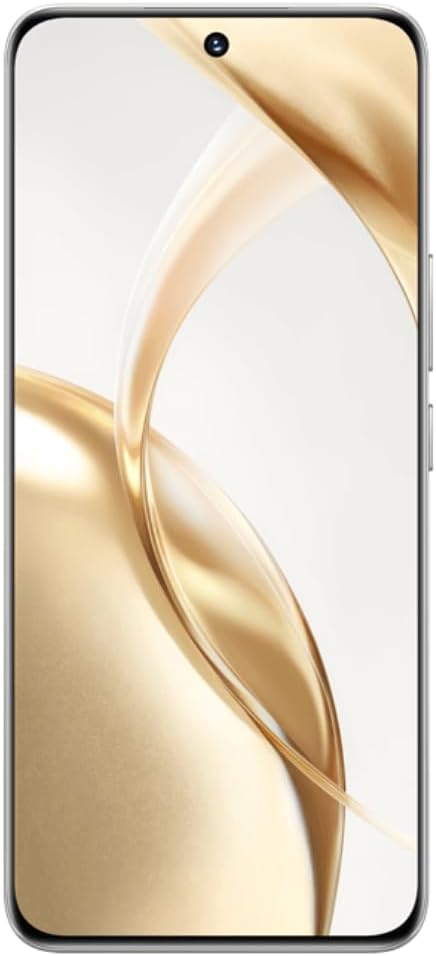
ചിത്രം 3.3: ഫ്രണ്ട് view of the HONOR 200 5G ELI-NX9, showcasing its large, curved display and the centered punch-hole front camera.

ചിത്രം 3.4: സൈഡ് പ്രോfile of the HONOR 200 5G ELI-NX9, illustrating the slim design and the placement of the power and volume buttons on the right edge.
3.1 പാക്കേജ് ഉള്ളടക്കം
നിങ്ങളുടെ പാക്കേജിൽ ഇനിപ്പറയുന്ന ഇനങ്ങൾ ഉണ്ടെന്ന് ഉറപ്പാക്കുക:
- HONOR 200 5G ELI-NX9 Smartphone
- USB കേബിൾ
- ദ്രുത ആരംഭ ഗൈഡ് (ഈ മാനുവൽ)
- സിം എജക്റ്റ് ടൂൾ
- വാറൻ്റി കാർഡ്
- പവർ അഡാപ്റ്റർ (പ്രദേശത്തിനനുസരിച്ച് വ്യത്യാസപ്പെടാം)
4. സജ്ജീകരണം
4.1 സിം കാർഡുകൾ ചേർക്കൽ
The HONOR 200 5G ELI-NX9 supports Dual SIM functionality.
- നിങ്ങളുടെ ഉപകരണത്തിന്റെ വശത്ത് സിം കാർഡ് ട്രേ കണ്ടെത്തുക.
- ട്രേയുടെ അടുത്തുള്ള ചെറിയ ദ്വാരത്തിലേക്ക് സിം എജക്റ്റ് ടൂൾ തിരുകുക, ട്രേ പുറത്തേക്ക് വരുന്നത് വരെ സൌമ്യമായി അമർത്തുക.
- നിങ്ങളുടെ നാനോ-സിം കാർഡുകൾ ട്രേയിലെ നിയുക്ത സ്ലോട്ടുകളിൽ വയ്ക്കുക, സ്വർണ്ണ കോൺടാക്റ്റുകൾ താഴേക്ക് അഭിമുഖമാണെന്ന് ഉറപ്പാക്കുക.
- സിം ട്രേ ശ്രദ്ധാപൂർവ്വം ഉപകരണത്തിലേക്ക് വീണ്ടും ചേർക്കുക.
4.2 പവർ ഓൺ/ഓഫ്
- പവർ ഓണാക്കാൻ: Press and hold the Power button (located on the right side) until the HONOR logo appears.
- പവർ ഓഫ് ചെയ്യാൻ: പവർ ബട്ടൺ അമർത്തിപ്പിടിക്കുക, തുടർന്ന് സ്ക്രീനിലെ ഓപ്ഷനുകളിൽ നിന്ന് "പവർ ഓഫ്" തിരഞ്ഞെടുക്കുക.
- പുനരാരംഭിക്കാൻ: പവർ ബട്ടൺ അമർത്തിപ്പിടിക്കുക, തുടർന്ന് ഓപ്ഷനുകളിൽ നിന്ന് "പുനരാരംഭിക്കുക" തിരഞ്ഞെടുക്കുക.
4.3 പ്രാരംഭ ഉപകരണ കോൺഫിഗറേഷൻ
Upon first power-on, follow the on-screen prompts to set up your device:
- നിങ്ങളുടെ ഭാഷയും പ്രദേശവും തിരഞ്ഞെടുക്കുക.
- ഒരു Wi-Fi നെറ്റ്വർക്കിലേക്ക് കണക്റ്റുചെയ്യുക.
- അന്തിമ ഉപയോക്തൃ ലൈസൻസ് കരാർ സ്വീകരിക്കുക.
- നിങ്ങളുടെ Google അക്കൗണ്ട് ഉപയോഗിച്ച് സൈൻ ഇൻ ചെയ്യുക അല്ലെങ്കിൽ പുതിയൊരെണ്ണം സൃഷ്ടിക്കുക.
- സ്ക്രീൻ ലോക്ക് (പിൻ, പാറ്റേൺ, പാസ്വേഡ്, ഫിംഗർപ്രിന്റ്, ഫെയ്സ് അൺലോക്ക്) സജ്ജീകരിക്കുക.
- മുമ്പത്തെ ഉപകരണത്തിൽ നിന്ന് ഡാറ്റ പുനഃസ്ഥാപിക്കുക (ഓപ്ഷണൽ).
5. നിങ്ങളുടെ ഉപകരണം പ്രവർത്തിപ്പിക്കുന്നു
5.1 അടിസ്ഥാന നാവിഗേഷൻ
Your HONOR 200 5G ELI-NX9 uses a touch-sensitive display for interaction:
- ടാപ്പ് ചെയ്യുക: ഒരു ഇനം തിരഞ്ഞെടുക്കുകയോ ഒരു ആപ്ലിക്കേഷൻ തുറക്കുകയോ ചെയ്യുക.
- സ്വൈപ്പ്: സ്ക്രീനുകളിലൂടെയോ ലിസ്റ്റുകളിലൂടെയോ നാവിഗേറ്റ് ചെയ്യുക.
- പിഞ്ച്: ചിത്രങ്ങൾ സൂം ഇൻ ചെയ്യുകയോ ഔട്ട് ചെയ്യുകയോ ചെയ്യുക, web പേജുകൾ.
- ലോംഗ് പ്രസ്സ്: സന്ദർഭോചിത മെനുകൾ ആക്സസ് ചെയ്യുക അല്ലെങ്കിൽ ഐക്കണുകൾ നീക്കുക.
5.2 ക്യാമറ പ്രവർത്തനങ്ങൾ
The device features a powerful camera system:
- പിൻ ക്യാമറകൾ: 50 MP Main, 50 MP Telephoto, 12 MP Ultra-Wide/Macro.
- മുൻ ക്യാമറ: 50 MP for high-resolution selfies.
- AI Portrait Engine: Enhances facial features and applies various portrait effects.
- രാത്രി മോഡ്: Optimizes photos in low-light conditions for clearer images.
- വീഡിയോ റെക്കോർഡിംഗ്: Supports 1080p video capture.
5.3 Display and Multimedia
Experience vibrant visuals on the 6.7-inch OLED display:
- റെസലൂഷൻ: 1200 x 2664 pixels for sharp images and text.
- വർണ്ണ ആഴം: 1 Billion colors for rich and accurate reproduction.
- HDR പിന്തുണ: Enhanced contrast and color for compatible content (Netflix, Amazon HDR certified).
5.4 പ്രകടനവും ബാറ്ററിയും
- പ്രോസസ്സർ: Qualcomm Snapdragon 7 Gen 3 (4 nm) Octa-core for efficient multitasking and gaming.
- മെമ്മറി: 12 GB RAM ensures smooth operation.
- സംഭരണം: 512 GB internal storage for apps, photos, and videos.
- ബാറ്ററി: 5200 mAh Silicon-Carbon battery provides extended usage.
- ഫാസ്റ്റ് ചാർജിംഗ്: 100W ഫാസ്റ്റ് ചാർജിംഗ് പിന്തുണയ്ക്കുന്നു.
6. പരിപാലനം
6.1 നിങ്ങളുടെ ഉപകരണം വൃത്തിയാക്കൽ
To keep your device in optimal condition:
- മൃദുവായ, ലിന്റ് രഹിത തുണി ഉപയോഗിച്ച് സ്ക്രീനും ബോഡിയും തുടയ്ക്കുക.
- കഠിനമായ രാസവസ്തുക്കൾ, അബ്രസീവ് ക്ലീനറുകൾ, അല്ലെങ്കിൽ എയറോസോൾ സ്പ്രേകൾ എന്നിവ ഉപയോഗിക്കുന്നത് ഒഴിവാക്കുക.
- ഉപകരണം അമിതമായ ഈർപ്പം കാണിക്കരുത്.
6.2 സോഫ്റ്റ്വെയർ അപ്ഡേറ്റുകൾ
Regularly check for and install software updates to enhance performance, security, and introduce new features. Navigate to ക്രമീകരണങ്ങൾ > സിസ്റ്റവും അപ്ഡേറ്റുകളും > സോഫ്റ്റ്വെയർ അപ്ഡേറ്റ്.
6.3 ബാറ്ററി കെയർ
ബാറ്ററി ആയുസ്സ് വർദ്ധിപ്പിക്കാൻ:
- ബാറ്ററി ഇടയ്ക്കിടെ പൂർണ്ണമായും ഡിസ്ചാർജ് ചെയ്യുന്നത് ഒഴിവാക്കുക.
- 100% ചാർജ് ആയതിനു ശേഷവും ഉപകരണം ദീർഘനേരം ചാർജ് ചെയ്യാൻ വയ്ക്കരുത്.
- Keep the device within recommended operating temperatures.
7. പ്രശ്നപരിഹാരം
നിങ്ങളുടെ ഉപകരണത്തിൽ പ്രശ്നങ്ങൾ നേരിടുകയാണെങ്കിൽ, ഇനിപ്പറയുന്ന പരിഹാരങ്ങൾ പരീക്ഷിക്കുക:
7.1 പൊതുവായ പ്രശ്നങ്ങൾ
- ഉപകരണം ഓണാക്കുന്നില്ല: ബാറ്ററി ചാർജ് ചെയ്തിട്ടുണ്ടെന്ന് ഉറപ്പാക്കുക. കുറഞ്ഞത് 10 മിനിറ്റെങ്കിലും ചാർജറുമായി കണക്റ്റ് ചെയ്യുക, തുടർന്ന് പവർ ഓൺ ചെയ്യാൻ ശ്രമിക്കുക.
- ആപ്പുകൾ ക്രാഷാകുകയോ മരവിക്കുകയോ ചെയ്യുന്നു: ആപ്പ് അടച്ച് വീണ്ടും തുറക്കുക. ആപ്പിന്റെ കാഷെ മായ്ക്കുക (ക്രമീകരണങ്ങൾ > ആപ്പുകൾ > [ആപ്പ് നാമം] > സംഭരണം > കാഷെ മായ്ക്കുക). ഉപകരണം പുനരാരംഭിക്കുക.
- നെറ്റ്വർക്ക് കണക്റ്റിവിറ്റി പ്രശ്നങ്ങൾ: Check if Airplane Mode is off. Restart the device. Reset network settings (ക്രമീകരണങ്ങൾ > സിസ്റ്റവും അപ്ഡേറ്റുകളും > പുനഃസജ്ജമാക്കുക > നെറ്റ്വർക്ക് ക്രമീകരണങ്ങൾ പുനഃസജ്ജമാക്കുക).
- മന്ദഗതിയിലുള്ള പ്രകടനം: ആവശ്യമില്ലാത്ത പശ്ചാത്തല ആപ്പുകൾ അടയ്ക്കുക. സംഭരണ സ്ഥലം ശൂന്യമാക്കുക. ഉപകരണം പുനരാരംഭിക്കുക.
7.2 ഫാക്ടറി റീസെറ്റ്
പ്രശ്നങ്ങൾ നിലനിൽക്കുകയാണെങ്കിൽ, നിങ്ങൾ ഒരു ഫാക്ടറി റീസെറ്റ് നടത്തേണ്ടി വന്നേക്കാം. മുന്നറിയിപ്പ്: ഇത് നിങ്ങളുടെ ഉപകരണത്തിലെ എല്ലാ ഡാറ്റയും മായ്ക്കും. തുടരുന്നതിന് മുമ്പ് പ്രധാനപ്പെട്ട ഡാറ്റയുടെ ബാക്കപ്പ് എടുക്കുക.
- പോകുക ക്രമീകരണങ്ങൾ > സിസ്റ്റവും അപ്ഡേറ്റുകളും > റീസെറ്റ് > ഫോൺ റീസെറ്റ് ചെയ്യുക.
- നിങ്ങളുടെ തീരുമാനം സ്ഥിരീകരിച്ച് ആവശ്യപ്പെടുകയാണെങ്കിൽ സ്ക്രീൻ ലോക്ക് പാസ്വേഡ് നൽകുക.
- The device will restart and restore to its factory settings.
8 സ്പെസിഫിക്കേഷനുകൾ
Key technical specifications for the HONOR 200 5G ELI-NX9:
| ബ്രാൻഡ് | ബഹുമതി |
| മോഡൽ | Honor 200 5G (ELI-NX9) |
| ഓപ്പറേറ്റിംഗ് സിസ്റ്റം | ആൻഡ്രോയിഡ് 14 |
| പ്രോസസ്സർ | Qualcomm Snapdragon 7 Gen 3 (4 nm), Octa-core (1x2.63 GHz, 4x2.4 GHz, 3x1.8 GHz) |
| റാം | 12 ജിബി |
| ആന്തരിക സംഭരണം | 512 ജിബി |
| പ്രദർശിപ്പിക്കുക | 6.7 inches OLED, 1B colors, 1200 x 2664 pixels, 120Hz |
| പിൻ ക്യാമറ | 50 MP (main), 50 MP (telephoto), 12 MP (ultrawide/macro) |
| മുൻ ക്യാമറ | 50 എം.പി |
| ബാറ്ററി ശേഷി | 5200 mAh |
| ചാർജിംഗ് | 100W ഫാസ്റ്റ് ചാർജിംഗ് |
| സിം പിന്തുണ | ഡ്യുവൽ സിം |
| സെല്ലുലാർ ടെക്നോളജി | 5G |
| ഇനം മോഡൽ നമ്പർ | Honor 200 5G |
| യു.പി.സി | 6936520843787 |
| IMEI (Exampലെ) | 868420070415840 (Note: Actual IMEI is unique to each device) |

ചിത്രം 8.1: Example product label showing model (ELI-NX9), ROM/RAM, color, IMEI, and UPC. This information is unique to each device.
9. വാറൻ്റിയും പിന്തുണയും
Your HONOR 200 5G ELI-NX9 comes with a limited warranty. Please refer to the separate warranty card included in your package for detailed terms and conditions.
For further assistance, technical support, or to find service centers, please visit the official HONOR webനിങ്ങളുടെ പ്രദേശത്തെ അവരുടെ ഉപഭോക്തൃ സേവനവുമായി ബന്ധപ്പെടുക അല്ലെങ്കിൽ സൈറ്റിൽ ബന്ധപ്പെടുക. വാറന്റി ക്ലെയിമുകൾക്കായി നിങ്ങളുടെ വാങ്ങിയതിന്റെ തെളിവ് സൂക്ഷിക്കുക.
Official HONOR Webസൈറ്റ്: www.hihonor.com


