1. ആമുഖം
This user manual provides detailed instructions for the installation, operation, and maintenance of your Ease Life 1080P Security Camera (Model: Y108). This camera is designed for outdoor home security, offering a 360° view with pan/tilt capabilities, color night vision, motion detection, and two-way audio communication. Please read this manual thoroughly before using the product to ensure proper functionality and safety.

Image: The Ease Life 1080P Security Camera shown alongside a smartphone displaying its live view interface. The camera is white with two antennas and a prominent lens array. The app shows a live feed of a child and an adult playing with a ball.
2 സുരക്ഷാ വിവരങ്ങൾ
- Ensure the power adapter used is compatible with the camera's specifications and local electrical standards.
- ഉയർന്ന താപനില, ഈർപ്പം, അല്ലെങ്കിൽ നാശകാരിയായ അന്തരീക്ഷം എന്നിവയിൽ ക്യാമറയെ തുറന്നുകാട്ടരുത്.
- ശക്തമായ കാന്തികക്ഷേത്രങ്ങൾക്കോ തടസ്സ സ്രോതസ്സുകൾക്കോ സമീപം ക്യാമറ വയ്ക്കുന്നത് ഒഴിവാക്കുക.
- ക്യാമറ വേർപെടുത്താനോ പരിഷ്കരിക്കാനോ ശ്രമിക്കരുത്. എല്ലാ സേവനങ്ങളും യോഗ്യതയുള്ള ഉദ്യോഗസ്ഥരെ ഏൽപ്പിക്കുക.
- Keep the camera and its accessories out of reach of children and pets.
- Clean the camera with a soft, dry cloth. Do not use harsh chemicals or abrasive cleaners.
- ആകസ്മികമായ വീഴ്ചകൾ തടയാൻ ക്യാമറ സുരക്ഷിതമായി ഘടിപ്പിച്ചിട്ടുണ്ടെന്ന് ഉറപ്പാക്കുക.
3. പാക്കേജ് ഉള്ളടക്കം
തുറക്കുമ്പോൾ പാക്കേജ് ഉള്ളടക്കങ്ങൾ പരിശോധിക്കുക. ഏതെങ്കിലും ഇനങ്ങൾ നഷ്ടപ്പെട്ടാലോ കേടുപാടുകൾ സംഭവിച്ചാലോ, ഉപഭോക്തൃ പിന്തുണയുമായി ബന്ധപ്പെടുക.
- Ease Life 1080P Security Camera (Y108)
- പവർ അഡാപ്റ്റർ
- മൗണ്ടിംഗ് സ്ക്രൂകളും വാൾ പ്ലഗുകളും
- ഉപയോക്തൃ മാനുവൽ (ഈ പ്രമാണം)
- Mounting Template (may be included)
4. ഉൽപ്പന്നം കഴിഞ്ഞുview
Familiarize yourself with the main components of your security camera.

ചിത്രം: വിശദമായ ഒരു ചിത്രം view of the camera's front, highlighting the lens, infrared LEDs, and visible light LEDs for color night vision.
4.1 ക്യാമറ അളവുകൾ
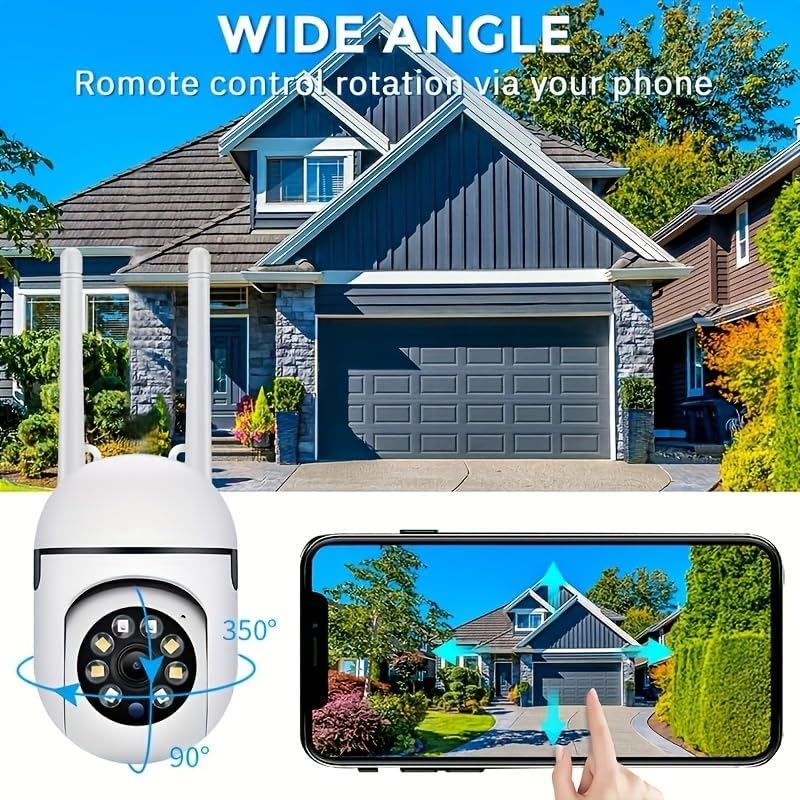
Image: Technical drawing showing the camera's dimensions: approximately 18cm (7.08 inches) in height, 7cm (2.76 inches) in width, and 8.8cm (3.46 inches) in depth from the wall mount.
4.2 പ്രധാന ഘടകങ്ങൾ
- ലെൻസ്: Captures 1080P Full HD video.
- ഇൻഫ്രാറെഡ് LED-കൾ: കറുപ്പും വെളുപ്പും നിറത്തിലുള്ള രാത്രി കാഴ്ചയ്ക്കായി.
- വൈറ്റ് ലൈറ്റ് എൽഇഡികൾ: For color night vision and alarm illumination.
- മൈക്രോഫോൺ: ടു-വേ ഓഡിയോ ആശയവിനിമയത്തിന്.
- സ്പീക്കർ: For two-way audio communication and alarm sounds.
- ആന്റിന: For 2.4GHz Wi-Fi connectivity.
- മൈക്രോ എസ്ഡി കാർഡ് സ്ലോട്ട്: ലോക്കൽ വീഡിയോ സംഭരണത്തിനായി (കാർഡ് ഉൾപ്പെടുത്തിയിട്ടില്ല).
- റീസെറ്റ് ബട്ടൺ: ഫാക്ടറി റീസെറ്റിനായി ഉപയോഗിക്കുന്നു.
- പവർ പോർട്ട്: പവർ അഡാപ്റ്റർ ബന്ധിപ്പിക്കുന്നതിന്.

Image: The camera is shown with labels pointing to the microphone and speaker, illustrating its two-way audio capability. A delivery person is shown interacting with the camera.
5. സജ്ജീകരണം
5.1 അപ്ലിക്കേഷൻ ഇൻസ്റ്റാളേഷൻ
- ഇതിനായി തിരയുക "EaseLife" in your smartphone's app store (App Store for iOS, Google Play Store for Android).
- Download and install the EaseLife app.
- ആപ്പ് തുറന്ന് സ്ക്രീനിലെ നിർദ്ദേശങ്ങൾ പാലിച്ച് പുതിയൊരു അക്കൗണ്ട് രജിസ്റ്റർ ചെയ്യുക അല്ലെങ്കിൽ നിങ്ങൾക്ക് ഇതിനകം അക്കൗണ്ട് ഉണ്ടെങ്കിൽ ലോഗിൻ ചെയ്യുക.
5.2 Camera Connection (Wi-Fi)
- Power on the camera by connecting the power adapter. The camera will perform a self-test and then enter pairing mode (indicated by a specific LED status or voice prompt).
- Open the EaseLife app, tap the "+" icon to add a new device.
- നിങ്ങളുടെ ക്യാമറ മോഡൽ തിരഞ്ഞെടുക്കുക അല്ലെങ്കിൽ ക്യാമറയിലെ QR കോഡ് സ്കാൻ ചെയ്യുക (ലഭ്യമെങ്കിൽ).
- Follow the in-app instructions to connect the camera to your 2.4GHz Wi-Fi network. Ensure your phone is connected to the same 2.4GHz Wi-Fi network during setup.
- കണക്റ്റ് ചെയ്തുകഴിഞ്ഞാൽ, നിങ്ങളുടെ ക്യാമറയ്ക്ക് പേര് നൽകാനും തത്സമയം ആരംഭിക്കാനും കഴിയും. viewing.
5.3 ക്യാമറ മൗണ്ടിംഗ്
Choose a suitable location for mounting, ensuring a clear view and access to a power outlet. The camera supports wall mounting.
- Use the provided mounting template (if included) or mark the drill holes on the desired surface.
- Drill holes and insert wall plugs if mounting on masonry or drywall.
- നൽകിയിരിക്കുന്ന സ്ക്രൂകൾ ഉപയോഗിച്ച് ക്യാമറയുടെ മൗണ്ടിംഗ് ബേസ് പ്രതലത്തിൽ ഉറപ്പിക്കുക.
- ക്യാമറ ഘടിപ്പിച്ചതിന് ശേഷം ആവശ്യാനുസരണം അതിന്റെ ആംഗിൾ ക്രമീകരിക്കുക.

Image: The camera is depicted with arrows indicating its 360-degree horizontal pan and 90-degree vertical tilt rotation, demonstrating its wide coverage capabilities.
6. പ്രവർത്തന നിർദ്ദേശങ്ങൾ
6.1 തത്സമയം View കൂടാതെ പാൻ/ടിൽറ്റ് നിയന്ത്രണം
Open the EaseLife app and select your camera to access the live view. You can control the camera's pan (horizontal) and tilt (vertical) movements directly from the app interface to adjust the viewing ആംഗിൾ.

Image: The camera is shown with a wide-angle view of a house, illustrating its ability to cover a large area. A smartphone screen demonstrates remote control of the camera's rotation.
6.2 ടു-വേ ഓഡിയോ
Tap the microphone icon in the app to speak through the camera's speaker. Tap the speaker icon to listen to audio from the camera's microphone. This feature allows for real-time communication with visitors or deterrence of intruders.
6.3 മോഷൻ ഡിറ്റക്ഷനും അലേർട്ടുകളും
Enable motion detection in the app settings. When motion is detected, the camera will record video and send push notifications to your smartphone. You can adjust sensitivity levels and set detection zones.
6.4 നൈറ്റ് വിഷൻ മോഡുകൾ
ക്യാമറ ഒന്നിലധികം രാത്രി ദർശന മോഡുകളെ പിന്തുണയ്ക്കുന്നു:
- ഇൻഫ്രാറെഡ് നൈറ്റ് വിഷൻ: Provides clear black and white images in low light or complete darkness using infrared LEDs.
- പൂർണ്ണ വർണ്ണ രാത്രി ദർശനം: Activates the camera's white light LEDs to provide full-color video even in dark conditions.
- Sound and Light Alarm Night Vision: Combines full-color night vision with an audible alarm and flashing lights upon motion detection to deter unwanted activity.

Image: Illustrations of the three night vision modes: Infrared (black and white), Full Color (illuminated by white light), and Sound and Light Alarm (with a red outline indicating an alarm trigger).
6.5 റെക്കോർഡിംഗും പ്ലേബാക്കും
Recordings can be stored on a Micro SD card (up to 128GB, not included) or via cloud service (subscription required). Access recorded footage through the "Playback" or "Gallery" section in the EaseLife app.
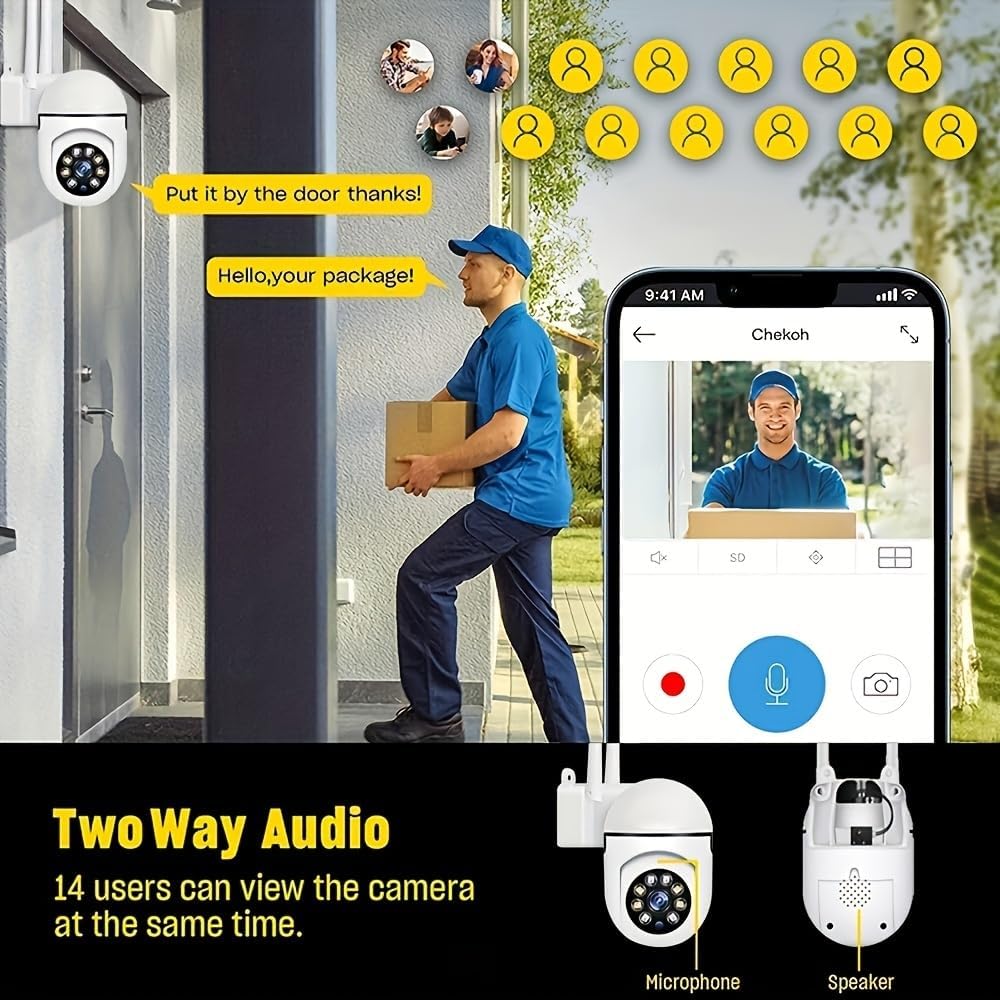
Image: A smartphone screen showing the replay function of the camera, with multiple thumbnail views of recorded events. Below, the camera is shown with its "Double light night vision" capability highlighted, indicating both infrared and white light LEDs.
7. പരിപാലനം
- വൃത്തിയാക്കൽ: Regularly wipe the camera lens and body with a soft, dry cloth to remove dust and dirt. Do not use liquid cleaners or sprays directly on the camera.
- ഫേംവെയർ അപ്ഡേറ്റുകൾ: Check the EaseLife app periodically for firmware updates. Keeping your camera's firmware updated ensures optimal performance and access to new features.
- പവർ സൈക്കിൾ: ക്യാമറയ്ക്ക് പ്രശ്നങ്ങൾ നേരിടുകയാണെങ്കിൽ, പവർ സ്രോതസ്സിൽ നിന്ന് 10 സെക്കൻഡ് നേരത്തേക്ക് അത് അൺപ്ലഗ് ചെയ്ത് വീണ്ടും പ്ലഗ് ഇൻ ചെയ്യാൻ ശ്രമിക്കുക.
8. പ്രശ്നപരിഹാരം
| പ്രശ്നം | സാധ്യമായ കാരണം | പരിഹാരം |
|---|---|---|
| ആപ്പിൽ ക്യാമറ ഓഫ്ലൈനാണ് | വൈദ്യുതിയില്ല; വൈഫൈ വിച്ഛേദിച്ചു; റൂട്ടർ പ്രശ്നങ്ങൾ. | Check power connection. Restart camera and router. Reconnect camera to Wi-Fi via app. |
| Wi-Fi-യിലേക്ക് കണക്റ്റുചെയ്യാൻ കഴിയില്ല | Incorrect Wi-Fi password; 5GHz Wi-Fi network; Weak signal. | Ensure correct 2.4GHz Wi-Fi password. Move camera closer to router. Reset camera and try pairing again. |
| മോഷൻ ഡിറ്റക്ഷൻ പ്രവർത്തിക്കുന്നില്ല | Feature disabled; Sensitivity too low; Incorrect detection zone. | Enable motion detection in app. Adjust sensitivity. Define detection zones correctly. |
| ക്യാമറയിൽ നിന്ന് ഓഡിയോ ഇല്ല. | Microphone/speaker disabled in app; Volume too low. | Check audio settings in app. Increase volume. |
| രാത്രിയിൽ ചിത്രത്തിന്റെ ഗുണനിലവാരം മോശമാണ് | Night vision mode not optimal; Obstruction in front of lens. | Switch night vision modes. Clean lens. Ensure no obstructions. |
9 സ്പെസിഫിക്കേഷനുകൾ
| ഫീച്ചർ | വിശദാംശങ്ങൾ |
|---|---|
| വീഡിയോ ക്യാപ്ചർ റെസല്യൂഷൻ | 1080p ഫുൾ എച്ച്ഡി |
| കണക്റ്റിവിറ്റി ടെക്നോളജി | വയർലെസ് (വൈ-ഫൈ) |
| Wi-Fi ഫ്രീക്വൻസി | 2.4GHz |
| പ്രത്യേക സവിശേഷതകൾ | Night Vision (Infrared, Full Color, Sound & Light Alarm), Pan/Tilt (360° horizontal, 90° vertical), Motion Detection, Two-Way Talk |
| അനുയോജ്യമായ ഉപകരണങ്ങൾ | Tablet, Smartphone (iPhone, Android) |
| പവർ ഉറവിടം | കോർഡഡ് ഇലക്ട്രിക് |
| മൗണ്ടിംഗ് തരം | മതിൽ മൗണ്ട് |
| ഫോം ഫാക്ടർ | താഴികക്കുടം |
| ഇനത്തിൻ്റെ ഭാരം | 250 ഗ്രാം |
| നിർമ്മാതാവ് | BoyKeep |
10. വാറണ്ടിയും പിന്തുണയും
Your Ease Life 1080P Security Camera comes with a standard manufacturer's warranty. Please refer to the product packaging or the official BoyKeep webനിർദ്ദിഷ്ട വാറന്റി നിബന്ധനകൾക്കും വ്യവസ്ഥകൾക്കും സൈറ്റ്.
For technical support, troubleshooting assistance, or warranty claims, please contact BoyKeep customer service through the contact information provided on their official webസൈറ്റ് അല്ലെങ്കിൽ നിങ്ങളുടെ വാങ്ങൽ പ്ലാറ്റ്ഫോം വഴി.
ഓൺലൈൻ ഉറവിടങ്ങൾ: For the latest FAQs, video tutorials, and software updates, please visit the official EaseLife or BoyKeep support page.


