1. ആമുഖം
The IDUINO PC1080 is a high-performance dual-channel 6S LiPo charger specifically designed for industrial application drones. It offers reliable, safe, and user-friendly operation with a comprehensive set of functionalities. These include a battery voltage meter, internal resistance meter, LiHV charging mode, and a time-saving synchronization mode. Its robust design ensures stable performance in various environments.
2. പാക്കേജ് ഉള്ളടക്കം
താഴെ കൊടുത്തിരിക്കുന്ന എല്ലാ ഇനങ്ങളും നിങ്ങളുടെ പാക്കേജിൽ ഉണ്ടെന്ന് ദയവായി ഉറപ്പാക്കുക:
- 1 x PC1080 Dual Channel LiPo Charger
- 1 x എസി പവർ കോർഡ്
- 1 x Synchronous data connectors
- 1 x ഇംഗ്ലീഷ് മാനുവൽ (ഈ പ്രമാണം)
3 പ്രധാന സവിശേഷതകൾ
The IDUINO PC1080 charger incorporates several advanced features for efficient and safe battery management:
- High-Frequency Capacitor: Utilizes high-specification large capacitors to ensure prolonged and stable operation.
- സജീവ PFC: Features Active Power Factor Correction circuitry for optimal power draw, achieving high efficiency (93%) and reducing interference to the power grid.
- Switched-mode Power Supply: Designed to accept power from mains supplies globally.
- കൺഫോർമൽ കോട്ടിംഗ്: Electronic components are protected with a conformal coating, enhancing resistance to moisture, dust, chemicals, corrosion, and temperature extremes, ensuring stable field performance.
- Automatic Sequential Charging: When paired with G630 charging hubs, the PC1080 can automatically charge up to 12 LiPo battery packs in sequence, prioritizing batteries with the highest remaining capacity.
- One-Key Start: Simplifies the charging process with a single button press (default 20A current).
- Unique Synchronization Function: Allows one charger to control multiple other chargers for streamlined operation.
- ബാറ്ററി സ്റ്റാറ്റസ് മോണിറ്ററിംഗ്: തത്സമയ ബാറ്ററി വോളിയം നൽകുന്നുtage and internal resistance detection.
- സമഗ്രമായ സംരക്ഷണങ്ങൾ: Includes short circuit maintenance, reverse polarity protection, over-temperature protection, and a built-in anti-fire protection circuit to prevent sparking during battery connection.
4 സ്പെസിഫിക്കേഷനുകൾ
| പരാമീറ്റർ | മൂല്യം |
|---|---|
| ബ്രാൻഡ് | IDUINO |
| നിർമ്മാതാവ് | SKYRC |
| മോഡൽ | SKYRC PC1080 |
| ഇൻപുട്ട് വോളിയംtage | 100-240 വി എസി |
| ഔട്ട്പുട്ട് പവർ | 1080W (540W x 2) |
| ഡിസ്ചാർജ് പവർ | 100W (50W x 2) |
| കറൻ്റ് ചാർജ് ചെയ്യുക | 1.0-20.0 A x 2 |
| ബാലൻസ് കറന്റ് | 1.2 എ |
| ബാറ്ററി തരം | ലിപോ/ലിഎച്ച്വി |
| ബാറ്ററി സെൽ എണ്ണം | 6S x 2 |
| ചാർജിംഗ് മോഡുകൾ | Balance Charge Mode / Storage Mode / Charge Mode |
| ഉൽപ്പന്ന അളവുകൾ | 5 x 3 x 4 സെ.മീ |
| ഇനത്തിൻ്റെ ഭാരം | 1 കി.ഗ്രാം |
| മാതൃരാജ്യം | ചൈന |
5. ഉൽപ്പന്നം കഴിഞ്ഞുview
5.1 ഫ്രണ്ട് View
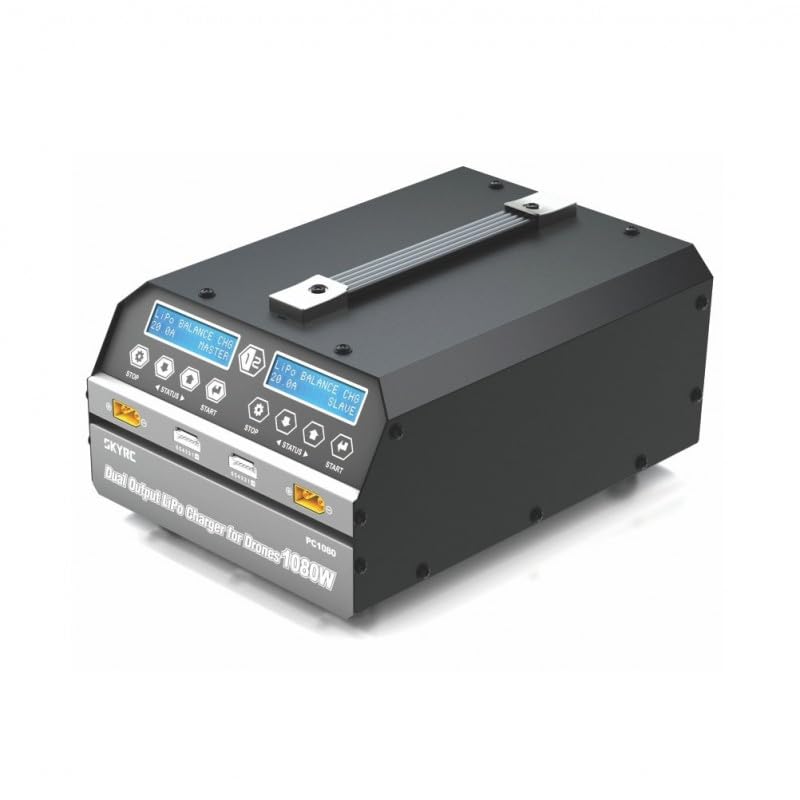
This image displays the front of the IDUINO PC1080 charger, highlighting its dual charging channels, each with its own display screen, control buttons (STOP, STATUS, START), and battery connection ports. The robust handle for portability is also visible.
5.2 പിൻഭാഗം View
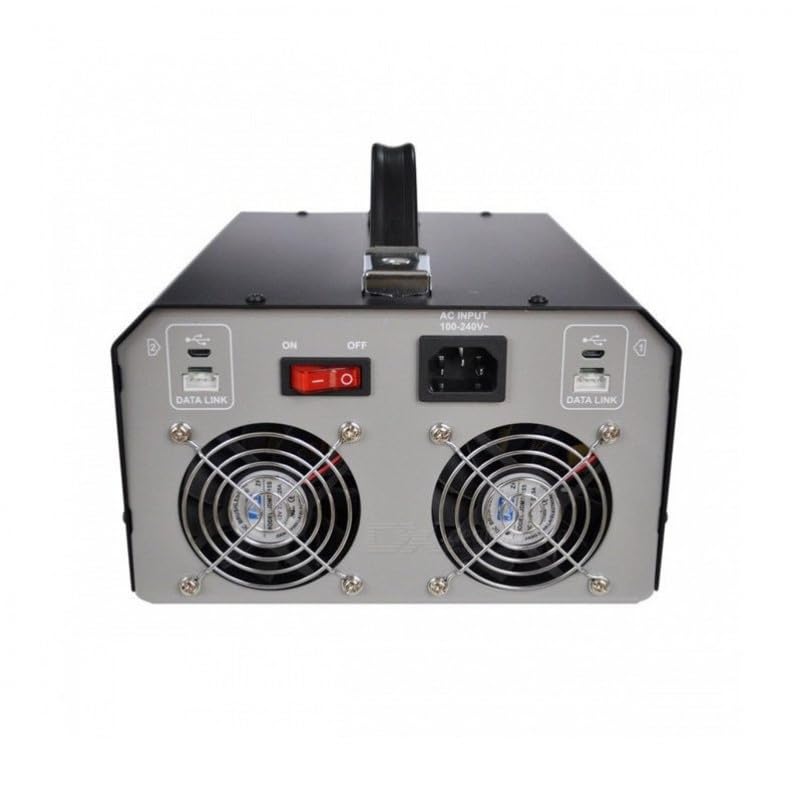
The rear panel of the charger features the AC input port (100-240V), the main ON/OFF power switch, and two cooling fans to dissipate heat during operation. Data Link ports are also present for synchronization with other units.
5.3 Charger in Operation
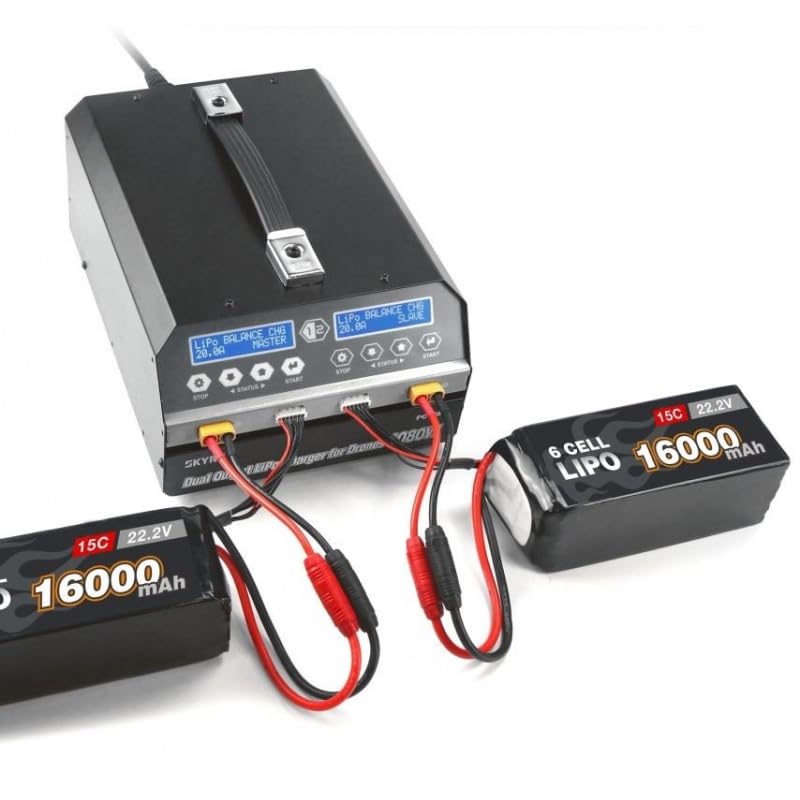
This image shows the IDUINO PC1080 charger actively charging two 6S 16000mAh LiPo batteries. The display screens indicate the charging status, demonstrating the dual-channel capability of the device.
6. സജ്ജീകരണം
Follow these steps for initial setup of your PC1080 charger:
- ചാർജർ അൺപാക്ക് ചെയ്യുക: പാക്കേജിംഗിൽ നിന്ന് ചാർജറും എല്ലാ അനുബന്ധ ഉപകരണങ്ങളും ശ്രദ്ധാപൂർവ്വം നീക്കം ചെയ്യുക.
- എസി പവർ ബന്ധിപ്പിക്കുക: Plug the supplied AC power cord into the AC input port on the rear of the charger. Connect the other end to a suitable 100-240V AC power outlet.
- പവർ ഓൺ: Flip the main ON/OFF switch on the rear panel to the 'ON' position. The display screens on the front will illuminate.
- ബാറ്ററികൾ തയ്യാറാക്കുക: Ensure your LiPo/LiHV batteries are in good condition and within their safe operating temperature range.
- ബാറ്ററികൾ ബന്ധിപ്പിക്കുക: Connect your battery's main discharge lead to the corresponding output port on one of the charger channels. Then, connect the battery's balance lead to the balance port. Ensure correct polarity for all connections.
7. പ്രവർത്തന നിർദ്ദേശങ്ങൾ
7.1 അടിസ്ഥാന ചാർജിംഗ്
To initiate a basic charge cycle:
- ചാനൽ തിരഞ്ഞെടുക്കുക: Identify the channel (Master or Slave) you wish to use.
- ബാറ്ററി ബന്ധിപ്പിക്കുക: As described in the Setup section, connect your battery to the chosen channel.
- One-Key Start: Press the 'START' button on the desired channel. The charger will automatically begin charging with a default current of 20A.
- പുരോഗതി നിരീക്ഷിക്കുക: The display screen will show real-time charging parameters such as voltage, current, and charged capacity.
- ചാർജ് ചെയ്യുന്നത് നിർത്തുക: To stop charging at any time, press the 'STOP' button on the active channel.
7.2 Advanced Charging Modes
The PC1080 supports various charging modes:
- Balance Charge Mode: Recommended for LiPo/LiHV batteries to ensure all cells are charged to the same voltage, prolonging battery life.
- സ്റ്റോറേജ് മോഡ്: ഒരു നിശ്ചിത വോള്യത്തിലേക്ക് ബാറ്ററി ചാർജ് ചെയ്യുകയോ ഡിസ്ചാർജ് ചെയ്യുകയോ ചെയ്യുന്നു.tage level suitable for long-term storage, preventing degradation.
- ചാർജ് മോഡ്: Standard charging without balancing. Use with caution and only when balancing is not required.
To select a specific mode, navigate through the menu using the 'STATUS' button before pressing 'START'.
7.3 സിൻക്രൊണൈസേഷൻ ഫംഗ്ഷൻ
The unique synchronization function allows you to control multiple PC1080 chargers from a single master unit. Connect the synchronous data connectors between the chargers as per the diagram in the full manual (not provided here). Once connected, operations initiated on the master charger will be replicated on the slave chargers.
7.4 Battery Status Monitoring
During charging or when a battery is connected, you can press the 'STATUS' button to cycle through various battery parameters displayed on the screen, including:
- മൊത്തം ബാറ്ററി വോള്യംtage
- വ്യക്തിഗത സെൽ വോള്യംtages
- Internal resistance of each cell
- Charging current and capacity
8. പരിപാലനം
Proper maintenance ensures the longevity and safe operation of your charger:
- വൃത്തിയാക്കൽ: Regularly wipe the charger's exterior with a soft, dry cloth. Do not use solvents or abrasive cleaners. Ensure ventilation openings are free from dust and debris.
- സംഭരണം: നേരിട്ടുള്ള സൂര്യപ്രകാശം, ഈർപ്പം, കടുത്ത താപനില എന്നിവയിൽ നിന്ന് മാറി തണുത്തതും വരണ്ടതുമായ സ്ഥലത്ത് ചാർജർ സൂക്ഷിക്കുക.
- കേബിൾ പരിശോധന: Periodically inspect all cables and connectors for signs of wear, damage, or corrosion. Replace damaged cables immediately.
- വെൻ്റിലേഷൻ: Ensure adequate airflow around the charger during operation. Do not block the cooling fans.
9. പ്രശ്നപരിഹാരം
If you encounter issues with your PC1080 charger, refer to the table below for common problems and their solutions:
| പ്രശ്നം | സാധ്യമായ കാരണം | പരിഹാരം |
|---|---|---|
| ചാർജർ പവർ ഓണാക്കുന്നില്ല | No AC power; Power switch off; Faulty power cord | Check AC outlet; Ensure power switch is ON; Try a different power cord |
| ചാർജിംഗ് ആരംഭിക്കുന്നില്ല | Battery not connected properly; Incorrect battery type selected; Safety error triggered | Reconnect battery (main and balance leads); Verify battery type and cell count; Check display for error messages (e.g., 'Connection Break', 'Cell Error') |
| Charger displays 'Over Temperature' | Poor ventilation; Ambient temperature too high; Internal fault | Ensure clear ventilation around charger; Move to a cooler environment; If problem persists, contact support |
| Battery not balancing correctly | Balance lead not connected; Damaged balance lead; Faulty battery cell | Ensure balance lead is fully inserted; Inspect balance lead for damage; Test battery with another device if possible |
| Synchronization not working | Data link cables not connected; Incorrect master/slave setup | Verify data link cable connections; Ensure one unit is set as master and others as slaves |
ഈ പരിഹാരങ്ങൾ പരീക്ഷിച്ചതിനുശേഷവും പ്രശ്നം നിലനിൽക്കുകയാണെങ്കിൽ, ദയവായി ഉപഭോക്തൃ പിന്തുണയുമായി ബന്ധപ്പെടുക.
10 സുരക്ഷാ വിവരങ്ങൾ
Always observe the following safety precautions when operating the IDUINO PC1080 charger:
- Never leave the charger unattended while in operation, especially when charging LiPo/LiHV batteries.
- Always charge batteries on a non-flammable surface, away from flammable materials.
- അമിതമായി ചൂടാക്കുന്നത് തടയാൻ ശരിയായ വായുസഞ്ചാരം ഉറപ്പാക്കുക.
- Do not attempt to charge damaged, swollen, or leaking batteries.
- Always connect the battery to the charger before connecting the charger to AC power. Disconnect AC power before disconnecting the battery.
- Keep the charger away from water, moisture, and high humidity.
- ചാർജർ ഡിസ്അസംബ്ലിംഗ് ചെയ്യുകയോ പരിഷ്കരിക്കുകയോ ചെയ്യരുത്. എല്ലാ സേവനങ്ങളും യോഗ്യതയുള്ള ഉദ്യോഗസ്ഥർക്ക് റഫർ ചെയ്യുക.
- കുട്ടികൾക്ക് ലഭ്യമാകാതെ സൂക്ഷിക്കുക.
11. വാറൻ്റിയും പിന്തുണയും
The IDUINO PC1080 Dual Channel LiPo Battery Charger comes with a standard manufacturer's warranty. For specific warranty terms and conditions, please refer to the warranty card included with your product or visit the official IDUINO website. For technical support, troubleshooting assistance, or warranty claims, please contact IDUINO customer service through the contact information provided on their official webസൈറ്റ് അല്ലെങ്കിൽ നിങ്ങളുടെ വാങ്ങൽ രസീത്.


