1. ആമുഖം
Thank you for choosing the Claiks Electric Standing Desk. This manual provides essential information for the safe and efficient use of your new desk. Designed for comfort and productivity, this desk allows you to easily switch between sitting and standing positions, promoting a healthier work environment. Its spacious 160x80cm desktop offers ample room for your equipment and tasks.
Please read this manual thoroughly before assembly and operation, and keep it for future reference.
2 സുരക്ഷാ വിവരങ്ങൾ
- ഭാര പരിധി: Do not exceed the maximum weight capacity of 80 kg (176 lbs) on the desktop. Overloading can cause damage to the desk and potential injury.
- സ്ഥിരത: To ensure optimal stability, especially when the desk is at higher settings or if heavy equipment is placed on it, it is recommended to secure the desk to a wall using appropriate anchors (not included).
- വൈദ്യുതി വിതരണം: Use only the provided power adapter. Ensure the power cord is not pinched or damaged. Keep liquids away from electrical components.
- കുട്ടികളും വളർത്തുമൃഗങ്ങളും: അപകടങ്ങൾ തടയുന്നതിന് ജോലി സമയത്ത് കുട്ടികളെയും വളർത്തുമൃഗങ്ങളെയും മേശയിൽ നിന്ന് അകറ്റി നിർത്തുക.
- ക്ലിയറൻസ്: മേശയുടെ ഉയരം ക്രമീകരിക്കുമ്പോൾ മുകളിലോ താഴെയോ തടസ്സങ്ങളൊന്നുമില്ലെന്ന് ഉറപ്പാക്കുക.
- അസംബ്ലി: Follow all assembly instructions carefully. Incorrect assembly can lead to instability or malfunction.
- പരിസ്ഥിതി: The desktop is made from environmentally friendly materials with low indoor air pollutant emissions.
3. പാക്കേജ് ഉള്ളടക്കം
Before beginning assembly, please verify that all parts are present and undamaged. Refer to the diagram below for a visual representation of the components.

Image: All components of the Claiks Electric Standing Desk, including desktop sections, frame, motor, control panel, and hardware.
- Desktop sections (4 pieces for the 160cm width)
- Desk legs and feet
- Motor and control box
- നിയന്ത്രണ പാനൽ
- പവർ അഡാപ്റ്ററും കേബിളും
- ട്രാൻസ്മിഷൻ വടി
- Cable clips and storage hooks
- അസംബ്ലി ഹാർഡ്വെയർ (സ്ക്രൂകൾ, അല്ലെൻ റെഞ്ചുകൾ)
4. സജ്ജീകരണവും അസംബ്ലിയും
Assembly typically takes approximately 1 hour. An electric screwdriver is highly recommended for faster and easier assembly due to the number of screws involved. Please follow the step-by-step instructions provided in the included assembly guide.
- എല്ലാ ഘടകങ്ങളും അൺപാക്ക് ചെയ്ത് പാക്കേജ് ഉള്ളടക്ക പട്ടികയുമായി താരതമ്യം ചെയ്യുക.
- Assemble the desk frame according to the diagrams. Ensure all screws are tightened securely.
- Attach the desktop sections to the frame.
- Install the motor and control box. Connect the transmission rod between the legs, ensuring it is fully inserted into the holes on both sides. This is crucial for proper height adjustment functionality.
- Mount the control panel to the underside of the desktop in an accessible location.
- Connect all cables to the control box and motor, then plug in the power adapter.
- Organize cables using the provided cable clips and storage hooks for a tidy workspace.
If you encounter any difficulties during assembly, please refer to the detailed diagrams in the separate assembly manual or contact customer support.
5. പ്രവർത്തന നിർദ്ദേശങ്ങൾ
5.1 ഉയരം ക്രമീകരിക്കൽ
The desk's height can be adjusted electrically within a range of 72 cm to 118 cm (28.3 to 46.5 inches) at a speed of 20mm/s. The control panel is located on the front edge of the desk for easy access.
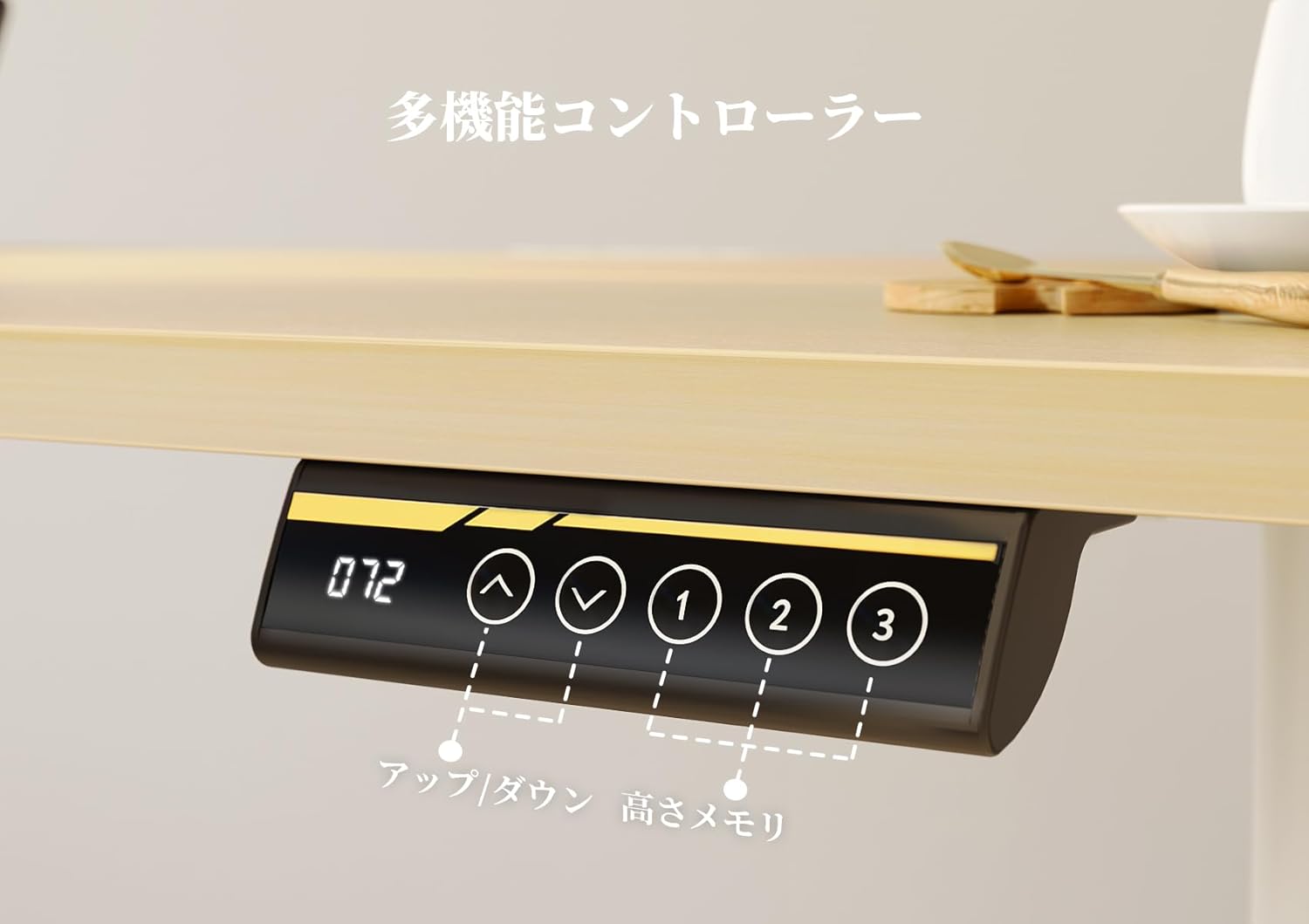
Image: Multifunction Controller Panel
- അപ്പ്/ഡൗൺ ബട്ടണുകൾ: Use the ▲ (Up) and ▼ (Down) buttons to manually adjust the desk to your desired height. The current height will be displayed on the digital screen.
- മെമ്മറി പ്രീസെറ്റുകൾ: The desk features three memory preset buttons (1, 2, 3) to save and recall your preferred heights.
- ഒരു പ്രീസെറ്റ് സംരക്ഷിക്കുന്നു: Adjust the desk to your desired height. Press the 'M' button (or checkmark button) once, then press one of the number buttons (1, 2, or 3) within 3 seconds to save the current height to that preset.
- ഒരു പ്രീസെറ്റ് ഓർമ്മിപ്പിക്കുന്നു: Press the corresponding number button (1, 2, or 3) to automatically move the desk to the saved height.
5.2 Smooth and Quiet Operation
The Claiks Electric Standing Desk is designed for smooth and quiet operation, ensuring minimal disturbance in your workspace. The operating noise level is approximately 45dB, comparable to a quiet library.

Image: Smooth and Stable Movement
6. പരിപാലനം
The Claiks Electric Standing Desk requires minimal maintenance to ensure its longevity and performance.
- വൃത്തിയാക്കൽ: The desktop is made with melamine resin, making it resistant to water, heat, and stains. Wipe the surface with a soft, damp ആവശ്യമെങ്കിൽ തുണിയും നേരിയ ഡിറ്റർജന്റും ഉപയോഗിക്കുക. ഉരച്ചിലുകളുള്ള ക്ലീനറുകളോ കഠിനമായ രാസവസ്തുക്കളോ ഒഴിവാക്കുക.
- ഫ്രെയിം: Periodically check all screws and connections to ensure they remain tight. Tighten if any looseness is detected.
- ഇലക്ട്രിക്കൽ ഘടകങ്ങൾ: Keep the motor, control box, and cables free from dust and debris. Do not attempt to open or repair any electrical components yourself.
7. പ്രശ്നപരിഹാരം
If you experience issues with your Claiks Electric Standing Desk, please refer to the following common troubleshooting steps:
| പ്രശ്നം | സാധ്യമായ കാരണം | പരിഹാരം |
|---|---|---|
| Desk does not move or only one leg moves. | Transmission rod not fully inserted; loose cable connection; power issue. | Ensure the transmission rod is fully inserted into both legs. Check all cable connections to the control box and motor. Verify the power adapter is securely plugged into a working outlet. |
| മേശ അസമമായി നീങ്ങുന്നു അല്ലെങ്കിൽ അസാധാരണമായ ശബ്ദങ്ങൾ ഉണ്ടാക്കുന്നു. | Uneven weight distribution; loose frame components. | Distribute weight evenly on the desktop. Check and tighten all frame screws. |
| Control panel display is off or unresponsive. | Power issue; faulty control panel. | Check power connections. Try unplugging and re-plugging the desk after 30 seconds. If the issue persists, contact customer support. |
| ക്രമീകരിക്കുമ്പോൾ ഡെസ്ക് ചലിക്കുന്നത് നിർത്തുന്നു. | Overload protection activated; thermal protection activated. | Reduce the weight on the desk. Allow the motor to cool down for 20-30 minutes before attempting to adjust again. |
If these steps do not resolve the issue, please contact Claiks customer support for further assistance.
8 സ്പെസിഫിക്കേഷനുകൾ
| ഫീച്ചർ | വിശദാംശങ്ങൾ |
|---|---|
| ബ്രാൻഡ് | അവകാശികൾ |
| മോഡൽ | ഇലക്ട്രിക് സ്റ്റാൻഡിംഗ് ഡെസ്ക് |
| Desktop Dimensions (W x D) | 160 സെ.മീ x 80 സെ.മീ (63 x 31.5 ഇഞ്ച്) |
| ഉയരം ക്രമീകരിക്കൽ ശ്രേണി | 72 സെ.മീ - 118 സെ.മീ (28.3 ഇഞ്ച് - 46.5 ഇഞ്ച്) |
| ലിഫ്റ്റിംഗ് സ്പീഡ് | 20 മിമി/സെ |
| ഭാരം ശേഷി | 80 കി.ഗ്രാം (176 പൗണ്ട്) |
| ഡെസ്ക്ടോപ്പ് മെറ്റീരിയൽ | Melamine Resin Laminate |
| അടിസ്ഥാന മെറ്റീരിയൽ | ലോഹം |
| Color (Frame/Top) | White Frame / Natural Top (Beige) |
| ശബ്ദ നില | ഏകദേശം 45 dB |
| മെമ്മറി പ്രീസെറ്റുകൾ | 3 programmable heights |
| പാക്കേജ് ഭാരം | 29 കി.ഗ്രാം (63.9 പൗണ്ട്) |
| ASIN | B0DBLFKLN3 |
9. വാറൻ്റിയും പിന്തുണയും
Claiks stands behind the quality of its products. Your electric standing desk comes with a 3 വർഷത്തെ നിർമ്മാതാവിന്റെ വാറന്റി വാങ്ങിയ തീയതി മുതൽ.
- During the warranty period, Claiks will provide free repair or replacement for any manufacturing defects or malfunctions under normal use.
- This warranty does not cover damage caused by improper assembly, misuse, accidents, unauthorized modifications, or normal wear and tear.
ഉപഭോക്തൃ പിന്തുണ
Our customer support team is available to assist you with any questions or concerns regarding your Claiks Electric Standing Desk. We offer support in multiple languages, including English and Japanese.
For assistance, please contact us through the Amazon platform or visit the official Claiks brand store:
Claiks Official Brand Store on Amazon.co.jp
Please have your purchase details (ASIN: B0DBLFKLN3) ready when contacting support to ensure a quicker resolution.


