1. ആമുഖം
The MECOOL KM7 Plus Android TV Box is a powerful streaming media player designed to enhance your home entertainment experience. Featuring Android 11.0 and an Amlogic S905Y4 Quad-Core A35 processor, it delivers fast 4K streaming. This device provides seamless access to popular streaming services such as Netflix, YouTube, Disney+, and Prime Video, with integrated Google Assistant for easy content discovery. Its high-performance hardware, including 2GB RAM and 16GB storage, ensures stable operation and ample space for applications and media. Enjoy ultra-high-definition viewing with 4K HDR technology and immersive audio with Dolby Atmos 3D sound.
2. ബോക്സിൽ എന്താണുള്ളത്?
Upon unboxing your MECOOL KM7 Plus Android TV Box, please ensure all the following components are present:
- MECOOL KM7 Plus Android TV Box
- റിമോട്ട് കൺട്രോൾ
- പവർ അഡാപ്റ്റർ
- HDMI കേബിൾ

Image: The MECOOL KM7 Plus Android TV Box and its accompanying remote control.
3. സജ്ജീകരണ ഗൈഡ്
Follow these steps to set up your MECOOL KM7 Plus Android TV Box:
- ടിവിയിലേക്ക് കണക്റ്റ് ചെയ്യുക: Connect one end of an HDMI cable to the HDMI port on the TV Box and the other end to an available HDMI input on your television.

ചിത്രം: പിൻഭാഗം view of the MECOOL KM7 Plus TV Box, highlighting the HDMI, LAN, and DC IN ports for connection.
- പവർ ബന്ധിപ്പിക്കുക: Plug the power adapter into the DC IN port on the TV Box, then plug the other end into a wall outlet.
- നെറ്റ്വർക്കിലേക്ക് കണക്റ്റ് ചെയ്യുക:
- വൈഫൈ: After powering on, navigate to the network settings and select your Wi-Fi network. Enter the password to connect. The device supports 2.4G and 5.0G Wi-Fi.
- ഇഥർനെറ്റ്: For a wired connection, connect an Ethernet cable from your router to the LAN port on the TV Box.
- പ്രാരംഭ സജ്ജീകരണം: Follow the on-screen instructions to complete the initial setup, including language selection, Google account login, and app permissions.
4. പ്രവർത്തന നിർദ്ദേശങ്ങൾ
4.1 വിദൂര നിയന്ത്രണ പ്രവർത്തനങ്ങൾ
The included remote control provides quick access to key features:
- പവർ ബട്ടൺ: ഉപകരണം ഓണാക്കുകയോ ഓഫാക്കുകയോ ചെയ്യുന്നു.
- നാവിഗേഷൻ പാഡ്: Use the directional buttons to navigate menus and select items.
- ബാക്ക് ബട്ടൺ: മുമ്പത്തെ സ്ക്രീനിലേക്ക് മടങ്ങുന്നു.
- ഹോം ബട്ടണ്: Returns to the main Google TV home screen.
- വോളിയം ബട്ടണുകൾ: വോളിയം ക്രമീകരിക്കുന്നു.
- നിശബ്ദ ബട്ടൺ: ഓഡിയോ മ്യൂട്ട് ചെയ്യുകയോ അൺമ്യൂട്ട് ചെയ്യുകയോ ചെയ്യുന്നു.
- സമർപ്പിത ആപ്പ് ബട്ടണുകൾ: One-touch access to Netflix, YouTube, and Prime Video.
- ഗൂഗിൾ അസിസ്റ്റന്റ് ബട്ടൺ: Activates the Google Assistant for voice commands.

Image: The remote control for the MECOOL KM7 Plus, showing dedicated buttons for popular streaming services and Google Assistant.
4.2 ഗൂഗിൾ ടിവി ഇന്റർഫേസ്
The MECOOL KM7 Plus runs on Google TV, providing a personalized and organized streaming experience. Content from all your services is gathered in one place, categorized by themes and interests.

ചിത്രം: വിവിധ സ്ട്രീമിംഗ് ആപ്ലിക്കേഷനുകളും ഉള്ളടക്ക ശുപാർശകളും പ്രദർശിപ്പിക്കുന്ന Google TV ഇന്റർഫേസിന്റെ ഒരു സ്ക്രീൻഷോട്ട്.
4.3 Google അസിസ്റ്റന്റ്
With the integrated Google Assistant, you can use voice commands to find movies, stream music, control your TV, and manage smart home devices. Press the Google Assistant button on your remote to begin.

Image: A user interacting with Google Assistant via the remote, displaying weather information on the TV screen.
4.4 Chromecast ബിൽറ്റ്-ഇൻ
Easily cast movies, shows, photos, and more from your phone, tablet, or laptop directly to your TV. Simply tap the Cast button in compatible applications.

Image: A visual representation of the Chromecast built-in feature, demonstrating content being cast from a mobile phone to a television.
5 പ്രധാന സവിശേഷതകൾ
- 4K HDR സ്ട്രീമിംഗ്: Supports 4K HDR technology for playback up to 60 frames per second, delivering a realistic and ultra-high-definition home theater experience.
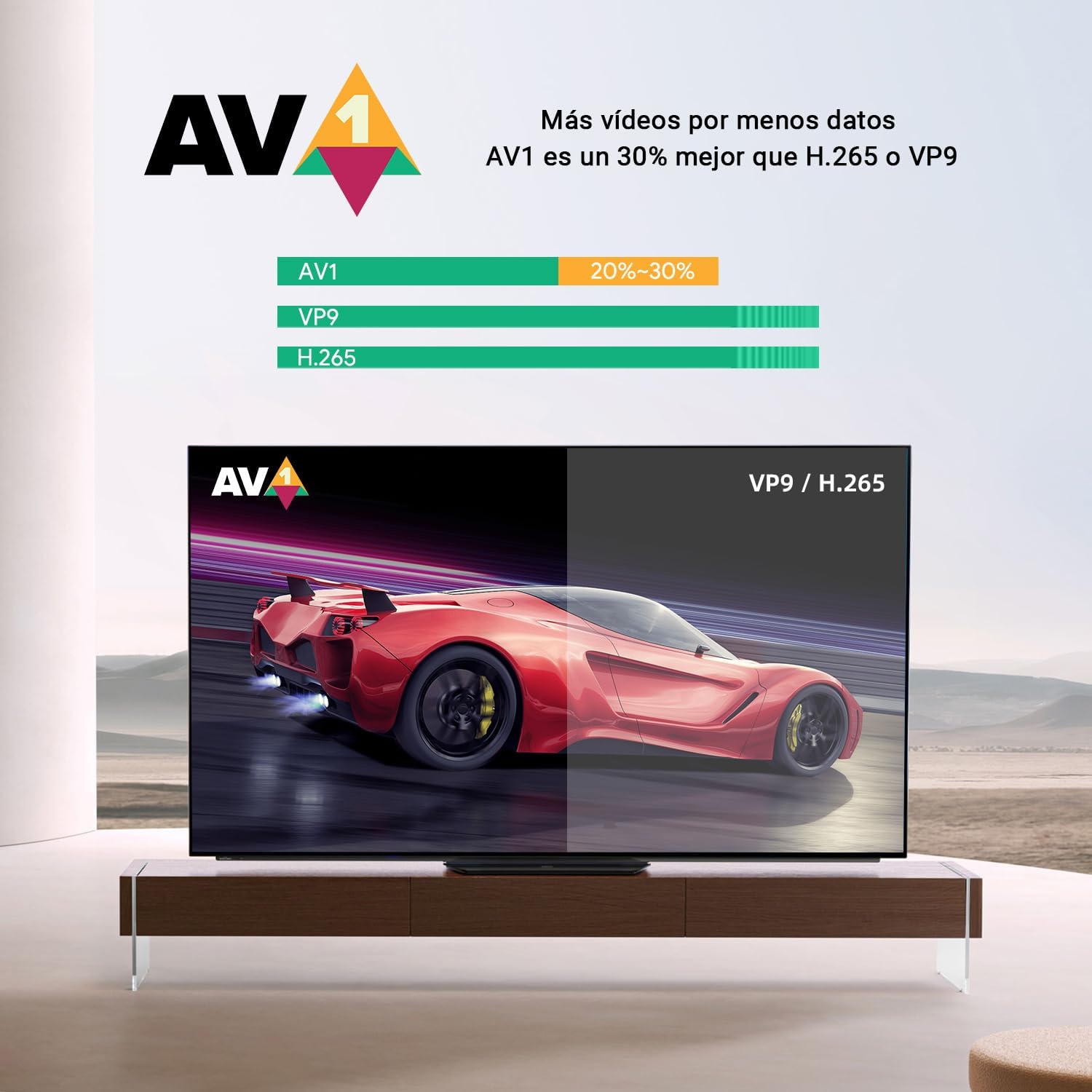
Image: A side-by-side comparison illustrating the enhanced visual quality with 4K HDR enabled versus without.
- AV1 Decoding: Features AV1 video decoding, which is approximately 30% more efficient than H.265 or VP9, allowing for more video data with less bandwidth.

Image: A graphic demonstrating the efficiency of the AV1 codec compared to VP9 and H.265.
- Dolby Atmos 3D Sound: Provides immersive audio with Dolby Atmos 3D sound, delivering a premium sound experience.

Image: The Dolby Atmos logo, indicating support for rich, clear, and exciting audio experiences.
- Integrated Netflix TV Version: Supports streaming media from the integrated Netflix TV version.
- High Performance & Storage: Equipped with 2GB RAM and 16GB storage, ensuring stable performance. Storage can be expanded via the TF card slot.

ചിത്രം: വിശദമായ ഒരു ചിത്രം view of the Amlogic S905Y4 processor, highlighting its low-power CPU cores.
6 സ്പെസിഫിക്കേഷനുകൾ
| ഫീച്ചർ | സ്പെസിഫിക്കേഷൻ |
|---|---|
| ബ്രാൻഡ് | MECOOL |
| മോഡലിൻ്റെ പേര് | KM7 പ്ലസ് |
| ഓപ്പറേറ്റിംഗ് സിസ്റ്റം | Android 11.0 (Google TV) |
| പ്രോസസ്സർ | Amlogic S905Y4 Quad-Core A35 |
| റാം | 2 ജിബി |
| സംഭരണം | 16 GB (expandable via TF card slot) |
| റെസലൂഷൻ | Up to 4K @ 60fps |
| HDR പിന്തുണ | 4K HDR |
| ഓഡിയോ ടെക്നോളജി | Dolby Atmos 3D Sound |
| വീഡിയോ ഡീകോഡിംഗ് | AV1, H.265, VP9 |
| കണക്റ്റിവിറ്റി | Wi-Fi (2.4G/5.0G), Ethernet, Bluetooth 5.0 |
| തുറമുഖങ്ങൾ | HDMI, LAN, DC IN, USB 2.0 (x2), TF Card Slot, S/PDIF, AV |
| അനുയോജ്യമായ ഉപകരണങ്ങൾ | Smart Television |
| പ്രത്യേക സവിശേഷതകൾ | Chromecast Built-in, Google Assistant, Netflix TV Version |
| ഉൽപ്പന്ന അളവുകൾ | 2.54 x 2.54 x 2.54 സെ.മീ |
| ഉൽപ്പന്ന ഭാരം | 340.19 ഗ്രാം |
7. പരിപാലനം
To ensure the longevity and optimal performance of your MECOOL KM7 Plus Android TV Box, follow these maintenance guidelines:
- വൃത്തിയാക്കൽ: ഉപകരണത്തിന്റെ പുറംഭാഗം വൃത്തിയാക്കാൻ മൃദുവായതും ഉണങ്ങിയതുമായ തുണി ഉപയോഗിക്കുക. ലിക്വിഡ് ക്ലീനറുകളോ ഉരച്ചിലുകളുള്ള വസ്തുക്കളോ ഉപയോഗിക്കരുത്.
- വെൻ്റിലേഷൻ: അമിതമായി ചൂടാകുന്നത് തടയാൻ ഉപകരണം നന്നായി വായുസഞ്ചാരമുള്ള സ്ഥലത്ത് സ്ഥാപിച്ചിട്ടുണ്ടെന്ന് ഉറപ്പാക്കുക. വെന്റിലേഷൻ ദ്വാരങ്ങളൊന്നും തടയരുത്.
- പവർ ഓഫ്: ദീർഘനേരം ഉപയോഗിക്കാത്തപ്പോൾ, ഉപകരണം ഓഫ് ചെയ്ത് പവർ ഔട്ട്ലെറ്റിൽ നിന്ന് അൺപ്ലഗ് ചെയ്യാൻ ശുപാർശ ചെയ്യുന്നു.
- സോഫ്റ്റ്വെയർ അപ്ഡേറ്റുകൾ: ഉപകരണത്തിൽ ഏറ്റവും പുതിയ സവിശേഷതകളും സുരക്ഷാ പാച്ചുകളും ഉണ്ടെന്ന് ഉറപ്പാക്കാൻ സോഫ്റ്റ്വെയർ അപ്ഡേറ്റുകൾ പതിവായി പരിശോധിച്ച് ഇൻസ്റ്റാൾ ചെയ്യുക.
8. പ്രശ്നപരിഹാരം
If you encounter issues with your MECOOL KM7 Plus Android TV Box, refer to the following common troubleshooting steps:
- ശക്തിയില്ല:
- Ensure the power adapter is securely connected to the TV Box and the wall outlet.
- മറ്റൊരു പവർ ഔട്ട്ലെറ്റ് പരീക്ഷിക്കുക.
- ചിത്രം/സിഗ്നൽ ഇല്ല:
- HDMI കേബിൾ ടിവി ബോക്സിലേക്കും ടിവിയിലേക്കും സുരക്ഷിതമായി ബന്ധിപ്പിച്ചിട്ടുണ്ടെന്ന് ഉറപ്പാക്കുക.
- നിങ്ങളുടെ ടിവി ശരിയായ HDMI ഇൻപുട്ട് ഉറവിടത്തിലേക്ക് സജ്ജീകരിച്ചിട്ടുണ്ടെന്ന് ഉറപ്പാക്കുക.
- നിങ്ങളുടെ ടിവിയിൽ മറ്റൊരു HDMI കേബിളോ HDMI പോർട്ടോ പരീക്ഷിച്ചുനോക്കൂ.
- ശബ്ദമില്ല:
- Check the volume levels on both the TV Box and your television.
- Ensure the TV Box is not muted.
- Verify audio settings on the TV Box are configured correctly.
- നെറ്റ്വർക്ക് കണക്ഷൻ പ്രശ്നങ്ങൾ:
- For Wi-Fi, ensure the password is correct and the signal strength is adequate. Try restarting your router.
- For Ethernet, ensure the cable is properly connected and your router is functioning.
- റിമോട്ട് കൺട്രോൾ പ്രതികരിക്കുന്നില്ല:
- റിമോട്ട് കൺട്രോളിൽ ബാറ്ററികൾ മാറ്റിസ്ഥാപിക്കുക.
- റിമോട്ടിനും ടിവി ബോക്സിനും ഇടയിൽ തടസ്സങ്ങളൊന്നുമില്ലെന്ന് ഉറപ്പാക്കുക.
9. വാറൻ്റിയും പിന്തുണയും
For warranty information and technical support, please refer to the documentation provided with your purchase or visit the official MECOOL webസൈറ്റ്. വാറന്റി ക്ലെയിമുകൾക്കായി നിങ്ങളുടെ വാങ്ങലിന്റെ തെളിവ് സൂക്ഷിക്കുക.
ഓൺലൈൻ പിന്തുണ: Visit the MECOOL Brand Store on Amazon