1. ആമുഖം
Thank you for choosing the avedio links HDMI Splitter. This device is designed to enhance your audio and video experience by simultaneously transmitting signals from a single HDMI source to two HDMI displays. It supports ultra-high resolutions up to 8K@60Hz and 4K@120Hz, providing excellent image quality and a smooth viewing experience for gaming, movies, or presentations.
പ്രധാന കുറിപ്പ്: This device functions as a splitter (duplication/mirror mode only) and is not an HDMI switch. It cannot display multiple HDMI sources on a single television.

Figure 1: avedio links HDMI Splitter 1 in 2 Out with included HDMI cable.
2 സുരക്ഷാ വിവരങ്ങൾ
- ആകസ്മികമായ വീഴ്ചകൾ തടയാൻ ഉപകരണം സ്ഥിരതയുള്ളതും പരന്നതുമായ ഒരു പ്രതലത്തിൽ സ്ഥാപിച്ചിട്ടുണ്ടെന്ന് ഉറപ്പാക്കുക.
- വെള്ളം, ഈർപ്പം, തീവ്രമായ താപനില എന്നിവയിൽ നിന്ന് ഉപകരണം അകറ്റി നിർത്തുക.
- ഉപകരണം സ്വയം തുറക്കാനോ നന്നാക്കാനോ ശ്രമിക്കരുത്. എല്ലാ സേവനങ്ങളും യോഗ്യതയുള്ള ഉദ്യോഗസ്ഥരെ ഏൽപ്പിക്കുക.
- വൈദ്യുതി വിതരണം: The device comes with a micro USB cable but no power adapter. It is highly recommended to connect the USB cable to a wall power outlet (e.g., using a standard 5V USB power adapter, not included) to ensure stable power delivery. Avoid connecting to low-power USB ports on other devices like cable boxes.
- Use only the provided high-speed HDMI 2.1 cable or other certified HDMI 2.1 cables.
- For optimal performance, especially with 8K resolutions, ensure HDMI cable length does not exceed 1.5 meters.
3. പാക്കേജ് ഉള്ളടക്കം
അൺബോക്സിംഗ് ചെയ്യുമ്പോൾ പാക്കേജ് ഉള്ളടക്കങ്ങൾ പരിശോധിക്കുക:
- 1 x avedio links HDMI 2.1 Splitter (1 in 2 Out)
- 1 x USB Power Cable (Micro USB)
- 1 x High-Speed HDMI 2.1 Cable
4. ഉൽപ്പന്ന സവിശേഷതകൾ
- HDMI 2.1 പാലിക്കൽ: Supports the latest HDMI 2.1 standard.
- ഉയർന്ന റെസല്യൂഷൻ പിന്തുണ: Capable of 8K@60Hz, 4K@120Hz, and backward compatible with lower resolutions.
- ഉയർന്ന പുതുക്കൽ നിരക്ക്: Experience smooth visuals with 4K@120Hz refresh rate, ideal for gaming.
- നൂതന വീഡിയോ സാങ്കേതികവിദ്യകൾ: Supports VRR (Variable Refresh Rate), Dynamic HDR (High Dynamic Range), and Dolby Vision for enhanced picture quality.
- HDCP 2.3 Compatible: Ensures compatibility with protected content.
- Smart EDID Management: Features EDID copy function, allowing direct copying from Output 1 for optimal display compatibility.
- വിശാലമായ അനുയോജ്യത: Works with various devices including NS (Nintendo Switch), PS5, XBOX, Fire Stick, Roku, 4K/8K high refresh rate TVs, and other AV devices.

Figure 2: Demonstrating the benefit of 4K@120Hz high refresh rate for smoother visuals.

Figure 3: Visual representation of improved dynamic range and image details with HDR.
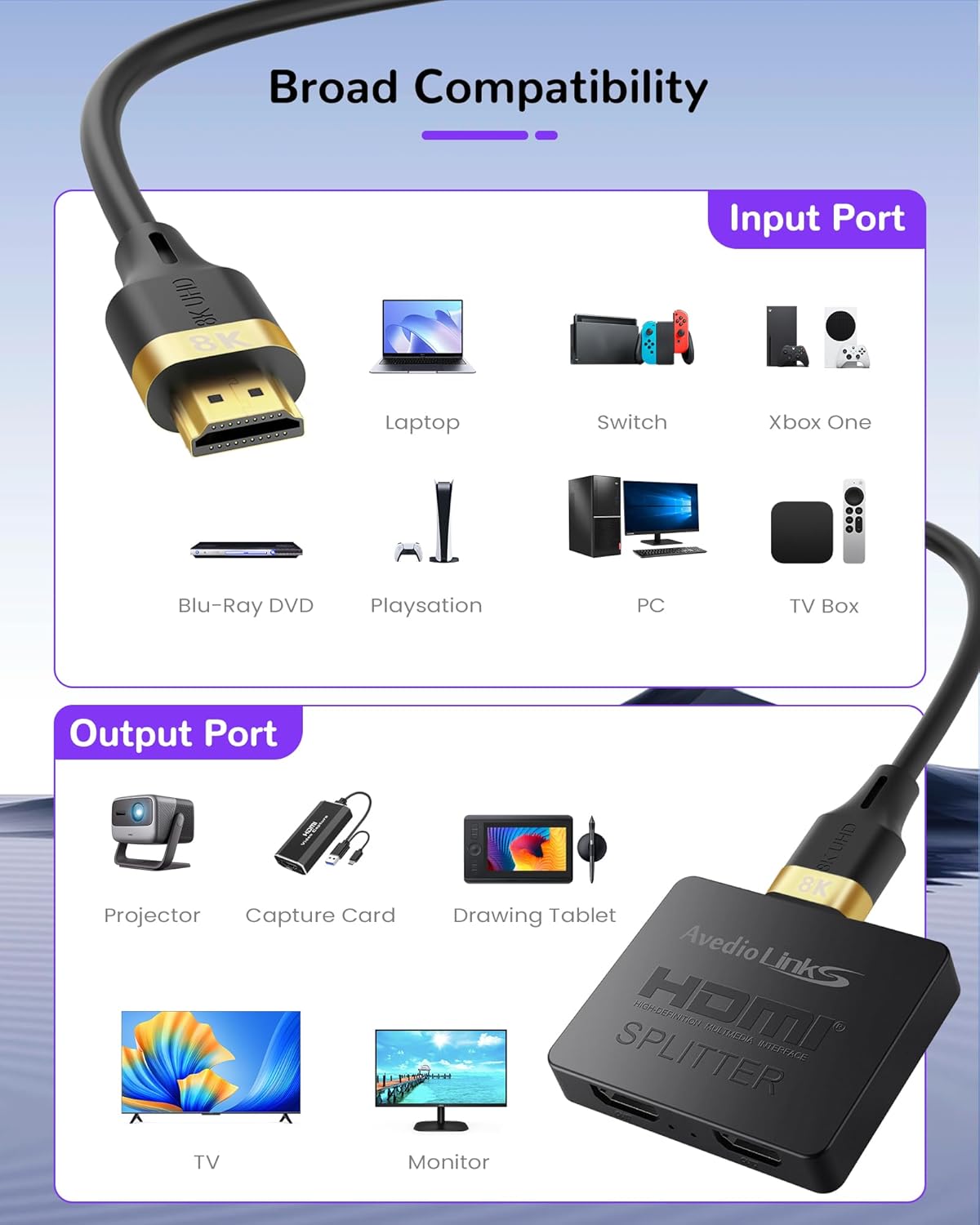
Figure 4: Input and Output ports illustrating broad device compatibility.
5. സജ്ജീകരണ നിർദ്ദേശങ്ങൾ
- HDMI ഉറവിടം ബന്ധിപ്പിക്കുക: Connect your HDMI source device (e.g., game console, Blu-ray player, PC) to the HDMI-IN port on the avedio links splitter using the provided high-speed HDMI 2.1 cable.
- HDMI ഡിസ്പ്ലേകൾ ബന്ധിപ്പിക്കുക: Connect your two HDMI display devices (e.g., TV, monitor, projector) to the HDMI OUT1 ഒപ്പം HDMI OUT2 ports on the splitter using high-speed HDMI 2.1 cables.
- പവർ ബന്ധിപ്പിക്കുക: Connect the micro USB power cable to the DC 5V port on the splitter. Then, connect the other end of the USB cable to a reliable 5V USB power adapter (not included) plugged into a wall outlet. Do not connect to low-power USB ports on other devices.
- പവർ ഓൺ: Power on your HDMI source device and both HDMI display devices. The splitter will automatically detect the signals and duplicate the source content to both displays.

Figure 5: The splitter supports Mirror/Copy mode, duplicating the source to both outputs. It does not support extended desktop mode.
6. പ്രവർത്തന നിർദ്ദേശങ്ങൾ
- Mirror/Duplication Mode: The avedio links HDMI splitter is designed to duplicate the video and audio signal from a single source to two displays simultaneously. Both connected displays will show the exact same content.
- EDID മാനേജ്മെന്റ്: The splitter features intelligent EDID management. It will automatically copy the EDID (Extended Display Identification Data) from the display connected to Output 1. This ensures optimal compatibility and resolution negotiation between your source and displays. For best results, connect the display with the lowest resolution capability to Output 1 if you encounter display issues.
- Laptop Connection: When connecting a laptop, ensure it is connected to the ഇൻപുട്ട് പോർട്ട് of this product. Laptops cannot be connected to the output ports.
- ആപ്ലിക്കേഷൻ സാഹചര്യങ്ങൾ: This splitter is ideal for various settings such as home theater systems, gaming setups, multimedia teaching, conference rooms, and more, allowing you to share content across multiple screens in different rooms.

Figure 6: Smart EDID Management allows automatic recognition or copying of Output 1's device resolution.

ചിത്രം 7: ഉദാamples of how the HDMI splitter can be used in various environments like home theater, gaming, and multimedia teaching.
7. പരിപാലനം
- വൃത്തിയാക്കൽ: ഉപകരണത്തിന്റെ പുറംഭാഗം വൃത്തിയാക്കാൻ മൃദുവായതും ഉണങ്ങിയതുമായ തുണി ഉപയോഗിക്കുക. ലിക്വിഡ് ക്ലീനറുകളോ എയറോസോളുകളോ ഉപയോഗിക്കരുത്.
- സംഭരണം: ദീർഘനേരം ഉപയോഗിക്കാത്തപ്പോൾ, നേരിട്ട് സൂര്യപ്രകാശം ഏൽക്കാത്ത ഒരു തണുത്തതും വരണ്ടതുമായ സ്ഥലത്ത് ഉപകരണം സൂക്ഷിക്കുക.
- കേബിൾ കെയർ: Avoid bending or kinking the HDMI and USB cables excessively to prevent damage.
8. പ്രശ്നപരിഹാരം
| പ്രശ്നം | സാധ്യമായ കാരണം | പരിഹാരം |
|---|---|---|
| No signal on display(s) |
|
|
| മിന്നിമറയുന്ന അല്ലെങ്കിൽ അസ്ഥിരമായ ചിത്രം |
|
|
| Only one display works |
|
|
| Resolution/features not as expected (e.g., no HDR) |
|
|
9 സ്പെസിഫിക്കേഷനുകൾ
| ബ്രാൻഡ് | avedio ലിങ്കുകൾ |
| മോഡൽ | 1 x 2 8K @ 60Hz |
| ഇൻപുട്ട് പോർട്ടുകൾ | 1 x HDMI 2.1 |
| ഔട്ട്പുട്ട് പോർട്ടുകൾ | 2 x HDMI 2.1 |
| പിന്തുണയ്ക്കുന്ന പ്രമേയങ്ങൾ | 8K@60Hz, 4K@120Hz, 4K@60Hz, 1080p, etc. (backward compatible) |
| പിന്തുണയ്ക്കുന്ന സാങ്കേതികവിദ്യകൾ | VRR, Dynamic HDR, Dolby Vision, HDCP 2.3 |
| അനുയോജ്യമായ ഉപകരണങ്ങൾ | NS, PS5, XBOX, Fire Stick, Roku, 4K/8K high refresh rate TVs, and other AV devices. |
| വൈദ്യുതി വിതരണം | DC 5V (via Micro USB, adapter not included) |
| പരമാവധി HDMI കേബിൾ ദൈർഘ്യം | 1.5 meters for HDMI 2.1 (for optimal performance) |
10. വാറൻ്റിയും പിന്തുണയും
For warranty information and technical support, please refer to the documentation provided with your purchase or contact the seller directly. Keep your purchase receipt for warranty claims.
For further assistance, you may visit the official avedio links webനിങ്ങൾ ഉൽപ്പന്നം വാങ്ങിയ പ്ലാറ്റ്ഫോം വഴി അവരുടെ ഉപഭോക്തൃ സേവനവുമായി ബന്ധപ്പെടുക അല്ലെങ്കിൽ സൈറ്റ് സന്ദർശിക്കുക.


