1. ആമുഖം
Thank you for choosing the Irfora T58B Digital Multimeter. This instrument is a handheld, true RMS digital multimeter designed for accurate measurement of AC/DC voltage, AC/DC current, frequency, resistance, capacitance, and diodes. It is a versatile tool for solving industrial and household electrical problems, suitable for both DIY enthusiasts and professionals.
Please read this manual thoroughly before use to ensure safe and proper operation. Keep this manual for future reference.
2 സുരക്ഷാ വിവരങ്ങൾ
മുന്നറിയിപ്പ്: To avoid electric shock or personal injury, and to prevent damage to the meter or the equipment under test, observe the following safety rules:
- മീറ്റർ ശരിയായ പ്രവർത്തനത്തിലാണെന്നും അളവെടുപ്പിനുള്ള പരിധിയിലാണെന്നും എല്ലായ്പ്പോഴും ഉറപ്പാക്കുക.
- റേറ്റുചെയ്ത വോള്യത്തേക്കാൾ കൂടുതൽ പ്രയോഗിക്കരുത്tage, മീറ്ററിൽ അടയാളപ്പെടുത്തിയിരിക്കുന്നതുപോലെ, ടെർമിനലുകൾക്കിടയിൽ അല്ലെങ്കിൽ ഏതെങ്കിലും ടെർമിനലിനും ഭൂമിക്കും ഇടയിൽ.
- വോള്യവുമായി പ്രവർത്തിക്കുമ്പോൾ ജാഗ്രത പാലിക്കുകtag30V AC RMS, 42V പീക്ക്, അല്ലെങ്കിൽ 60V DC എന്നിവയ്ക്ക് മുകളിലാണ്. അത്തരം വോള്യംtagഒരു ഷോക്ക് അപകടമാണ്.
- Before making current measurements, ensure the meter's fuses are intact and the test leads are connected to the correct input jacks.
- ഫംഗ്ഷനുകളോ ശ്രേണികളോ മാറ്റുന്നതിനുമുമ്പ് സർക്യൂട്ടിൽ നിന്ന് ടെസ്റ്റ് ലീഡുകൾ വിച്ഛേദിക്കുക.
- മീറ്റർ കേടായതായി തോന്നുകയോ ടെസ്റ്റ് ലീഡുകളിലെ ഇൻസുലേഷൻ തകരാറിലാവുകയോ ചെയ്താൽ അത് ഉപയോഗിക്കരുത്.
- തെറ്റായ റീഡിംഗുകൾ ഒഴിവാക്കാൻ കുറഞ്ഞ ബാറ്ററി സൂചകം പ്രത്യക്ഷപ്പെട്ടാലുടൻ ബാറ്ററി മാറ്റിസ്ഥാപിക്കുക.
- പ്രാദേശികവും ദേശീയവുമായ സുരക്ഷാ കോഡുകൾ പാലിക്കുക.
3. ഉൽപ്പന്നം കഴിഞ്ഞുview
The Irfora T58B Digital Multimeter features a robust design and a clear LCD display for easy readings.
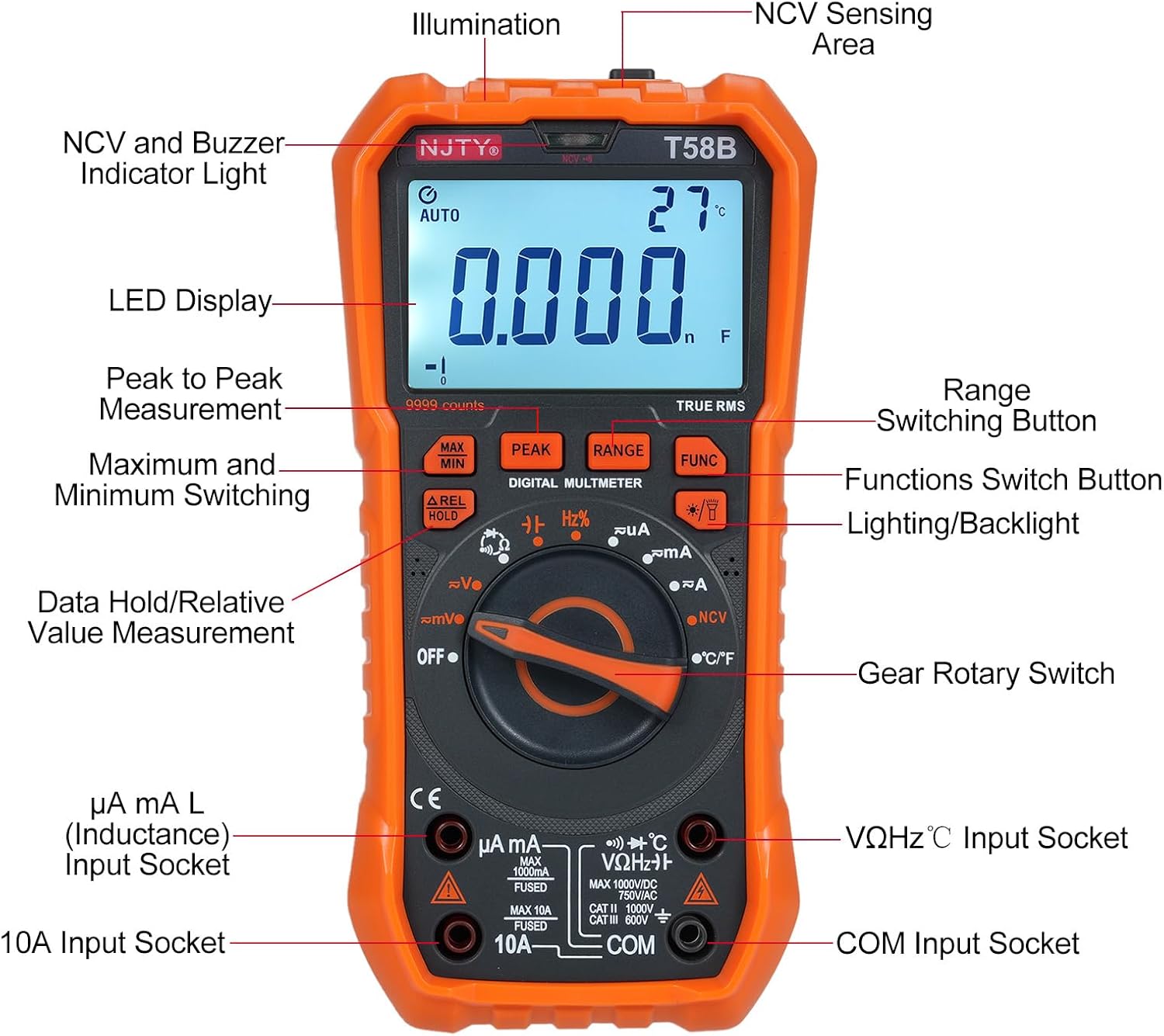
ചിത്രം 3.1: ഫ്രണ്ട് view of the Irfora T58B Digital Multimeter with labeled components. Key features include the LED Display, NCV and Buzzer Indicator Light, Gear Rotary Switch, Input Sockets, and various function buttons.

ചിത്രം 3.2: Dimensions of the Irfora T58B Digital Multimeter. The device measures approximately 187mm (7.36in) in height, 95mm (3.74in) in width, and 55mm (2.16in) in depth.

ചിത്രം 3.3: പിൻഭാഗം view of the multimeter showing the 90-degree adjustable support stand and integrated storage slots for test leads, designed for convenience and protection.

ചിത്രം 3.4: കഴിഞ്ഞുview of the Irfora T58B Digital Multimeter's capabilities, including 9999 counts display, and measurement of current, resistance, capacitance, temperature, and frequency.
പ്രധാന സവിശേഷതകൾ:
- 9999 Counts LCD Digital Display with Backlight
- യഥാർത്ഥ RMS അളവ്
- നോൺ-കോൺടാക്റ്റ് വോളിയംtagഇ (NCV) കണ്ടെത്തൽ
- ഓട്ടോമാറ്റിക് പവർ ഓഫ്
- Data Hold and Relative Value Measurement
- Flashlight Function for low-light conditions
- AC/DC വോളിയം അളക്കുന്നുtage, AC/DC Current, Resistance, Capacitance, Frequency, and Temperature
- ഡയോഡും കണ്ടിന്യൂറ്റി ടെസ്റ്റും
4. സജ്ജീകരണം
4.1. ബാറ്ററി ഇൻസ്റ്റാളേഷൻ
The Irfora T58B Multimeter requires 3 x 1.5V AAA batteries (not included). To install or replace batteries:
- മൾട്ടിമീറ്റർ ഓഫാക്കിയിട്ടുണ്ടെന്ന് ഉറപ്പാക്കുക, ഇൻപുട്ട് ടെർമിനലുകളിൽ നിന്ന് എല്ലാ ടെസ്റ്റ് ലീഡുകളും വിച്ഛേദിക്കുക.
- മീറ്ററിന്റെ പിൻഭാഗത്ത് ബാറ്ററി കമ്പാർട്ട്മെന്റ് കവർ കണ്ടെത്തുക.
- ബാറ്ററി കവർ ഉറപ്പിക്കുന്ന സ്ക്രൂ(കൾ) അഴിക്കാൻ ഒരു സ്ക്രൂഡ്രൈവർ ഉപയോഗിക്കുക.
- Remove the cover and insert the 3 AAA batteries, observing the correct polarity (+ and -).
- ബാറ്ററി കവർ മാറ്റി സ്ക്രൂ(കൾ) മുറുക്കുക.
കുറിപ്പ്: മീറ്റർ ദീർഘനേരം ഉപയോഗിച്ചിട്ടില്ലെങ്കിൽ, ചോർച്ച തടയാൻ ബാറ്ററികൾ നീക്കം ചെയ്യുക.
4.2. ടെസ്റ്റ് ലീഡുകൾ ബന്ധിപ്പിക്കുന്നു
Always connect the black test lead to the "COM" (Common) input jack. Connect the red test lead to the appropriate input jack based on the measurement type:
- വാല്യംtage, Resistance, Capacitance, Frequency, Diode, and Temperature measurements: Connect the red lead to the "VΩHz°C" jack.
- For Current measurements (up to 600mA): Connect the red lead to the "µA mA" jack.
- For High Current measurements (up to 10A): Connect the red lead to the "10A" jack.
Ensure test leads are fully inserted into the jacks before use.
5. പ്രവർത്തന നിർദ്ദേശങ്ങൾ
To operate the multimeter, turn the Gear Rotary Switch to the desired function. The meter will automatically select the appropriate range in most modes (AUTO function).
5.1. എസി/ഡിസി വോളിയംtagഇ അളവ്
- Turn the rotary switch to the "V~" (AC Voltage) അല്ലെങ്കിൽ "V-" (DC Voltagഇ) സ്ഥാനം.
- Connect the black test lead to the "COM" jack and the red test lead to the "VΩHz°C" jack.
- ടെസ്റ്റ് പ്രോബുകൾ സർക്യൂട്ട് പോയിന്റുകളിലേക്ക് സ്പർശിക്കുക, അവിടെ വോളിയംtage ആണ് അളക്കേണ്ടത്.
- വാല്യം വായിക്കുകtagഎൽസിഡി ഡിസ്പ്ലേയിലെ ഇ മൂല്യം.
5.2. എസി/ഡിസി കറന്റ് മെഷർമെന്റ്
ജാഗ്രത: Never connect the meter in parallel to a voltagകറന്റ് അളക്കുമ്പോൾ e ഉറവിടം. ഇത് ഫ്യൂസ് പൊട്ടിത്തെറിക്കുകയോ മീറ്ററിന് കേടുപാടുകൾ വരുത്തുകയോ ചെയ്തേക്കാം.
- Turn the rotary switch to the "µA mA" or "A" position for AC or DC current. Use the "FUNC" button to switch between AC and DC if necessary.
- Connect the black test lead to the "COM" jack. Connect the red test lead to the "µA mA" jack for currents up to 600mA, or to the "10A" jack for currents up to 10A.
- Open the circuit where current is to be measured and connect the meter in series with the load.
- LCD ഡിസ്പ്ലേയിലെ നിലവിലെ മൂല്യം വായിക്കുക.
5.3. പ്രതിരോധം അളക്കൽ
- റോട്ടറി സ്വിച്ച് "Ω" സ്ഥാനത്തേക്ക് തിരിക്കുക.
- Connect the black test lead to "COM" and the red test lead to "VΩHz°C".
- പ്രതിരോധം അളക്കുന്നതിന് മുമ്പ് സർക്യൂട്ട് ഡീ-എനർജൈസ് ചെയ്തിട്ടുണ്ടെന്ന് ഉറപ്പാക്കുക.
- Touch the test probes across the component or circuit where resistance is to be measured.
- എൽസിഡി ഡിസ്പ്ലേയിൽ പ്രതിരോധ മൂല്യം വായിക്കുക.
5.4. കപ്പാസിറ്റൻസ് മെഷർമെന്റ്
- Turn the rotary switch to the "Capacitance" position (often shared with other functions, use FUNC button if needed).
- Connect the black test lead to "COM" and the red test lead to "VΩHz°C".
- Discharge the capacitor completely before measurement to avoid damage to the meter.
- കപ്പാസിറ്റർ ടെർമിനലുകളിലുടനീളമുള്ള ടെസ്റ്റ് പ്രോബുകളിൽ സ്പർശിക്കുക.
- എൽസിഡി ഡിസ്പ്ലേയിലെ കപ്പാസിറ്റൻസ് മൂല്യം വായിക്കുക.
5.5. ഫ്രീക്വൻസി മെഷർമെന്റ്
- Turn the rotary switch to the "Hz" position.
- Connect the black test lead to "COM" and the red test lead to "VΩHz°C".
- ഫ്രീക്വൻസി അളക്കേണ്ട സർക്യൂട്ടിലെ ടെസ്റ്റ് പ്രോബുകളിൽ സ്പർശിക്കുക.
- LCD ഡിസ്പ്ലേയിലെ ഫ്രീക്വൻസി മൂല്യം വായിക്കുക.
5.6. Diode Test and Continuity
- Turn the rotary switch to the "Diode/Continuity" position. Use the "FUNC" button to toggle between diode test and continuity.
- Connect the black test lead to "COM" and the red test lead to "VΩHz°C".
- For Diode Test: Place the red probe on the anode and the black probe on the cathode. The display will show the forward voltagഇ ഡ്രോപ്പ് ചെയ്യുക. പ്രോബുകൾ റിവേഴ്സ് ചെയ്യുക; നല്ല ഡയോഡിനായി ഡിസ്പ്ലേ "OL" (ഓപ്പൺ ലൂപ്പ്) കാണിക്കണം.
- For Continuity Test: Touch the probes to the circuit points. If resistance is below approximately 50Ω, the buzzer will sound, indicating continuity.
5.7. താപനില അളക്കൽ
- Turn the rotary switch to the "°C/°F" position.
- Connect the thermocouple (included) to the "VΩHz°C" and "COM" jacks, observing polarity.
- Place the thermocouple tip on the object or area where temperature is to be measured.
- Read the temperature value on the LCD display. Use the "FUNC" button to switch between Celsius and Fahrenheit.
5.8. നോൺ-കോൺടാക്റ്റ് വോളിയംtagഇ (NCV) കണ്ടെത്തൽ

ചിത്രം 5.1: Demonstrating NCV (Non-Contact Voltage) detection. The meter's top is placed near an AC voltage source, and the signal strength indicator lights up, accompanied by an audible alarm.
- റോട്ടറി സ്വിച്ച് "NCV" സ്ഥാനത്തേക്ക് തിരിക്കുക.
- Place the top of the meter (NCV sensing area) close to the conductor or outlet you suspect has AC voltage.
- എസി വോള്യം ആണെങ്കിൽtage is detected, the corresponding signal strength indicator (low-yellow, high-red) will light up, and the buzzer will emit different frequency alarms based on signal strength.
5.9. ബാക്ക്ലൈറ്റും ടോർച്ചും
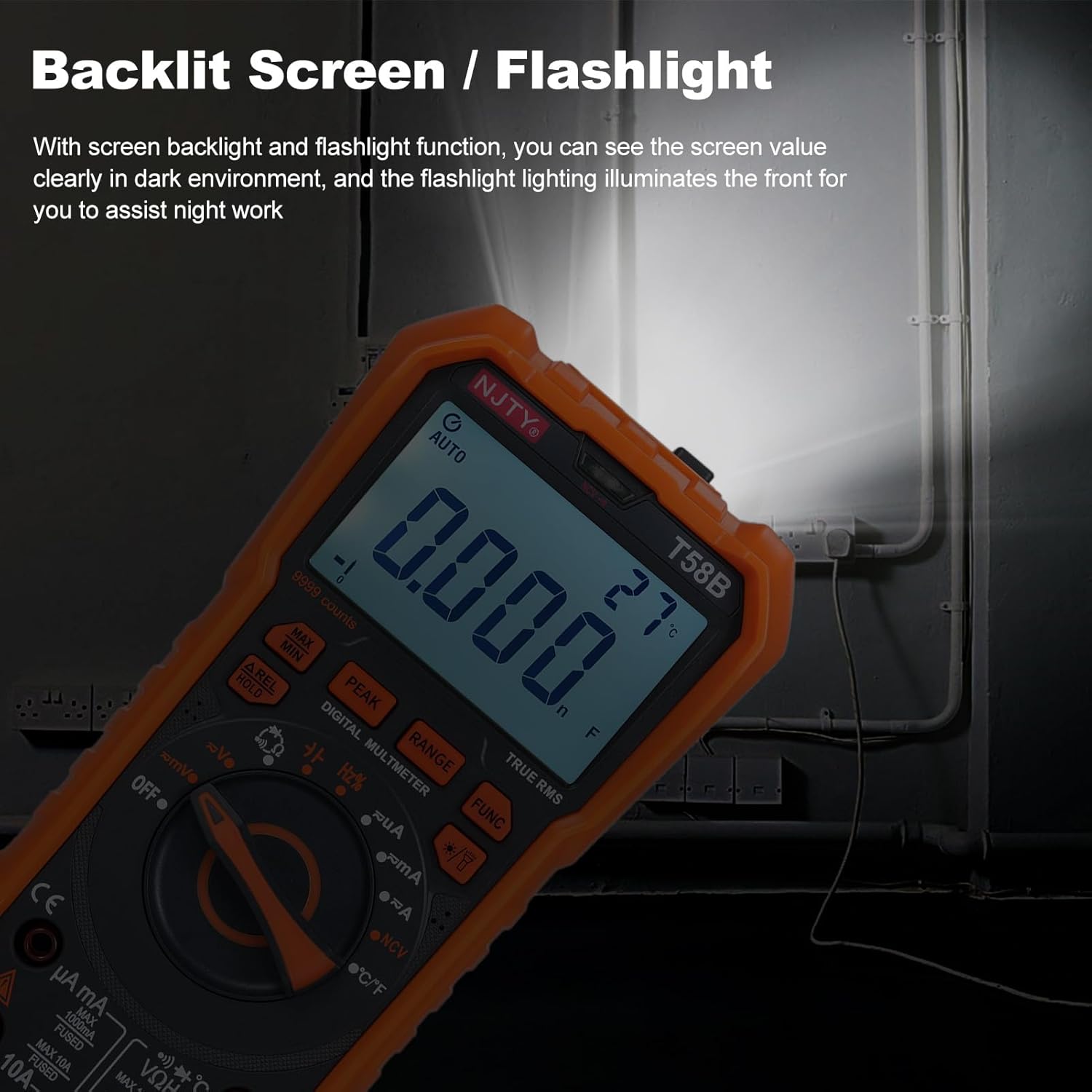
ചിത്രം 5.2: The multimeter's backlit screen and integrated flashlight illuminate the display and work area, enhancing visibility in dark environments.
Press the "Lighting/Backlight" button (often marked with a light bulb icon) to turn on the display backlight. Press and hold the same button to activate the flashlight located at the top of the meter. Press again to turn off.
5.10. ഓട്ടോമാറ്റിക് പവർ ഓഫ്

ചിത്രം 5.3: The multimeter features an automatic shutdown function, turning off after approximately 15 minutes of inactivity to conserve battery life.
The multimeter will automatically power off after approximately 15 minutes of inactivity to conserve battery life. An audible voice prompt will sound before shutdown. To restart the meter, press any button or turn the rotary switch.
6. പരിപാലനം
6.1. വൃത്തിയാക്കൽ
മീറ്റർ പരസ്യം ഉപയോഗിച്ച് തുടയ്ക്കുകamp തുണിയും നേരിയ ഡിറ്റർജന്റും. അബ്രാസീവ്സുകളോ ലായകങ്ങളോ ഉപയോഗിക്കരുത്. ഇൻപുട്ട് ടെർമിനലുകൾ അഴുക്കും ഈർപ്പവും ഇല്ലാതെ സൂക്ഷിക്കുക.
6.2. ബാറ്ററി മാറ്റിസ്ഥാപിക്കൽ
When the low battery indicator appears on the display, replace the batteries as described in Section 4.1. Prompt battery replacement ensures accurate readings.
6.3. ഫ്യൂസ് മാറ്റിസ്ഥാപിക്കൽ
If the meter fails to measure current, the fuse may be blown. To replace the fuse:
- മൾട്ടിമീറ്റർ ഓഫാക്കിയിട്ടുണ്ടെന്ന് ഉറപ്പുവരുത്തി എല്ലാ ടെസ്റ്റ് ലീഡുകളും വിച്ഛേദിക്കുക.
- Open the battery compartment cover as described in Section 4.1.
- പഴയ ഫ്യൂസ് ശ്രദ്ധാപൂർവ്വം നീക്കം ചെയ്യുക.
- Replace with a fuse of the same type and rating:
- For µA mA input: F 600mA/250V
- For 10A input: F 10A/250V
- ബാറ്ററി കവർ മാറ്റി സ്ക്രൂ(കൾ) മുറുക്കുക.
7. പ്രശ്നപരിഹാരം
| പ്രശ്നം | സാധ്യമായ കാരണം | പരിഹാരം |
|---|---|---|
| മീറ്റർ പവർ ഓൺ ആകുന്നില്ല. | ഡെഡ് അല്ലെങ്കിൽ തെറ്റായി ഇൻസ്റ്റാൾ ചെയ്ത ബാറ്ററികൾ. | Check battery polarity and replace batteries if necessary (Section 4.1). |
| No reading or "OL" displayed during measurement. | Incorrect range, open circuit, or blown fuse (for current). | Ensure correct function/range. Check test lead connections. For current, check and replace fuse (Section 6.3). Verify circuit continuity. |
| കൃത്യമല്ലാത്ത വായനകൾ. | Low battery, incorrect connection, or external interference. | Replace batteries. Recheck test lead connections. Move away from strong electromagnetic fields. |
| Buzzer does not sound during continuity test. | Circuit resistance is too high. | Ensure resistance is below approximately 50Ω for continuity indication. |
ഈ പരിഹാരങ്ങൾ പരീക്ഷിച്ചതിനു ശേഷവും പ്രശ്നം നിലനിൽക്കുകയാണെങ്കിൽ, ഉപഭോക്തൃ പിന്തുണയുമായി ബന്ധപ്പെടുക.
8 സ്പെസിഫിക്കേഷനുകൾ
The following specifications are for the Irfora T58B Digital Multimeter:
പൊതുവായ സവിശേഷതകൾ:
- Display: 9999 Counts LCD display
- Safety Rating: CAT III 600V, CAT II 1000V
- Pollution Grade: 2
- Working Height: Under 2000m
- Working Temperature: 0-40°C (<80%RH, not considered <10°C)
- Storage Temperature: -10~60°C (<80%RH, remove battery)
- Test/Calibration Ambient Temperature: 20°C ± 2°C
- പരമാവധി വോളിയംtage between Measurement End and Ground: 1000V DC or 750V AC
- ഫ്യൂസ് സംരക്ഷണം:
- For µA mA input: F 600mA/250V
- For 10A input: F 10A/250V
- Conversion Rate: Approximately 3 readings/second
- Overload Display: "OL"
- Power Supply: 3 * 1.5V AAA batteries (Not included)
- Item Size: 187 * 95 * 55mm / 7.36 * 3.74 * 2.16in
- Item Weight: 331g / 11.67oz
അളക്കൽ ശ്രേണികൾ:
- ഡിസി വോളിയംtage: 100mV, 600mV, 1V, 60V, 600V, 1000V
- എസി വോളിയംtage: 100mV, 600mV, 1V, 60V, 600V, 750V
- DC Current: 600µA, 6mA, 60mA, 600mA, 6A, 10A
- AC Current: 600µA, 6mA, 60mA, 600mA, 6A, 10A
- Resistance: 600Ω, 6kΩ, 60kΩ, 600kΩ, 6MΩ, 60MΩ
- Capacitance: 6nF, 60nF, 600nF, 6µF, 60µF, 600µF, 6mF, 60mF
- Frequency: 100Hz, 1KHz, 10KHz, 100KHz, 1MHz, 10MHz, 25MHz
- Temperature: -50°C~1000°C / -58°F~1832°F
- ഡയോഡ് ടെസ്റ്റ്: അതെ
- Buzzer (Continuity): Yes
9. വാറൻ്റിയും പിന്തുണയും
For warranty information or technical support, please refer to the purchase platform or contact Irfora customer service directly. Keep your purchase receipt as proof of purchase.
ബന്ധപ്പെടാനുള്ള വിവരങ്ങൾ: Please refer to the seller's contact details on the platform where the product was purchased.
