1. ഉൽപ്പന്നം കഴിഞ്ഞുview
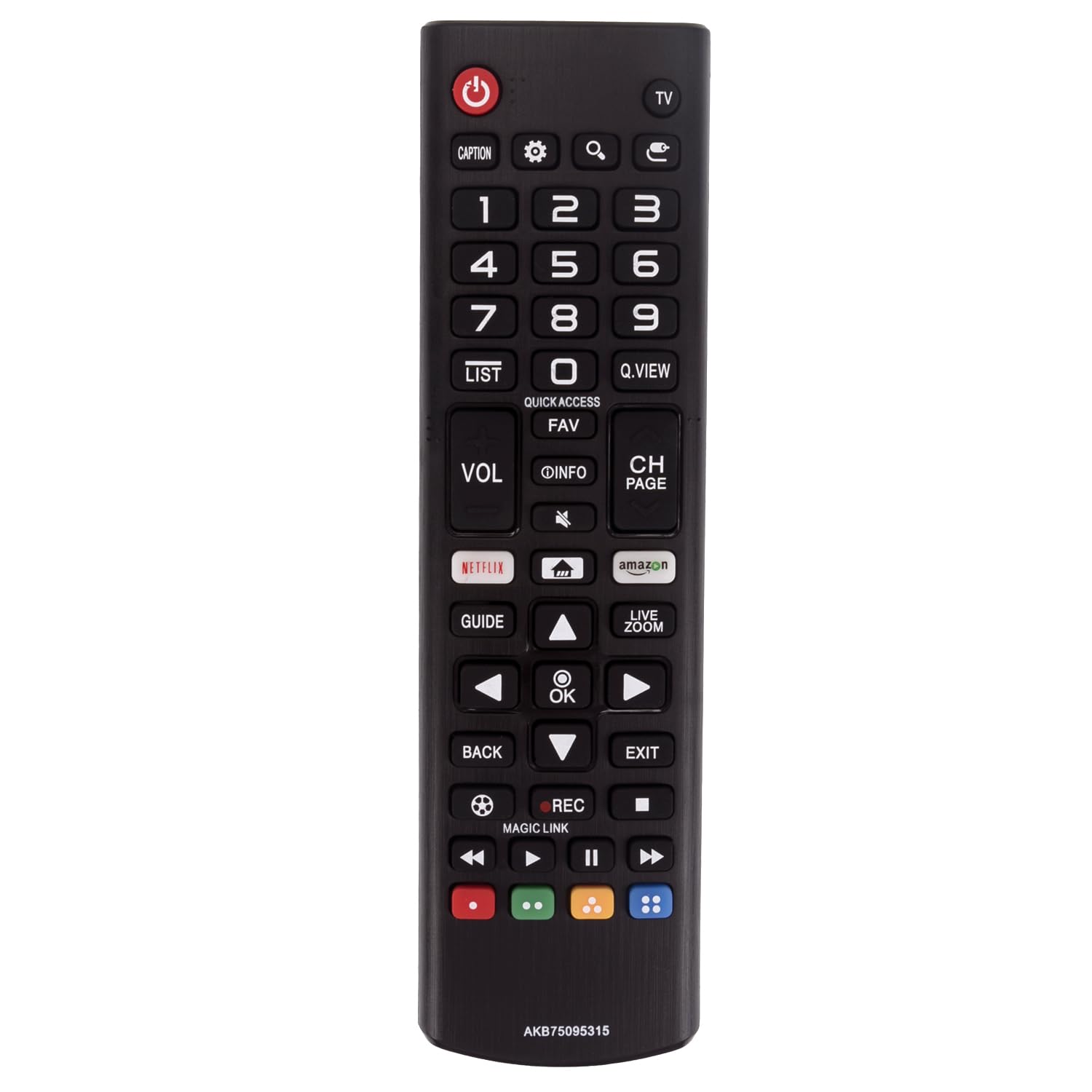
This manual provides instructions for the AULCMEET AKB75095315 replacement remote control. This remote is designed to be compatible with a wide range of LG LCD, LED, OLED, and 4K Smart TV models. It operates without requiring any prior setup, functioning directly out of the package.
2. സജ്ജീകരണം
2.1 ബാറ്ററി ഇൻസ്റ്റാളേഷൻ
The remote control requires two AAA batteries (not included) for operation. No programming or pairing is necessary; simply insert the batteries, and the remote is ready to use.
- റിമോട്ട് കൺട്രോളിൻ്റെ പിൻഭാഗത്ത് ബാറ്ററി കമ്പാർട്ട്മെൻ്റ് കവർ കണ്ടെത്തുക.
- ടാബിൽ താഴേക്ക് അമർത്തി കവർ നീക്കുക.
- കമ്പാർട്ടുമെന്റിനുള്ളിലെ അടയാളപ്പെടുത്തലുകളുമായി പോസിറ്റീവ് (+), നെഗറ്റീവ് (-) ടെർമിനലുകൾ ശരിയായി വിന്യസിക്കുന്നുണ്ടെന്ന് ഉറപ്പാക്കിക്കൊണ്ട് രണ്ട് പുതിയ AAA ബാറ്ററികൾ ഇടുക.
- സുരക്ഷിതമായി ക്ലിക്ക് ചെയ്യുന്നതുവരെ ബാറ്ററി കമ്പാർട്ട്മെന്റ് കവർ തിരികെ സ്ഥലത്തേക്ക് സ്ലൈഡ് ചെയ്യുക.
3. പ്രവർത്തന നിർദ്ദേശങ്ങൾ
3.1 ബട്ടൺ പ്രവർത്തനങ്ങൾ
The remote control features a standard layout for intuitive operation of your LG Smart TV. Below is a description of key buttons and their functions:
- പവർ (വരയുള്ള ചുവന്ന വൃത്തം): ടിവി ഓണാക്കുകയോ ഓഫാക്കുകയോ ചെയ്യുന്നു.
- TV: Switches the input source to TV mode.
- അടിക്കുറിപ്പ്: അടച്ച അടിക്കുറിപ്പുകൾ സജീവമാക്കുന്നു അല്ലെങ്കിൽ നിർജ്ജീവമാക്കുന്നു.
- ക്രമീകരണങ്ങൾ (ഗിയർ ഐക്കൺ): Accesses the TV's settings menu.
- Search (Magnifying Glass icon): Opens the search function.
- Input (Arrow into Box icon): ഇൻപുട്ട് ഉറവിടം മാറ്റുന്നു (HDMI, AV, മുതലായവ).
- നമ്പർ ബട്ടണുകൾ (0-9): Directly selects channels or enters numerical values.
- ലിസ്റ്റ്: ചാനൽ ലിസ്റ്റ് പ്രദർശിപ്പിക്കുന്നു.
- Q.VIEW: Quickly switches between previously viewed ചാനലുകൾ.
- ദ്രുത പ്രവേശനം: Provides quick access to frequently used apps or functions.
- FAV: പ്രിയപ്പെട്ട ചാനലുകൾ ആക്സസ് ചെയ്യുന്നു.
- VOL (Volume Up/Down): Adjusts the TV's volume level.
- INFO (i icon): നിലവിലെ പ്രോഗ്രാമിനെക്കുറിച്ചുള്ള വിവരങ്ങൾ പ്രദർശിപ്പിക്കുന്നു.
- Mute (Speaker with X icon): Mutes or unmutes the TV's audio.
- CH PAGE (Channel Up/Down): ടിവി ചാനൽ മാറ്റുന്നു.
- നെറ്റ്ഫ്ലിക്സ്: നെറ്റ്ഫ്ലിക്സ് ആപ്ലിക്കേഷനിലേക്കുള്ള നേരിട്ടുള്ള ആക്സസ്.
- വീട് (വീടിന്റെ ഐക്കൺ): Returns to the TV's home screen.
- amazon (Amazon Prime Video): Direct access to the Amazon Prime Video application.
- ഗൈഡ്: ഇലക്ട്രോണിക് പ്രോഗ്രാം ഗൈഡ് പ്രദർശിപ്പിക്കുന്നു.
- നാവിഗേഷൻ അമ്പടയാളങ്ങൾ (മുകളിലേക്ക്, താഴേക്ക്, ഇടത്തേക്ക്, വലത്തേക്ക്): മെനുകളിലൂടെയും ഓപ്ഷനുകളിലൂടെയും നാവിഗേറ്റ് ചെയ്യുന്നു.
- OK: തിരഞ്ഞെടുപ്പുകൾ സ്ഥിരീകരിക്കുന്നു.
- ലൈവ് സൂം: Activates the live zoom feature.
- തിരികെ: മുമ്പത്തെ സ്ക്രീനിലേക്കോ മെനുവിലേക്കോ മടങ്ങുന്നു.
- പുറത്ത്: നിലവിലുള്ള മെനുവിൽ നിന്നോ ആപ്ലിക്കേഷനിൽ നിന്നോ പുറത്തുകടക്കുന്നു.
- REC (റെക്കോർഡ്): റെക്കോർഡിംഗ് ആരംഭിക്കുന്നു (ടിവിയും ബാഹ്യ സംഭരണവും പിന്തുണയ്ക്കുന്നുവെങ്കിൽ).
- മാജിക് ലിങ്ക്: Activates the Magic Link feature for related content.
- Media Control Buttons (Rewind, Play/Pause, Fast Forward, Stop): മീഡിയ പ്ലേബാക്ക് നിയന്ത്രിക്കുന്നു.
- നിറമുള്ള ബട്ടണുകൾ (ചുവപ്പ്, പച്ച, മഞ്ഞ, നീല): ടിവി മെനു അല്ലെങ്കിൽ ആപ്ലിക്കേഷൻ അനുസരിച്ച് പ്രവർത്തനങ്ങൾ വ്യത്യാസപ്പെടുന്നു.
4. പരിപാലനം
4.1 വൃത്തിയാക്കൽ
To maintain the remote control's performance and appearance:
- മൃദുവായതും ഉണങ്ങിയതുമായ തുണി ഉപയോഗിച്ച് റിമോട്ട് കൺട്രോൾ തുടയ്ക്കുക.
- Do not use liquid cleaners, sprays, or abrasive materials, as these can damage the remote.
4.2 ബാറ്ററി മാറ്റിസ്ഥാപിക്കൽ
Replace batteries when the remote control becomes unresponsive or its range decreases. Always replace both batteries at the same time with new ones of the same type (AAA). Dispose of used batteries responsibly according to local regulations.
5. പ്രശ്നപരിഹാരം
5.1 പൊതുവായ പ്രശ്നങ്ങളും പരിഹാരങ്ങളും
- റിമോട്ട് പ്രതികരിക്കുന്നില്ല:
- ശരിയായ പോളാരിറ്റിയോടെ ബാറ്ററികൾ ശരിയായി ചേർത്തിട്ടുണ്ടോയെന്ന് പരിശോധിക്കുക.
- പഴയ ബാറ്ററികൾ പുതിയവ ഉപയോഗിച്ച് മാറ്റിസ്ഥാപിക്കുക.
- റിമോട്ട് കൺട്രോളിനും ടിവിയുടെ ഇൻഫ്രാറെഡ് സെൻസറിനും ഇടയിൽ തടസ്സങ്ങളൊന്നുമില്ലെന്ന് ഉറപ്പാക്കുക.
- ടിവിയുടെ സെൻസറിലേക്ക് റിമോട്ട് നേരിട്ട് ചൂണ്ടുക.
- ബട്ടണുകൾ പ്രതികരിക്കുന്നില്ല:
- Clean the remote control, especially around the buttons, to remove any dirt or debris.
- If only specific buttons are not working, the remote may be damaged and require replacement.
- പരിമിതമായ ശ്രേണി:
- ബാറ്ററികൾ മാറ്റിസ്ഥാപിക്കുക.
- ടിവിയുടെ IR സെൻസറിനെ ശക്തമായ പ്രകാശ സ്രോതസ്സുകൾ (നേരിട്ടുള്ള സൂര്യപ്രകാശം പോലുള്ളവ) തടസ്സപ്പെടുത്തുന്നില്ലെന്ന് ഉറപ്പാക്കുക.
6 സ്പെസിഫിക്കേഷനുകൾ
6.1 ഉൽപ്പന്ന വിശദാംശങ്ങൾ
| ഫീച്ചർ | വിശദാംശങ്ങൾ |
|---|---|
| ബ്രാൻഡ് | ഓൾക്മീറ്റ് |
| മോഡൽ നമ്പർ | എകെബി75095315 |
| അനുയോജ്യമായ ഉപകരണങ്ങൾ | LG LCD LED OLED 4K Smart TVs |
| ഉൽപ്പന്ന അളവുകൾ | 6 x 2 x 0.5 ഇഞ്ച് (15.24 x 5.08 x 1.27 സെ.മീ) |
| ഇനത്തിൻ്റെ ഭാരം | 1.9 ഔൺസ് (53.86 ഗ്രാം) |
| നിറം | കറുപ്പ് |
| പ്രത്യേക ഫീച്ചർ | എർഗണോമിക് ഡിസൈൻ |
| പിന്തുണയ്ക്കുന്ന ഉപകരണങ്ങളുടെ പരമാവധി എണ്ണം | 1 (ടെലിവിഷൻ) |
7. വാറൻ്റി വിവരങ്ങൾ
Specific warranty details for this replacement remote control may vary. Please refer to the product listing or contact the seller directly for information regarding warranty coverage and terms.
8. പിന്തുണ
For further assistance or inquiries regarding your AULCMEET replacement remote control, please contact the seller or manufacturer through the platform where the product was purchased. Provide your order details and a clear description of the issue for efficient support.