1. ആമുഖം
This manual provides instructions for the installation, operation, and maintenance of your Tapo C403 BatteryCam 1080P Wireless Outdoor Security Camera. Please read this manual thoroughly before using the device to ensure proper functionality and safety.
2. ബോക്സിൽ എന്താണുള്ളത്?
പാക്കേജിൽ എല്ലാ ഘടകങ്ങളും ഉണ്ടെന്ന് ഉറപ്പാക്കുക:
- ടാപ്പോ സി403 ക്യാമറ × 1
- ക്യാമറ ബ്രാക്കറ്റ് × 1
- യുഎസ്ബി അഡാപ്റ്റർ × 1
- USB അഡാപ്റ്റർ കേബിൾ × 1
- Screws and Anchors × 3
- മൗണ്ടിംഗ് ടെംപ്ലേറ്റ് × 1
- ദ്രുത ആരംഭ ഗൈഡ് × 1
3. ഉൽപ്പന്നം കഴിഞ്ഞുview
The Tapo C403 is a wireless, battery-powered security camera designed for both indoor and outdoor use. It features 1080P video resolution, color night vision, person detection, two-way audio, and local/cloud storage options.

ചിത്രം: മുൻഭാഗം view of the Tapo C403 camera, showing the lens, spotlights, and motion sensor.

ചിത്രം: ഒരു ഓവർview graphic highlighting key features such as flexible wire-free design, 1080p HD live view, up to 180-day battery life, color night vision, smart person detection, robust weatherproofing, local & cloud storage, and two-way audio & built-in siren.
4. സജ്ജീകരണം
4.1 പ്രാരംഭ ചാർജിംഗ്
Before first use, fully charge the camera's built-in battery. It is recommended to charge for approximately 7 hours to ensure optimal battery performance.
4.2 Tapo App Installation
- Download the Tapo app from your device's app store (available for Android and iOS).
- ഒരു Tapo അക്കൗണ്ട് സൃഷ്ടിക്കുക അല്ലെങ്കിൽ നിങ്ങൾക്ക് ഇതിനകം ഒന്ന് ഉണ്ടെങ്കിൽ ലോഗിൻ ചെയ്യുക.
- Follow the in-app instructions to add your Tapo C403 camera.
4.3 ക്യാമറ മൗണ്ടിംഗ്
The Tapo C403 offers flexible, wire-free installation for both indoor and outdoor environments. Use the provided mounting template, screws, and anchors for secure wall mounting.
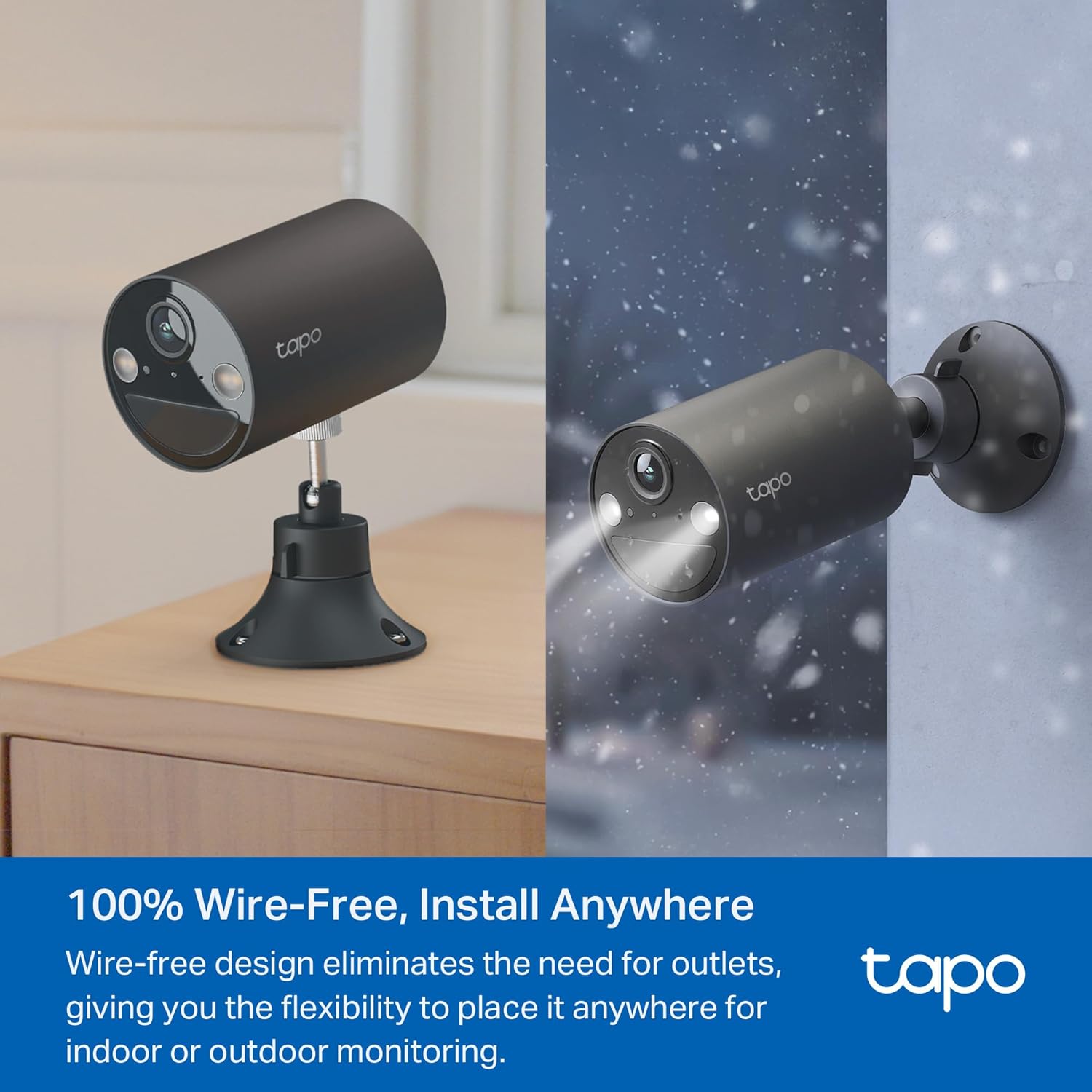
Image: The Tapo C403 camera shown mounted on a wall outdoors and placed on a table indoors, illustrating its wire-free and flexible placement options.
5. പ്രവർത്തന നിർദ്ദേശങ്ങൾ
5.1 തത്സമയം View
Access real-time video from your camera through the Tapo app. The camera provides 1080p HD live view with dynamic exposure correction for clear images day or night.

Image: A smartphone displaying the 1080p HD live view from the Tapo C403 camera, showing a person walking on a driveway.
5.2 Two-Way Audio and Alarm
Utilize the built-in microphone and speaker for two-way communication. You can interact with visitors or deter unwanted individuals. The camera also features a customizable light and sound alarm, including an integrated siren and adjustable spotlights.
Image: A delivery person standing at a door, with a speech bubble indicating interaction with the camera's two-way audio feature.
5.3 Person Detection and Activity Zones
The camera features free person detection to reduce false alerts. You can define specific activity zones within the camera's view to monitor for motion or people, minimizing irrelevant notifications.
Image: A live view from the camera showing a person detected, with a bounding box and 'Person' label overlay.
Image: A smartphone screen showing the Tapo app interface with a customizable activity zone defined over a lawn area.
5.4 കളർ നൈറ്റ് വിഷൻ
The large aperture lens and built-in spotlights enable the camera to capture detailed and vivid color night vision up to 30 feet (9 meters) in complete darkness.

Image: A split image comparing the camera's color night vision (left) with traditional IR night vision (right), showing the enhanced detail and color in the color night vision view.
5.5 സംഭരണ ഓപ്ഷനുകൾ
റെക്കോർഡ് ചെയ്ത footage can be stored locally on a microSD card (up to 512GB, purchased separately) or via the Tapo Care cloud service subscription.

Image: The Tapo C403 camera with a microSD card being inserted, alongside a graphic illustrating local storage capacity and cloud storage options.
5.6 സ്മാർട്ട് ഹോം ഇന്റഗ്രേഷൻ
The Tapo C403 is compatible with Amazon Alexa and Google Assistant, allowing for voice control and integration into your smart home ecosystem.
Image: A person interacting with an Amazon Echo Show device, displaying the live feed from the Tapo C403 camera, demonstrating Alexa integration.
6. പരിപാലനം
6.1 ബാറ്ററി ലൈഫ്
The built-in rechargeable battery provides up to 180 days of performance on a single charge under typical usage conditions (based on Tapo laboratory tests with 250s of use per day). Actual battery life may vary.

ചിത്രം: പൊട്ടിത്തെറിച്ച ഒരു view diagram of the Tapo C403 camera highlighting its internal battery, with a large '180 Days' text indicating battery life.
6.2 വെതർപ്രൂഫിംഗ്
The camera is designed with robust weatherproofing for outdoor use. Ensure all covers and seals are properly secured during installation to maintain its weather-resistant properties.
Image: The Tapo C403 camera mounted outdoors on a wall during rainfall, illustrating its weatherproof design.
6.3 വൃത്തിയാക്കൽ
To clean the camera, gently wipe the lens and exterior with a soft, damp തുണി. ഉപകരണത്തിന് കേടുവരുത്തുന്ന കഠിനമായ രാസവസ്തുക്കളോ ഉരച്ചിലുകളുള്ള വസ്തുക്കളോ ഉപയോഗിക്കുന്നത് ഒഴിവാക്കുക.
7. പ്രശ്നപരിഹാരം
7.1 കണക്റ്റിവിറ്റി പ്രശ്നങ്ങൾ
- Ensure your Wi-Fi network is active and within range of the camera.
- If the camera is far from your router, consider using a Wi-Fi extender.
- Even with low Wi-Fi signal strength, the camera is designed to maintain connection and recording capabilities.
7.2 തെറ്റായ മുന്നറിയിപ്പുകൾ
- Adjust the motion detection sensitivity in the Tapo app.
- Utilize activity zones to exclude areas where unwanted motion (e.g., pets, passing vehicles) might trigger alerts.
- Ensure the person detection feature is enabled to filter out non-human motion.
7.3 Image Fogging
If the camera lens fogs up, ensure the camera is properly sealed and mounted according to instructions. If the issue persists, contact Tapo support for assistance.
8 സ്പെസിഫിക്കേഷനുകൾ
| ഫീച്ചർ | വിശദാംശങ്ങൾ |
|---|---|
| ഇൻഡോർ/ഔട്ട്ഡോർ ഉപയോഗം | ഇൻഡോർ, ഔട്ട്ഡോർ |
| അനുയോജ്യമായ ഉപകരണങ്ങൾ | സ്മാർട്ട്ഫോൺ, ടാബ്ലെറ്റ് |
| പവർ ഉറവിടം | ബാറ്ററി പവർ |
| കണക്റ്റിവിറ്റി പ്രോട്ടോക്കോൾ | വൈഫൈ |
| കൺട്രോളർ തരം | ആമസോൺ അലക്സ, ആൻഡ്രോയിഡ്, ഗൂഗിൾ അസിസ്റ്റന്റ് |
| മൗണ്ടിംഗ് തരം | മതിൽ മൗണ്ട് |
| വീഡിയോ ക്യാപ്ചർ റെസല്യൂഷൻ | 1080p |
| നിറം | കറുപ്പ് |
| ഇനത്തിന്റെ അളവുകൾ (L x W x H) | 3.5 x 2.36 x 2.36 ഇഞ്ച് |
| ഇനത്തിൻ്റെ ഭാരം | 15.8 ഔൺസ് |
| ബാറ്ററികൾ | 2 ലിഥിയം അയോൺ ബാറ്ററികൾ ആവശ്യമാണ് (ഉൾപ്പെടുത്തിയിരിക്കുന്നു) |
| വീഡിയോ ക്യാപ്ചർ ഫോർമാറ്റ് | MP4 |
| പ്രത്യേക സവിശേഷതകൾ | 2-Way Audio, Built-In Light, Local Recording, Motion Sensor, Night Vision |
| യു.പി.സി | 810142822299 |
9. വാറൻ്റി വിവരങ്ങൾ
For detailed warranty information, please refer to the official Tapo website or the warranty card included with your product packaging. Warranty terms and conditions may vary by region.
10. പിന്തുണ
If you encounter any issues or have questions regarding your Tapo C403 camera, please contact Tapo support:
- ഫോൺ: (866) 225-8139
- Webസൈറ്റ്: myproducts.tp-link.com/us (www.myproducts.tp-link.com) എന്ന വിലാസത്തിൽ നിന്നും നിങ്ങൾക്ക് ഏറ്റവും പുതിയ വിവരങ്ങൾ ലഭിക്കും.
- ഇമെയിൽ: support.USA@tp-link.com
You can also visit the official Tapo Store for more product information and accessories: Tapo Store on Amazon


