1. ഉൽപ്പന്നം കഴിഞ്ഞുview
The aigo TK03 True Wireless Earbuds offer a seamless audio experience with Bluetooth 5.4 connectivity, touch controls, and a water-resistant design. This manual provides essential information for optimal use and care of your device.

Image: aigo TK03 True Wireless Earbuds and their transparent charging case.
2. പാക്കേജ് ഉള്ളടക്കം
നിങ്ങളുടെ ഉൽപ്പന്ന പാക്കേജിൽ എല്ലാ ഇനങ്ങളും ഉണ്ടെന്ന് ഉറപ്പാക്കുക:
- aigo TK03 Earbuds & Charging Case
- യുഎസ്ബി ചാർജിംഗ് കേബിൾ
- നെക്ക് ലാനിയാർഡ്
- ഉപയോക്തൃ മാനുവൽ
- ഗിഫ്റ്റ് ബോക്സ്

Image: Illustration of the items included in the aigo TK03 product package.
3. സജ്ജീകരണവും ജോടിയാക്കലും
3.1 പ്രാരംഭ ചാർജിംഗ്
Before first use, fully charge the earbuds and charging case. Connect the provided USB charging cable to the charging case and a power source. The charging indicator will provide status.
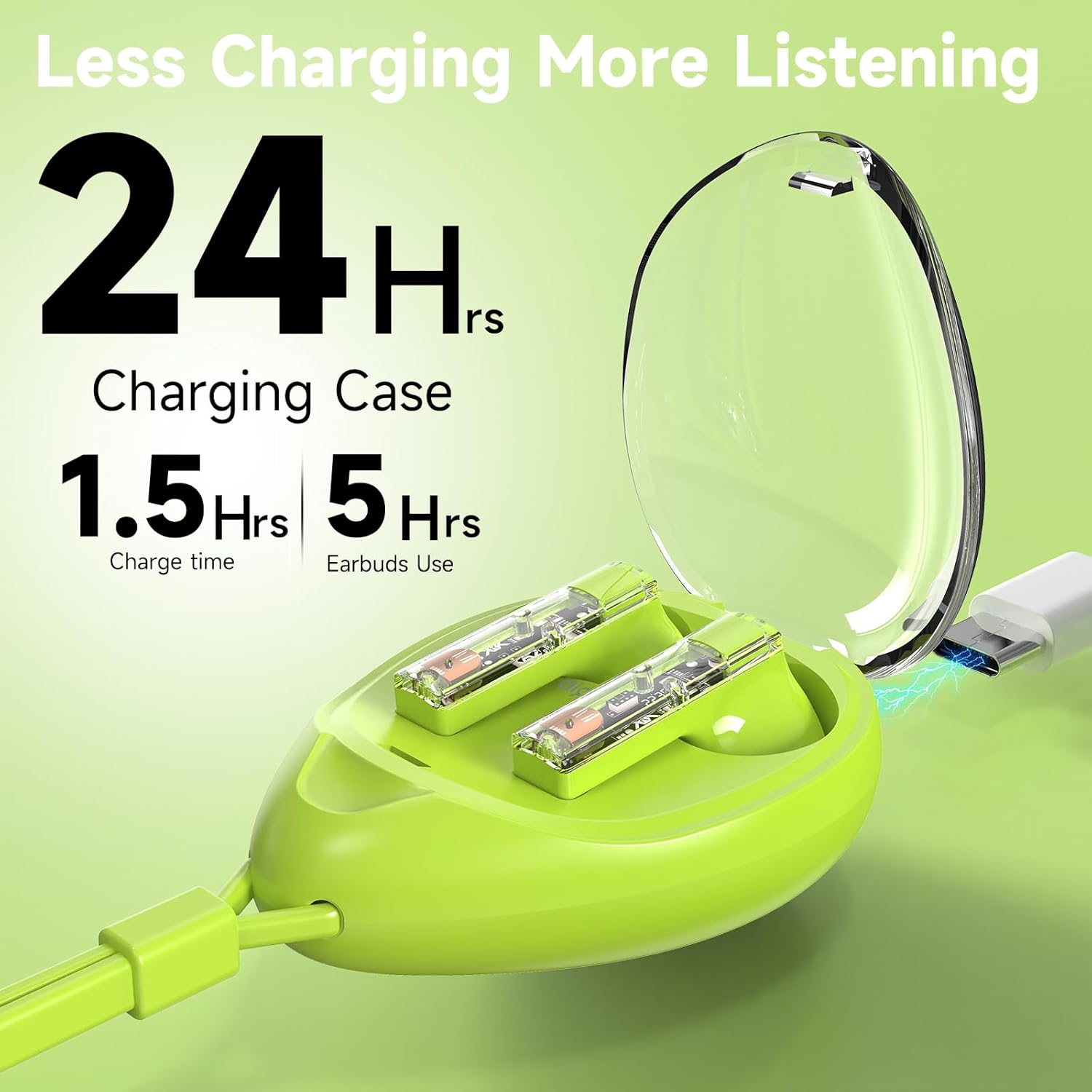
Image: The aigo TK03 charging case being charged via a USB-C cable.
3.2 ബ്ലൂടൂത്ത് ജോടിയാക്കൽ
- ഇയർബഡുകൾ ചാർജ്ജ് ചെയ്തിട്ടുണ്ടെന്ന് ഉറപ്പാക്കുക.
- ചാർജിംഗ് കേസ് തുറക്കുക. ഇയർബഡുകൾ സ്വയമേവ ഓണാകുകയും ജോടിയാക്കൽ മോഡിലേക്ക് പ്രവേശിക്കുകയും ചെയ്യും.
- നിങ്ങളുടെ ഉപകരണത്തിൽ (സ്മാർട്ട്ഫോൺ, ടാബ്ലെറ്റ്, ലാപ്ടോപ്പ്), ബ്ലൂടൂത്ത് ക്രമീകരണങ്ങളിലേക്ക് നാവിഗേറ്റ് ചെയ്യുക.
- Select "aigo TK03" from the list of available devices to connect.
- കണക്റ്റ് ചെയ്തുകഴിഞ്ഞാൽ, ഒരു സ്ഥിരീകരണ ശബ്ദം പ്ലേ ചെയ്യും, ഇയർബഡുകൾ ഉപയോഗത്തിന് തയ്യാറാണ്.
The earbuds feature one-step auto-pairing and wide compatibility with iOS, Android, and Windows devices.

Image: A smartphone displaying Bluetooth pairing options, with 'aigo TK03' highlighted.
4. പ്രവർത്തന നിർദ്ദേശങ്ങൾ
4.1 ടച്ച് നിയന്ത്രണങ്ങൾ
The aigo TK03 earbuds feature intuitive touch controls for managing audio playback and calls:
- പ്ലേ/താൽക്കാലികമായി നിർത്തുക: ഇയർബഡുകളിൽ ഏതെങ്കിലുമൊന്നിൽ ഒറ്റ ടാപ്പ് ചെയ്യുക.
- ഉത്തരം/അവസാന കോൾ: ഇയർബഡുകളിൽ ഏതെങ്കിലുമൊന്നിൽ ഒറ്റ ടാപ്പ് ചെയ്യുക.
- അടുത്ത ട്രാക്ക്: വലതുവശത്തെ ഇയർബഡിൽ രണ്ടുതവണ ടാപ്പ് ചെയ്യുക.
- മുമ്പത്തെ ട്രാക്ക്: ഇടതുവശത്തെ ഇയർബഡിൽ മൂന്ന് തവണ ടാപ്പ് ചെയ്യുക.
- കോൾ നിരസിക്കുക: ഏതെങ്കിലും ഇയർബഡിൽ രണ്ടുതവണ ടാപ്പ് ചെയ്യുക.
- വോയ്സ് അസിസ്റ്റന്റ് (സിരി/ഗൂഗിൾ അസിസ്റ്റന്റ്): Long press (2 seconds) on either earbud.
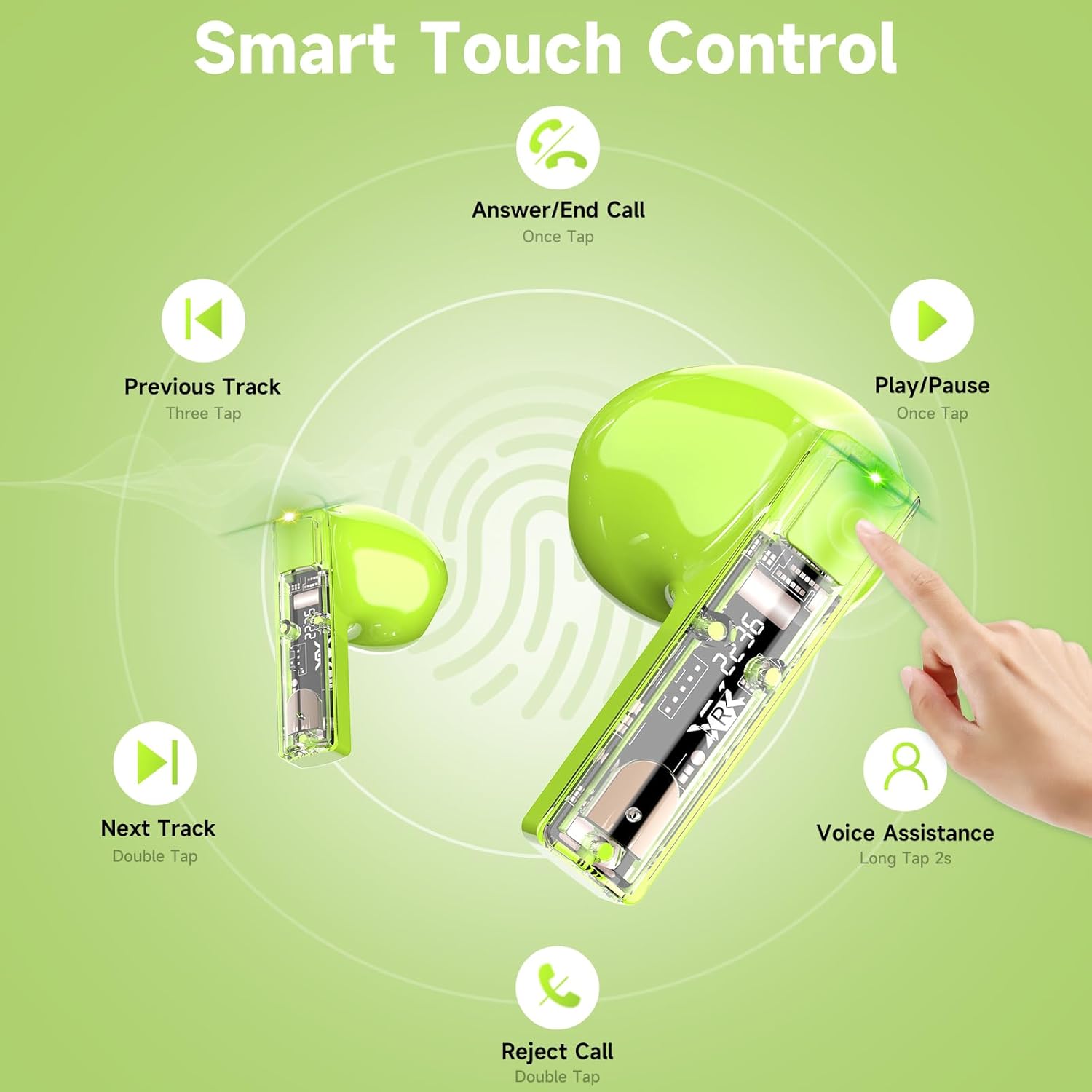
Image: Visual guide to the touch control gestures for the aigo TK03 earbuds.
4.2 ഓഡിയോ നിലവാരവും കോളുകളും
The earbuds deliver Hi-Fi stereo sound through 13mm dynamic drivers. Equipped with two built-in microphones and noise reduction technology, they are designed to provide clear call quality.

Image: Depiction of the earbud's internal components highlighting Bluetooth 5.4 and call clarity features.
4.3 ഇയർബഡുകൾ ധരിക്കൽ
The aigo TK03 earbuds feature a shorter stem design for a comfortable in-ear fit. Ensure they are securely placed in your ears for optimal sound and stability.

Image: A user wearing the aigo TK03 earbuds, showcasing their ergonomic design and comfortable fit.
5. പരിപാലനവും പരിചരണവും
5.1 ജല പ്രതിരോധം
The aigo TK03 earbuds are IPX4 water-resistant, meaning they are protected against splashing water from any direction. This makes them suitable for workouts and light rain. They are not designed for submersion in water.

Image: Earbuds with water droplets, demonstrating their water-resistant capabilities.
5.2 വൃത്തിയാക്കൽ
To maintain optimal performance and hygiene, regularly clean your earbuds and charging case. Use a soft, dry, lint-free cloth. Avoid using abrasive materials or harsh chemicals. Ensure charging contacts are free of debris.
6. പ്രശ്നപരിഹാരം
If you encounter issues with your aigo TK03 earbuds, refer to the following common solutions:
- ശബ്ദ/കണക്ഷൻ പ്രശ്നങ്ങളില്ല:
- ഇയർബഡുകൾ ചാർജ് ചെയ്തിട്ടുണ്ടെന്ന് ഉറപ്പാക്കുക.
- Verify Bluetooth is enabled on your device and "aigo TK03" is selected.
- നിങ്ങളുടെ ഉപകരണവുമായി ഇയർബഡുകൾ ജോടി വിച്ഛേദിച്ച് വീണ്ടും ജോടിയാക്കാൻ ശ്രമിക്കുക.
- Move closer to your device to ensure you are within the 15-meter Bluetooth range.
- ഇയർബഡുകൾ ചാർജ് ചെയ്യുന്നില്ല:
- ചാർജിംഗ് കേബിൾ കേസിലേക്കും പവർ സ്രോതസ്സിലേക്കും സുരക്ഷിതമായി ബന്ധിപ്പിച്ചിട്ടുണ്ടോയെന്ന് പരിശോധിക്കുക.
- Ensure the charging contacts on the earbuds and inside the case are clean and free of obstructions.
- ചാർജിംഗ് കേസിന് തന്നെ മതിയായ പവർ ഉണ്ടെന്ന് ഉറപ്പാക്കുക.
- ടച്ച് നിയന്ത്രണങ്ങൾ പ്രതികരിക്കുന്നില്ല:
- ടച്ച് കൺട്രോളുകൾ ഉപയോഗിക്കുമ്പോൾ നിങ്ങളുടെ വിരലുകൾ വൃത്തിയുള്ളതും വരണ്ടതുമാണെന്ന് ഉറപ്പാക്കുക.
- ഇയർബഡുകൾ കേസിൽ സ്ഥാപിച്ച് അടച്ചുവെച്ച് വീണ്ടും തുറന്ന് പുനരാരംഭിക്കുക.
If problems persist, consult the manufacturer's support resources.
7 സ്പെസിഫിക്കേഷനുകൾ
| ഫീച്ചർ | വിശദാംശങ്ങൾ |
|---|---|
| മോഡലിൻ്റെ പേര് | TK03 |
| കണക്റ്റിവിറ്റി ടെക്നോളജി | വയർലെസ്സ് (ബ്ലൂടൂത്ത് 5.4) |
| ബ്ലൂടൂത്ത് ശ്രേണി | 15 മീറ്റർ |
| ഓഡിയോ ഡ്രൈവർ തരം | ഡൈനാമിക് ഡ്രൈവർ |
| ഓഡിയോ ഡ്രൈവർ വലിപ്പം | 13 മില്ലിമീറ്റർ |
| ഫ്രീക്വൻസി റേഞ്ച് | 20 ഹെർട്സ് - 20,000 ഹെർട്സ് |
| സംവേദനക്ഷമത | 70 ഡി.ബി |
| പ്രതിരോധം | 25 ഓം |
| ബാറ്ററി ലൈഫ് (ഇയർബഡുകൾ) | Up to 5 hours (music playback), 4 hours (call talking) |
| ആകെ പ്ലേടൈം (ചാർജിംഗ് കേസിനൊപ്പം) | 24 മണിക്കൂർ വരെ |
| ചാർജിംഗ് സമയം | 1.5 മണിക്കൂർ (കേസിന്) |
| ജല പ്രതിരോധ നില | IPX4 (വാട്ടർപ്രൂഫ്) |
| നിയന്ത്രണ തരം | ടച്ച് നിയന്ത്രണം |
| മൈക്രോഫോണുകൾ | 2 (ബിൽറ്റ്-ഇൻ) |
| ഇനത്തിൻ്റെ ഭാരം | 4.6 ഔൺസ് (ആകെ പാക്കേജ്) |
| കേസ് ഭാരം വഹിക്കുന്നു | 0.8 ഔൺസ് |
| കേസ് അളവുകൾ വഹിക്കുന്നു | 1.29" (L) x 1.84" (W) x 2.5" (H) |

Image: Product dimensions for the aigo TK03 earbuds and charging case.
8. വാറൻ്റിയും പിന്തുണയും
8.1 വാറൻ്റി വിവരങ്ങൾ
For details regarding the product warranty, please refer to the warranty card included in your package or contact the retailer/manufacturer directly. Warranty terms may vary based on region and purchase location.
8.2 ഉപഭോക്തൃ പിന്തുണ
If you require further assistance or have questions not covered in this manual, please contact aigo customer support through their official webസൈറ്റ് അല്ലെങ്കിൽ നിങ്ങൾ ഉൽപ്പന്നം വാങ്ങിയ റീട്ടെയിലർ.


