1. ആമുഖം
The MOOKA PR1 Air Purifier is designed to improve indoor air quality by effectively removing various airborne pollutants. Featuring a multi-stage filtration system, including a washable pre-filter, PM2.5 sensor, and specialized modes for pets, this device is suitable for large rooms up to 2200 sq.ft. This manual provides essential information for the safe and efficient operation and maintenance of your air purifier.

Image 1.1: The MOOKA PR1 Air Purifier, designed for home use, shown next to a dog, illustrating its effectiveness in pet-friendly environments.
2. സുരക്ഷാ നിർദ്ദേശങ്ങൾ
പരിക്കുകളോ കേടുപാടുകളോ തടയാൻ ഉപകരണം ഉപയോഗിക്കുന്നതിന് മുമ്പ് ദയവായി എല്ലാ സുരക്ഷാ നിർദ്ദേശങ്ങളും ശ്രദ്ധാപൂർവ്വം വായിക്കുക.
- നീക്കുന്നതിനോ വൃത്തിയാക്കുന്നതിനോ അറ്റകുറ്റപ്പണികൾ നടത്തുന്നതിനോ മുമ്പ് എല്ലായ്പ്പോഴും എയർ പ്യൂരിഫയർ അൺപ്ലഗ് ചെയ്യുക.
- Do not operate the appliance with a damaged cord or plug. If the cord or plug is damaged, contact customer support.
- Keep the air purifier away from water or other liquids. Do not use in wet environments such as bathrooms.
- Ensure the air inlet and outlet are not blocked. Maintain at least 15 cm (6 inches) clearance from walls and furniture.
- എയർ ഇൻലെറ്റുകളിലേക്കോ ഔട്ട്ലെറ്റുകളിലേക്കോ വിരലുകളോ വിദേശ വസ്തുക്കളോ തിരുകരുത്.
- ശാരീരികമോ ഇന്ദ്രിയപരമോ മാനസികമോ ആയ കഴിവുകൾ കുറവുള്ള വ്യക്തികൾ (കുട്ടികൾ ഉൾപ്പെടെ) അല്ലെങ്കിൽ അവരുടെ സുരക്ഷയ്ക്ക് ഉത്തരവാദിയായ ഒരു വ്യക്തി ഉപകരണത്തിൻ്റെ ഉപയോഗത്തെ സംബന്ധിച്ച മേൽനോട്ടമോ നിർദ്ദേശമോ നൽകിയിട്ടില്ലെങ്കിൽ, ഈ ഉപകരണം ഉപയോഗിക്കാൻ ഉദ്ദേശിച്ചുള്ളതല്ല. .
- Use only MOOKA official replacement filters.
3. ഉൽപ്പന്ന ഘടകങ്ങൾ
The MOOKA PR1 Air Purifier consists of the main unit, a multi-layer filter, and a control panel.
- പ്രധാന യൂണിറ്റ്: Houses the fan, motor, and air quality sensor.
- നിയന്ത്രണ പാനൽ: Located on the top of the unit, with touch-sensitive buttons and a digital display.
- Filter Compartment: Located at the back/bottom for filter installation and replacement.

Image 3.1: An internal diagram of the air purifier, highlighting the high CADR, quiet operation, and extra-large fan for efficient air circulation.
4. സജ്ജീകരണം
4.1 അൺപാക്കിംഗ്
- എയർ പ്യൂരിഫയർ അതിന്റെ പാക്കേജിംഗിൽ നിന്ന് ശ്രദ്ധാപൂർവ്വം നീക്കം ചെയ്യുക.
- Remove all plastic wrapping from the unit and the filter.
4.2 ഫിൽട്ടർ ഇൻസ്റ്റാളേഷൻ
The filter comes pre-installed but is wrapped in plastic for protection during shipping. This plastic must be removed before first use.
- Turn the air purifier upside down or open the back cover (depending on model design).
- Twist the filter cover counter-clockwise to unlock and remove it.
- Take out the filter and remove the plastic bag.
- Place the filter back into the unit, ensuring it is seated correctly.
- Replace the filter cover and twist clockwise to lock it securely.
4.3 പ്ലേസ്മെൻ്റ്
For optimal performance, place the air purifier on a flat, stable surface in the room where purification is desired. Ensure there is adequate space around the unit for proper airflow.
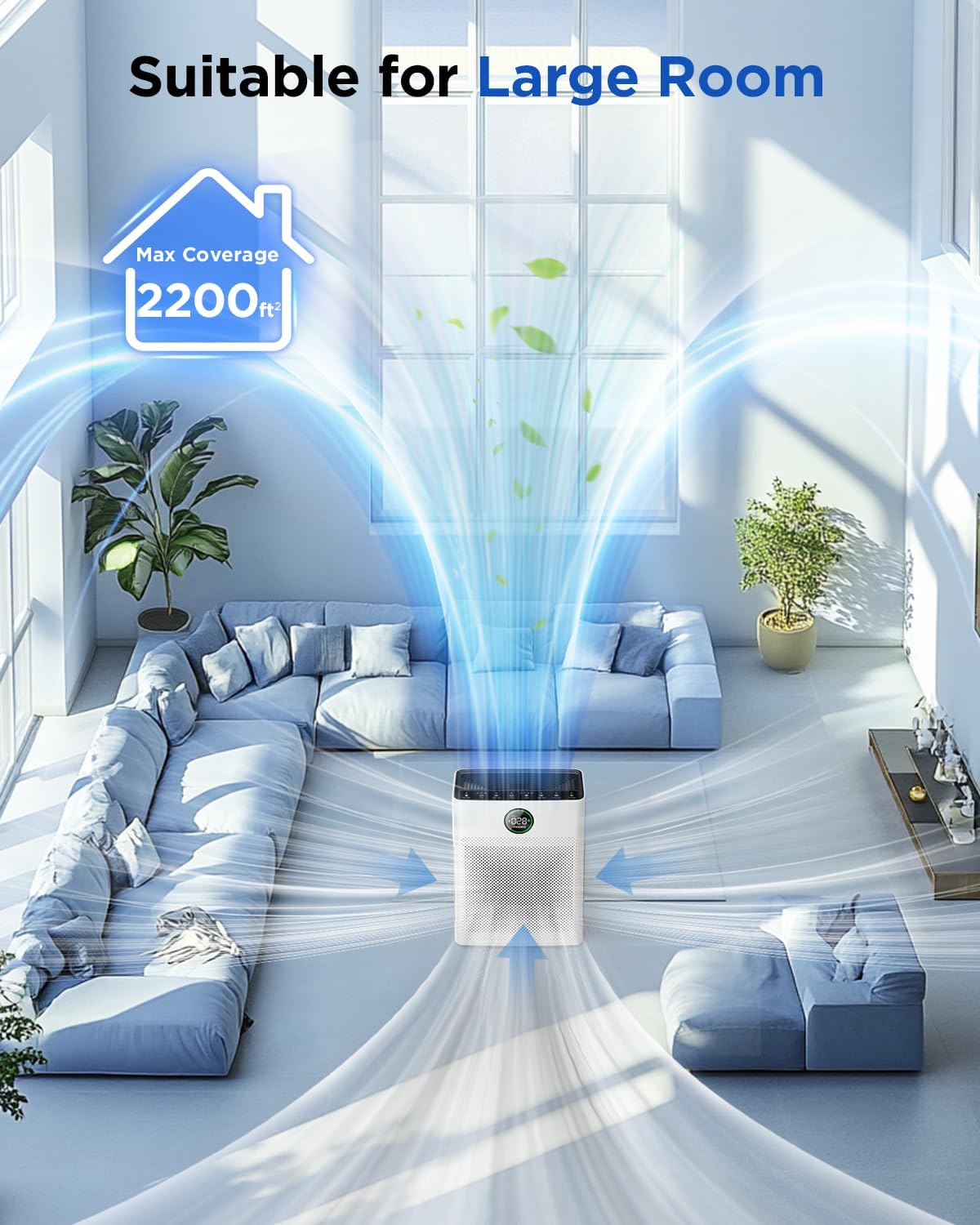
Image 4.1: The MOOKA PR1 Air Purifier positioned in a spacious living area, demonstrating its capability to purify air in large rooms up to 2200 sq.ft.
5. പ്രവർത്തന നിർദ്ദേശങ്ങൾ
നിയന്ത്രണ പാനലും അതിന്റെ പ്രവർത്തനങ്ങളും സ്വയം പരിചയപ്പെടുത്തുക.
5.1 പവർ ഓൺ/ഓഫ്
- അനുയോജ്യമായ ഒരു ഇലക്ട്രിക്കൽ ഔട്ട്ലെറ്റിലേക്ക് പവർ കോർഡ് പ്ലഗ് ചെയ്യുക.
- അമർത്തുക ശക്തി യൂണിറ്റ് ഓണാക്കാനോ ഓഫാക്കാനോ ഉള്ള ബട്ടൺ.
5.2 ഫാൻ സ്പീഡ് മോഡുകൾ
The air purifier offers 6 adjustable fan speed modes:
- സ്ലീപ്പ് മോഡ്: Operates at the lowest fan speed (26dB) for quiet operation during rest.
- I, II, III: Manual fan speed settings from low to high.
- യാന്ത്രിക മോഡ്: The fan speed automatically adjusts based on the detected air quality.
- പെറ്റ് മോഡ്: Increases purification effect to capture pet hair and odors faster.
അമർത്തുക വേഗത ലഭ്യമായ മോഡുകളിലൂടെ സൈക്കിൾ ചെയ്യാൻ ബട്ടൺ.

Image 5.1: The MOOKA PR1 Air Purifier with a dog, emphasizing the 'Pet Mode' feature on the control panel, designed for pet owners.
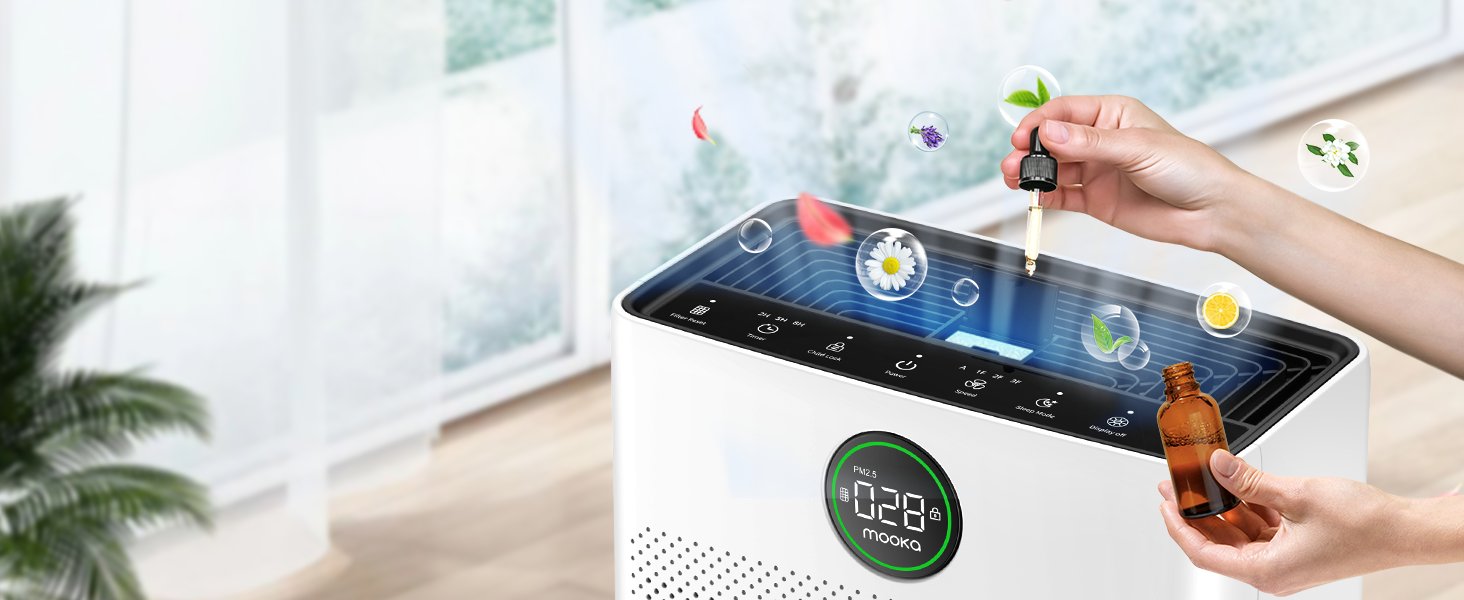
Image 5.2: The air purifier operating quietly in a bedroom at 26dB, indicating its suitability for undisturbed sleep.
5.3 Air Quality Display
The PR1 is equipped with a PM2.5 sensor that displays real-time air quality levels on the screen. The indicator light changes color to reflect air quality:
- പച്ച: Good air quality (0-75 PM2.5)
- ഓറഞ്ച്: മിതമായ വായു നിലവാരം (76-150 PM2.5)
- ചുവപ്പ്: Poor air quality (>150 PM2.5)
Upon powering on, the air purifier enters a preheating state, and the indicator light will flash for approximately one minute before displaying the current air quality.

Image 5.3: The air quality sensor display on the MOOKA PR1, showing PM2.5 levels and their corresponding color-coded air quality ratings.
5.4 ടൈമർ പ്രവർത്തനം
The timer allows you to set the air purifier to operate for a specific duration before automatically turning off.
- അമർത്തുക ടൈമർ button to select desired operating hours (e.g., 2H, 5H, 8H).
5.5 ചൈൽഡ് ലോക്ക്
The Child Lock feature prevents accidental changes to settings.
- അമർത്തിപ്പിടിക്കുക ചൈൽഡ് ലോക്ക് button for 3 seconds to activate or deactivate.
5.6 Aroma Function
The air purifier includes an aroma function to diffuse essential oils.
- Locate the aroma pad compartment.
- Add a few drops of essential oil to the aroma pad. For first-time use, moisten the pad with more essential oil.
- കമ്പാർട്ട്മെന്റ് അടയ്ക്കുക.

Image 5.4: A user adding essential oils to the aroma diffuser compartment of the air purifier, demonstrating the aromatherapy feature.
6. പരിപാലനം
പതിവ് അറ്റകുറ്റപ്പണികൾ മികച്ച പ്രകടനം ഉറപ്പാക്കുകയും നിങ്ങളുടെ എയർ പ്യൂരിഫയറിന്റെ ആയുസ്സ് വർദ്ധിപ്പിക്കുകയും ചെയ്യുന്നു.
6.1 Washable Pre-Filter Cleaning
The pre-filter can be cleaned to maintain efficiency.
- എയർ പ്യൂരിഫയർ അൺപ്ലഗ് ചെയ്യുക.
- Remove the pre-filter (refer to Filter Installation section).
- Rinse the pre-filter under running water to remove accumulated pet hair and dust.
- Allow the pre-filter to air dry completely in the shade before re-installing.

Image 6.1: The washable pre-filter, illustrating its ability to capture pet hair and the ease of cleaning under water.
6.2 ഫിൽട്ടർ മാറ്റിസ്ഥാപിക്കൽ
The air purifier has a filter replacement reminder function. The filter indicator light will illuminate when it's time to replace the filter.
- Recommended replacement frequency: Every 3-6 months for optimal purification.
- To reset the filter reminder: After replacing the filter, press and hold the ഫിൽട്ടർ റീസെറ്റ് 3 സെക്കൻഡിനുള്ള ബട്ടൺ.
- മാറ്റിസ്ഥാപിക്കൽ ഫിൽട്ടർ മോഡൽ: ഇതിനായി തിരയുക B0DD3ZZ7ZV.

Image 6.2: The 'Pet Owners Choice' filter, designed to effectively filter pet dander, fluff, pollen, and absorb unwanted odors.
6.3 സെൻസർ ക്ലീനിംഗ്
Regularly clean the PM2.5 sensor to maintain accurate air quality readings.
- The air quality sensor is located on the left back position of the unit.
- Gently wipe the sensor opening with a dry cotton swab or soft cloth to remove any dust accumulation.
7. പ്രശ്നപരിഹാരം
നിങ്ങൾ നേരിട്ടേക്കാവുന്ന പൊതുവായ പ്രശ്നങ്ങളെ ഈ വിഭാഗം അഭിസംബോധന ചെയ്യുന്നു.
7.1 Why does the screen show 005 air quality?
If the screen consistently displays '005' or an unexpectedly low reading, consider the following:
- സെൻസർ സ്ഥാനം: The air quality sensor is located on the left back position of the unit. Ensure this area is not obstructed.
- സെൻസർ ശുചിത്വം: Dust accumulation on the sensor can affect its accuracy. Refer to Section 6.3 for sensor cleaning instructions.
- മുൻകൂട്ടി ചൂടാക്കൽ: After powering on, the air purifier is in a preheating state for about one minute, during which the indicator light flashes. Wait for this process to complete for accurate readings.
- പാരിസ്ഥിതിക ഘടകങ്ങൾ: In very clean environments, a low reading is normal.
7.2 യൂണിറ്റ് ഓണാക്കുന്നില്ല
- Check if the power cord is securely plugged into both the unit and the electrical outlet.
- മറ്റൊരു ഉപകരണം ഉപയോഗിച്ച് പരിശോധിച്ച് ഇലക്ട്രിക്കൽ ഔട്ട്ലെറ്റ് പ്രവർത്തിക്കുന്നുണ്ടെന്ന് ഉറപ്പാക്കുക.
7.3 Poor Air Purification
- Check if the filter's plastic packaging has been removed.
- Ensure the filter is correctly installed and not clogged. Replace if necessary (refer to Section 6.2).
- Verify that the air inlet and outlet are not obstructed.
- Select an appropriate fan speed or Auto/Pet mode for the room size and air quality.
8 സ്പെസിഫിക്കേഷനുകൾ
| ഫീച്ചർ | സ്പെസിഫിക്കേഷൻ |
|---|---|
| മോഡൽ നമ്പർ | PR1 |
| ഉൽപ്പന്ന അളവുകൾ | 12.3"D x 6.4"W x 16.3"H |
| ഭാരം | 8.93 പൗണ്ട് |
| ഫ്ലോർ ഏരിയ കവറേജ് | 2200 ചതുരശ്ര അടി വരെ |
| ശബ്ദ നില (സ്ലീപ്പ് മോഡ്) | 26 ഡി.ബി |
| നിറം | വെള്ള |
| സർട്ടിഫിക്കേഷനുകൾ | CARB, ETL, DOE, FCC |
| Ozone Release | ഇല്ല |
| യുവി ലൈറ്റ് | ഇല്ല |
9. വാറൻ്റിയും പിന്തുണയും
MOOKA products are designed for long-term use and safety. This product is backed by authoritative certifications.
- For any questions or concerns regarding your MOOKA PR1 Air Purifier, please contact MOOKA customer support.
- Refer to your purchase documentation for specific warranty details.


