ആമുഖം
Thank you for choosing the Mediashop Kendox Life Tracker Smartwatch. This manual provides essential information for setting up, operating, and maintaining your device. Please read it carefully to ensure optimal performance and longevity of your smartwatch.

Image: The Kendox Life Tracker Smartwatch, featuring a sleek black design with a digital display showing time, date, battery, steps, and vital signs like temperature.
പാക്കേജ് ഉള്ളടക്കം
നിങ്ങളുടെ പാക്കേജിൽ എല്ലാ ഇനങ്ങളും ഉണ്ടെന്ന് ഉറപ്പാക്കുക:
- 1x Kendox Life Tracker Health Watch
- 1x ചാർജിംഗ് കേബിൾ
സജ്ജീകരണ ഗൈഡ്
1 ഉപകരണം ചാർജ് ചെയ്യുന്നു
Before first use, fully charge your Kendox Life Tracker. Connect the provided charging cable to the charging port on the back of the smartwatch and plug the other end into a USB power source (e.g., computer, wall adapter).

ചിത്രം: ഒരു ക്ലോസ്-അപ്പ് view of the charging cable connected to the charging port of the Kendox Life Tracker Smartwatch.
2. ആപ്പ് ഇൻസ്റ്റാളേഷനും ജോടിയാക്കലും
To unlock the full potential of your smartwatch, download the companion app on your smartphone. The Kendox Life Tracker is compatible with both iOS and Android devices.
- ഇതിനായി തിരയുക the official "Kendox Life Tracker" app in the Apple App Store (for iOS) or Google Play Store (for Android).
- ആപ്പ് ഇൻസ്റ്റാൾ ചെയ്ത് തുറക്കുക.
- Follow the on-screen instructions within the app to pair your smartwatch via Bluetooth. Ensure Bluetooth is enabled on your smartphone.

Image: Logos for Android and iPhone, indicating compatibility with both operating systems.
പ്രവർത്തന നിർദ്ദേശങ്ങൾ
ഇൻ്റർഫേസ് നാവിഗേറ്റ് ചെയ്യുന്നു
The Kendox Life Tracker features a 4.3 cm High-Definition display. Swipe left/right or up/down to navigate through different screens and menus. Tap to select an option.
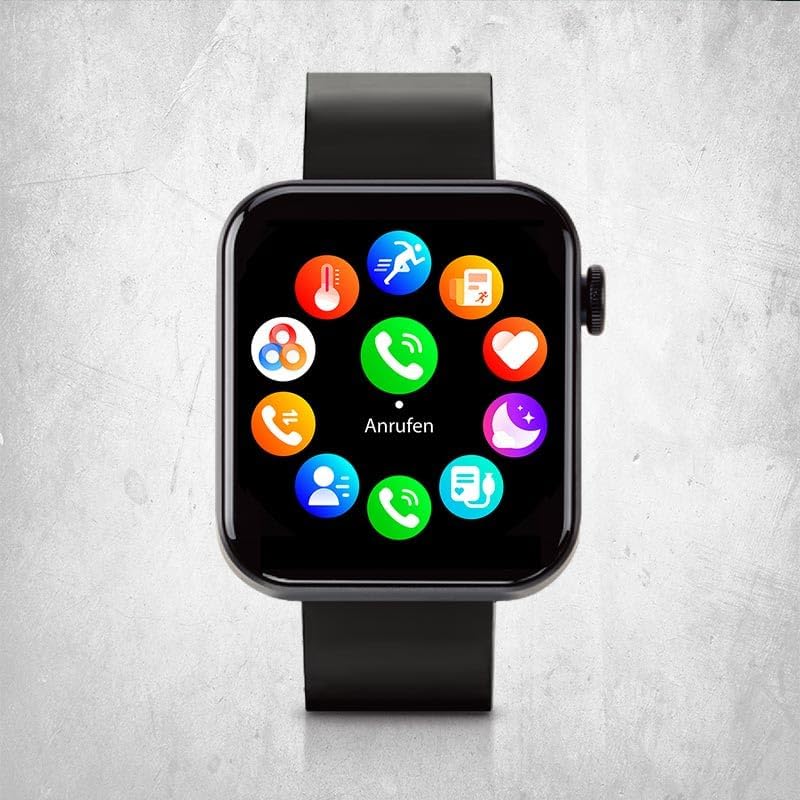
Image: The smartwatch display showing a circular menu of various app icons, including calls, messages, and health tracking.
പ്രധാന സവിശേഷതകളും പ്രവർത്തനങ്ങളും
24/7 Vital Value Display
Continuously monitor your body temperature, heart rate, blood pressure, and blood oxygen levels. Access these readings directly on your watch or through the app for detailed historical data.

Image: A close-up of the smartwatch on a wrist, showing a heart icon and a heart rate reading of 91 BPM.
Intelligent Sport Modes
Choose from 18 different sport modes to track your fitness activities. The watch records steps, distance, calorie consumption, mileage, and training duration for comprehensive fitness tracking.

Image: The smartwatch on a person's wrist, displaying a timer during a workout, indicating active sport mode tracking.
Smart Functions (Calls & Messages)
Make and receive calls and messages directly from your watch when connected to your smartphone. Enjoy other versatile functions like weather information, flashlight, alarm clock, and reminders.

Image: A close-up of the smartwatch on a wrist, showing a numeric keypad for dialing a phone number.
Real-time Sleep Analysis
Optimize your sleep habits with real-time monitoring of sleep phases and patterns. The Kendox Life Tracker helps ensure restful sleep and improved well-being by providing insights into your sleep quality.
മെയിൻ്റനൻസ്
നിങ്ങളുടെ സ്മാർട്ട് വാച്ച് വൃത്തിയാക്കുന്നു
Regular cleaning helps maintain the appearance and functionality of your device.
- മൃദുവായ, ലിന്റ് രഹിത തുണി ഉപയോഗിച്ച് സ്ക്രീനും ബോഡിയും തുടയ്ക്കുക.
- മുരടിച്ച പാടുകൾക്ക്, ചെറുതായി ഡിampതുണിയിൽ വെള്ളം ഒഴിക്കുക. കഠിനമായ രാസവസ്തുക്കളോ ഉരച്ചിലുകളോ ഉള്ള വസ്തുക്കൾ ഉപയോഗിക്കുന്നത് ഒഴിവാക്കുക.
- ചാർജ് ചെയ്യുന്നതിനുമുമ്പ് ചാർജിംഗ് കോൺടാക്റ്റുകൾ വൃത്തിയുള്ളതും വരണ്ടതുമാണെന്ന് ഉറപ്പാക്കുക.
ജല പ്രതിരോധം
The Kendox Life Tracker is sweat-resistant and waterproof. However, it is not recommended for diving or high-pressure water activities. Always dry the watch thoroughly after exposure to water.
ട്രബിൾഷൂട്ടിംഗ്
| പ്രശ്നം | സാധ്യമായ കാരണം | പരിഹാരം |
|---|---|---|
| വാച്ച് ഓണാകുന്നില്ല. | ബാറ്ററി കുറവാണ്; ഉപകരണം ഫ്രീസുചെയ്തു. | Charge the watch for at least 30 minutes. If still unresponsive, perform a soft reset by pressing and holding the side button for 10-15 seconds. |
| സ്മാർട്ട്ഫോണുമായി ജോടിയാക്കാൻ കഴിയില്ല | Bluetooth off; watch not in pairing mode; app issues. | Ensure Bluetooth is enabled on your phone. Restart both the watch and phone. Reinstall the app if necessary. Check app permissions. |
| Inaccurate vital sign readings | അനുചിതമായ ഫിറ്റ്; സെൻസർ തടസ്സം; അളക്കുമ്പോൾ ചലനം. | Ensure the watch is worn snugly on your wrist. Clean the sensor on the back of the watch. Remain still during measurements. Note that this device is not a medical instrument. |
| അറിയിപ്പുകൾ ലഭിച്ചിട്ടില്ല | App permissions; Bluetooth connection lost; notification settings. | Check notification permissions in the app and on your phone. Verify Bluetooth connection. Ensure notifications are enabled in the watch app settings. |
സ്പെസിഫിക്കേഷനുകൾ
| ഫീച്ചർ | വിശദാംശങ്ങൾ |
|---|---|
| മോഡൽ നമ്പർ | 9010041056028 |
| ബ്രാൻഡ് | മീഡിയഷോപ്പ് |
| പ്രദർശിപ്പിക്കുക | 4.3 cm High-Definition Digital Display |
| കണക്റ്റിവിറ്റി | ബ്ലൂടൂത്ത് |
| ഓപ്പറേറ്റിംഗ് സിസ്റ്റം | OS ധരിക്കുക |
| അനുയോജ്യമായ ഉപകരണങ്ങൾ | Smartphones (iOS & Android), Tablets, PCs, Laptops |
| അളവുകൾ | 21 x 4.3 x 8 സെ.മീ |
| ഭാരം | 120 ഗ്രാം |
| ജല പ്രതിരോധം | Sweat-resistant and waterproof (not for diving) |
| ബാറ്ററി ലൈഫ് | 7 ദിവസം വരെ (ഉപയോഗത്തെ ആശ്രയിച്ച്) |

Image: An infographic highlighting key specifications such as the 4.3 cm High-Definition Display, up to 7 days battery life, sweat resistance, waterproofing, flexible silicone band, and integrated flashlight.
വാറൻ്റിയും പിന്തുണയും
For warranty information and customer support, please refer to the official Mediashop webസൈറ്റിൽ ബന്ധപ്പെടുകയോ അവരുടെ ഉപഭോക്തൃ സേവനവുമായി നേരിട്ട് ബന്ധപ്പെടുകയോ ചെയ്യുക. ഏതെങ്കിലും വാറന്റി ക്ലെയിമുകൾക്കായി നിങ്ങളുടെ വാങ്ങലിന്റെ തെളിവ് സൂക്ഷിക്കുക.
നിർമ്മാതാവ്: മീഡിയഷോപ്പ്
ASIN: B0DCBF6JTG
മോഡൽ: 9010041056028
കൂടുതൽ സഹായത്തിന്, സന്ദർശിക്കുക Mediashop Store on Amazon.


