1. ആമുഖം
This manual provides essential information for the safe and efficient operation of your KEFEYA 32-Inch Portable Touch Screen TV, Model G2. This device combines a large 32-inch 1080P Full HD touch screen with the versatility of Android 13 OS, offering a portable entertainment and productivity solution with an integrated battery and mobile stand.
2. പാക്കേജ് ഉള്ളടക്കം
താഴെ ലിസ്റ്റ് ചെയ്തിരിക്കുന്ന എല്ലാ ഇനങ്ങളും നിങ്ങളുടെ പാക്കേജിൽ ഉൾപ്പെടുത്തിയിട്ടുണ്ടെന്ന് ഉറപ്പാക്കുക:
- സ്ക്രീൻ x1
- സ്റ്റാൻഡ് x1
- അഡാപ്റ്റർ x1
- എസി പവർ കേബിൾ x1
- ഷോർട്ട് സ്ക്രൂ x1
- നീളമുള്ള സ്ക്രൂകൾ x4
- HDMI കേബിൾ x1
- സ്ക്രൂഡ്രൈവർ x1
- അടിസ്ഥാനം x1
- Cable Outlet Cover x1
- വിദൂര x1

ചിത്രം 2.1: ഉൾപ്പെടുത്തിയ ആക്സസറികൾ
3. സജ്ജീകരണം
3.1 അസംബ്ലി
- പാക്കേജിംഗിൽ നിന്ന് എല്ലാ ഘടകങ്ങളും ശ്രദ്ധാപൂർവ്വം അൺപാക്ക് ചെയ്യുക.
- Attach the screen to the stand using the provided screws and screwdriver.
- Secure the stand to the base.
- Connect the AC Power Cable to the adapter, then plug the adapter into the TV and a power outlet.
3.2 പ്രാരംഭ പവർ-ഓൺ
Press the power button located on the device to turn on the TV. Follow the on-screen prompts for initial setup, including language selection and network connection.
3.3 വിദൂര നിയന്ത്രണ ജോടിയാക്കൽ
To pair your remote with the G2, follow these steps:
- Ensure the remote control has batteries installed correctly.
- Press and hold the “Confirm” and “Back” buttons on the remote for 3 seconds until the indicator light begins flashing.
- Open the G2 settings page.
- Locate “Connected Devices” in the settings options.
- Select “Pair with New Device.”
- Tap the Bluetooth option named “portable tv.” Pairing is now complete.
4. പ്രവർത്തന നിർദ്ദേശങ്ങൾ
4.1 ടച്ച് സ്ക്രീൻ നാവിഗേഷൻ
The 10-point touch screen allows for intuitive interaction. Use standard touch gestures such as tapping to select, swiping to scroll, and pinching to zoom. The screen can be rotated 90 degrees for portrait or landscape viewing.
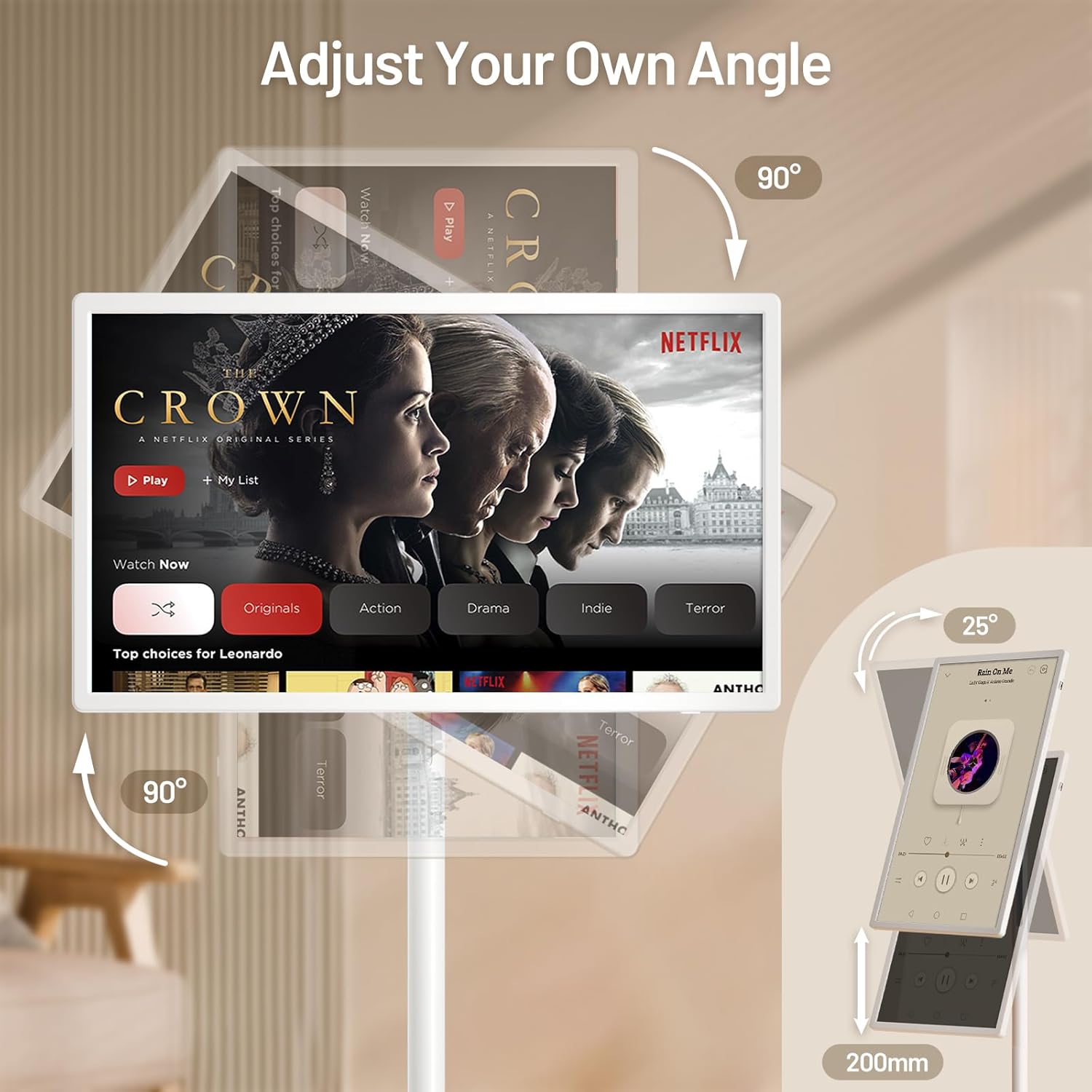
Figure 4.1: Screen Adjustment Capabilities
4.2 Android 13 OS and Applications
Your KEFEYA G2 runs on Android 13 OS and includes the Google Play Store, allowing you to download and install a wide range of applications for entertainment, productivity, and more. Navigate the home screen to access your installed apps.

Figure 4.2: Android 13 Interface with Google Play
4.3 കണക്റ്റിവിറ്റി
The TV supports various connection methods:
- വയർലെസ് കാസ്റ്റിംഗ്: Connect wirelessly from compatible devices to mirror content.
- Physical Ports: Utilize Type-C, USB-A, and HDMI ports for wired connections to external devices such as laptops, gaming consoles, or storage drives.

Figure 4.3: Multiple Screen Sharing Options
4.4 ഓഡിയോ
The device features dual stereo speakers for audio output. Volume can be adjusted via the remote control or on-screen controls.
4.5 Mobility and Battery Life
The integrated base with five silent wheels allows for easy movement of the TV between rooms. The built-in high-capacity battery provides approximately 6 to 9 hours of continuous use, depending on usage and settings.

Figure 4.4: Portable Usage Scenario
വീഡിയോ 4.1: കഴിഞ്ഞുview of the KEFEYA Portable Smart Screen on Wheels, demonstrating its features and mobility.
5. പരിപാലനം
To ensure the longevity and optimal performance of your KEFEYA G2:
- വൃത്തിയാക്കൽ: സ്ക്രീനും പുറംഭാഗവും വൃത്തിയാക്കാൻ മൃദുവായതും ഉണങ്ങിയതുമായ തുണി ഉപയോഗിക്കുക. ഉരച്ചിലുകൾ ഉള്ള ക്ലീനറുകളോ ലായകങ്ങളോ ഉപയോഗിക്കുന്നത് ഒഴിവാക്കുക.
- ബാറ്ററി കെയർ: For optimal battery health, avoid completely draining the battery frequently. When the TV is not in use, it is recommended to turn it off.
- സംഭരണം: Store the TV in a cool, dry place away from direct sunlight and extreme temperatures.
6. പ്രശ്നപരിഹാരം
If you encounter issues with your KEFEYA G2, refer to the following common solutions:
- TV will not turn on: Ensure all power cords are securely connected. Check if the TV has sufficient battery charge or is connected to a power source.
- Remote control not working or connecting: Re-pair the remote control by following the steps in Section 3.3. Ensure batteries are correctly inserted and charged.
- Distorted picture or audio from external device: Verify the external device is properly connected to the correct port (HDMI, Type-C). Check the device's output settings and the TV's input selection.
- General performance issues (slow response, app crashes): Try restarting the TV. Ensure the device's software is up to date via the settings menu.
7 സ്പെസിഫിക്കേഷനുകൾ
| ഫീച്ചർ | സ്പെസിഫിക്കേഷൻ |
|---|---|
| ഉൽപ്പന്ന അളവുകൾ | 29.05 x 17.12 x 2.28 ഇഞ്ച് |
| ഇനത്തിൻ്റെ ഭാരം | 52.9 പൗണ്ട് |
| ഇനം മോഡൽ നമ്പർ | G2 |
| ബാറ്ററികൾ | 1 ലിഥിയം അയോൺ ബാറ്ററികൾ ആവശ്യമാണ് (ഉൾപ്പെടുത്തിയിരിക്കുന്നു) |
| സ്റ്റാൻഡിംഗ് സ്ക്രീൻ ഡിസ്പ്ലേ വലുപ്പം | 32 ഇഞ്ച് |
| വീക്ഷണാനുപാതം | 16:9 |
| ബ്രാൻഡ് | കെഫെയ |
| ഡിസ്പ്ലേ ടെക്നോളജി | ഐ.പി.എസ് |
| റെസലൂഷൻ | 1080p |
| പുതുക്കിയ നിരക്ക് | 60 Hz |
| പ്രത്യേക ഫീച്ചർ | Height Adjustment, Swivel Adjustment, Tilt Adjustment, Touchscreen |
| കണക്റ്റിവിറ്റി ടെക്നോളജി | വയർഡ്, വയർലെസ് |
| പിന്തുണയ്ക്കുന്ന ഇന്റർനെറ്റ് സേവനങ്ങൾ | Netflix, Google Play Store (and various other streaming services) |
8. വാറണ്ടിയും പിന്തുണയും
KEFEYA is committed to providing reliable customer service. Your product includes:
- 30-day replacement and return policy.
- ആജീവനാന്ത സാങ്കേതിക പിന്തുണ.
- Prompt response to inquiries within 24 hours.
For any questions or assistance, please contact KEFEYA customer support directly through the seller's page on Amazon or visit the official KEFEYA store: KEFEYA Store.


