Xtreme Multicolored LED Strip Lights
ഉപയോക്തൃ മാനുവൽ
Brand: XTREME DIGITAL LIFESTYLE ACCESSORIES | Model: XLS7-1007-MCW
ആമുഖം
Transform your living space or event with the Xtreme Multicolored LED Strip Lights. This extensive 100-foot strip provides a generous length of vibrant illumination, making it perfect for large areas like walls, ceilings, or furniture. With 15 distinct colors and 4 dynamic flashing modes (Flashing, Strobe, Fade, and Smooth), you can effortlessly create the perfect ambiance for any occasion, from lively parties to cozy, relaxing evenings. The LED strip is powered via a built-in plug, offering great convenience. This ensures easy installation and operation in various settings without the need for additional power converters. The strip's cut-and-reconnect feature allows for customizable length adjustments, so you can tailor the strip to fit your specific needs and space requirements. Installation is simple with the adhesive backing, which securely sticks to any clean, flat surface. Additionally, the dimmable feature lets you adjust the brightness to your liking, providing versatile lighting options for any setting. Included with the lights is a remote control that allows you to conveniently manage colors, modes, and brightness from a distance. Whether you're aiming to enhance your home decor, create a festive atmosphere, or simply add a splash of color, the Xtreme Multicolored LED Strip Lights offer a blend of flexibility, functionality, and vibrant illumination to meet all your lighting needs.
ബോക്സിൽ എന്താണുള്ളത്
ഇൻസ്റ്റാളേഷൻ ആരംഭിക്കുന്നതിന് മുമ്പ് എല്ലാ ഘടകങ്ങളും നിലവിലുണ്ടെന്ന് ദയവായി പരിശോധിക്കുക.
- 100ft LED Strip
- 12 വി പവർ അഡാപ്റ്റർ
- ഫ്ലെക്സിബിൾ കണക്ടറുകൾ
- Set of Strip Mounting Clips and 2 Cable Mounting Clips
- Remote with 2 AAA Batteries (batteries may not be included, please check packaging)
- ഉപയോക്തൃ മാനുവൽ

സജ്ജീകരണവും ഇൻസ്റ്റാളേഷനും
ഉപരിതല തയ്യാറാക്കൽ
Ensure the surface where the LED strip will be installed is clean, dry, and smooth. Dust, dirt, or moisture can compromise the adhesive backing's effectiveness.
Applying the LED Strip
- എൽഇഡി സ്ട്രിപ്പ് ശ്രദ്ധാപൂർവ്വം അഴിക്കുക.
- Peel off a small section of the adhesive backing from the start of the strip.
- Press the exposed adhesive firmly onto your desired surface, working your way along the strip, peeling off more backing as you go. Apply even pressure to ensure good adhesion.


Cutting and Reconnecting the Strip
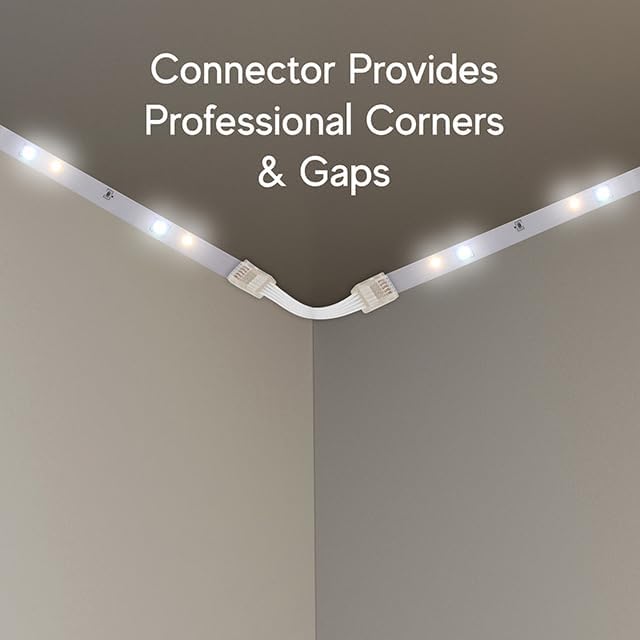
The LED strip can be cut to your desired length at designated cut marks, usually indicated by a scissor icon or copper pads. Use the included flexible connectors to reattach cut sections or to navigate corners.
- Identify the cut marks on the LED strip.
- Using sharp scissors, cut precisely along the designated line.
- To reconnect, open the clasp of a flexible connector. Align the copper pads of the LED strip with the pins inside the connector. Close the clasp firmly to secure the connection.

പവർ കണക്ഷൻ
Connect the LED strip to the provided 12V power adapter. Plug the power adapter into a standard electrical outlet. The built-in plug design simplifies this process.
പ്രവർത്തന നിർദ്ദേശങ്ങൾ
The Xtreme LED Strip Lights are controlled using the included remote control.


വിദൂര നിയന്ത്രണ പ്രവർത്തനങ്ങൾ
- ഓൺ/ഓഫ്: ലൈറ്റുകൾ ഓണാക്കുക അല്ലെങ്കിൽ ഓഫാക്കുക.
- വർണ്ണ തിരഞ്ഞെടുപ്പ്: Choose from 15 distinct colors using the color buttons.
- തെളിച്ച ക്രമീകരണം: Use the dimmable feature to increase or decrease the light intensity.
- മോഡ് തിരഞ്ഞെടുക്കൽ: Select from 4 dynamic flashing modes:
- ഫ്ലാഷ്: നിറങ്ങളിലൂടെ വേഗത്തിൽ സഞ്ചരിക്കുന്നു.
- സ്ട്രോബ്: Flashes a single color on and off.
- മങ്ങുക: നിറങ്ങൾക്കിടയിൽ സുഗമമായ സംക്രമണം.
- മിനുസമാർന്നത്: Gradually changes colors with a softer transition.
- വൈറ്റ് ലൈറ്റ് ഓപ്ഷനുകൾ: Buttons for Cool White, Soft White, and Warm White are available for dedicated white light settings.
Ensure the remote control has working batteries (2x AAA, not always included) and is pointed towards the receiver on the LED strip for optimal performance.
മെയിൻ്റനൻസ്
To ensure the longevity and optimal performance of your Xtreme LED Strip Lights, follow these maintenance guidelines:
- വൃത്തിയാക്കൽ: Gently wipe the LED strip with a dry, soft cloth to remove dust. Do not use liquid cleaners or abrasive materials.
- ജല പ്രതിരോധം: This product is designed for indoor use only and is വാട്ടർ റെസിസ്റ്റൻ്റ് അല്ല. Avoid exposure to water, high humidity, or outdoor elements.
- കൈകാര്യം ചെയ്യൽ: Avoid bending the LED strip sharply, especially at points other than the designated cut marks, as this can damage the internal circuitry.
- സംഭരണം: If storing the lights, ensure they are clean, dry, and coiled loosely to prevent damage.
ട്രബിൾഷൂട്ടിംഗ്
If you encounter issues with your Xtreme LED Strip Lights, please refer to the following common problems and solutions:
| പ്രശ്നം | സാധ്യമായ കാരണം | പരിഹാരം |
|---|---|---|
| വിളക്കുകൾ തെളിയുന്നില്ല. | വൈദ്യുതിയില്ല, കണക്ഷൻ അയഞ്ഞിരിക്കുന്നു, പവർ അഡാപ്റ്റർ തകരാറിലാണ്. | Ensure the power adapter is securely plugged into a working outlet and the strip. Check if the power adapter is functioning. |
| റിമോട്ട് കൺട്രോൾ പ്രവർത്തിക്കുന്നില്ല. | Dead batteries, remote not pointed at receiver, faulty remote. | Replace batteries (2x AAA). Ensure clear line of sight to the strip's receiver. If issues persist, contact support. |
| Sections of the strip are not lighting up or show incorrect colors. | Poor connection at cut/reconnect points, damaged section of the strip. | Check all flexible connectors to ensure they are properly secured and making good contact with the copper pads. Ensure cuts were made precisely at designated marks. If a section is damaged, it may need to be isolated or replaced. |
| Adhesive backing not sticking. | Surface not clean/dry, improper application. | Ensure the surface is thoroughly cleaned and dry before application. Apply firm, even pressure during installation. For difficult surfaces, consider using additional mounting clips (if not already used). |
സ്പെസിഫിക്കേഷനുകൾ
| ഫീച്ചർ | വിശദാംശങ്ങൾ |
|---|---|
| ബ്രാൻഡ് | എക്സ്ട്രീം ഡിജിറ്റൽ ലൈഫ്സ്റ്റൈൽ ആക്സസറികൾ |
| മോഡൽ നമ്പർ | XLS7-1007-MCW |
| നിറം | Multicolor (RGBW) |
| നീളം | 100 അടി |
| LED- കളുടെ എണ്ണം | 900 |
| പവർ ഉറവിടം | കോർഡഡ് ഇലക്ട്രിക് |
| നിയന്ത്രണ രീതി | റിമോട്ട് കൺട്രോൾ |
| പ്രത്യേക സവിശേഷതകൾ | Remote Controlled, Dimmable, Adjustable, Blinking, Color Changing |
| ഇൻഡോർ/ഔട്ട്ഡോർ ഉപയോഗം | ഇൻഡോർ മാത്രം |
| ജല പ്രതിരോധ നില | വാട്ടർ റെസിസ്റ്റൻ്റ് അല്ല |
| ഇനത്തിൻ്റെ ഭാരം | 13.3 ഔൺസ് |
| യു.പി.സി | 805106237806 |
വാറൻ്റിയും പിന്തുണയും
For warranty information or technical support regarding your Xtreme Multicolored LED Strip Lights, please contact XTREME DIGITAL LIFESTYLE ACCESSORIES directly through their official webസൈറ്റ് അല്ലെങ്കിൽ ഉപഭോക്തൃ സേവന ചാനലുകൾ. വാങ്ങിയതിന്റെ തെളിവായി നിങ്ങളുടെ വാങ്ങൽ രസീത് സൂക്ഷിക്കുക.
For further assistance, you may visit the XTREME DIGITAL LIFESTYLE ACCESSORIES Store on Amazon: XTREME DIGITAL LIFESTYLE ACCESSORIES Store


