ആമുഖം
Thank you for choosing GNMN M7 Wireless Earbuds. These earbuds are designed to provide a high-fidelity audio experience with deep bass, clear calls, and extended battery life. Featuring Bluetooth 5.3 technology, touch controls, and IPX7 waterproofing, they are suitable for various activities including sports, work, and daily use. This manual will guide you through the setup, operation, and maintenance of your new earbuds.
എന്താണ് ഉൾപ്പെടുത്തിയിരിക്കുന്നത്
The GNMN M7 Wireless Earbuds package includes the following components:
- വയർലെസ് ഇയർബഡുകൾ (ഇടതും വലതും)
- വയർലെസ് ചാർജിംഗ് കേസ്
- USB-C ചാർജിംഗ് കേബിൾ
- Eartips (Multiple Sizes)
- ഉപയോക്തൃ മാനുവൽ
സജ്ജീകരണ ഗൈഡ്
1. പ്രാരംഭ ചാർജിംഗ്
Before first use, ensure the earbuds are fully charged. Remove the insulation stickers from the charging contacts on the earbuds. Place both earbuds into the charging case. Connect the USB-C cable to the charging case and a power source, or place the case on a wireless charging pad (not included). The LED display on the case will show the charging status.

Image: GNMN M7 Wireless Earbuds in their charging case, displaying a full charge.

Image: Illustration of the two charging methods for the GNMN M7 earbuds: wireless charging and USB-C cable charging.
2. നിങ്ങളുടെ ഉപകരണവുമായി ജോടിയാക്കുന്നു
- ഇയർബഡുകൾ ചാർജിംഗ് കെയ്സിലാണെന്നും കെയ്സിന് പവർ ഉണ്ടെന്നും ഉറപ്പാക്കുക.
- ചാർജിംഗ് കേസ് തുറക്കുക. ഇയർബഡുകൾ സ്വയമേവ ഓണാകുകയും ജോടിയാക്കൽ മോഡിലേക്ക് പ്രവേശിക്കുകയും ചെയ്യും.
- നിങ്ങളുടെ ഉപകരണത്തിൽ (സ്മാർട്ട്ഫോൺ, ടാബ്ലെറ്റ്, ലാപ്ടോപ്പ്), ബ്ലൂടൂത്ത് ക്രമീകരണങ്ങളിലേക്ക് പോകുക.
- ഇതിനായി തിരയുക "M7" in the list of available devices and select it to connect.
- കണക്റ്റ് ചെയ്തുകഴിഞ്ഞാൽ, ഒരു സ്ഥിരീകരണ ടോൺ നിങ്ങൾ കേൾക്കും, ഇയർബഡുകൾ ഉപയോഗത്തിന് തയ്യാറാകും.
The earbuds will automatically reconnect to the last paired device when the case is opened, provided Bluetooth is enabled on the device.

Image: A visual guide demonstrating the one-step auto-pairing process of the M7 earbuds with a smartphone.
3. ഇയർബഡുകൾ ധരിക്കുന്നു
Select the ear tips that provide the most comfortable and secure fit for your ears. Gently insert the earbuds into your ear canal and rotate them slightly to ensure a snug fit. A proper seal is crucial for optimal sound quality and bass performance.

Image: Instructions on how to properly wear the earbuds, including selecting the correct ear tip size.
പ്രവർത്തന നിർദ്ദേശങ്ങൾ
ടച്ച് നിയന്ത്രണങ്ങൾ
The GNMN M7 earbuds feature sensitive touch panels for easy control of music playback, calls, and voice assistant activation. Refer to the table below for common touch functions:

Image: A visual guide detailing the various touch control functions of the earbuds, such as play/pause, call management, and volume adjustment.
| ഫംഗ്ഷൻ | ആക്ഷൻ |
|---|---|
| സംഗീതം പ്ലേ ചെയ്യുക/താൽക്കാലികമായി നിർത്തുക | ഏതെങ്കിലും ഇയർബഡിൽ ഒറ്റ ടാപ്പ് ചെയ്യുക |
| അടുത്ത ഗാനം | വലതുവശത്തെ ഇയർബഡിൽ രണ്ടുതവണ ടാപ്പ് ചെയ്യുക |
| മുൻ ഗാനം | ഇടതുവശത്തെ ഇയർബഡിൽ രണ്ടുതവണ ടാപ്പ് ചെയ്യുക |
| വോളിയം കൂട്ടുക | വലതുവശത്തെ ഇയർബഡിൽ മൂന്ന് തവണ ടാപ്പ് ചെയ്യുക |
| വോളിയം ഡൗൺ | ഇടതുവശത്തെ ഇയർബഡിൽ മൂന്ന് തവണ ടാപ്പ് ചെയ്യുക |
| ഉത്തരം / കോൾ അവസാനിപ്പിക്കുക | ഏതെങ്കിലും ഇയർബഡിൽ ഒറ്റ ടാപ്പ് ചെയ്യുക |
| കോൾ നിരസിക്കുക | ഏതെങ്കിലും ഇയർബഡിൽ 2 സെക്കൻഡ് അമർത്തിപ്പിടിക്കുക |
| വോയ്സ് അസിസ്റ്റൻ്റ് സജീവമാക്കുക | ഏതെങ്കിലും ഇയർബഡിൽ 3 സെക്കൻഡ് അമർത്തിപ്പിടിക്കുക |
ഓഡിയോ നിലവാരം
Equipped with 13mm double-layer diaphragm driver units, the M7 earbuds deliver rich, deep bass, clear vocals, and bright treble, providing an immersive stereo sound experience. The built-in microphone combined with ENC (Environmental Noise Cancellation) technology ensures clear phone calls by filtering out surrounding noise.

ചിത്രം: വിശദമായ ഒരു ചിത്രം view highlighting the Hi-Fi sound quality capabilities of the earbud's internal components.
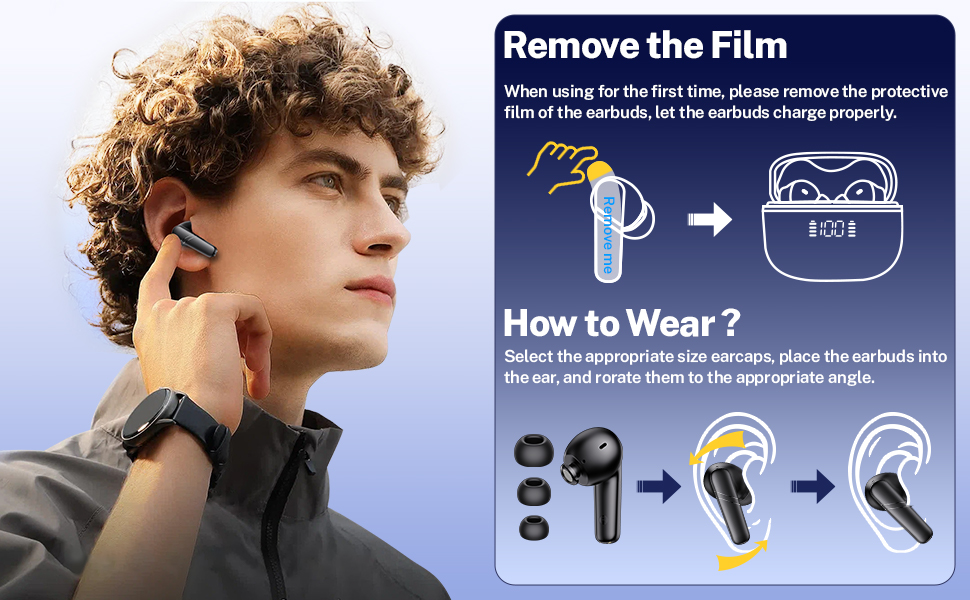
Image: Depiction of the earbud's microphone and its function during a phone call, emphasizing clear communication.
ചാർജിംഗും ബാറ്ററി ലൈഫും
The GNMN M7 earbuds offer impressive battery life and flexible charging options:
- ഇയർബഡ് പ്ലേടൈം: ഒറ്റ ചാർജിൽ 8 മണിക്കൂർ വരെ.
- ചാർജിംഗ് കെയ്സുള്ള മൊത്തം കളിസമയം: 68 മണിക്കൂർ വരെ.
- ചാർജ് ചെയ്യുന്ന രീതികൾ: Supports both USB-C cable charging and wireless charging.

Image: Visual representation of the superior battery life, indicating 8 hours on a single charge and 68 hours with the charging case.
LED പവർ ഡിസ്പ്ലേ
The charging case features a dual LED digital display that shows the remaining battery percentage of the case and the charging status of each earbud. This allows you to monitor power levels in real-time.

Image: Close-up of the charging case's LED power display, showing both the case's battery percentage and the individual earbud charging status.
പരിപാലനവും പരിചരണവും
- വൃത്തിയാക്കൽ: Regularly clean the earbuds and charging contacts with a soft, dry cloth. If charging issues occur, try wiping the pins and points with an alcohol cloth.
- ജല പ്രതിരോധം: The earbuds feature an IPX7 waterproof nano-coating, protecting them from sweat and rain. They are suitable for workouts and outdoor activities, but are not designed for swimming or submersion.
- സംഭരണം: ഉപയോഗത്തിലില്ലാത്തപ്പോൾ, ഇയർബഡുകൾ സംരക്ഷിക്കുന്നതിനും ചാർജ്ജ് ചെയ്ത നിലയിൽ നിലനിർത്തുന്നതിനും അവ ചാർജിംഗ് കേസിൽ സൂക്ഷിക്കുക.
- ബാറ്ററി കെയർ: To prolong battery life, charge the charging case at least once a week, even if not in frequent use.

Image: The earbuds are shown with water droplets, illustrating their IPX7 waterproof capability.
ട്രബിൾഷൂട്ടിംഗ്
If you encounter any issues with your GNMN M7 Wireless Earbuds, please refer to the following common solutions:
- Earbuds Not Charging Properly:
- Ensure the insulation stickers have been removed from the earbud charging contacts.
- Wipe the charging pins on the earbuds and the charging points inside the case with an alcohol cloth to remove any dirt or debris.
- If the charging case is excessively discharged, the LED display might show "0" initially. Wait 15-30 minutes after plugging in the charging cable; the display should update.
- Only One Earbud Playing Sound:
- രണ്ട് ഇയർബഡുകളും തിരികെ ചാർജിംഗ് കെയ്സിലേക്ക് വയ്ക്കുക, ലിഡ് അടയ്ക്കുക.
- രണ്ട് ഇയർബഡുകളും പൂർണ്ണമായും ചാർജ് ചെയ്തിട്ടുണ്ടെന്ന് ഉറപ്പാക്കുക.
- Perform a factory reset (see "Factory Reset" below).
- ഇയർബഡുകൾ കണക്റ്റുചെയ്യുന്നില്ല/ജോടിയാക്കുന്നില്ല:
- Ensure Bluetooth is enabled on your device and the earbuds are within range (up to 30 ft).
- "Forget" or "Remove" "M7" from your device's Bluetooth list.
- Place both earbuds back into the charging case, close the lid, then open it again to re-enter pairing mode.
- ഒരു ഫാക്ടറി റീസെറ്റ് നടത്തുക.
ഫാക്ടറി റീസെറ്റ്
To restore the earbuds to their factory settings and clear all pairing records:
- രണ്ട് ഇയർബഡുകളും ചാർജിംഗ് കേസിൽ വയ്ക്കുക.
- ചാർജിംഗ് കേസ് ലിഡ് അടയ്ക്കുക.
- ചാർജിംഗ് കെയ്സിലെ റീസെറ്റ് ബട്ടൺ 5 സെക്കൻഡ് അമർത്തിപ്പിടിക്കുക.
- All previous pairing records will be cleared. You can now pair the earbuds with a new device or re-pair with an existing one.

ചിത്രം: ഒരു ക്ലോസ്-അപ്പ് view of the charging case, highlighting the location of the reset button.
സ്പെസിഫിക്കേഷനുകൾ
| ഫീച്ചർ | വിശദാംശങ്ങൾ |
|---|---|
| മോഡലിൻ്റെ പേര് | M7 |
| കണക്റ്റിവിറ്റി ടെക്നോളജി | വയർലെസ് |
| വയർലെസ് കമ്മ്യൂണിക്കേഷൻ ടെക്നോളജി | ബ്ലൂടൂത്ത് 5.3 |
| ബാറ്ററി ലൈഫ് (ഇയർബഡുകൾ) | 8 മണിക്കൂർ (ഒറ്റ ചാർജ്) |
| ബാറ്ററി ലൈഫ് (ചാർജിംഗ് കെയ്സിനൊപ്പം) | 68 മണിക്കൂർ |
| നിയന്ത്രണ തരം | ടച്ച് നിയന്ത്രണം |
| ജല പ്രതിരോധ നില | IPX7 (വാട്ടർ റെസിസ്റ്റൻ്റ്) |
| അനുയോജ്യമായ ഉപകരണങ്ങൾ | Bluetooth-enabled devices (Android, iPhone, Laptops, Tablets, TV, etc.) |
| ഇനത്തിന്റെ ഭാരം (ഇയർബഡ്) | 0.13oz (approx. 3.6g) |
| കേസ് അളവുകൾ ചാർജ് ചെയ്യുന്നു | 2.3 x 1.9 x 1 ഇഞ്ച് (ഏകദേശം) |
| മെറ്റീരിയൽ | പ്ലാസ്റ്റിക് |
| നിറം | കറുപ്പ് |
വാറൻ്റിയും പിന്തുണയും
GNMN products are designed for reliability and performance. For any product-related inquiries, technical support, or warranty claims, please refer to the contact information provided with your purchase or visit the official GNMN webസൈറ്റ്. വാറന്റി ആവശ്യങ്ങൾക്കായി നിങ്ങളുടെ വാങ്ങിയതിന്റെ തെളിവ് സൂക്ഷിക്കുക.


