1. ആമുഖം
The Keychron K5 Max is an advanced ultra-slim wireless mechanical keyboard designed for versatility and performance. It offers triple-mode connectivity, including 2.4 GHz wireless, Bluetooth 5.1, and Type-C wired options, ensuring seamless integration with various devices. Featuring QMK/VIA programmability, hot-swappable low-profile Gateron mechanical switches, and PBT keycaps, the K5 Max provides a customizable and efficient typing experience for macOS, Windows, and Linux users.
2. സജ്ജീകരണം
2.1 പാക്കേജ് ഉള്ളടക്കം
- കീക്രോൺ K5 മാക്സ് മെക്കാനിക്കൽ കീബോർഡ്
- യുഎസ്ബി ടൈപ്പ്-സി കേബിൾ
- കീക്യാപ് പുള്ളർ
- സ്വിച്ച് പുള്ളർ
- ഉപയോക്തൃ മാനുവൽ
2.2 കണക്റ്റിവിറ്റി മോഡുകൾ
The K5 Max supports three connection modes: 2.4 GHz wireless, Bluetooth, and wired USB Type-C. Use the mode switch located on the top edge of the keyboard to select your desired connection type.

The Keychron K5 Max supports 2.4 GHz wireless, Bluetooth, and wired USB-C connections for versatile use.

Detail of the G/Cable/BT and Win/Android Mac/iOS switches on the Keychron K5 Max.
2.2.1 2.4 GHz വയർലെസ് കണക്ഷൻ
- Flip the mode switch to '2.4G'.
- Plug the 2.4 GHz receiver into your device's USB port.
- The keyboard will automatically connect. The polling rate in this mode is 1000 Hz.
2.2.2 ബ്ലൂടൂത്ത് കണക്ഷൻ
- Flip the mode switch to 'BT'.
- Press and hold 'Fn + 1' (or 'Fn + 2' / 'Fn + 3') for 4 seconds until the '1' key (or '2' / '3') flashes rapidly, indicating pairing mode.
- On your device, search for 'Keychron K5 Max' in the Bluetooth settings and connect.
- You can connect up to 3 devices and switch between them using 'Fn + 1/2/3'.
2.2.3 വയർഡ് കണക്ഷൻ
- Flip the mode switch to 'Cable'.
- Connect the keyboard to your device using the provided USB Type-C cable.
- The keyboard will function as a wired device and charge simultaneously. The polling rate in this mode is 1000 Hz.
2.3 സിസ്റ്റം അനുയോജ്യത
The K5 Max is compatible with macOS, Windows, and Linux operating systems. Use the OS switch located next to the connectivity mode switch to select the correct layout for your system.

The Keychron K5 Max is suitable for both Mac and Windows operating systems, with a dedicated switch for layout adjustment.
3. പ്രവർത്തന നിർദ്ദേശങ്ങൾ
3.1 കീബോർഡ് ലേഔട്ട്
The K5 Max features a 100% full-size layout with 104 keys, including a dedicated number pad, providing a complete typing experience in an ultra-slim form factor.
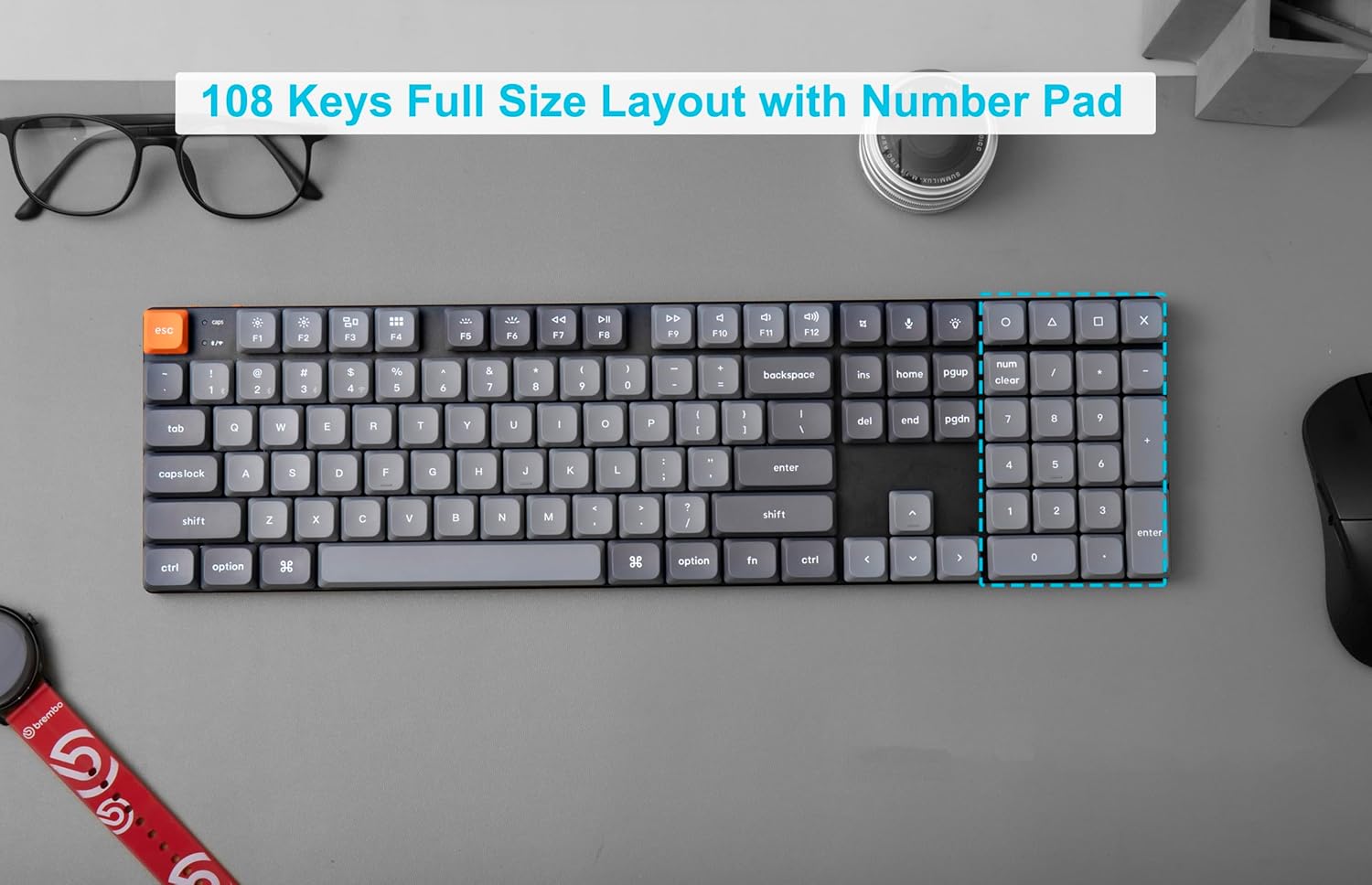
The Keychron K5 Max features a 108-key full-size layout, including a number pad.
3.2 ക്യുഎംകെ/വിഐഎ പ്രോഗ്രാമബിലിറ്റി
The K5 Max is fully QMK/VIA programmable, allowing you to remap keys, create macros, and customize lighting effects. Connect the keyboard via USB-C to your computer and use the VIA software to access its full customization potential. VIA is compatible with macOS, Windows, and Linux.

Program your Keychron K5 Max with QMK and VIA software for custom key assignments and macros.
3.3 RGB ബാക്ക്ലൈറ്റ് നിയന്ത്രണം
The keyboard features dynamic RGB backlighting. Use the dedicated backlight key (usually 'Fn + Lightbulb icon' or similar) to cycle through various lighting effects and colors. Brightness can typically be adjusted with 'Fn + F5' (decrease) and 'Fn + F6' (increase).
3.4 ഹോട്ട്-സ്വാപ്പബിൾ സ്വിച്ചുകൾ
The K5 Max is equipped with hot-swappable low-profile Gateron mechanical switches, allowing you to easily change switches without soldering. This enables customization of your typing feel.

The Keychron K5 Max features hot-swappable switches, allowing for easy customization of your typing experience.

The Keychron K5 Max features low-profile Gateron Red switches, designed for a responsive and quiet keystroke.

The ultra-slim body of the Keychron K5 Max is designed with low-profile Gateron switches for a compact and comfortable typing experience.
4. പരിപാലനം
4.1 കീബോർഡ് വൃത്തിയാക്കൽ
- എല്ലാ പവർ സ്രോതസ്സുകളിൽ നിന്നും കീബോർഡ് വിച്ഛേദിക്കുക.
- കീക്യാപ്പുകൾക്കിടയിൽ നിന്ന് പൊടിയും അവശിഷ്ടങ്ങളും നീക്കം ചെയ്യാൻ ഒരു കംപ്രസ് ചെയ്ത വായു ക്യാൻ ഉപയോഗിക്കുക.
- For stubborn dirt, gently wipe the keycaps and keyboard surface with a slightly damp, ലിന്റ് രഹിത തുണി. അമിതമായ ഈർപ്പം ഒഴിവാക്കുക.
- കഠിനമായ രാസവസ്തുക്കളോ ഉരച്ചിലുകളോ ഉപയോഗിക്കരുത്.
4.2 സ്വിച്ചുകളും കീക്യാപ്പുകളും മാറ്റിസ്ഥാപിക്കൽ
Thanks to the hot-swappable design, you can easily replace switches and keycaps. Use the provided keycap puller to remove keycaps and the switch puller to remove switches. Ensure the new switch pins align correctly before pressing them into place.
5. പ്രശ്നപരിഹാരം
5.1 കണക്റ്റിവിറ്റി പ്രശ്നങ്ങൾ
- 2.4 GHz / Bluetooth Not Connecting: Ensure the mode switch is set correctly. For Bluetooth, confirm the keyboard is in pairing mode (key flashing). Try re-pairing. Ensure the 2.4 GHz receiver is securely plugged in.
- ഇടവിട്ടുള്ള കണക്ഷൻ: Check for interference from other wireless devices. Ensure the keyboard is within range of your device.
- വയർഡ് കണക്ഷൻ പ്രവർത്തിക്കുന്നില്ല: Try a different USB port or cable. Ensure the mode switch is set to 'Cable'.
5.2 Keys Not Responding / Incorrect Input
- പ്രത്യേക കീ പ്രവർത്തിക്കുന്നില്ല: If the keyboard is hot-swappable, try removing and re-inserting the switch for that key. Ensure the switch pins are not bent.
- തെറ്റായ കീ ഔട്ട്പുട്ട്: Verify the OS switch is set to the correct operating system (Mac/Win/Android/iOS). If you have remapped keys using QMK/VIA, check your custom layout in the software.
- ഫേംവെയർ അപ്ഡേറ്റ്: Check the Keychron official website for the latest firmware updates for your K5 Max model. Firmware updates can resolve various performance and functionality issues.
5.3 ബാക്ക്ലൈറ്റ് പ്രശ്നങ്ങൾ
- ബാക്ക്ലൈറ്റ് ഓണാക്കുന്നില്ല: Ensure the keyboard is charged. Adjust brightness levels using the designated function keys.
- പൊരുത്തമില്ലാത്ത ലൈറ്റിംഗ്: This might indicate a software issue; try resetting the keyboard or updating firmware.
6 സ്പെസിഫിക്കേഷനുകൾ
| ബ്രാൻഡ് | കീക്രോൺ |
| മോഡൽ നമ്പർ | K5M-H1 |
| കണക്റ്റിവിറ്റി ടെക്നോളജി | 2.4 GHz Wireless, Bluetooth 5.1, USB Type-C Wired |
| കീബോർഡ് വിവരണം | മെക്കാനിക്കൽ |
| സ്വിച്ച് തരം | കുറഞ്ഞ പ്രോfile Gateron Mechanical (Red Switch variant) |
| കീകളുടെ എണ്ണം | 104 |
| ബാക്ക്ലൈറ്റിംഗ് | RGB |
| പോളിംഗ് നിരക്ക് | 1000 Hz (2.4 GHz & Wired modes) |
| പ്രോഗ്രാമബിലിറ്റി | ക്യുഎംകെ/വിഐഎ |
| ഹോട്ട്-സ്വാപ്പബിൾ | അതെ |
| കീക്യാപ് മെറ്റീരിയൽ | പി.ബി.ടി |
| അനുയോജ്യമായ ഉപകരണങ്ങൾ | Mac, Windows, Linux (via Bluetooth or 2.4 GHz wireless connection) |
| ഇനത്തിൻ്റെ ഭാരം | 2.7 പൗണ്ട് |
| പാക്കേജ് അളവുകൾ | 17.48 x 6.42 x 1.93 ഇഞ്ച് |
| ബാറ്ററികൾ | 1 ലിഥിയം അയോൺ ബാറ്ററി (ഉൾപ്പെടുത്തിയിരിക്കുന്നു) |
7. വാറൻ്റിയും പിന്തുണയും
For detailed warranty information, please refer to the official Keychron website or the warranty card included with your product. Keychron provides customer support for product inquiries, technical assistance, and troubleshooting.
ഉദ്യോഗസ്ഥൻ Webസൈറ്റ്: www.keychron.com
ദയവായി സന്ദർശിക്കുക webഏറ്റവും പുതിയ ഡ്രൈവറുകൾ, ഫേംവെയർ, പിന്തുണാ ഉറവിടങ്ങൾ എന്നിവയ്ക്കുള്ള സൈറ്റ്.


